Freedom251 › Video Podcast Software

Iris.fm
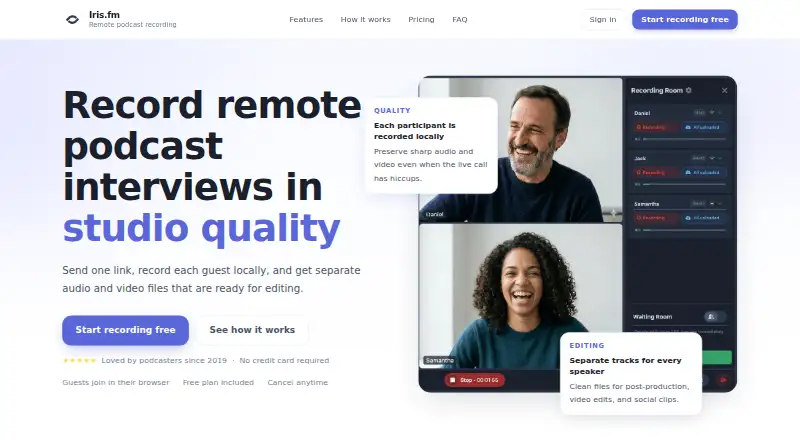
What Iris.fm is
Iris.fm records remote podcast interviews in a browser, capturing each participant locally and providing separate audio and video files for editing. It also displays real-time captions during sessions and saves them with the recording for show notes and repurposing. Progressive uploads back up a session while it is underway. Guests join through a browser link without installing an app or creating an Iris account. Recording rooms support host, producer, and guest roles with device controls, and up to nine people can record at once. The service supports desktop and laptop browsers, iPhone, and Android, with Chrome, Safari, Firefox, and Edge listed. Users can create a studio with custom branding and a URL. Paid plans include Google Drive and Dropbox uploads, and recording hours are counted by overall session time rather than multiplied by the number of participants. The free plan is available; paid plans start at $9 a month. Iris operates its services in the United States, where information from users elsewhere is transferred, stored, and processed.
Who it suits
Iris.fm suits podcast hosts and producers who want separate participant recordings for editing and browser-based guest access. Its roles, captions, and custom studio options can support a managed interview workflow.
What it does well
- Records each participant locally
- Provides separate audio and video files
- Guests can join without an app or account
- Supports up to nine recording participants
- Paid plans include Google Drive and Dropbox uploads
What to know first
- Recording rooms are limited to nine people
- User information is transferred to and processed in the United States
- Iris does not guarantee that data will not be lost or corrupted
Limits
The free plan is described as including browser guest access and no credit card requirement, but no recording-hour allowance is given. Starter includes two hours, Pro five hours, and Studio ten hours; recording time is based on overall session time. Iris performs regular content backups but does not guarantee that data will not be lost or corrupted.
Plans
| Plan | Billed and limits | Price |
|---|---|---|
| Free | up to 2 hours · separate audio and video · watermark on exports · up to 720p | Free |
| Pro | $19 /mo · 5 hours recording · local HD files · host, producer and guest roles · unlimited audio mastering · unlimited transcriptions · Google Drive and Dropbox upload | $19 a month |
| Studio | $29 /mo · 10 hours recording · local HD files · host, producer and guest roles · unlimited audio mastering · unlimited transcriptions · Google Drive and Dropbox upload | $29 a month |
| Starter | $9 /mo · 2 hours recording · local HD files · host, producer and guest roles · unlimited audio mastering · unlimited transcriptions · Google Drive and Dropbox upload | $9 a month |
As iris.fm lists them, read 19 Oct 2026. The maker's own page has the final word.
Getting started
- Open iris.fm in a supported desktop or laptop browser, or use an iPhone or Android device.
- Choose the free plan or a paid plan; paid options start at $9 per month.
- Create a recording room and assign host, producer, and guest roles.
- Share a browser link so guests can join without an app or Iris account.
- Create a branded studio with a custom URL if needed.
Overview
Iris.fm is a remote podcast recording service for interviewers who want separate participant recordings to edit after a call. It is best suited to browser-based sessions with a small group; the nine-person cap and lack of a guarantee against data loss make it a less compelling choice for larger productions or as the sole archive for valuable recordings.
Local recording means a live-call hiccup need not carry over to each participant’s saved files. Separate audio and video files give editors individual material to work with, while live captions are saved alongside the recording for show notes or repurposing. Progressive uploads back up sessions as they run, but Iris says its regular content backups do not guarantee against loss or corruption.
Key features
- Individual local tracks: Each participant receives separate audio and video files, a useful foundation for post-production rather than a single combined recording. Video recording and automatic transcription are supported.
- Browser-based guest access: Guests join from a link without an app, installation, or Iris account. That is practical for occasional interviewees who may not want to set up recording software.
- Captions during recording: Real-time captions are saved with the session, giving creators text to use for show notes and other repurposing.
- Room roles and device controls: Hosts, producers, and guests have distinct roles. Up to nine people can record at once, which works for interviews and modest roundtables but rules out larger panels.
- Custom studio and uploads: Users can brand a studio with their own branding and URL. Paid plans include Google Drive and Dropbox uploads, useful for teams already using those services.
- Usage billing: Recording hours count the overall session time rather than multiplying by participant count, so adding participants does not itself consume more hours.
Pricing
Iris is freemium, with paid plans starting at $9 /mo. The free plan costs nothing, is included without a credit card, and lets guests join in their browser. For a regular recording workflow, however, the stated hour allowances and production features begin with paid tiers.
- Free — free: Browser guest access and no credit card requirement. It is the low-commitment option, but no recording-hour allowance or other included production features are stated for this tier.
- Starter — $9 /mo: 2 hours of recording, local HD recording files, host/producer/guest roles, unlimited audio mastering and transcriptions, plus Google Drive and Dropbox uploads. It suits occasional creators who can work within two session hours.
- Pro — $19 /mo: 5 hours of recording with the same listed features as Starter. The larger allowance better fits creators recording more regularly.
- Studio — $29 /mo: 10 hours of recording and the same listed production features. This is the best fit among the stated tiers for heavier monthly use, though the nine-person room limit still applies.
Across paid plans, the recording-hour quota is based on total session time, not the number of participants. That keeps multi-person sessions from multiplying usage, but creators should choose a tier around their combined recording time.
Platforms
Iris supports Android, iOS, and web. Recording takes place in a browser, with support for desktop and laptop browsers as well as iPhone, Android, Chrome, Safari, Firefox, and Edge. Browser guest access reduces setup demands, though it does not remove the nine-person limit.
The service is operated in the United States, and information from users elsewhere is transferred to, stored, and processed in the United States. Iris says support usually replies within a few hours at [email protected].
Who it's for
Iris is a strong fit for podcasters who prioritize individually recorded participant tracks, need both audio and video for editing, and want guests to join without an account or install. Its role controls and captions also suit small teams that divide session duties and want text to reuse after recording.
Look elsewhere if a production regularly needs more than nine simultaneous participants, or if a guaranteed backup is essential. Progressive uploads are useful during a session, but Iris does not promise that content cannot be lost or corrupted.
Pros and cons
- Pros: Local separate audio and video files give editors participant-level material, and live captions are saved for follow-up use.
- Pros: Guests can join in a browser without an account or installation, reducing friction for interviewees.
- Pros: Paid recording hours count session time rather than participant count, which is favorable for multi-person conversations.
- Cons: Rooms cap at nine people, excluding larger panels.
- Cons: The stated backup policy is not a guarantee against loss or corruption, so important sessions should not rely on Iris as the only copy.
- Cons: Paid-hour allowances range from 2 to 10 hours per month across the listed tiers, which may constrain frequent or long-form recording.
Alternatives
Riverside is another freemium option with Android, iOS, and web support among a broader platform range; consider it if that broader platform coverage or its free trial matters to your choice.
Spreaker may suit creators focused on publishing podcasts: its Free Speech plan includes one podcast and unlimited episodes, rather than Iris’s emphasis on recording separate participant tracks.
Async is worth considering if AI chat media uploads and export resolution are central: its free tier includes 10 lifetime AI credits, one hour of media upload to AI chat, up to 720p export, and 2 GB storage.
Zencastr is a possible alternative for creators seeking a free tier with unlimited recording and downloads, up to 4K video, unlimited track storage, and support for up to six participants. Iris allows up to nine participants, so its room cap is higher.
Adobe Podcast is a web-based option with a free plan and free trial; its free plan includes audio-only speech enhancement with per-file and daily limits, so it is a different fit from Iris’s participant-track recording workflow.
Airtape Studio is another web freemium option, with its free plan limited to two recording hours per month and two participants total.
Boomcaster offers a free-forever plan and a $20/month Starter plan with five hours of studio-quality recording and livestreaming; consider it if livestreaming is part of the requirement.
Waveroom may fit creators wanting a free tier with unlimited audio and video recordings, up to 2K video, 48 kHz WAV audio, and up to five participants.
For broader category browsing, see Podcast Recording Software and Video Podcast Software.
Verdict
Choose Iris.fm if your priority is separate local participant tracks, browser access for guests, and saved captions in a compact recording room. Its clearest advantage is an edit-friendly recording workflow with session-time billing that does not scale with participant count. Choose another service if you need more than nine people in a room or dependable protection against data loss beyond Iris’s stated backup approach.
Verdict
Iris.fm is built around locally recorded participant tracks, captions, and browser-based guest access. Consider its participant cap and stated data-backup limitation when planning sessions.
Questions
Does Iris.fm have a free plan?
Yes. The Free plan is listed as free, and guests can join in their browser without a credit card.
What do paid plans cost?
Starter is $9 per month, Pro is $19 per month, and Studio is $29 per month. Their listed recording allowances are two, five, and ten hours, respectively.
Which platforms and browsers does Iris.fm support?
It supports desktop and laptop browsers, iPhone, and Android. Chrome, Safari, Firefox, and Edge are listed.
Can guests join without an Iris account?
Yes. Guests can join from a browser link without an app, an install, or an Iris account.
Does Iris.fm connect to Google Drive or Dropbox?
Google Drive and Dropbox uploads are included with paid plans.
Where does Iris.fm process user information?
Its services operate in the United States. Information from users elsewhere is transferred to, stored, and processed in the United States.
Facts from Iris.fm's own pages
- Annual billing
- Yearly subscriptions are offered with a stated 10% discount. · iris.fm, 19 Oct 2026
- API and SDK availability
- The public maker pages reviewed describe a browser application and Google Drive/Dropbox uploads but do not document a public API, SDK or self-hosted deployment. · iris.fm, 19 Oct 2026
- Backup
- Progressive uploads back up the session while recording. · iris.fm, 1 Oct 2026
- Backup liability
- The terms say backups are performed but Iris does not guarantee that data will avoid loss or corruption, and users should keep independent copies. · iris.fm, 19 Oct 2026
- Backup limitation
- The terms say regular content backups are performed but Iris does not guarantee that data will not be lost or corrupted. · iris.fm, 1 Oct 2026
- Billing metric
- Recording hours are charged by total session length rather than multiplied by the number of participants. · iris.fm, 19 Oct 2026
- Browser guests
- Guests can enter through a shared browser link without installing software or remembering a meeting ID. · iris.fm, 19 Oct 2026
- Cloud integrations
- Paid plans list upload connections for Google Drive and Dropbox. · iris.fm, 19 Oct 2026
- Customization
- Users can create a custom studio with their branding and URL. · iris.fm, 1 Oct 2026
- Custom rooms
- Hosts can create branded recording studios with custom URLs and schedule sessions in advance. · iris.fm, 19 Oct 2026
- Data location
- The privacy policy says services operate in the United States and information from other jurisdictions is transferred there for storage and processing. · iris.fm, 19 Oct 2026
- Guest access
- Guests join from a browser link without apps, installs, or an Iris account. · iris.fm, 1 Oct 2026
- Headquarters
- Colorado, United States · iris.fm, 28 Sept 2026
- Independent ranking
- The Podcast Host placed Iris fourth in its eight-tool remote podcast recording roundup. · thepodcasthost.com, 19 Oct 2026
- Integrations
- Paid plans include Google Drive and Dropbox upload. · iris.fm, 1 Oct 2026
- Licence
- The terms identify Iris and its licensors as exclusive owners of the service software, content, features and functionality, indicating proprietary software. · iris.fm, 19 Oct 2026
- Limit: hosting
- The Podcast Host lists Iris as offering video recording but no podcast hosting. · thepodcasthost.com, 19 Oct 2026
- Limit: price
- A Slashdot reviewer considered Iris expensive compared with services offering more features and stability for less money. · slashdot.org, 19 Oct 2026
- Limit: recording caps
- The Podcast Host lists paid tiers capped at 2, 5 or 10 recording hours per month. · thepodcasthost.com, 19 Oct 2026
- Limit: reliability
- Slashdot reviews report recordings sometimes becoming stuck in processing or failing to produce usable footage, audio or images. · slashdot.org, 19 Oct 2026
- Limit: support
- Independent reviewers complain that support can be slow and that failed recordings did not lead to refunds or discounts. · slashdot.org, 19 Oct 2026
- Live captions
- Real-time captions are displayed during recording and saved with the session. · iris.fm, 19 Oct 2026
- Local recording
- Each participant is recorded on their own device, helping preserve quality when the live call has connection problems. · iris.fm, 19 Oct 2026
- Participant limit
- A recording room can contain up to nine people recording at the same time. · iris.fm, 19 Oct 2026
Where Iris.fm stands on Freedom251
- Video Podcast Software#7 of 39
- Podcast Recording Software#6 of 22
- Virtual Recording Studio Software#5 of 18