Freedom251 › AI Sound Effect Generators

Async
What Async is
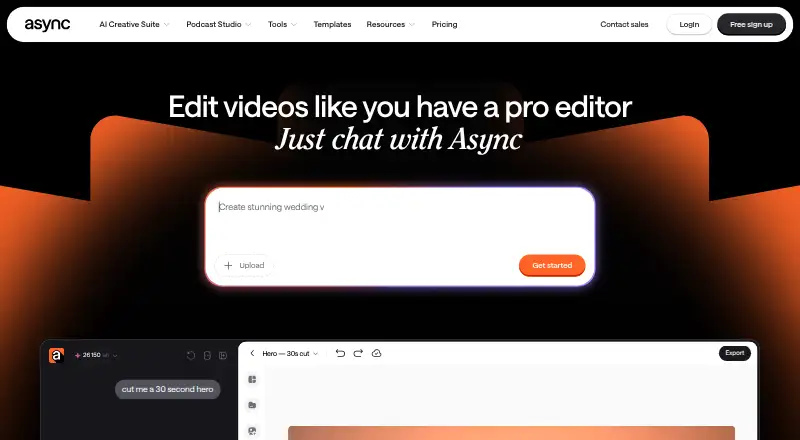
Async is an online AI video editor where users can create and edit videos through chat. It can remove filler, pauses, repeats, bad takes and awkward moments. Magic Dust reduces background noise and clarifies voices, while chat can generate B-roll, visuals, scenes or music within an edit. Users can add subtitles and turn strong moments from longer videos into short-form clips. Async presents its workflow for ads, vlogs, explainers and podcasts, and says it is built for creators and teams. Its browser-based remote interview feature supports up to 10 participants with separate tracks; local recording and automatic transcription are also listed. The Voice API supports text-to-speech and speech-to-text, including streaming over WebSockets. Async is available on web and iOS; the site says there is currently no Android version. The free plan includes 10 lifetime AI credits, one hour of media upload to AI chat, exports up to 720p and 2 GB storage. Paid pricing is listed from $11.99 a month (annual). Subscription AI credits reset each billing cycle, and yearly-plan credits arrive monthly.
Who it suits
Async suits creators and teams making ads, vlogs, explainers or podcasts who want chat-based editing and audio cleanup. It may also fit users recording browser-based remote interviews with up to 10 participants.
What it does well
- Edits video through chat
- Magic Dust reduces background noise
- Remote interviews support up to 10 participants
- Free plan includes 2 GB storage
What to know first
- No Android version is listed
- Free plan exports up to 720p
- AI credits reset each billing cycle
Limits
The Free plan includes 10 lifetime AI credits, one hour of media upload to AI chat, exports up to 720p, and 2 GB storage. Subscription AI credits reset each billing cycle, and yearly-plan credits are added monthly.
Plans
| Plan | Billed and limits | Price |
|---|---|---|
| Free | 10 lifetime AI credits · 1 hour media upload to AI chat (lifetime) · up to 720p export · 2 GB storage | Free |
| Essentials | Monthly or yearly billing is offered; the live pricing page did not display a numeric price. · 450 AI credits/month · 20 GB storage · unlimited media upload minutes · up to Full HD export | On request |
| Pro | Monthly or yearly billing is offered; the live pricing page did not display a numeric price. · 1,200 AI credits/month · 120 GB storage · up to 4K export · 20 hours remote recording | On request |
| Teams | Monthly or yearly billing is offered; the live pricing page did not display a numeric price. · 3,000 AI credits/month · 1 TB storage · collaboration and team workspaces · 50 hours remote recording | On request |
| Business | Custom pricing; contact sales. · Custom AI credits · custom storage · advanced security and compliance | On request |
As async.com lists them, read 29 Sept 2026. The maker's own page has the final word.
Getting started
- Visit the Async website.
- Create an account and start with the Free plan or review paid options.
- Use the web app or iOS app to create or edit video through chat.
- For remote interviews, record in the browser with up to 10 participants.
- Cancel a subscription through Profile Settings if needed.
Async is a chat-driven AI video editor for creators and teams working with footage, spoken-word recordings, or short-form video. Its mix of editing, audio cleanup, asset generation, and browser-based remote recording suits people who want those jobs in one workflow. The free plan is useful for a small trial, but its lifetime credits and upload cap make it a poor fit for ongoing production.
Overview
Async lets users edit video by chatting with AI, from removing filler, pauses, repeats, bad takes, and awkward moments to adding subtitles and extracting short clips from longer footage. That combination is particularly relevant to podcasts, vlogs, explainers, and ads: a creator can clean up a recording and prepare material for reuse without switching between separate editing and clipping tools. It is less compelling for someone seeking only a narrow recording or audio utility.
Key features
Editing and generation in chat
Users can ask for edits and generate B-roll, visuals, scenes, or music from within the conversation. Keeping asset generation beside the edit can simplify work on videos that need supporting material, while the AI-credit system sets a clear ceiling on how much of that workflow a plan supports. Subscription credits reset each billing cycle; on yearly plans, credits are added monthly rather than arriving as one annual balance.
Audio cleanup and repurposing
Magic Dust reduces background noise and clarifies voices. Captions and short-form clip creation add practical value for spoken-word creators who need more than a cleaned-up full-length video. These tools make Async broader than a basic cutter, though users should consider the credit allowance alongside their expected editing volume.
Remote recording
Browser-based remote interviews support up to 10 participants, with separate tracks for each participant. Local recording, separate audio tracks, video recording, and automatic transcription are also supported. Pro includes 20 hours of remote recording and Teams includes 50 hours, so the higher recording allowances are tied to paid tiers rather than the free plan’s limited media-upload allowance.
Voice API
Async Voice API supports text-to-speech and speech-to-text, including streaming over WebSockets. Its documentation names Pipecat, LiveKit, Twilio, n8n, and Picsart Flow as integrations, making the API relevant to teams building voice workflows as well as creators editing video.
Pricing
Async is freemium, with paid plans starting at $11.99/mo (annual). The plan allowances below help distinguish a brief evaluation from recurring production, but only the Free plan and starting price have a published numeric price.
| Plan | Price | What it includes |
|---|---|---|
| Free | free | 10 lifetime AI credits, 1 hour of media upload to AI chat for the lifetime of the plan, exports up to 720p, and 2 GB storage. |
| Essentials | Custom pricing | 450 AI credits/month, 20 GB storage, unlimited media upload minutes, and exports up to Full HD. |
| Pro | Custom pricing | 1,200 AI credits/month, 120 GB storage, exports up to 4K, and 20 hours of remote recording. |
| Teams | Custom pricing | 3,000 AI credits/month, 1 TB storage, collaboration and team workspaces, and 50 hours of remote recording. |
| Business | Custom pricing | Custom AI-credit limits and recording hours, advanced security and compliance, and dedicated onboarding and support. |
Free is suited to trying the workflow or making a small project, but 10 lifetime credits and one lifetime upload hour are not recurring allowances. Essentials removes the upload-minute ceiling and raises storage and export quality, making it a more practical step for regular individual use. Pro adds 4K exports and a defined remote-recording allowance; Teams is the clearer fit for collaborative work, with team workspaces, more storage, and more recording hours. Business is aimed at organizations needing tailored limits and security provisions. Monthly or yearly billing is offered for paid plans. New subscriptions have a 7-day refund policy, excluding AI credits already used, and users can cancel through Profile Settings.
Platforms
Async is available on the web and iOS, and its recording platform runs in a browser. There is no Android version, which rules it out as a mobile-first choice for Android users. The API is also a platform option for teams integrating voice capabilities into other workflows.
Who it's for
Async is best suited to creators and teams who routinely edit spoken-word video, generate supporting assets, and repurpose longer recordings into clips. Its separate participant tracks and browser recording also suit remote interviews. It is a weaker fit for someone who needs a generous free production tier, Android mobile editing, or a standalone recorder without chat-based editing and generation.
Pros and cons
- Pros: Editing, audio cleanup, generation, captions, and clipping share one chat-based workflow, useful for creators handling several stages of a video project.
- Pros: Browser recording supports up to 10 participants with separate tracks, and paid tiers define remote-recording hours for individuals and teams.
- Pros: A voice API with streaming text-to-speech and speech-to-text supports integration beyond the editor.
- Cons: Free users get only 10 lifetime AI credits and one lifetime hour of media upload, limiting the plan to light use.
- Cons: The mobile app is iOS-only, leaving Android users without a native mobile option.
- Cons: The numeric prices for Essentials, Pro, Teams, and Business are custom pricing, making direct budget comparisons difficult.
Alternatives
Descript is worth considering for users who want text-based editing and AI tools on a free plan with 60 minutes per month and 100 one-time AI credits. Choose Riverside Magic Audio when multi-track recording is the priority: its free tier includes a one-off two hours of multi-track recording, up to 720p video, and a watermark. Iris.fm offers a free plan with browser-based guest participation and a Starter plan at $9 a month with two recording hours, making it an option for readers comparing recording-focused tiers. Restream has a free plan for streaming to two channels at once, with branding and six hours recorded per stream, so it is the alternative to consider when simultaneous streaming matters more than chat-based editing.
For more focused comparisons, browse Video Podcast Software, AI Sound Effect Generators, Podcast Recording Software, AI Podcast Editing Software, Text-to-Speech Software, and AI Music Generators. Other listed options are OBS Studio, Podbean, VDO.Ninja, and Vimeo.
Verdict
Choose Async if you want chat-based video cleanup, audio enhancement, generation, and clipping alongside browser-based remote recording. The main reason to look elsewhere is the free plan’s small lifetime allowances; Android users and teams that need transparent pricing for higher tiers should also compare alternatives before committing.
Verdict
Async combines chat-based video editing with audio cleanup, clip creation and remote recording. The free plan has defined credit, upload and export limits, and mobile availability is listed for iOS only.
Questions
Is there a free plan?
Yes. The Free plan costs nothing and includes 10 lifetime AI credits, one hour of media upload to AI chat, exports up to 720p, and 2 GB storage.
How much do paid plans cost?
Paid pricing is listed from $11.99/mo (annual). The Essentials, Pro, and Teams plan descriptions list monthly or yearly billing, while Business uses custom terms.
Which platforms can I use?
Async is available on the web and iOS. The site says there is currently no Android version.
Can Async record remote interviews?
Yes. Its browser-based remote interview feature supports up to 10 participants with a separate track for each. Local recording and automatic transcription are also listed.
Does Async have an API?
Yes. The Voice API supports text-to-speech and speech-to-text, including streaming over WebSockets. Its documentation lists Pipecat, LiveKit, Twilio, n8n, and Picsart Flow as integrations.
Can I cancel and get a refund?
Subscriptions can be canceled through Profile Settings. New subscriptions have a 7-day refund policy, excluding AI credits used.
Facts from Async's own pages
- AI credit limits
- Subscription AI credits reset each billing cycle, while yearly-plan credits are added monthly rather than all at once. · async.com, 29 Sept 2026
- API
- Async Voice API supports text-to-speech and speech-to-text, including streaming endpoints over WebSockets. · docs.async.com, 29 Sept 2026
- Audio cleanup
- Magic Dust removes background noise and makes voices sound clearer. · async.com, 29 Sept 2026
- Captions and clips
- Async can add subtitles and turn strong moments from longer videos into short-form clips. · async.com, 29 Sept 2026
- Editing
- Async can remove filler, pauses, repeats, bad takes, and awkward moments from video edits. · async.com, 29 Sept 2026
- Formats and users
- Async presents its workflow for ads, vlogs, explainers, podcasts, and more, and says it is built for creators and teams. · async.com, 29 Sept 2026
- Free plan
- Yes · help.async.com, 21 Sept 2026
- Generative tools
- Users can generate B-roll, visuals, scenes, or music in chat without leaving the edit. · async.com, 29 Sept 2026
- Integrations
- The Async Voice API documentation lists Pipecat, LiveKit, Twilio, n8n, and Picsart Flow as integrations. · docs.async.com, 29 Sept 2026
- Mobile availability
- Async’s mobile app is available on iOS, and its site says there is currently no Android version. · async.com, 29 Sept 2026
- Plan cancellation
- Users can cancel through Profile Settings, and new subscriptions have a 7-day refund policy excluding AI credits used. · async.com, 29 Sept 2026
- Product
- Async is an online AI video editor that lets users create and edit videos by chatting with AI. · async.com, 29 Sept 2026
- Remote recording
- Async says its remote interview feature supports up to 10 participants with a separate track for each. · async.com, 29 Sept 2026
- Security
- Async’s privacy policy says it strives to protect personal data using commercially acceptable means but cannot guarantee absolute security. · async.com, 29 Sept 2026
- Paid from
- 11.99 · help.async.com, 21 Sept 2026
- Support
- Async’s help center provides guides covering accounts and billing, recording, video editing, AI generation, and other product areas. · help.async.com, 29 Sept 2026
Where Async stands on Freedom251
- AI Sound Effect Generators#1 of 29
- Video Podcast Software#2 of 39
- Text-to-Speech Software#16 of 223
- AI Podcast Editing Software#2 of 26
- Podcast Recording Software#2 of 22
- Text-to-speech tools#144 of 232
- AI Music Generators#84 of 123