Freedom251 › AI Video Summarizers
YouTubeSummarizer.com
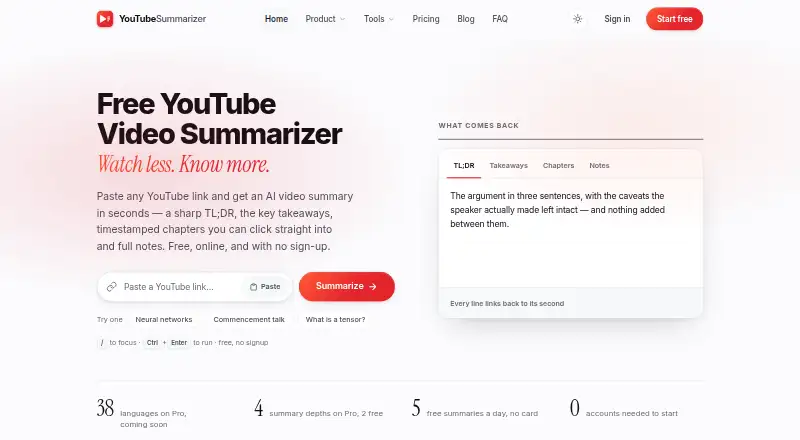
What YouTubeSummarizer.com is
YouTubeSummarizer.com turns video captions into a TL;DR, key takeaways, timestamped chapters, and structured notes. Chapters and claims link to relevant points in the video, letting readers check them against the source. It accepts YouTube watch links, short links, Shorts, embeds, live replays, mobile links, and bare video IDs. There is no fixed video-length limit, but videos need captions to be summarized. Summaries follow the caption language; translations in 38 languages are listed as a Pro feature that is not yet open for sign-up. Summaries can be copied or downloaded as Markdown, which the site says works with Notion, Obsidian, and Google Docs. The service is available on web, Android, and iOS, and works in mobile browsers without an app installation. The Free plan costs nothing and allows five summaries a day, with the count resetting at midnight UTC. Pro costs $12 a month and Team costs $39 a month, though both are available via waitlist rather than open sign-up. The maker says video files are not stored; account summaries are stored for syncing and can be deleted.
Who it suits
It suits students, researchers, creators, and teams who want structured notes from captioned YouTube videos. Mobile browser access is available without installing an app.
What it does well
- Chapters and claims link to points in the video.
- Accepts several YouTube link formats and video IDs.
- Markdown summaries can be copied or downloaded.
- Free plan permits five summaries per day.
- Available on web, Android, and iOS.
What to know first
- Videos without captions cannot be summarized.
- Free plan is limited to five summaries daily.
- Pro and Team are not yet open for sign-up.
- Summaries use the video's caption language.
Limits
The Free plan allows five summaries per day, resetting at midnight UTC. Videos require captions, and Pro and Team are currently available via waitlist.
Plans
| Plan | Billed and limits | Price |
|---|---|---|
| Free | 5 summaries/day · any video length · TL;DR, takeaways, chapters and notes · Markdown export and share links | Free |
| Pro | Monthly; yearly billing is 20% off · Unlimited summaries · playlists and batch processing · searchable history across devices · translations into 38 languages · priority queue | $12 a month |
| Team | Monthly; yearly billing is 20% off · 5 seats · shared workspace and history · house summary format · API access · priority processing | $39 a month |
As youtubesummarizer.com lists them, read 8 Oct 2026. The maker's own page has the final word.
Getting started
- Open https://www.youtubesummarizer.com/ in a web browser or use the Android or iOS platform.
- Provide a supported YouTube link or a bare video ID.
- Choose the Free plan, which allows five summaries per day.
- Copy or download the resulting summary as Markdown, or use its share link.
- Join the waitlist for Pro or Team if their listed features are needed.
YouTubeSummarizer.com is a caption-driven YouTube note maker for anyone who needs to extract the substance of lectures, interviews, briefings, or creator research. It suits students, researchers, creators, and teams who want a recap that can be checked against the original video rather than treated as an unsupported synopsis.
Overview
Paste a YouTube watch URL, youtu.be link, Short, embed, live replay, mobile link, or bare video ID. The service returns a TL;DR, key takeaways, timestamped chapters, and structured notes. There is no fixed duration ceiling, but captions are mandatory: a video without captions cannot be processed. That makes the tool broad for captioned material but unsuitable for videos whose speech is not transcribed.
Summaries stay in the caption language. Markdown can be copied or downloaded and is intended to work with Notion, Obsidian, and Google Docs; share links provide another way to pass notes along. On a phone, it runs in a mobile browser, so installing a dedicated app is unnecessary. Video files are not stored, according to the FAQ. Recent results for visitors without accounts remain in browser storage, while account histories are retained for cross-device syncing and can be deleted. The maker says it does not sell user data or display advertising.
Key features
Traceable chapters and claims
Each chapter and claim links to the corresponding video point. This is the most consequential differentiator for study and research: you can verify context, wording, and sequence instead of trusting an unanchored AI recap. It also helps editors and creators jump directly to passages worth revisiting.
Portable notes
Markdown export keeps the output usable outside the service, while share links support handoffs. The broad URL support reduces friction when videos come from different YouTube surfaces.
Language and batch work
Caption-language summaries cover the core service. Translation into 38 languages, playlists, and batch processing are reserved for Pro and are not yet open for sign-up, so multilingual or high-volume workflows currently require the waitlist.
Pricing
Free
The $0.00 USD free plan allows five summaries per day, with the counter resetting at midnight UTC. It includes any video length, the TL;DR, takeaways, chapters and notes, Markdown export, share links, and email support. This is a sensible fit for occasional viewing, coursework, or a small daily research queue; the cap is restrictive for regular batch work.
Pro
Pro costs $12 a month, billed monthly, with yearly billing 20% off. It removes the summary quota and adds playlists, batch processing, searchable history across devices, 38-language translations, and a priority queue. It is the natural individual upgrade for sustained use, but it is currently waitlist-only.
Team
Team is $39 a month, billed monthly, with yearly billing 20% off. Five seats, a shared workspace and history, a house summary format, API access, priority processing, and priority support target coordinated teams and integrations. It is excessive for a single reader and also requires joining the waitlist.
Platforms
It supports web, Android, and iOS access, including mobile-browser use without installation. YouTube is the input source; captions determine whether a video can be summarized.
Who it's for
Choose it for students checking lecture claims, researchers building verifiable reading notes, creators reviewing source material, or teams standardizing summaries. The free tier works for light daily use. Look elsewhere if you need non-captioned video processing, an immediately available paid plan, or a quota larger than five free summaries per day.
Pros and cons
- Pros: timestamp links make claims auditable; accepts many YouTube URL formats; no fixed video-length limit for captioned videos; Markdown and share links fit existing note systems; no ads and no sale of user data.
- Cons: captionless videos fail; free use is limited to five summaries daily; Pro and Team features are waitlist-only; translation is not part of the currently open core offering.
Alternatives
Browse the AI Video Summarizers list for a wider comparison. Pick Scribiz if API and desktop operating-system coverage matter, or Glasp if you want a broader free allowance spanning YouTube, PDFs, chat credits, and audio transcription. Summarize Video to Text suits users who want a browser extension and a free-account limit of up to one-hour videos. Choose VideoHighlighter for offline, AGPL-licensed analysis on Windows, macOS, or Linux. AI VidSummary offers extension and web access with file upload, while Claras is cheaper at $4.39 per month for its Pro tier. Distill is an iOS option with a guest allowance, and Helpolos adds transcripts, mind maps, quizzes, video chat, and exports through a daily credit model.
Verdict
YouTubeSummarizer.com is a strong choice for captioned-YouTube workflows where verifiable timestamps matter more than a generic recap. Its free plan is useful for occasional users, but daily limits and the unavailable paid tiers make it a poor fit for heavy, multilingual, or team-based work until Pro and Team open beyond the waitlist.
Verdict
YouTubeSummarizer.com makes caption-based notes with links back to the relevant video points. The free plan has a daily cap, and the listed paid tiers require joining a waitlist.
Questions
How much does YouTubeSummarizer.com cost?
The Free plan costs nothing. Pro is $12 a month and Team is $39 a month; yearly billing is 20% off for both paid plans.
What does the free plan include?
It allows five summaries per day and includes TL;DR, takeaways, chapters, notes, Markdown export, and share links.
Which platforms does it support?
The listed platforms are web, Android, and iOS. It also works in mobile browsers without an app installation.
Can it summarize any YouTube video?
There is no fixed video-length limit, but the video needs captions. Summaries use the caption language.
Are the paid plans open for sign-up?
Pro and Team are available through a waitlist rather than open sign-up.
What happens to summaries and video files?
The maker says video files are not stored. Without an account, recent summaries stay in browser local storage; account summaries are stored for syncing and can be deleted.
Facts from YouTubeSummarizer.com's own pages
- Availability
- The maker says Pro and Team are not yet open for sign-up and are available via waitlist. · youtubesummarizer.com, 8 Oct 2026
- Data use
- The maker says it does not sell user data or show ads, and describes subscriptions as its business model. · youtubesummarizer.com, 8 Oct 2026
- Exports and integrations
- Summaries can be copied or downloaded as Markdown, which the site says works with Notion, Obsidian, and Google Docs. · youtubesummarizer.com, 8 Oct 2026
- Free allowance
- The free plan allows five summaries per day, and the daily count resets at midnight UTC. · youtubesummarizer.com, 8 Oct 2026
- Language
- Summaries use the language of the video's captions; translated summaries in 38 languages are listed as a Pro feature that is not yet open. · youtubesummarizer.com, 8 Oct 2026
- Maker identity
- The About page describes the maker as a small, fully remote team; it does not state a headquarters or founding year. · youtubesummarizer.com, 8 Oct 2026
- Phone access
- The site says it works in mobile browsers without installing an app. · youtubesummarizer.com, 8 Oct 2026
- Privacy
- The FAQ says video files are not stored; without an account recent summaries stay in browser local storage, while account summaries are stored for syncing and can be deleted. · youtubesummarizer.com, 8 Oct 2026
- Purpose
- Summarizes YouTube videos from their captions into a TL;DR, key takeaways, timestamped chapters, and structured notes. · youtubesummarizer.com, 8 Oct 2026
- Support
- The pricing comparison lists email support for Free and Pro, and priority support for Team. · youtubesummarizer.com, 8 Oct 2026
- Traceable summaries
- Chapters and claims are linked to the relevant point in the video so users can check them. · youtubesummarizer.com, 8 Oct 2026
- Use cases
- The site describes use by students, researchers, creators, and teams. · youtubesummarizer.com, 8 Oct 2026
- Video length and captions
- There is no fixed video-length limit, but a video without captions cannot be summarized. · youtubesummarizer.com, 8 Oct 2026
- Video links
- It accepts YouTube watch, short-link, Shorts, embed, live replay, mobile, and bare video ID formats. · youtubesummarizer.com, 8 Oct 2026
Where YouTubeSummarizer.com stands on Freedom251
- AI Video Summarizers#20 of 25