Freedom251 › AI Video Summarizers
SonicScribe
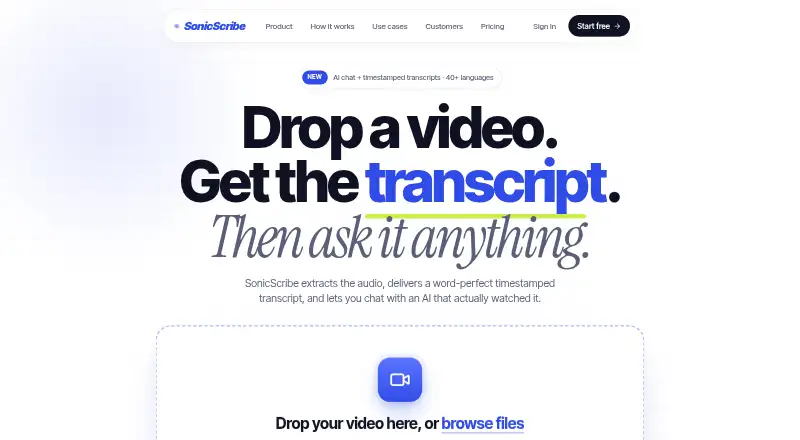
What SonicScribe is
SonicScribe turns audio and video into searchable transcripts, with speaker detection, timestamped words, confidence scores, translation, and automatic formatting. It accepts uploaded MP4, MOV, AVI, MKV, WEBM, MP3, WAV, and M4A files, along with YouTube, Vimeo, Loom, and direct video URLs. Users can ask questions about a video and receive answers linked to timestamps; chapter generation is also available. Exports include SRT, VTT, DOCX, PDF, JSON, and TXT, with connections to Notion, Docs, Descript, and Premiere. The Free plan costs nothing and allows three transcripts a day, uploads up to 30 minutes, and one file at a time. Unlimited costs $20 a month and supports uploads up to 10 hours. Teams pricing is custom. SonicScribe says uploaded files are deleted after 30 days by default, while transcript text remains until deletion or account closure. It also says uploads and transcripts are not used to train AI models.
Who it suits
SonicScribe suits podcasters, journalists, students, and teams working with meetings, interviews, webinars, or training materials. Legal and medical users may also find its transcription and export tools relevant.
What it does well
- Free plan includes AI chat and all exports.
- Accepts video, audio, and several video URLs.
- Answers to video questions link to timestamps.
- Offers chapter generation and multiple export formats.
- Uploaded files are not used for AI training.
What to know first
- Free plan limits uploads to 30 minutes.
- Free plan allows three transcripts per day.
- Files are deleted after 30 days by default.
Limits
The Free plan allows three transcripts per day, uploads up to 30 minutes, and one file at a time; it uses a standard queue. Unlimited costs $20 a month and allows uploads up to 10 hours, with a 5 GB per-file limit. Teams pricing is custom based on team size.
Plans
| Plan | Billed and limits | Price |
|---|---|---|
| Free | $0/forever · 3 transcripts per day · 30-minute uploads · 1 file at a time · standard queue · AI chat and all exports | Free |
| Unlimited | Billed monthly · cancel anytime · Unlimited transcriptions · 10-hour uploads (5 GB per file) · up to 50 files at once · 134+ languages · unlimited storage | $20 a month |
| Teams | Custom pricing based on team size · Team access control and roles · shared files and collaboration · admin dashboard and audit logs · SSO · SCIM · BAA available · HIPAA and zero-retention mode | On request |
As sonicscribe.co lists them, read 30 Sept 2026. The maker's own page has the final word.
Getting started
- Visit https://sonicscribe.co/ in a web browser.
- Choose the Free, Unlimited, or Teams plan.
- Upload a supported file or provide a YouTube, Vimeo, Loom, or direct video URL.
- Transcribe the media and use the available transcript tools, chat, or exports.
Verdict
SonicScribe combines transcription, timestamp-linked video questions, chapters, and a broad set of exports. The Free plan has daily and upload-length limits; longer uploads are listed with the $20 a month Unlimited plan.
Questions
Is SonicScribe free?
Yes. The Free plan costs nothing, billed at $0/forever. It includes three transcripts per day, uploads up to 30 minutes, and one file at a time.
How much does Unlimited cost?
Unlimited costs $20 a month, billed monthly, and can be canceled anytime.
Which platforms does it support?
SonicScribe is available on the web. It accepts audio and video uploads and URLs from YouTube, Vimeo, Loom, or direct video links.
What can I export?
Exports include SRT, VTT, DOCX, PDF, JSON, and TXT. Direct connections are shown for Notion, Docs, Descript, and Premiere.
Who makes SonicScribe?
SonicScribe says it was established in 2023 by a team of AI enthusiasts and audio experts.
What are its retention and AI training policies?
Uploaded files are automatically deleted after 30 days by default, with configurable retention. Transcription text remains until deletion or account closure, and SonicScribe says files and transcripts are never used to train its or third-party AI models.
Facts from SonicScribe's own pages
- AI chat
- Users can ask questions about a video and receive answers linked to specific timestamps. · sonicscribe.co, 30 Sept 2026
- AI training policy
- Uploaded files and transcriptions are never used to train SonicScribe or third-party AI models. · sonicscribe.co, 30 Sept 2026
- Company history
- SonicScribe says it was established in 2023 by a team of AI enthusiasts and audio experts. · sonicscribe.co, 30 Sept 2026
- Enterprise compliance
- The contact page lists SOC 2 compliance, SSO integration, audit logs, and BAA availability for enterprise customers. · sonicscribe.co, 30 Sept 2026
- Enterprise integrations
- Enterprise features include API access, webhooks, and custom workflows. · sonicscribe.co, 30 Sept 2026
- Exports and integrations
- Exports include SRT, VTT, DOCX, PDF, JSON, and TXT, with direct connections shown for Notion, Docs, Descript, and Premiere. · sonicscribe.co, 30 Sept 2026
- Retention
- Uploaded files are automatically deleted after 30 days, configurable, while transcription text remains until deletion or account closure. · sonicscribe.co, 30 Sept 2026
- Security
- The privacy policy states that data is protected with TLS in transit, AES-256 at rest, encrypted database storage, multi-factor authentication, role-based access controls, and regular security audits. · sonicscribe.co, 30 Sept 2026
- Support
- The pricing page includes basic support on the Free plan, and the site says chat questions are answered in under an hour. · sonicscribe.co, 30 Sept 2026
- Supported formats
- The homepage lists MP4, MOV, AVI, MKV, WEBM, MP3, WAV, and M4A uploads, plus YouTube, Vimeo, Loom, or direct video URLs. · sonicscribe.co, 30 Sept 2026
- Target users
- SonicScribe describes use cases for podcasters, journalists, students, legal and medical users, businesses, meetings, interviews, webinars, and training materials. · sonicscribe.co, 30 Sept 2026
- Transcription features
- The service provides per-word timestamps, speaker diarization, confidence scores, translation, and automatic formatting. · sonicscribe.co, 30 Sept 2026
- What it does
- SonicScribe converts audio and video files into searchable text with speaker detection, exports, and workflows for teams. · sonicscribe.co, 30 Sept 2026
Where SonicScribe stands on Freedom251
- AI Video Summarizers#18 of 25