Freedom251 › AI Video Summarizers
VideoHighlighter
What VideoHighlighter is
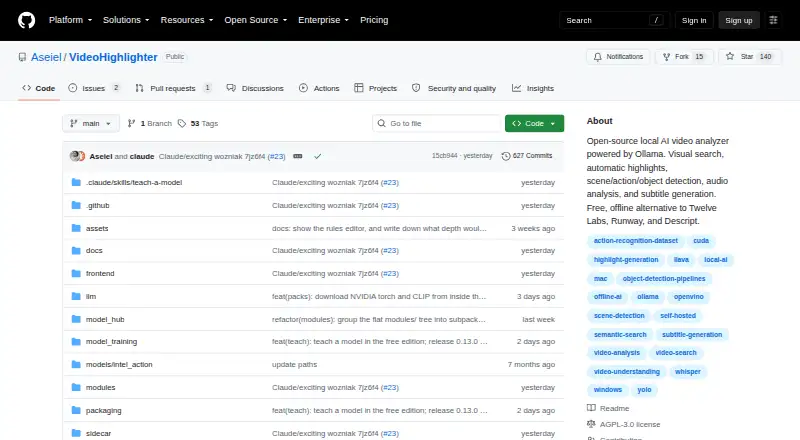
VideoHighlighter is a local desktop app that analyzes video and exports highlight reels or individual clips. It scores scene, motion, audio, object, action, and transcript signals, then explains the results in a timeline and report. Reports include per-signal point breakdowns, signals that fired, strong moments that missed the cut, and transcript claims that were not measured. Video files, transcripts, detections, and local models stay on disk; analysis, search, and export do not upload footage. The basic pipeline needs no API key, and a GPU is optional: current CPUs can run it. The free edition includes offline analysis, live face detection, VR side-by-side playback, CLIP search, composition rules, model training, and a model hub. Individual Pro adds live object and action overlays, point-and-teach categories, find-more-like-this search, open-vocabulary detection, and counter or scoreboard detection. Prebuilt downloads are available for Windows and macOS; Linux runs from source with pip and Python. The free repository is under AGPL-3.0, with a separate commercial license. Individual Pro costs $49, paid once and covers one editor on up to five computers.
Who it suits
It suits video editors looking for local analysis and highlight or clip exports, including those working with local video, YouTube VODs, or Twitch VODs. Linux users need to run it from source with pip and Python.
What it does well
- Analysis, search, and export do not upload footage.
- Basic pipeline requires no API key.
- Free edition includes offline analysis and CLIP search.
- A GPU is optional.
What to know first
- Linux use requires running from source with pip and Python.
- Individual Pro is limited to one editor and five computers.
- Pro activation requires an internet connection once.
Limits
The Free edition is released under AGPL-3.0. Individual Pro covers one editor on up to five computers and requires an internet connection for initial activation.
Plans
| Plan | Billed and limits | Price |
|---|---|---|
| Free | AGPL-3.0 · offline analysis · Windows, macOS, Linux | Free |
| Individual | one-time · single editor · up to 5 computers · commercial license · priority support | $49, paid once |
| Studio | teams and multi-seat deployments · multiple seats · volume pricing | On request |
As github.com lists them, read 1 Oct 2026. The maker's own page has the final word.
Getting started
- Choose Windows or macOS for a prebuilt download, or use pip and Python to run the Linux source version.
- Start with the Free edition, or select Individual Pro for one editor and up to five computers.
- For Pro, connect to the internet once to activate the license.
- Open local video files or work with YouTube or Twitch VODs, then analyze and export clips.
Verdict
VideoHighlighter offers local video analysis with an explainable scoring report and a substantial free edition. Pro adds detection and search functions, while Linux installation and the one-time Pro activation requirement are worth noting.
Questions
Is VideoHighlighter free?
Yes. The Free plan costs nothing and includes offline analysis and the listed Free capabilities.
How much does Individual Pro cost?
Individual Pro costs $49, paid once, billed one-time. It covers one editor on up to five computers.
Which platforms can run it?
VideoHighlighter supports Linux, macOS, and Windows. Prebuilt downloads are available for Windows and macOS; Linux runs from source with pip and Python.
Does it upload video for analysis?
No. Video files, transcripts, detections, and local models stay on disk, and analysis, search, and export do not upload footage.
What license does the Free edition use?
The free repository is released under the GNU Affero General Public License v3.0. The copyright holders also offer a separate commercial license.
What does Pro add?
Pro adds live object and action overlays, point-and-teach categories, find-more-like-this search, open-vocabulary detection, and counter or scoreboard detection.
Facts from VideoHighlighter's own pages
- Activation
- Pro activation requires an internet connection once, after which the license is checked locally and the app does not contact the vendor. · aseiel.github.io, 1 Oct 2026
- API requirement
- The basic pipeline needs no API key. · github.com, 1 Oct 2026
- Detection
- The app scores scene, motion, audio, objects, actions and transcript signals, then displays the reasons on a timeline and report. · github.com, 1 Oct 2026
- Explainability
- Reports provide per-signal point breakdowns, fired signals, strong moments that missed the cut and transcript claims that were not measured. · github.com, 1 Oct 2026
- Free capabilities
- The free edition includes offline analysis, live face detection, VR side-by-side playback, CLIP search, composition rules, model training and a model hub. · github.com, 1 Oct 2026
- Hardware
- A GPU is optional; current CPUs run the pipeline, while Intel Arc and other GPUs can accelerate detection. · aseiel.github.io, 1 Oct 2026
- Install platforms
- Prebuilt downloads are available for Windows and macOS, while Linux runs from source with pip and Python. · github.com, 1 Oct 2026
- License
- The free repository is released under the GNU Affero General Public License v3.0, with a separate commercial license offered by the copyright holders. · github.com, 1 Oct 2026
- Offline privacy
- Video files, transcripts, detections and local models stay on disk; analysis, search and export do not upload footage. · aseiel.github.io, 1 Oct 2026
- Pro capabilities
- Pro adds live object and action overlays, point-and-teach categories, find-more-like-this search, open-vocabulary detection and counter or scoreboard detection. · aseiel.github.io, 1 Oct 2026
- Purpose
- VideoHighlighter is a local desktop app that analyzes video and exports highlight reels plus individual clips. · github.com, 1 Oct 2026
- Support
- Support is provided through Discord and email, with priority support for Pro customers and no ticket portal. · aseiel.github.io, 1 Oct 2026
- Technical stack
- The pipeline uses YOLOX with OpenVINO, YuNet and SFace face models, Whisper transcription, a composition engine, CLIP search and a PySide6 editor. · aseiel.github.io, 1 Oct 2026
- Usage limit
- An Individual Pro license is for one editor and may be used on up to five computers. · aseiel.github.io, 1 Oct 2026
Where VideoHighlighter stands on Freedom251
- AI Video Summarizers#16 of 25