Freedom251 › AI Video Summarizers

Synop
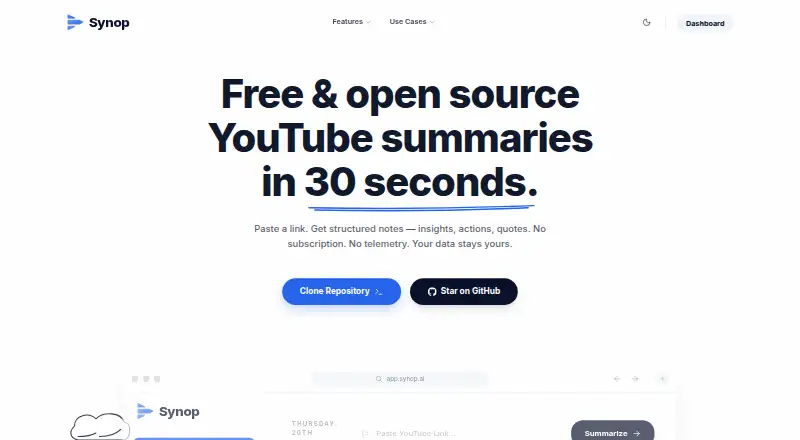
What Synop is
Synop is a self-hosted, web-based tool for turning YouTube videos, playlists, and channels into summaries and study materials. Its searchable library includes full-text search, a cross-video topic map, and questions across saved material. Study Mode creates flashcards and quizzes, supports spaced-repetition review, and can convert a playlist into an Anki deck. Individual video analysis includes semantic topic clusters, a multi-speaker debate matrix, freshness checks, and bias critique. Users can follow channels so new uploads are automatically summarized into their library. Summaries can be exported as Markdown or PDF, or synced to Obsidian and Notion with generated wiki-links. The project says it supports more than 12 languages and accepts OpenAI-compatible providers, including OpenAI, DeepSeek, Groq, OpenRouter, Gemini, and local Ollama. Notes and summaries are kept in a local SQLite database; there is no Synop server. Setup requires Node.js 18+ and an AI API key. The free plan has no subscription, but provider usage costs depend on the selected AI service. Self-hosters can run it wherever Node.js runs, with optional Postgres for syncing across devices or multi-user use.
Who it suits
Synop suits students, researchers or analysts, and creators or writers who work with YouTube material. It also fits users comfortable setting up a self-hosted tool with Node.js and supplying an AI API key.
What it does well
- Searches and maps topics across saved videos.
- Study Mode creates quizzes and flashcards.
- Can convert playlists into Anki decks.
- Summaries sync to Obsidian and Notion.
- Notes and summaries are stored in a local SQLite database.
What to know first
- Setup requires Node.js 18+ and an AI API key.
- Provider usage costs depend on the selected service.
- No Synop server is provided.
Limits
The free plan has no subscription, but requires your own AI API key. Usage costs depend on the selected provider.
Plans
| Plan | Billed and limits | Price |
|---|---|---|
| Free | No subscription · bring your own AI API key · usage costs depend on chosen provider | Free |
As synop-ai.vercel.app lists them, read 4 Oct 2026. The maker's own page has the final word.
Getting started
- Visit the Synop website or prepare a self-hosted installation.
- Install Node.js 18 or later.
- Provide an AI API key for an OpenAI-compatible provider.
- Run Synop wherever Node.js runs, such as a home server, Raspberry Pi, or VPS.
- Optionally configure Postgres for syncing across devices or multi-user use.
Verdict
Synop pairs YouTube summarization with library search, study tools, and exports or note-app syncing. It has no subscription, but setup and AI provider usage require the user to supply the runtime and API key.
Questions
Is Synop free?
Its Free plan costs nothing and has no subscription. You bring an AI API key, and usage costs depend on the chosen provider.
What platforms does Synop support?
Synop is listed as self-hosted and web-based. It can run wherever Node.js runs, including a home server, Raspberry Pi, or VPS.
What can I use as input?
Synop supports YouTube videos, playlists, and channels.
Does Synop have a free trial?
No. The listed free trial is no.
Is Synop open source?
The project is distributed under the MIT License.
Where are summaries and notes stored?
The project says they are stored in a local SQLite database and that there is no Synop server. AI keys are stored in browser local storage and sent to the selected provider per request.
Facts from Synop's own pages
- AI providers
- Synop accepts OpenAI-compatible providers and lists OpenAI, DeepSeek, Groq, OpenRouter, Gemini, and local Ollama among its provider options. · github.com, 4 Oct 2026
- Channel watchlist
- Users can follow channels and have new uploads automatically summarized into their library. · github.com, 4 Oct 2026
- Exports
- Summaries can be exported as Markdown or PDF, or synced to Obsidian and Notion with generated wiki-links. · github.com, 4 Oct 2026
- Intended users
- The README describes persona-specific workflows for students, researchers or analysts, and creators or writers. · github.com, 4 Oct 2026
- Languages
- The official site says users can summarize and chat with videos in over 12 languages. · synop-ai.vercel.app, 4 Oct 2026
- Library
- Its searchable library includes a cross-video topic map, full-text search, and a feature to ask questions across the library. · github.com, 4 Oct 2026
- License
- The project is distributed under the MIT License. · github.com, 4 Oct 2026
- Local provider guard
- Custom provider URLs are checked against private, metadata, and localhost addresses; self-hosters can opt in to local providers with ALLOW_LOCAL_PROVIDERS=true. · github.com, 4 Oct 2026
- Privacy
- The project says summaries and notes are stored in a local SQLite database, there is no Synop server, and AI keys are stored in browser local storage and sent to the selected provider per request. · github.com, 4 Oct 2026
- Purpose
- Synop turns long YouTube videos into short, high-signal summaries tailored to students, researchers, or creators. · github.com, 4 Oct 2026
- Self-hosting
- Synop can run wherever Node.js runs, including a home server, Raspberry Pi, or VPS, and supports optional Postgres for syncing across devices or multi-user use. · github.com, 4 Oct 2026
- Setup requirements
- The README lists Node.js 18+ and an AI API key as requirements for setup. · github.com, 4 Oct 2026
- Study tools
- Study Mode creates flashcards and quizzes, supports spaced-repetition review, and can turn a playlist into an Anki deck. · github.com, 4 Oct 2026
- Video analysis
- Per-video analysis includes semantic topic clusters, a multi-speaker debate matrix, freshness checks, and bias critique. · github.com, 4 Oct 2026
Where Synop stands on Freedom251
- AI Video Summarizers#14 of 25