Freedom251 › AI Video Summarizers
AI VidSummary
What AI VidSummary is
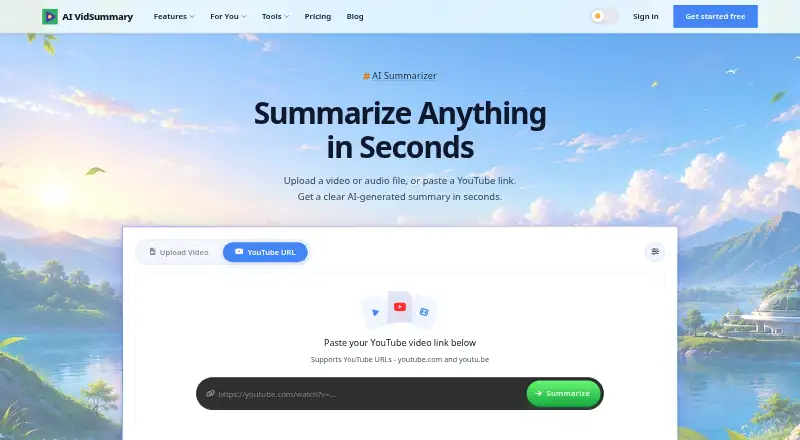
AI VidSummary turns YouTube links and uploaded video or audio files into summaries, transcripts, captions, and text from speech. It offers 13 summary templates for formats such as quotes, steps, facts, Q&A, chapters, action items, and code. Summaries can be generated in 20 languages, and AI Chat can answer questions about video content with timestamps. The service is available on the web and through Chrome and Firefox extensions; its Chrome extension is also listed for Edge and Brave. The Free plan costs nothing and includes 10 summaries per day, YouTube and file uploads, and two active sessions, but not AI Chat or Notion export. Premium is $19 a month and adds all 13 templates plus five custom templates, AI Chat, translation, Notion export, uploads up to 500 MB, five active sessions, and priority support. The home page lists a 50 MB upload maximum and automatic file deletion after 24 hours. Premium use is capped at 100 videos per day and 1,500 per month.
Who it suits
AI VidSummary suits students, researchers, educators, professionals, and others who want structured notes from videos or audio. It may also suit users who need timestamped answers or Notion export on Premium.
What it does well
- Handles YouTube links and video or audio uploads
- Offers 13 templates and 20 languages
- AI Chat answers with timestamps
- Premium includes Notion export
- Uploaded files are deleted after 24 hours
What to know first
- Free plan excludes AI Chat and Notion export
- Homepage upload maximum is 50 MB
- Premium use capped at 100 videos daily
- Premium use capped at 1,500 videos monthly
Limits
The Free plan is listed with 10 summaries per day, but the fair usage policy limits free use to three video summaries per day and offers three bonus videos after email signup. Premium costs $19 a month and is subject to fair use limits of 100 videos per day and 1,500 per month; homepage uploads are limited to 50 MB, while Premium lists a 500 MB maximum.
Plans
| Plan | Billed and limits | Price |
|---|---|---|
| Free | 10 summaries per day · General Summary template · YouTube and file upload · Max 50 MB upload · 2 active sessions · no AI chat or Notion export | Free |
| Premium | Unlimited summaries · all 13 templates + 5 custom · AI Chat · translation to 20 languages · Notion export · Max 500 MB upload · 5 active sessions · priority support; fair use: 100 videos/day and 1,500/month | $19 a month |
As aividsummary.com lists them, read 2 Oct 2026. The maker's own page has the final word.
Getting started
- Open the AI VidSummary website or install its Chrome or Firefox extension.
- Choose a YouTube URL or upload a video or audio file up to 50 MB.
- Select an available summary tool or template.
- Use the Free plan, or choose Premium at $19 a month for its additional features.
AI VidSummary turns YouTube links and uploaded video or audio into structured summaries, transcripts, captions and chapters. It suits students, researchers, educators and professionals who need to extract information quickly, while developers, marketers and lifelong learners may value its templates and timestamped questions. Its strongest case is the combination of broad input support and structured output; the main decision points are upload size, fair-use ceilings and the Premium-only tools.
Overview
AI VidSummary accepts YouTube URLs, video files and audio files. Its tools cover video-to-summary, video-to-transcript, speech-to-text, audio-to-summary and YouTube captions, so it can handle both online viewing and local recordings. Uploaded files can be as large as 50 MB on the Free plan and 500 MB on Premium, and the service automatically deletes uploads after 24 hours. That retention window limits the exposure of stored media, but it also means the service is not a long-term media archive.
Summaries can be generated in 20 languages. The product also offers 13 templates, including quotes, how-to steps, facts and statistics, Q&A, chapters, action items and code. This makes the output more useful than a single generic synopsis when a reader needs study notes, implementation steps or technical extracts.
Key features
Structured summaries and transcripts
The combination of transcript output, caption generation and chapter creation gives users several ways to revisit a source. Students can turn lectures into chaptered notes, researchers can pull out facts and quotations, and developers can use the code-oriented format for instructional videos. The Free plan includes only the General Summary template, so the more specialized workflows require Premium.
Timestamped AI Chat
AI Chat answers questions about video content with timestamped responses. That is useful when you need to locate the passage behind an answer instead of reading an entire transcript. It is not included in Free, making this a paid feature for research and review workflows.
Notion and browser access
Premium adds one-click Notion export. The connection uses OAuth 2.0 and write permission for pages the user chooses, which is a practical fit for people maintaining a research or project workspace. Chrome and Firefox extensions bring the service into the browser; the Chrome extension is also listed as working on Edge and Brave. The web app remains the broader route for file uploads.
Privacy and usage controls
The privacy policy says processing is shared with OpenRouter and Groq, while Stripe and Razorpay handle billing. It also says personal information is not sold, traded or rented. The company states that it is GDPR compliant and lets users export or delete their data. These commitments help privacy-conscious users assess the service, although sending media to processing partners remains part of the service model.
Pricing
| Plan | Price | What you get |
|---|---|---|
| Free | free | 10 summaries per day; General Summary template; YouTube and file upload; 50 MB maximum upload; 2 active sessions; no AI Chat or Notion export |
| Premium | $19 a month | Unlimited summaries; all 13 templates plus 5 custom; AI Chat; translation to 20 languages; Notion export; 500 MB maximum upload; 5 active sessions; priority support |
Free is a sensible way to process occasional short media, provided the single-template output and absent chat are acceptable. The fair-usage policy limits free use to three video summaries per day, plus three bonus videos after email signup, despite the plan table's 10-summaries-per-day allowance; readers should therefore budget around the stricter published usage rule. Premium is aimed at regular users who need larger uploads, specialized formats, translation, chat or Notion workflows. Its “unlimited” wording still operates under fair use: 100 videos per day and 1,500 per month. There is no free trial. Paid users receive priority support, and usage-limit questions have a stated response time of within 12 business hours.
Platforms
AI VidSummary is available on the web and through browser extensions. Chrome and Firefox are supported, with the Chrome extension also working on Edge and Brave. YouTube links and uploaded video or audio files are supported input sources.
Who it's for
Students and educators can turn lectures into summaries, chapters and action items. Researchers and professionals benefit from transcripts, multilingual summaries and timestamped questions. Marketers, developers, crypto users and lifelong learners can choose templates suited to facts, Q&A, code or instructional steps. It is less suitable for anyone needing permanent upload storage, desktop-native applications or unrestricted high-volume processing.
Pros and cons
Pros
- Multiple input types: YouTube, video files and audio files cover common media sources.
- Useful structure: 13 templates, transcripts and chapters support study, research and technical work.
- Timestamped answers: AI Chat can point users to relevant moments in a video.
- Browser coverage: Web access plus Chrome, Firefox, Edge and Brave compatibility reduces platform friction.
- Privacy controls: GDPR compliance, data export and deletion options are stated, with automatic upload deletion after 24 hours.
Cons
- Free-plan restrictions: Only the General Summary template is included, with no AI Chat or Notion export.
- Conflicting practical caps: The table says 10 free summaries daily, while fair use limits free users to three daily plus signup bonuses.
- Premium usage ceiling: “Unlimited” summaries remain capped at 100 videos daily and 1,500 monthly.
- Small free uploads: The 50 MB maximum may exclude longer or higher-quality files.
- Third-party processing: Video processing involves OpenRouter and Groq, which matters for sensitive recordings.
Alternatives
Choose Scribiz if you need API, Linux, macOS or Windows coverage alongside web access and a free allowance of 30 caption lookups and 10 Listen or Watch minutes daily.
Glasp fits users who want Android or iOS apps, three YouTube summaries per day, PDF handling and monthly AI-chat credits.
Pick Summarize Video to Text for Android or iOS access, two videos daily without an account, or ten monthly credits after free Google sign-in.
VideoHighlighter is the alternative for offline analysis on Windows, macOS or Linux, including a one-time Individual plan.
Choose YouTubeSummarizer.com for five daily summaries, any video length, Markdown export and share links, with Pro at $12 a month.
Claras is better suited to extension and web users seeking SuperSearch, with a 4.39 USD monthly Pro plan.
Distill is an iOS option with a guest mode for one YouTube summary daily and videos up to 30 minutes.
Helpolos offers API and web access with daily credits, summaries, transcripts, mind maps, quizzes, video chat and exports.
See the broader AI Video Summarizers list for more options.
Verdict
AI VidSummary is a strong choice for people who move between YouTube and uploaded media and want templates, transcripts, multilingual output and timestamped chat in one browser-based service. Choose Premium when those tools or larger files justify $19 a month; choose Free for occasional general summaries. Look elsewhere if offline software, mobile apps, permanent storage or higher predictable volume matters more than its integrated workflow.
Verdict
AI VidSummary combines video and audio summaries with transcripts, captions, templates, and timestamped chat. Check the plan limits and upload size against your needs before choosing a tier.
Questions
Is there a free plan?
Yes. The Free plan costs nothing. The fair usage policy limits free use to three video summaries per day, with three bonus videos after email signup.
How much does Premium cost?
Premium costs $19 a month. It includes all 13 templates plus five custom templates, AI Chat, translation to 20 languages, Notion export, uploads up to 500 MB, five active sessions and priority support.
Which platforms and inputs does it support?
It is available on the web and as Chrome and Firefox extensions. It accepts YouTube URLs and uploaded video or audio files; the Chrome extension is also listed as working on Edge and Brave.
Can it generate transcripts and chapters?
Yes. The listed tools include video-to-transcript and speech-to-text, and the product lists chapter generation and a chapters summary template.
Does it connect to Notion?
Notion export is included with Premium. The connection uses OAuth 2.0 and requests permission to write to pages the user chooses.
What happens to uploaded files?
The homepage says uploads can be up to 50 MB and uploaded files are automatically deleted after 24 hours.
Facts from AI VidSummary's own pages
- AI chat
- AI Chat answers questions about video content with timestamped responses. · aividsummary.com, 2 Oct 2026
- Browser extensions
- The product offers extensions for Chrome and Firefox, with the Chrome extension also listed as working on Edge and Brave. · aividsummary.com, 2 Oct 2026
- Compliance
- The About page states that the company is GDPR compliant and allows users to export or delete their data. · aividsummary.com, 2 Oct 2026
- Fair usage
- The fair usage policy caps paid plans at 100 videos per day and 1,500 per month, and says free use is limited to 3 video summaries per day plus 3 bonus videos after email signup. · aividsummary.com, 2 Oct 2026
- File limits and retention
- The home page lists a 50 MB upload maximum and says uploaded files are automatically deleted after 24 hours. · aividsummary.com, 2 Oct 2026
- Integrations
- Premium includes one-click Notion export, and the Notion page says the connection uses OAuth 2.0 with write permission for pages the user chooses. · aividsummary.com, 2 Oct 2026
- Intended users
- The site identifies students, researchers, professionals, educators, marketers, developers, crypto users, and lifelong learners as audiences. · aividsummary.com, 2 Oct 2026
- Languages
- The home page says summaries can be generated in 20 languages. · aividsummary.com, 2 Oct 2026
- Purpose
- AI VidSummary summarizes YouTube videos and uploaded video or audio files into structured summaries. · aividsummary.com, 2 Oct 2026
- Security and privacy
- The privacy policy says it shares information with OpenRouter and Groq for video processing and with Stripe and Razorpay for billing, and says it does not sell, trade, or rent personal information. · aividsummary.com, 2 Oct 2026
- Summary tools
- The site lists video-to-summary, video-to-transcript, speech-to-text, audio-to-summary, and YouTube-caption tools. · aividsummary.com, 2 Oct 2026
- Support
- The pricing page lists priority support for Premium, while the fair usage policy gives a response time of within 12 business hours for usage-limit questions. · aividsummary.com, 2 Oct 2026
- Templates
- The product describes 13 summary templates for formats including quotes, how-to steps, facts and statistics, Q&A, chapters, action items, and code. · aividsummary.com, 2 Oct 2026
Where AI VidSummary stands on Freedom251
- AI Video Summarizers#2 of 25
- Video Summarizers Software#2 of 12