Freedom251 › AI Video Summarizers

Claras
What Claras is
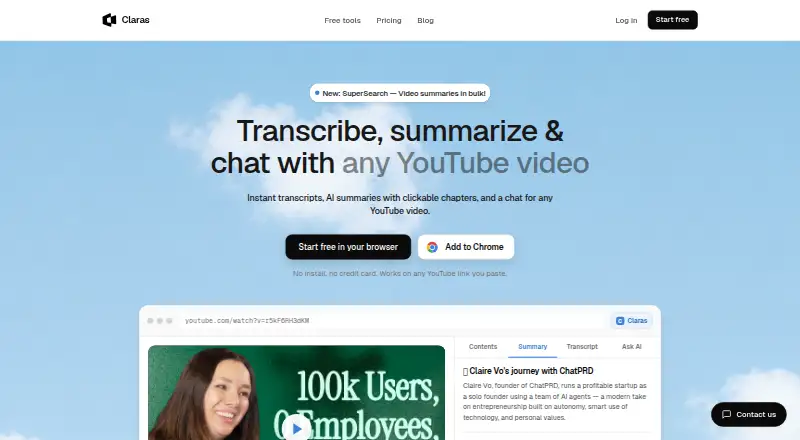
Claras is a Chrome extension and web service for transcribing YouTube videos and working with their transcripts. It generates AI summaries, clickable chapters and timestamps, and supports chat based on transcript text. SuperSearch can summarize a playlist or a YouTube search page in one go. The service supports 17 languages, with automatic detection and summaries in a preferred language when captions are available. It works with YouTube watch links, youtu.be links, Shorts, live videos and embeds; video uploads are not supported. Transcripts can be sent to Claude, ChatGPT, Gemini or NotebookLM, or exported as TXT, PDF or .srt files. The free plan includes 3 videos and 1 SuperSearch per month. Pro costs $4.39 a month and includes up to 50 videos per day; Unlimited costs $6 a month. Claras says transcript text is not stored on its servers, but is sent to third-party AI providers to generate summaries and chat responses. Unlimited and Lifetime users can provide their own API key; the privacy policy says these keys remain in browser extension storage and are not transmitted to Claras servers.
Who it suits
Claras suits people who use YouTube for learning or research, including course and lecture learners, traders, investors, AI builders, founders and indie hackers. It is designed for working with YouTube video transcripts rather than uploading videos.
What it does well
- Creates summaries, chapters, timestamps and transcript-based chat.
- SuperSearch works across playlists and YouTube search pages.
- Supports 17 languages when captions are available.
- Offers transcript exports and sending to named AI tools.
- Free plan includes 3 videos and 1 SuperSearch monthly.
What to know first
- Video uploads are not supported.
- Free plan is limited to 3 videos per month.
- Transcript text is sent to third-party AI providers.
Limits
The free plan includes 3 videos and 1 SuperSearch per month. Pro allows 50 videos per day; Unlimited removes the daily video and SuperSearch limits. Lifetime use with Claras AI is limited to 50 summaries and 5 SuperSearches per month, while using a personal API key provides unlimited use.
Plans
| Plan | Billed and limits | Price |
|---|---|---|
| Free | 3 videos/month · 1 SuperSearch · no credit card | Free |
| Lifetime | One-time payment — never renews · Unlimited with your own API key · Alternatively 50 summaries/month and 5 SuperSearches/month with Claras AI · Future updates included | $179, paid once |
| Pro | Billed monthly · 50 videos/day · SuperSearch across playlists and searches · AI summaries, chapters, timestamps and chat · AI social posts · TXT and PDF export · 17 languages | $4.39 a month |
| Unlimited | Billed monthly · Unlimited videos/day · Unlimited SuperSearch · Bring your own API key · Includes Pro features | $6 a month |
As meetclaras.com lists them, read 30 Sept 2026. The maker's own page has the final word.
Getting started
- Open the Claras website or install its Chrome extension.
- Use one of the five browser tools without an account, or choose a plan for the service.
- Open a YouTube watch link, youtu.be link, Short, live video, or embed.
- Use the transcript, summary, chapters, timestamps, or chat; for a playlist or search page, use SuperSearch.
- Export the transcript as TXT, PDF, or .srt, or send it to Claude, ChatGPT, Gemini, or NotebookLM.
Claras is a YouTube-focused transcription and AI analysis tool for people who study, research, build products, or work with video knowledge. It is strongest when you need to move quickly from individual videos to whole playlists or search results; it is a poor fit if your workflow starts with local video files.
Overview
Claras adds transcripts, summaries, clickable chapters, timestamps, and transcript-based chat to YouTube through a Chrome extension and web service. It supports watch links, youtu.be links, Shorts, live videos, and embeds. Playlists and YouTube search pages can also be used as inputs for SuperSearch, which summarizes a collection in one pass instead of making you open each result.
Seventeen languages are supported, with automatic detection and summaries in a preferred language when captions are available. Transcripts can be sent to Claude, ChatGPT, Gemini, or NotebookLM, and exported as TXT, PDF, or .srt files. That makes Claras practical for moving research into other writing and AI tools, while its YouTube-only focus excludes uploaded-video workflows.
Key features
Transcript navigation and chat
Clickable chapters and timestamps turn long videos into navigable reference material. Transcript-based chat lets you ask focused questions about a video's content rather than relying on memory or manual scrubbing. This is particularly useful for lectures, interviews, market commentary, and technical explainers.
Playlist and search-page analysis
SuperSearch is the feature that most clearly separates Claras from a single-video summarizer. It can summarize an entire playlist or YouTube search page, making it suitable for surveying a course catalog, competitor coverage, or a research topic before deciding which videos deserve a closer read.
Exports and external models
TXT, PDF, and .srt exports cover straightforward archiving and caption reuse. Sending transcripts to Claude, ChatGPT, Gemini, or NotebookLM gives advanced users more control over downstream analysis. Unlimited and Lifetime subscribers can instead bring their own API key for supported models; Claras says those keys remain in browser storage and are not transmitted to its servers.
Data handling
Claras says transcript text is not stored on its servers. Transcript text is sent to third-party AI providers when summaries or chat responses are generated, so privacy-sensitive users should account for that processing. The privacy policy also cites commercially reasonable technical and organizational safeguards and provides support at [email protected].
Pricing
| Plan | Price | What you get |
|---|---|---|
| Free | free | 3 videos per month, 1 SuperSearch per month, no credit card |
| Pro | $4.39 a month, billed monthly | 50 videos per day; SuperSearch across playlists and searches; summaries, chapters, timestamps, chat, AI social posts, TXT and PDF export, and 17 languages |
| Unlimited | $6 a month, billed monthly | Unlimited videos and SuperSearch, bring-your-own API key, and Pro features |
| Lifetime | 179.00 USD one time | Unlimited with your own API key, or 50 summaries and 5 SuperSearches per month using Claras AI; future updates included |
The Free plan is enough for occasional sampling but its three-video and one-search caps make regular study or research impractical. Pro is the economical choice for daily YouTube work, although its 50-videos-per-day ceiling remains a meaningful limit for heavy monitoring. Unlimited suits high-volume users who can supply their own model key. Lifetime avoids renewals and includes future updates, but Claras AI usage is capped unless you use your own key, so the one-time price is most compelling for long-term users comfortable with that arrangement.
Platforms
Claras is available as a Chrome extension and on the web. There is no video-upload workflow; supported inputs are YouTube links, Shorts, live videos, embeds, playlists, and search pages.
Who it's for
AI builders, founders, indie hackers, traders, investors, and course or lecture learners all have a clear use case. Researchers can scan a search page, learners can jump through chapters, and operators can export or forward transcripts into their existing AI stack. Anyone needing to analyze privately stored footage should choose a different tool.
Pros and cons
Pros
- Collection-level summarization: SuperSearch handles playlists and search pages, not just isolated videos.
- Strong transcript workflow: Chapters, timestamps, chat, exports, and external-model handoff support research from discovery through reuse.
- Broad YouTube coverage: Watch links, Shorts, live videos, embeds, playlists, and search pages are supported.
- Flexible high-volume plans: Unlimited and Lifetime offer bring-your-own-key options.
Cons
- Strict free allowance: Three videos and one SuperSearch per month is a trial rather than a sustained free workflow.
- YouTube dependency: There is no upload support for local or other hosted video files.
- Third-party processing: Transcript text leaves Claras for AI-generated summaries and chat responses.
- Lifetime trade-off: Claras AI usage is limited to 50 summaries and 5 SuperSearches per month without your own key.
Alternatives
AI Video Summarizers is the broader starting point when you want to compare this category. Choose Scribiz if caption lookups and listening or watching minutes across desktop platforms matter more than Claras's YouTube collection analysis. Glasp is better for users who also need Android or iOS access and PDF, audio, and chat allowances. Pick Summarize Video to Text for a mobile-friendly option with limited no-account daily summaries and video uploads. VideoHighlighter suits users wanting offline analysis on Windows, macOS, or Linux. YouTubeSummarizer.com offers five daily summaries and Markdown sharing on its free plan. AI VidSummary is preferable when file upload and ten daily summaries matter more than transcript chat. Distill is an iOS-only choice with a one-summary-per-day guest tier. Helpolos is the alternative for API access plus mind maps, quizzes, and video AI chat.
Verdict
Choose Claras if YouTube is your primary source and you want transcript-led navigation plus fast summaries across playlists and search pages. Its Pro price is approachable for regular users, while Unlimited is built for sustained volume. Look elsewhere if you need uploaded-video support, broader device coverage, or a free allowance large enough for daily use.
Verdict
Claras combines YouTube transcription with summaries, navigation, chat and playlist or search-page summarization. Its free plan is limited, and users should note that transcript text goes to third-party AI providers for some features.
Questions
Does Claras have a free plan?
Yes. The free plan costs nothing and includes 3 videos and 1 SuperSearch per month, with no credit card required.
How much do the paid plans cost?
Pro is $4.39/mo, billed monthly, and Unlimited is $6.00/mo, billed monthly. Lifetime costs $179.00 once and does not renew.
Which platforms does Claras support?
It is available on the web and as a Chrome extension. The extension adds transcripts, summaries, chapters, and chat to YouTube pages.
Can I use Claras with videos I upload?
No. It supports YouTube links, Shorts, live videos, embeds, playlists, and search pages; video uploads are not supported.
Can I use my own AI API key?
Unlimited and Lifetime users can bring a key for models including ChatGPT, Claude, and Gemini. Claras says keys are stored in browser extension storage and are not sent to its servers.
What happens to transcript text?
Claras says it does not store transcript text on its servers. The text is sent to third-party AI providers to generate summaries and chat responses.
Facts from Claras's own pages
- AI models
- Unlimited and Lifetime users can bring their own API key for models including ChatGPT, Claude and Gemini; the site says the key stays in the browser. · meetclaras.com, 30 Sept 2026
- API key storage
- The privacy policy says user-provided API keys are stored in browser extension storage and are not transmitted to Claras servers. · meetclaras.com, 30 Sept 2026
- Browser extension
- Claras is offered as a Chrome extension that adds transcripts, summaries, chapters and chat to YouTube pages. · meetclaras.com, 30 Sept 2026
- Bulk search
- SuperSearch can summarize an entire playlist or YouTube search page at once. · meetclaras.com, 30 Sept 2026
- Data handling
- The privacy policy says transcript text is not stored on Claras servers, while transcript text is sent to third-party AI providers to generate summaries and chat responses. · meetclaras.com, 30 Sept 2026
- Exports
- Users can send transcripts to Claude, ChatGPT, Gemini or NotebookLM, or export TXT, PDF and .srt files. · meetclaras.com, 30 Sept 2026
- Free tools
- The site offers five browser tools without requiring an account, and its free plan includes 3 videos and 1 SuperSearch per month. · meetclaras.com, 30 Sept 2026
- Intended users
- The site identifies AI builders, founders and indie hackers, traders and investors, and course or lecture learners as audiences for Claras. · meetclaras.com, 30 Sept 2026
- Languages
- The product page says Claras supports 17 languages, with auto-detection and summaries in a preferred language when captions are available. · meetclaras.com, 30 Sept 2026
- Product
- Claras transcribes YouTube videos and provides AI summaries, clickable chapters, timestamps and transcript-based chat. · meetclaras.com, 30 Sept 2026
- Security
- The privacy policy says Claras uses commercially reasonable technical and organizational measures to protect information. · meetclaras.com, 30 Sept 2026
- Support
- The privacy policy lists [email protected] as its support email. · meetclaras.com, 30 Sept 2026
- Supported video types
- The extension supports YouTube watch links, youtu.be links, Shorts, live videos and embeds. · meetclaras.com, 30 Sept 2026
Where Claras stands on Freedom251
- AI Video Summarizers#3 of 25