XcelAI
What XcelAI is
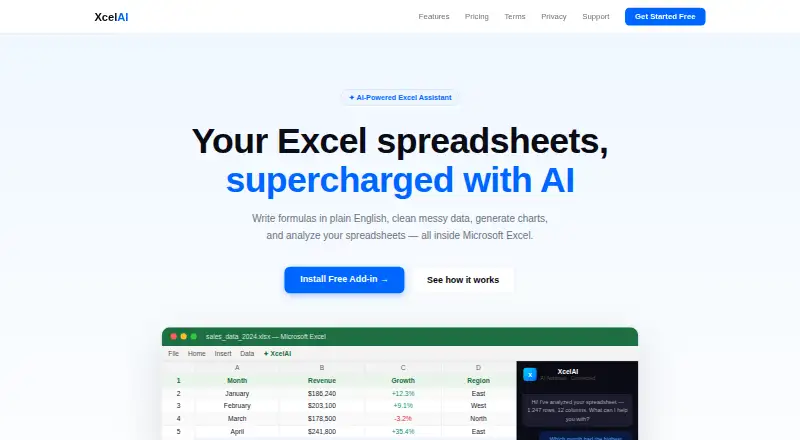
XcelAI is an AI-powered Microsoft Excel add-in that lets users work with spreadsheets through natural-language requests. On the web, users can describe a calculation in plain English and have XcelAI write and insert the Excel formula. It can also transform tables, clean data, answer questions about spreadsheet contents, highlight patterns, find duplicates, correct formatting issues, and provide insights. Pro tools include Smart Charts, which select a chart type and summarize the data, One-Click Reports for executive metrics, salesperson rankings, regional analysis, and data-quality checks, and Forecasting for monthly projections, growth rates, and confidence levels in a new forecast sheet. XcelAI is installed by opening Excel Online and uploading its manifest through Excel's add-ins menu. Spreadsheet content is sent to Anthropic or OpenAI to produce requested output, is not used to train AI models, and is not permanently stored after processing. Usage logs can remain for up to 90 days. The Free plan costs nothing and includes 200 requests per month, a 50-row limit, and five Pro-feature trials. Pro costs $9 a month or $89 a year, supports 500 rows, and includes priority support.
Who it suits
XcelAI suits Microsoft Excel users who want formulas, cleaning, analysis, charts, reports, or forecasts generated from plain-language instructions. The free tier fits lighter work within its request and row limits, while Pro is aimed at sheets up to 500 rows and users needing the listed Pro features.
What it does well
- Natural-language formula writing and insertion
- Table transformation, data cleaning, and spreadsheet analysis
- Smart Charts, reports, and forecasting on Pro
- Free plan with 200 monthly requests
- Works with Microsoft Excel 365
- Seven-day money-back guarantee on new subscriptions
What to know first
- Free plan limits sheets to 50 rows
- Free plan allows 200 requests per month
- Five Pro-feature trials are included on Free
- AI output may contain errors requiring review
Limits
Free allows 200 requests per month, up to 50 rows, and five trials of Pro features. Pro raises the row limit to 500; Smart Charts, One-Click Reports, and Forecasting are Pro features.
Plans
| Plan | Billed and limits | Price |
|---|---|---|
| Free | forever · Formula Assistant · Analyze & Clean · 200 requests/month · 50-row limit · 5 Pro feature trials · Excel 365 | Free |
| Pro | or $89/year Save 18% · 500 row limit · Smart Charts · One-Click Reports · Forecasting · Priority support · Cancel anytime | $9 a month |
| Pro annual | $89/year, auto-renewing · All features · 500-row limit · Priority support · 18% saving | $89 a year |
| Pro monthly | $9/mo, auto-renewing · All features · 500-row limit · Priority support | $9 a month |
As xcelsai.com lists them, read 15 Oct 2026. The maker's own page has the final word.
Getting started
- Open Excel Online
- Open Excel's add-ins menu
- Upload the XcelAI manifest
- Choose the Free or Pro plan
- Describe a spreadsheet task in plain English
Verdict
Pick XcelAI for natural-language spreadsheet work in Microsoft Excel, especially when formulas and data tasks are repetitive. Pro adds charts, reports, forecasting, a higher row limit, and priority support. Consider alternatives if your sheets exceed 500 rows or you need output without manual validation.
Questions
How much does XcelAI cost?
Free costs nothing, billed forever. Pro costs $9 a month or $89 a year.
Is there a free trial?
Yes. XcelAI lists a free trial as well as its free plan.
Which platform does it use?
XcelAI is accessed on the web and lists Microsoft Excel as its primary platform. Installation uses an Excel Online add-in manifest.
What does the Free plan include?
Free includes 200 requests per month, a 50-row limit, five Pro-feature trials, Formula Assistant, Analyze & Clean, and Excel 365 support.
Does XcelAI store spreadsheet content?
Content is sent to Anthropic or OpenAI for requested output, is not used to train AI models, and is not permanently stored after processing.
Are refunds available?
New subscriptions have a 7-day money-back guarantee, and Pro includes priority support.
Facts from XcelAI's own pages
- AI providers and data use
- Spreadsheet content is sent to Anthropic or OpenAI to generate requested output, is not used to train AI models, and is not permanently stored after processing. · xcelsai.com, 8 Oct 2026
- AI vendors
- The privacy policy names Anthropic or OpenAI as processors for generating requested outputs and says submitted spreadsheet data is not used for model training. · xcelsai.com, 15 Oct 2026
- Analyze and Clean
- The tool can answer questions about spreadsheet data, identify patterns and duplicates, correct formatting and provide insights. · xcelsai.com, 15 Oct 2026
- Billing processor
- Paddle processes subscription payments and stores billing details, while XcelAI says it does not retain card information. · xcelsai.com, 15 Oct 2026
- Business classification
- The registry lists business and management consulting among the company’s economic activities. · podnikatel.cz, 15 Oct 2026
- Cancellation
- Subscribers can cancel in the add-in account settings or by email, with access continuing through the paid billing period. · xcelsai.com, 15 Oct 2026
- Company size
- The registry classifies XcelAI Services s.r.o. in the 1–5 employee category. · podnikatel.cz, 15 Oct 2026
- Spreadsheet analysis
- Yes · xcelsai.com, 20 Sept 2026
- Data minimization
- Only spreadsheet content actively selected and submitted is processed, and the provider says spreadsheet content is not permanently stored. · xcelsai.com, 15 Oct 2026
- Data retention
- Usage logs may be retained for up to 90 days, while account information is kept while needed to operate the account. · xcelsai.com, 15 Oct 2026
- Documentation depth
- Public support documentation consists of installation guidance, plan FAQs, troubleshooting and privacy and billing information rather than an API reference. · xcelsai.com, 15 Oct 2026
- Forecasting
- The Pro forecasting feature creates monthly projections, growth rates and confidence levels in a new worksheet. · xcelsai.com, 15 Oct 2026
- Formula Assistant
- Users describe a calculation in plain English and XcelAI inserts the resulting Excel formula into the sheet. · xcelsai.com, 15 Oct 2026
- Formula generation
- Yes · xcelsai.com, 20 Sept 2026
- Founded
- The registry records the company’s formation date as 30 December 2021. · podnikatel.cz, 15 Oct 2026
- Free plan
- Yes · xcelsai.com, 20 Sept 2026
- Google Play distinction
- Google Play’s ExcelAI listing is a separate India-only data-collection app by Mohammad Imran Shaikh, not the XcelAI Excel add-in. · play.google.com, 15 Oct 2026
- Headquarters
- The registry gives the registered office as Na Florenci 2116/15, Prague-New Town, Prague 1, Czech Republic. · podnikatel.cz, 15 Oct 2026
- Installation
- Installation uses an Excel add-in manifest uploaded through Insert, Add-ins, My Add-ins and Upload My Add-in. · xcelsai.com, 15 Oct 2026
- Legal entity
- A Czech business registry lists the company as XcelAI Services s.r.o. with identification number 14103281. · podnikatel.cz, 15 Oct 2026
- Licence
- XcelAI states that its software, text, graphics and logos are its exclusive property; no open-source licence is offered. · xcelsai.com, 15 Oct 2026
- Limit: AI accuracy
- Terms warn that generated formulas, analysis and recommendations can contain errors and must be reviewed before professional or financial use. · xcelsai.com, 15 Oct 2026
- Limit and AI accuracy
- The terms say AI-generated output may contain errors and users are responsible for reviewing and validating it before professional or financial use. · xcelsai.com, 8 Oct 2026
- Limit: API and SDK
- The public product pages describe an Excel add-in but provide no public API endpoints, SDK downloads or developer integration documentation. · xcelsai.com, 15 Oct 2026
Where XcelAI stands on Freedom251
- Spreadsheet apps#14 of 31
- AI Spreadsheet Tools#23 of 31