Freedom251 › Workflow Orchestration Software
Workflow Engine
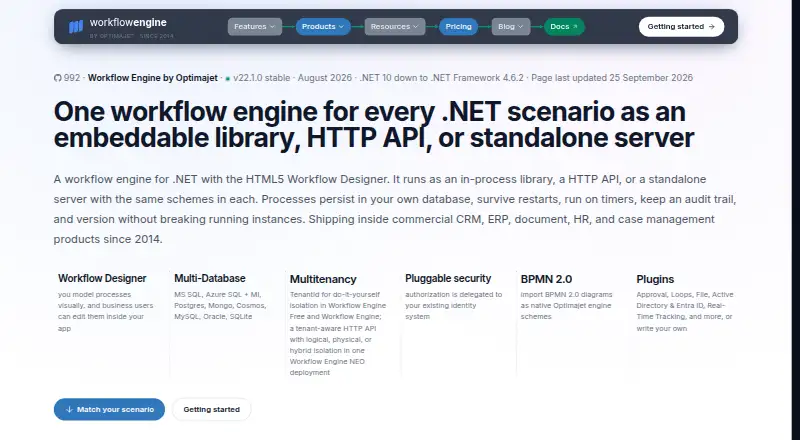
What Workflow Engine is
Workflow Engine is an embeddable .NET workflow library for applications that need to manage business process state in a database. It supports timers, audit history, and process versioning, and includes an HTML5 visual Workflow Designer that can be embedded in an application. Designer packages are available for React, Angular, and vanilla JavaScript, with documented Blazor integration. The core package supports .NET Framework 4.6.2 through .NET 10 and is self-hosted on premises or in a customer's cloud. Listed database options include SQL Server, Azure SQL, PostgreSQL, MongoDB, Azure Cosmos DB, MySQL, Oracle, and SQLite. Plugins include Approval, Loops, File, Active Directory and Entra ID, and Real-Time Tracking, with support for custom plugins. Workflow Engine imports BPMN 2.0 diagrams as native schemes, but does not export them back to BPMN. Its Free edition is perpetual, costs nothing, and is limited to personal, non-commercial use, 10 schemas, and four execution threads. Paid editions include one-time licenses and subscriptions; Workflow Engine NEO adds an HTTP API and multitenancy, while Workflow Server is a standalone Docker service called over HTTP.
Who it suits
Workflow Engine suits developers embedding workflow management in .NET applications that run on premises or in a customer's cloud. The free edition is limited to personal, non-commercial use; commercial use is covered by paid editions.
What it does well
- Visual designer embeds in applications.
- Supports .NET Framework 4.6.2 through .NET 10.
- Lists eight supported database systems.
- Imports BPMN 2.0 diagrams as native schemes.
- Free edition is perpetual with no payment required.
What to know first
- Free edition is limited to personal, non-commercial use.
- Free edition allows 10 schemas and four execution threads.
- BPMN diagrams cannot be exported back to BPMN.
- Authentication remains the host application's responsibility.
Limits
Workflow Engine Free costs nothing, is licensed for personal, non-commercial use, and is limited to 10 schemas and 4 execution threads. Workflow Engine Team is $2,000, paid once and is limited to a single server, 8 execution threads, and per-schema command, activity, and transition limits.
Plans
| Plan | Billed and limits | Price |
|---|---|---|
| Workflow Engine Free | Perpetual · No payment required · 10 schemas · 4 execution threads · Personal use only | Free |
| Workflow Engine NEO Business | Perpetual · One-time · Internal commercial use · Multi-server · Trial key valid 60 days | $10,000, paid once |
| Workflow Engine NEO SaaS | Perpetual · One-time · Public web app or SaaS · Multi-server · Trial key valid 90 days | $15,000, paid once |
| Workflow Engine Team | Perpetual · One-time · Internal commercial use · 8 execution threads · 100 commands and 100 activities per schema · 500 transitions per schema · Single-server | $2,000, paid once |
| Workflow Engine Complete | Perpetual · One-time · Internal commercial use · Multi-server · Forms integration available as a $1,500 add-on | $5,000, paid once |
| Workflow Engine NEO Subscription | Subscription · Per year, updates included · Public web app or SaaS · Multi-server · Trial key valid 60 days | $8,000 a year |
| Workflow Engine NEO Enterprise | On request · Perpetual · One-time · Public web app, SaaS, or OEM · Multi-server · White-label canvas · Trial key valid 90 days | On request |
As workflowengine.io lists them, read 5 Oct 2026. The maker's own page has the final word.
Getting started
- Open https://workflowengine.io/.
- Select the Free edition or a commercial edition; the Free edition requires no payment.
- Choose an on-premises or customer-cloud deployment.
- Embed the HTML5 Workflow Designer using the React, Angular, vanilla JavaScript, or documented Blazor integration.
- Connect a supported database and provide host-application authentication and workflow command authorization.
Workflow Engine is an embeddable .NET library for building and running business processes inside an application. It best suits development teams that want process state in their own database and can take responsibility for the host application's security. Its strongest case is the combination of an embeddable visual designer, broad database support, and versioned, auditable execution; the edition and deployment limits determine whether it fits a particular rollout.
Overview
Workflow Engine keeps business process state in a database and provides timers, audit history, and process versioning. That makes it a natural fit for teams adding durable workflows to an existing .NET product rather than seeking a standalone general-purpose automation platform. It supports .NET Framework 4.6.2 through .NET 10 and can be self-hosted on-premises or in a customer's cloud.
The HTML5 Workflow Designer can be embedded in an application, with packages for React, Angular, and vanilla JavaScript plus documented Blazor integration. BPMN 2.0 diagrams can be imported as native schemes, but cannot be exported back to BPMN; teams that need round-trip BPMN exchange should account for that boundary.
Key features
Runtime, data, and extensions
The maker lists support for SQL Server, Azure SQL, PostgreSQL, MongoDB, Azure Cosmos DB, MySQL, Oracle, and SQLite. This range gives teams room to use an existing database, though they still need to choose and operate the database as part of a self-hosted deployment. Listed plugins include Approval, Loops, File, Active Directory and Entra ID, and Real-Time Tracking, with custom plugins also supported.
Workflow Engine includes a visual workflow builder, event triggers, execution observability, and human approvals. Workflow Engine NEO adds an HTTP API and multitenancy; Workflow Server is a standalone Docker service called over HTTP. Those options give teams different integration shapes, but the core library remains the closer fit when embedding execution directly in a .NET application.
Security and administration
The core engine has no user store. Authentication and authorization of workflow commands remain the host application's responsibility, through an application-provided rule provider. That is workable for teams with established identity and access-control systems, but it is not a self-contained user or security layer.
Pricing
The free edition costs nothing, billed Perpetual · No payment required. It allows 10 schemas and 4 execution threads and is restricted to personal, non-commercial use, so it is for evaluation or personal projects rather than a commercial deployment. Commercial trials range from 30 to 90 days depending on edition; NEO subscription and business trial keys are valid 60 days, while NEO SaaS and Enterprise keys are valid 90 days.
Workflow Engine Team costs $2,000, paid once, billed Perpetual · One-time. It permits internal commercial use on a single server, with 8 execution threads, 100 commands and 100 activities per schema, and 500 transitions per schema. Those per-schema caps and single-server scope make it the more constrained commercial option.
Workflow Engine Complete costs $5,000, paid once, billed Perpetual · One-time, for internal commercial use with multi-server deployment. Forms integration is a $1,500 add-on. It is the step up for teams that need multiple servers, though public web apps and SaaS use call for a NEO edition instead.
Workflow Engine NEO Subscription costs $8,000 a year, billed Subscription · Per year, with updates included. It supports public web apps or SaaS and multi-server deployment. NEO Business costs $10,000, paid once, billed Perpetual · One-time, for internal commercial use with multi-server deployment. NEO SaaS costs $15,000, paid once, billed Perpetual · One-time, for public web apps or SaaS with multi-server deployment. NEO Enterprise has custom pricing, billed On request · Perpetual · One-time, and adds support for public web apps, SaaS, or OEM use, multi-server deployment, and a white-label canvas. The choice between these editions turns on commercial use, deployment model, and whether an annual subscription or one-time purchase suits the buyer.
Platforms
Workflow Engine supports API, Linux, macOS, self-hosted, web, and Windows. Its runtime is a .NET library, and deployment is self-hosted, so platform support does not remove the need to manage the host environment.
Who it's for
It is best for developers embedding business-process execution in a .NET application who want control over persistence, database choice, and deployment. The designer integrations and custom plugins are useful when workflows need to sit within an application's own interface and capabilities. Teams that need a managed user store, authorization out of the box, or BPMN export should look elsewhere or plan to provide those capabilities themselves.
Pros and cons
- Pros: Broad database support makes it easier to align workflow persistence with an existing application stack.
- Pros: Audit history, timers, and process versioning support processes that need durable state and traceable execution.
- Pros: An embeddable designer with React, Angular, vanilla JavaScript, and Blazor integration gives teams options for fitting workflow design into an application.
- Cons: The free edition is limited to personal, non-commercial use, 10 schemas, and 4 execution threads.
- Cons: The core engine delegates authentication and workflow-command authorization to the host application, adding implementation responsibility.
- Cons: BPMN import is one-way; diagrams cannot be exported back to BPMN.
Alternatives
Consider Kestra if an Apache 2.0-licensed, free platform is a better fit. Argo Workflows is a free open-source workflow engine for Kubernetes, making it the alternative to consider when Kubernetes is central to the choice. Bonita offers a free plan capped at 150 process instances per month, with no time limit and no credit card required. Camunda has a free self-managed development option for local development and testing, so consider it when that is the immediate need.
Apache Airflow is free to download and use under the Apache License. Bizagi Modeler has a free plan for one user with unlimited processes and models but local storage only, making it a different option for individual modeling. Windmill has a free and open-source plan with 3 workspaces, 50 users, 10 GiB of workspace object storage, and 100 guest app users. AWS Step Functions has a Free Tier that does not automatically expire after the 12-month AWS Free Tier term and is available to new and existing AWS customers indefinitely.
For more options in the category, browse Workflow Orchestration Software.
Verdict
Choose Workflow Engine if you are building a .NET application that needs embedded, database-backed processes with audit history and versioning, and you can own authentication and authorization in the host. Its deployment flexibility and broad database support are compelling, but the personal-use-only free edition, commercial tier boundaries, and one-way BPMN import make it a poor fit for teams seeking a ready-made security layer, unrestricted evaluation for business use, or BPMN round-tripping.
Verdict
Workflow Engine offers an embeddable designer and runtime with broad listed database support and process history features. Check the edition limits and host application's security responsibilities when assessing it for a deployment.
Questions
Is there a free edition?
Yes. Workflow Engine Free costs nothing, requires no payment, and is licensed for personal, non-commercial use. It allows 10 schemas and 4 execution threads.
What does Workflow Engine Team cost?
Workflow Engine Team costs $2,000, paid once. It is a perpetual one-time license for internal commercial use.
Which platforms and .NET versions are supported?
Listed platforms include API, Linux, macOS, self-hosted, web, and Windows. The core package supports .NET Framework 4.6.2 through .NET 10.
Can it import and export BPMN diagrams?
Workflow Engine imports BPMN 2.0 diagrams as native schemes. It does not export diagrams back to BPMN.
Where is workflow authentication handled?
The core engine has no user store. Authentication is the host application's responsibility, and workflow command authorization is delegated to an application-provided rule provider.
What do Workflow Engine NEO and Workflow Server add?
Workflow Engine NEO adds an HTTP API and multitenancy. Workflow Server is a standalone Docker service called over HTTP.
Facts from Workflow Engine's own pages
- BPMN
- Workflow Engine imports BPMN 2.0 diagrams as native schemes, and the maker says it does not export diagrams back to BPMN. · workflowengine.io, 5 Oct 2026
- Company
- The product site identifies Optimajet Limited and lists its office at 14 Penn Plaza, 225 West 34th Street, New York, NY 10122. · workflowengine.io, 5 Oct 2026
- Database support
- The maker lists SQL Server, Azure SQL, PostgreSQL, MongoDB, Azure Cosmos DB, MySQL, Oracle, and SQLite database support. · workflowengine.io, 5 Oct 2026
- Deployment
- Workflow Engine NEO adds an HTTP API and multitenancy, while Workflow Server is a standalone Docker service called over HTTP. · workflowengine.io, 5 Oct 2026
- Designer
- The product includes an HTML5 visual Workflow Designer that can be embedded in an application, with packages for React, Angular, and vanilla JavaScript and a documented Blazor integration. · workflowengine.io, 5 Oct 2026
- Free edition limits
- Workflow Engine Free has a limit of 10 schemas and 4 execution threads and is licensed for personal, non-commercial use. · workflowengine.io, 5 Oct 2026
- Headquarters
- New York, United States · workflowengine.io, 28 Sept 2026
- Integrations
- The maker lists plugins including Approval, Loops, File, Active Directory and Entra ID, Real-Time Tracking, and support for custom plugins. · workflowengine.io, 5 Oct 2026
- Product
- Workflow Engine is an embeddable .NET workflow library that persists business process state in your database and supports timers, audit history, and process versioning. · workflowengine.io, 5 Oct 2026
- Runtime
- The core package supports .NET Framework 4.6.2 through .NET 10, and the products are self-hosted on-premises or in a customer's cloud. · workflowengine.io, 5 Oct 2026
- Security
- The core engine has no user store and delegates workflow command authorization to an application-provided rule provider; authentication remains the host application's responsibility. · workflowengine.io, 5 Oct 2026
- Support
- The maker directs existing customers to technical support under their support plan and offers public GitHub Discussions for questions. · workflowengine.io, 5 Oct 2026
- Trial
- The pricing page lists product trial periods from 30 to 90 days, depending on the commercial edition. · workflowengine.io, 5 Oct 2026
Where Workflow Engine stands on Freedom251
- Workflow Orchestration Software#25 of 38