Freedom251 › Task Automation Software

Windmill
What Windmill is
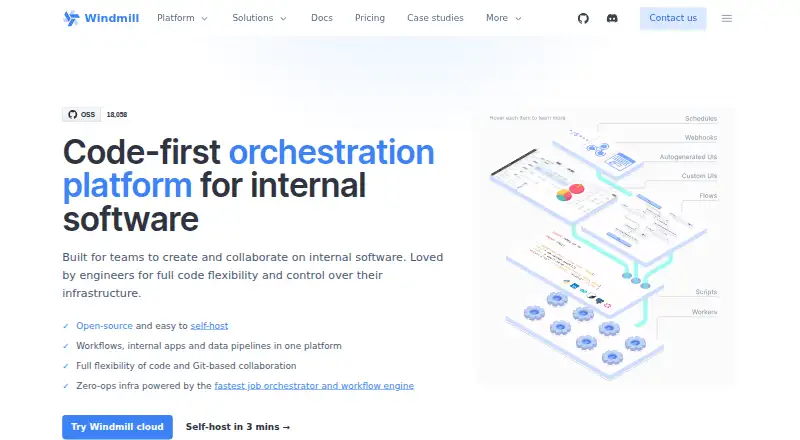
Windmill is an open-source workflow engine and developer platform for creating endpoints, workflows, and user interfaces for internal software. It combines a script editor with low-code flow and app builders, plus React and Svelte app builders. Scripts can be written in TypeScript, Python, Go, PHP, Bash, C#, SQL, Rust, Ruby, R, and other languages. Webhooks, schedules, HTTP routes, queues, and an open API can trigger scripts and flows. Its Hub lists more than 200 resource types, including integrations for GitHub, Slack, AWS, BigQuery, and PostgreSQL; users can also define their own resource types with fields and constraints. Local development is supported through a CLI, and Git sync can support version control and deployment workflows. Windmill runs on the web, Linux, Windows, API, or self-hosted deployments. The free plan includes 3 workspaces, 50 users, 10 GiB of object storage, and 100 guest app users per 30 days. Enterprise is $120 a month, and a month-long Enterprise trial is available.
Who it suits
Windmill suits teams building internal tools across engineering, data, sales, support, and marketing. It may also suit teams that want script-based workflows alongside low-code builders and self-hosting.
What it does well
- Supports scripts in many listed programming languages.
- Offers low-code flows and app builders.
- More than 200 resource types on its Hub.
- Free plan includes 3 workspaces and 50 users.
- Supports local development with CLI and Git sync.
What to know first
- Enterprise starts at $120 a month.
- PID namespace isolation is disabled by default.
- NSJAIL sandboxing is optional.
Limits
The Free and Open-source plan includes 3 workspaces, 50 users, 10 GiB of workspace object storage and 100 guest app users per 30 days. Enterprise is listed at $120 a month, and its trial lasts one month.
Plans
| Plan | Billed and limits | Price |
|---|---|---|
| Free and Open-source | from $0/mo · Unlimited executions · 3 workspaces · 50 users · 100 app guests per 30 days · 10 SSO users | Free |
| Enterprise | from $120/mo · Audit logs · SAML/SCIM · unlimited SSO · commercial licence · 24/7 priority support with 3-hour response | $120 a month |
| Enterprise example configuration | $170/mo · 1 developer · $20/mo per additional developer · $10/mo per operator · first 100 guests free · 3 compute units | $170 a month |
As windmill.dev lists them, read 15 Oct 2026. The maker's own page has the final word.
Getting started
- Open https://www.windmill.dev/
- Choose the Free and Open-source plan or start the Enterprise trial
- Use Windmill on Linux, web, Windows or through its API
- For self-hosted deployment, use the self-hosted option
Windmill brings scripts, workflow automation and interface building together for teams creating internal software. It is best suited to groups that want developers and operational teams to work from the same platform. The trade-off is that self-hosting and security configuration need deliberate attention.
Overview
Teams in engineering, data, sales, support and marketing can use Windmill to build internal tools. Developers can write scripts in TypeScript, Python, Go, PHP, Bash, C#, SQL, Rust, Ruby and R, among other languages; others can assemble workflows and applications with low-code builders. React and Svelte app builders add an option for teams building interfaces with those frameworks.
This mix suits organizations whose internal software needs range from coded services to workflow-driven apps. It also means teams must decide how much to build in code and how much to use the visual builders. Windmill supports self-hosting, local development through its CLI, and Git sync for version control and deployment workflows. Those capabilities give technical teams deployment and development options, but self-hosting makes security setup important: PID namespace isolation is disabled by default, and NSJAIL sandboxing is optional.
Key features
Scripts, workflows and triggers
Scripts and flows can run on webhooks, schedules, HTTP routes, queues or through the open API. This range supports both scheduled jobs and work that responds to events or requests. Reusable workflows can help teams structure recurring automation, though the value depends on having people able to maintain the underlying scripts and flows.
Builders and integrations
A script editor sits alongside a low-code flow builder and low-code, React and Svelte app builders. That breadth can serve developers and colleagues who need to assemble internal interfaces without using the same development approach. Windmill's Hub includes more than 200 resource types, with integrations such as GitHub, Slack, AWS, BigQuery and PostgreSQL. Teams can also define custom resource types through schemas with fields and constraints, which is useful when a required connection is not covered by an existing resource.
Access and support
Enterprise features include granular permissions, RBAC, secret management, OAuth, SSO and audit logs. These controls address access and oversight needs for larger or more sensitive deployments, while the documented isolation defaults still warrant review before self-hosting. The free self-hosted plan has community support on Discord; Enterprise adds 24/7 priority support with a three-hour response time.
Pricing
Windmill is freemium, with a 30-day Enterprise trial and paid pricing from $120/mo. The free plan, Free and Open-source, costs nothing, billed monthly. It allows 3 workspaces, 50 users, 10 GiB of workspace object storage and 100 guest app users per 30 days. Those caps make it a substantial starting point for teams evaluating or running internal tools, but organizations with more workspaces, storage or guest use will need to account for the limits.
Enterprise costs $120 a month, billed from $120/mo. It adds Enterprise features, uncapped SSO that requires seats, 24/7 priority support with a three-hour response time, and a commercial licence. The plan is aimed at organizations that need those capabilities and support; the free plan gives up the commercial licence and priority support. The 30-day trial is for Enterprise.
Platforms
Windmill supports API, Linux, self-hosted, web and Windows. Self-hosting is a meaningful option for teams with deployment requirements, while web access and API support accommodate other ways of working with the platform.
Who it's for
Windmill is a strong fit for teams building internal software across technical and operational functions, especially when they want code, low-code workflows and app interfaces in the same platform. Its language range, custom resource types and local development options favor teams with engineering capacity. It is less compelling for organizations that want a managed, tightly isolated deployment without taking responsibility for security settings.
Pros and cons
- Broad ways to build: scripting, low-code flows, and low-code, React or Svelte apps let teams choose an approach for different internal tools.
- Flexible connections: more than 200 Hub resource types, custom schemas and several trigger types cover varied integration and automation needs.
- Usable free allowance: 50 users and 3 workspaces provide room to start, subject to storage and guest-user caps.
- Security setup needs care: PID namespace isolation is off by default and NSJAIL sandboxing is optional, so self-hosting requires attention to isolation requirements.
- Enterprise costs more: the $120.00 monthly entry price is necessary for the commercial licence and priority support.
Alternatives
Choose Knit instead if API integration is the priority and a 100K API calls/month plan at $499 a month fits the budget; its Start Up plan also includes unlimited data usage, 3 test accounts and 3-day log retention. Apache Camel is a free option under the Apache License 2.0 for teams seeking a no-cost, self-hosted tool. Apache NiFi is another free, Apache-licensed option, with API, web and self-hosted platforms among its stated support.
Celigo may suit teams whose needs fit its free allowance of 2 endpoints, 1 flow and 1 production environment. Nango is worth considering for teams focused on connections, with 10 connections, 10 hours of compute per month and 10GB of data transfer on its free plan. Workato Agent Studio offers a free plan with 50,000 one-time credits and AI and agentic capabilities. Google Cloud Application Integration may fit teams looking for a free tier with up to 400 integration executions and up to 20 GiB of data processed per month. Superfeedr is another freemium alternative.
Readers comparing broader categories can explore API Integration Platforms, Internal Tools Software, IT Orchestration Software, Task Automation Software, Workload Automation Software and Workflow Orchestration Software.
Verdict
Choose Windmill if your team is building internal software and wants scripts, workflow automation and app creation under one roof, with the option to self-host. The free plan offers room to start, and Enterprise adds a commercial licence and priority support. Look elsewhere if your deployment needs stronger isolation by default or you do not want to take on security configuration.
Verdict
Windmill combines developer scripting with low-code workflow and app building, and supports self-hosting. Its free plan has stated workspace, user, storage, and guest-user limits; Enterprise adds listed security features and priority support.
Questions
Is Windmill open source?
Yes. Windmill describes itself as an open-source workflow engine, and its Free and Open-source plan costs nothing.
What does the free plan include?
It includes 3 workspaces, 50 users, 10 GiB of workspace object storage and 100 guest app users per 30 days.
How much does Enterprise cost?
Enterprise is listed at $120 a month.
Is there a free trial?
Yes. Windmill offers an Enterprise trial for a month.
Can Windmill be self-hosted?
Yes. Windmill supports self-hosted deployment.
Which platforms does Windmill support?
Its listed platforms are API, Linux, self-hosted, web and Windows.
Facts from Windmill's own pages
- API and SDK
- Windmill exposes an API and a TypeScript SDK with services for jobs, scripts, flows, resources, variables, schedules, workers, users and workspaces. · app.windmill.dev, 15 Oct 2026
- Builders
- The platform includes a script editor, a low-code flow builder, and low-code and React or Svelte app builders. · windmill.dev, 2 Oct 2026
- Changelog update
- The June 2026 changelog added automatic Git-to-Windmill deployment, pull-request creation and deployment status checks. · windmill.dev, 15 Oct 2026
- CLI
- The wmill CLI supports listing, retrieving and creating scripts, flows, apps, resources, variables, schedules, folders and triggers as a shell API client. · windmill.dev, 15 Oct 2026
- Cloud hosting region
- Windmill Cloud is hosted in the United States, with dedicated European Union instances available to Cloud Enterprise customers. · windmill.dev, 15 Oct 2026
- Community feedback
- A Reddit discussion praised the Jenkins-and-Retool combination and self-hosting but called the UX messy and said Windmill is better suited to internal tools than CI. · reddit.com, 15 Oct 2026
- Company
- Windmill says it was founded in 2022 and is based between San Francisco and Paris. · windmill.dev, 2 Oct 2026
- Company founder and investors
- Crunchbase lists Ruben Fiszel as founder and identifies Y Combinator among three investors in one pre-seed round. · crunchbase.com, 15 Oct 2026
- Company legal name
- Crunchbase lists the legal entity as Windmill Labs, Inc. · crunchbase.com, 15 Oct 2026
- Company profile
- LinkedIn lists Windmill as privately held, founded in 2022, headquartered in Dover and employing 11–50 people. · linkedin.com, 15 Oct 2026
- Custom integrations
- Users can define their own resource types with JSON schemas and publish verified types to Windmill Hub. · windmill.dev, 15 Oct 2026
- Deployment environments
- Official deployment guides cover AWS, GCP, Azure, Hetzner, Fly.io, Render, DigitalOcean and other Docker or Kubernetes environments. · windmill.dev, 15 Oct 2026
- Development and deployment
- Windmill supports local development with its CLI and Git sync for version control and deployment workflows. · windmill.dev, 2 Oct 2026
- Documentation depth
- Documentation covers scripts, flows, apps, local development, CLI, SDKs, integrations, deployment, authentication, security and operations. · windmill.dev, 15 Oct 2026
- Enterprise compliance
- The Enterprise plan lists SAML/SCIM, external secret backends, audit logs, OpenTelemetry, Prometheus metrics and a SOC 2 Type II report. · windmill.dev, 15 Oct 2026
- Flow editor
- Flows compose scripts into workflows with branches, loops, approvals and retries. · windmill.dev, 15 Oct 2026
- Founded
- 2022 · windmill.dev, 23 Sept 2026
- Full-code apps
- Full-code apps use React or Svelte frontends connected to Windmill backend runnables. · windmill.dev, 15 Oct 2026
- Headquarters
- San Francisco and Paris · windmill.dev, 23 Sept 2026
- Integrations
- Windmill Hub lists more than 200 resource types, including Google services, GitHub, GitLab, Slack, Microsoft Teams, AWS, S3, BigQuery, ClickHouse, Datadog and Discord. · windmill.dev, 15 Oct 2026
- Isolation limit
- The security documentation says PID namespace isolation is disabled by default and NSJAIL sandboxing is optional. · windmill.dev, 2 Oct 2026
- Languages
- Windmill supports scripts in TypeScript, Python, Go, PHP, Bash, C#, SQL, Rust, Ruby and R, among other languages. · windmill.dev, 2 Oct 2026
- Licence
- Windmill states that its open-source edition is licensed under AGPLv3; enterprise features use a commercial licence. · windmill.dev, 15 Oct 2026
- Limit: app builder
- DevOpsBoys judged Windmill's app builder less capable than Retool for complex layouts, joins, filtering and real-time updates. · devopsboys.com, 15 Oct 2026
Where Windmill stands on Freedom251
- Task Automation Software#2 of 35
- IT Orchestration Software#2 of 28
- Low-Code Development Platforms#5 of 56
- API Integration Platforms#4 of 37
- Ai Automation#4 of 28
- Internal Tools Software#4 of 26
- Workflow Orchestration Software#6 of 38
- Workload Automation Software#4 of 24