Freedom251 › Task Automation Software
FlexGet
What FlexGet is
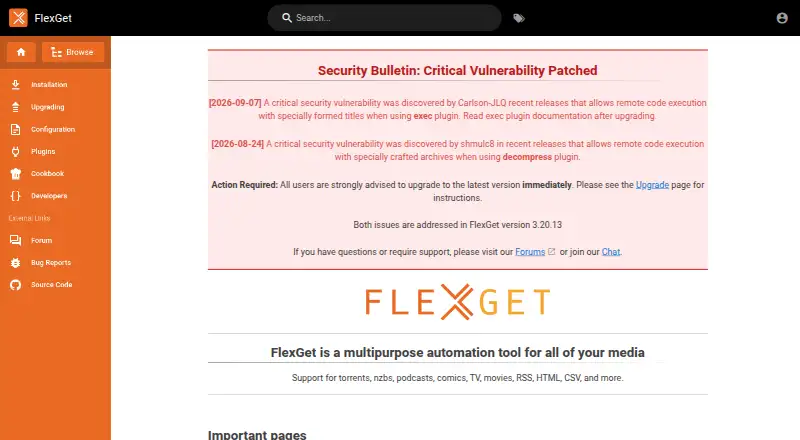
FlexGet is free, MIT-licensed automation software for media and other content, including torrents, NZBs, podcasts, comics, television, movies, RSS, HTML, and CSV. Tasks and plugin settings are defined in YAML configuration files. Plugins provide much of its functionality, including creating, filtering, modifying, or downloading entries and changing how the tool operates. FlexGet can run as a daemon and schedule tasks from its configuration. Its homepage lists integrations with clients such as Deluge, Transmission, uTorrent, rTorrent, and SABnzbd, and connections to Trakt, TheTVDB, or IMDb for tracking series or movies. It provides a JSON API, which can run independently of the web UI. Documentation says users must set a password to start the web server. The homepage describes the web interface as under development; Web UI v2 is experimental and not recommended for new users. Installation guidance covers Windows, Linux/BSD, Mac OS X, and Docker. The homepage says critical remote-code-execution vulnerabilities involving the exec and decompress plugins were addressed in version 3.20.13 and advises upgrading. YAML may confuse new users, though a validator helps guide configuration corrections.
Who it suits
It suits users who want configurable automation for media and content, particularly alongside applications with watch-directory support or external-utility interfaces. Users should be comfortable working with YAML and installing the software themselves.
What it does well
- Supports a broad range of media and content sources.
- Can schedule tasks in daemon mode.
- Provides a JSON API independent of the web UI.
- Installation guidance includes Windows, Linux/BSD, macOS, and Docker.
What to know first
- YAML configuration may confuse new users.
- The web interface is described as under development.
- Web UI v2 is experimental and not recommended for new users.
- The homepage advises upgrading past version 3.20.13.
Limits
The Web UI v2 is experimental, and its documentation does not recommend it for new users. The homepage describes the web interface as under development.
Plans
| Plan | Billed and limits | Price |
|---|---|---|
| FlexGet | Multipurpose media automation tool; installable via pip | Free |
As flexget.com lists them, read 11 Oct 2026. The maker's own page has the final word.
Getting started
- Visit https://www.flexget.com/.
- Install FlexGet through pip, or follow the installation guide for Windows, Linux/BSD, Mac OS X, or Docker.
- Create a YAML configuration defining tasks and plugin settings.
- Configure daemon scheduling and connect supported clients or media services as needed.
- Set a password before starting the web server for the API or Web-UI.
FlexGet is a configurable automation tool for media and other content, best suited to users comfortable defining workflows in YAML. Its strength is combining scheduled tasks, plugins, and download-client integrations; those looking for a polished, visual interface should look elsewhere.
Overview
FlexGet handles content ranging from torrents, NZBs, podcasts, comics, television and movies to RSS, HTML and CSV. Tasks and plugin settings are defined in YAML, so it can be shaped around varied workflows, but configuration is a real hurdle for newcomers. A validator can help identify mistakes, though it does not replace a guided setup experience.
In daemon mode, FlexGet can schedule tasks from its configuration. For series and movies, it supports automatic scheduling, searching and downloading, with sorting available in some cases. It is particularly suited to working alongside applications that use watch directories or accept external utilities, rather than serving as a standalone media interface.
Key features
Plugins and integrations
Plugins can create, filter, modify or download entries, and can alter how FlexGet operates. This makes the tool adaptable, while also placing responsibility on users to assemble and maintain their own workflows. Direct integrations include Deluge, Transmission, uTorrent, rTorrent and SABnzbd; series and movie tracking can connect with Trakt, TheTVDB or IMDb.
API and web interface
The JSON API can run independently of the web UI, and the web server can enable both. Starting that server requires setting a password. The Web UI v2 remains experimental and is not recommended for new users, so FlexGet is a stronger fit for people happy to work with configuration and the API than for anyone choosing it primarily for a finished browser-based control panel. SSL is optional but highly recommended if the UI is exposed to the internet.
Security and community
Two critical remote-code-execution vulnerabilities involving the exec and decompress plugins were addressed in version 3.20.13; users should upgrade to that version or later. The project is community-led, with forums for help, GitHub issues for bug reports and community chat for discussion, and it invites code and documentation contributions.
Pricing
FlexGet is free and open source under the MIT license. The FlexGet plan costs nothing and is installable via pip; there are no paid tiers to trade off against the core offering.
Platforms
FlexGet supports Linux, macOS, Windows and self-hosted use, with Docker installation also documented. Its API and web interface add access through those components, while cross-platform desktop support broadens where users can run it.
Who it's for
FlexGet suits technically confident users who want to automate media or other content tasks and already use compatible download clients or watch-directory workflows. It is less suitable for beginners who expect a visual workflow builder, or for users who need a mature web interface as their main way to manage automation.
Pros and cons
- Broad content coverage: tasks can work across media, feeds and structured sources such as HTML and CSV, making one tool useful for varied collection workflows.
- Flexible plugin system: plugins can create, filter, modify and download entries, but users must be comfortable composing behavior through configuration.
- Useful client and tracking integrations: direct links to popular download clients and movie or series services fit users with an existing media setup.
- Free and open source: there is no subscription cost, though the YAML-first approach demands more technical involvement than a visual automation product.
- Experimental web UI: the API is available independently, but the Web UI v2 is not recommended for new users and should not be the basis for choosing FlexGet.
Alternatives
Task Automation Software is the broader category to explore if FlexGet's media-oriented, YAML-configured approach does not match the workflow you need.
- Make is worth considering for web-based automation across Android, iOS, API and web, especially if its Free plan's 1,000 monthly credits, two active scenarios and 15-minute minimum interval suit your workload.
- Node-RED is another free, open-source option if you want automation across its listed platforms without stated paid plans or usage limits.
- Ui.Vision RPA is an alternative to compare if its listed API, browser extension and desktop platforms better fit your automation setup.
- IFTTT may suit users who want mobile and web Applets rather than FlexGet's YAML task configuration; its free plan includes two Applets and unlimited runs.
- Macro Recorder is an alternative for users focused on repeating desktop actions on macOS or Windows.
- Windmill is worth a look for self-hosted or web-based automation, with a free open-source plan that includes three workspaces and 50 users.
- Activepieces offers a free plan with 1,000 monthly credits and unlimited flows for users who prefer that flow-based approach.
- Browserflow is an alternative to consider for browser-oriented automation across its extension, API and web platforms.
Verdict
Choose FlexGet if you want free, open-source automation for media and other content and are prepared to manage tasks through YAML, plugins and compatible clients. Its flexibility and scheduling are the clearest reasons to use it; look elsewhere if you need an accessible visual builder or a stable, recommended web UI.
Verdict
FlexGet combines configurable plugins, scheduled automation, client integrations, and a JSON API for varied content tasks. YAML configuration and the experimental state of its web interface are key considerations.
Questions
Is FlexGet free?
Yes. FlexGet is listed as free and open source, with an MIT license.
Which platforms can I install FlexGet on?
Installation guidance covers Windows, Linux/BSD, Mac OS X, and Docker. FlexGet also lists API, Linux, macOS, self-hosted, web, and Windows platforms.
Does FlexGet have a web interface?
The homepage describes the web interface as under development. Web UI v2 is experimental and the documentation says it is not recommended for new users.
What does FlexGet integrate with?
Its homepage lists Deluge, Transmission, uTorrent, rTorrent, and SABnzbd, among other clients. It also connects with Trakt, TheTVDB, or IMDb for managing and tracking series or movies.
How does FlexGet schedule tasks?
It can run in daemon mode and schedule tasks through its YAML configuration.
How do I get help with FlexGet?
The homepage directs users to forums for help, GitHub issues for bugs, and community chat for discussion.
Facts from FlexGet's own pages
- API
- FlexGet offers a JSON API that can run independently of the web UI. · flexget.com, 11 Oct 2026
- API and authentication
- FlexGet offers a JSON API; its documentation instructs users to set a password to start the web server. · flexget.com, 4 Oct 2026
- Audience
- The repository describes FlexGet as useful alongside applications with watch directory support or an interface for external utilities. · github.com, 11 Oct 2026
- Client integrations
- The homepage lists direct integrations with Deluge, Transmission, uTorrent, rTorrent, SABnzbd, and other clients. · flexget.com, 4 Oct 2026
- Community contribution
- The homepage describes FlexGet as a community effort and invites code and documentation contributions. · flexget.com, 4 Oct 2026
- Configuration
- FlexGet uses YAML configuration files, and its configuration validator tries to guide users when they make mistakes. · flexget.com, 11 Oct 2026
- Configuration caveat
- The homepage notes that YAML may be confusing for new users, and says a validator helps guide users when they make mistakes. · flexget.com, 4 Oct 2026
- Daemon
- FlexGet can run in daemon mode and handle scheduling in its configuration. · flexget.com, 11 Oct 2026
- Daemon scheduling
- FlexGet can run in daemon mode and schedule tasks through its configuration. · flexget.com, 4 Oct 2026
- Installation platforms
- The installation guide lists Windows, Linux/BSD, and Mac OSX installation methods, as well as Docker and community hardware-specific guides. · flexget.com, 11 Oct 2026
- Integrations
- FlexGet directly integrates with Deluge, Transmission, uTorrent, rTorrent, SABnzbd, and other clients. · flexget.com, 11 Oct 2026
- Media management
- FlexGet supports series and movies with automatic scheduling, searching, downloading, and, in some cases, sorting. · flexget.com, 11 Oct 2026
- Plugins
- Plugins provide most FlexGet functionality, and the listed plugins are included in the package except for third-party plugins. · flexget.com, 11 Oct 2026
- Project license
- The official FlexGet repository identifies the project as MIT licensed. · github.com, 11 Oct 2026
- Purpose
- FlexGet is a multipurpose automation tool for media such as torrents, nzbs, podcasts, comics, TV, movies, RSS, HTML, and CSV. · flexget.com, 11 Oct 2026
- Security
- The homepage reports that two critical remote-code-execution vulnerabilities involving the exec and decompress plugins were addressed in version 3.20.13 and advises users to upgrade. · flexget.com, 4 Oct 2026
- Security bulletin
- The home page reports two critical remote code execution vulnerabilities involving the exec and decompress plugins and says both are addressed in version 3.20.13. · flexget.com, 11 Oct 2026
- Site integrations
- The homepage says users can manage and track series or movies through Trakt, TheTVDB, or IMDb. · flexget.com, 4 Oct 2026
- Support
- The project directs users to its forums and chat for help and to GitHub issues for bugs. · flexget.com, 11 Oct 2026
- Web interface
- The homepage describes the web interface as under development, while the API documentation says the web server can enable the API and Web-UI. · flexget.com, 4 Oct 2026
- Web security
- The Web UI documentation says SSL is optional but highly recommended if the UI is exposed to the internet. · flexget.com, 11 Oct 2026
- Web UI status
- The Web UI v2 is experimental and the documentation says it is not recommended for new users. · flexget.com, 11 Oct 2026
Where FlexGet stands on Freedom251
- Task Automation Software#4 of 35