
Weave Vault
What Weave Vault is
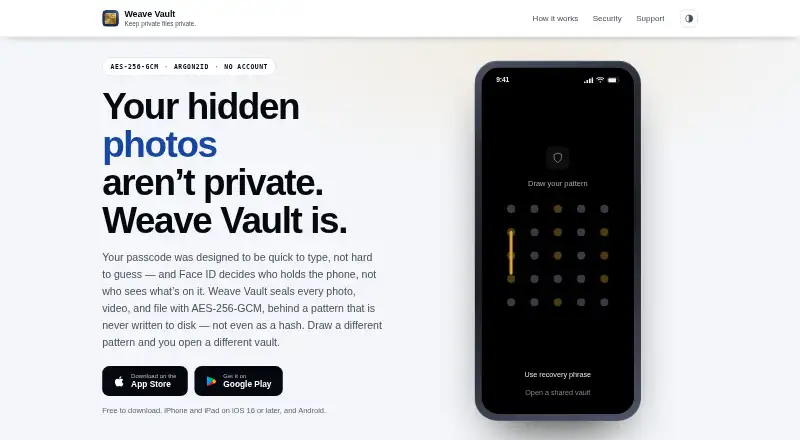
Weave Vault is a mobile app for keeping private photos, videos, PDFs, and documents in an encrypted vault on Android and iOS. Users unlock a vault with a pattern drawn on a 5×5 grid; an unrecognized pattern opens a fresh, empty vault. The app supports files up to 16 GB and includes sealed folders, duress mode, and a camera that saves directly into the vault. Its security page says AES-256-GCM protects files and related vault information, including thumbnails and metadata. A 12-word recovery phrase is shown once when a vault is created. If both the phrase and pattern are lost, the vault cannot be recovered. Optional encrypted backup requires Pro and stores ciphertext in the user’s iCloud or Google Drive; restoring does not require Pro. Sharing sends a point-in-time copy that expires within at most 30 days and can be revoked earlier. The free plan allows up to three vaults and 50 files per vault. Pro removes free-tier limits and unlocks additional features, but prices are shown in the app at purchase time. The maker says the app has no accounts, analytics, crash reporting, advertising SDKs, or device fingerprinting.
Who it suits
Weave Vault suits mobile users who want a private place for photos, videos, and documents, with optional encrypted backup and time-limited sharing. Its terms describe protection against casual, opportunistic access, not targeted forensic analysis.
What it does well
- Supports photos, videos, PDFs, and documents
- Maximum file size is 16 GB
- Includes duress mode and sealed folders
- Optional encrypted backup uses the user's cloud storage
- Sharing can be revoked early
What to know first
- Free plan is limited to three vaults
- Free plan allows 50 files per vault
- Losing both unlock methods makes a vault unrecoverable
- Pro prices are shown only at purchase time
Limits
The free plan allows up to three vaults and 50 files per vault. Optional encrypted backup requires Pro, though restoring a backup does not. The Pro annual plan includes a 7-day free trial for new subscribers.
Plans
| Plan | Billed and limits | Price |
|---|---|---|
| Free | up to 3 vaults · 50 files per vault | Free |
| Weave Vault Pro — Monthly | auto-renewable · unlimited vaults and files · folders · decoy vault · secure sharing | $1.99 a month |
| Weave Vault Pro — Lifetime | one-time non-consumable purchase · unlimited vaults and files · folders · decoy vault · secure sharing | $29.99, paid once |
| Weave Vault Pro — Yearly | auto-renewable; 7-day free trial for new subscribers · unlimited vaults and files · folders · decoy vault · secure sharing | $9.99 a year |
| Pro — Lifetime | One-time, non-consumable purchase; price shown in the app at purchase time · Grants Pro access on the store account used at purchase | On request |
| Pro — Annual | Auto-renewable · Includes a 7-day free trial for new subscribers · Price shown in the app at purchase time · Removes free-tier limits · Unlocks additional features | On request |
| Pro — Monthly | Auto-renewable; price shown in the app at purchase time · Removes free-tier limits · Unlocks additional features | On request |
As weavevault.app lists them, read 15 Oct 2026. The maker's own page has the final word.
Getting started
- Open the Weave Vault website or find the app in the Apple or Google store.
- Install it on an Android or iOS device.
- Create a vault and record its 12-word recovery phrase when it is shown.
- Use the free plan, or choose a Pro option in the app; the annual plan includes a 7-day trial for new subscribers.
- Add supported photos, videos, PDFs, or documents, or capture directly into the vault.
- Enable optional encrypted backup with iCloud on iPhone or iPad, or Google Drive on Android, if you have Pro.
Overview
Weave Vault is an encrypted file vault for Android and iOS. It suits people who want private mobile storage with a pattern-based unlock and optional backup to their own cloud account. Its privacy features come with a strict recovery rule: lose both the pattern and recovery phrase, and the vault cannot be restored.
Key features
A pattern drawn on a 5×5 grid derives the vault key. An unrecognized pattern opens a fresh, empty vault instead of showing an error. That may offer some discretion against casual inspection, but it also makes it important to keep the correct pattern and recovery phrase safe. The 12-word phrase is shown only once, when the vault is created.
Weave Vault accepts photos, videos, PDFs, and documents, with a maximum file size of 16 GB. AES-256-GCM encryption covers files, thumbnails, metadata, vault manifests, and key-wrapping headers. Sealed folders, duress mode, and a camera that saves directly into the vault add useful privacy controls for day-to-day phone use. They do not make it a tool for every threat: the maker says the app is intended to deter casual, opportunistic access, not targeted forensic analysis.
Encrypted backup is optional, requires Pro to set up, and saves ciphertext to the user’s iCloud on iPhone and iPad or Google Drive on Android. Restoring a backup does not require Pro, which reduces the risk of losing access to an existing backup if a subscription ends. Sharing sends a point-in-time copy, expires within at most 30 days, and can be revoked sooner.
The maker says Weave Vault has no accounts, analytics, crash reporting, advertising SDKs, or device fingerprinting. With optional features disabled, the app makes no network requests. Sharing is an exception: encrypted content goes to Apple, while limited share-control records go to a service operated by the maker. Email support cannot look up account or device data because the maker holds none.
Pricing
The Free plan costs nothing and allows up to three vaults and 50 files per vault. That is a practical starting point for a small personal collection, but it will constrain larger libraries and does not include encrypted backup setup.
Pro removes free-tier limits and unlocks additional features. Pro — Annual has custom pricing, auto-renews, and includes a 7-day free trial for new subscribers; the price is shown in the app at purchase. Pro — Monthly also has custom pricing, auto-renews, and shows its price at purchase. Pro — Lifetime has custom pricing and is a one-time, non-consumable purchase that grants Pro access on the store account used to buy it. Annual and monthly suit users who prefer recurring access; lifetime avoids recurring billing but ties access to the purchasing store account. Review renewal terms before choosing a subscription.
Platforms
Weave Vault is available on Android and iOS. Optional backup uses Google Drive on Android and iCloud on iPhone and iPad; app distribution and purchases use the Apple and Google stores.
Who it's for
Choose Weave Vault if you want private files stored in a mobile vault, value a camera that saves directly into it, and can manage the recovery phrase carefully. It is less suitable if you need protection against targeted forensic analysis, want a recovery route that does not depend on your own pattern and phrase, or need desktop platforms.
Pros and cons
Pros
- AES-256-GCM covers files and supporting vault data, including thumbnails and metadata.
- Optional encrypted backup uses the user’s own iCloud or Google Drive, and restoring does not require Pro.
- The free tier supports up to three vaults, with 50 files per vault.
- Duress mode, sealed folders, and direct-to-vault camera capture add privacy controls beyond basic storage.
Cons
- If both the pattern and one-time recovery phrase are lost, the vault is unrecoverable.
- Setting up encrypted backup requires Pro, even though restoring does not.
- The maker does not position the app as protection against targeted forensic analysis.
- Pro prices are shown only at purchase, and annual and monthly plans auto-renew.
Alternatives
Hide it Pro is worth considering if you want a free vault on Android, iOS, macOS, or Windows; it has no free trial and no paid plans listed on its official site.
Keepsafe Photo Vault may suit readers who want a cloud-based free tier with a 200-item cap and can accept ads, or who prefer a published premium monthly price of $9.99 a month with automatic renewal.
NullVault is another free Android and iOS option, built and maintained by a small independent development group.
Private Photo Vault is an alternative for Android and iOS users looking for a basic on-device photo and video vault; switching to Basic deletes Cloud Backup.
Blackbox offers a free tier with limited vaults, PIN-only unlock, local storage, and ads. Its Premium plan costs $12.99 a month and adds unlimited vaults and advanced unlock methods.
CalcSafe is a free Android and iOS option whose maker says all core features are free forever and require no account.
Calculator Lock - Photo Vault is Android-only; its free plan allows up to two personal vaults, and ads may appear.
LockMyPix may fit readers who want a free Android or iOS option with a free trial and a one-time Premium purchase of 29.99 USD; its free tier includes ads and reserves some features for Premium.
Browse Photo Vault Apps for more options.
Verdict
Weave Vault is a strong fit for people who want encrypted mobile storage, direct-to-vault capture, and optional backup to their own cloud account. Its clearest reasons to choose it are the breadth of encrypted vault data and the ability to restore backups without an active Pro plan. Look elsewhere if you need forensic-grade protection, a less fragile recovery path, or desktop support.
Verdict
Weave Vault offers encrypted mobile storage with a range of privacy features and clear recovery constraints. Keep the recovery phrase safe, and note that the maker does not position it against targeted forensic analysis.
Questions
Is Weave Vault free?
Yes. The Free plan costs nothing and allows up to three vaults with 50 files per vault.
What do the Pro plans cost?
The annual, monthly, and lifetime prices are shown in the app at purchase time. The annual option includes a 7-day free trial for new subscribers.
Which devices does it support?
Weave Vault is available on Android and iOS.
Can I back up a vault?
Optional encrypted backup requires Pro and stores ciphertext in your iCloud or Google Drive. Restoring a backup does not require Pro.
What happens if I lose my unlock pattern?
A 12-word recovery phrase is shown once when a vault is created. If both the pattern and phrase are lost, the vault cannot be recovered.
Who makes Weave Vault?
The maker is headquartered in Hyderabad, Telangana, India. Support is provided by email.
Facts from Weave Vault's own pages
- API and SDKs
- The public product pages describe no public API, SDK or developer integration surface. · weavevault.app, 15 Oct 2026
- Apple App Store languages
- The listing says the app supports English plus 31 additional languages. · apps.apple.com, 15 Oct 2026
- Backup
- Encrypted backup is opt-in, requires Pro, and stores ciphertext in the user’s iCloud or Google Drive; restoring does not require Pro. · weavevault.app, 4 Oct 2026
- Company directors
- ZaubaCorp names Prasanthy Gurugubelli and Paidi Rao Vasudeva as directors. · zaubacorp.com, 15 Oct 2026
- Company headquarters
- The maker identifies Hyderabad, Telangana, India as its base and registered address location. · weavevault.app, 15 Oct 2026
- Company incorporation
- ZaubaCorp records Silmaril Software Private Limited as incorporated on January 21, 2011. · zaubacorp.com, 15 Oct 2026
- Company status
- ZaubaCorp lists Silmaril Software Private Limited as an active, unlisted Indian private company. · zaubacorp.com, 15 Oct 2026
- Data collection
- The maker says it collects no photos, files, metadata, patterns or recovery phrases and runs no analytics, crash reporting or advertising SDKs. · weavevault.app, 15 Oct 2026
- Documentation depth
- Public documentation includes detailed security architecture, privacy policy, terms and troubleshooting guidance. · weavevault.app, 15 Oct 2026
- Duress mode
- Duress mode opens a decoy vault and discards the device keys for the other vaults. · weavevault.app, 15 Oct 2026
- Encrypted backup
- Optional backup copies ciphertext to the user's private iCloud database on iPhone and iPad or hidden Google Drive app folder on Android. · weavevault.app, 15 Oct 2026
- Encryption
- AES-256-GCM seals imported files, thumbnails, metadata, vault manifests and key-wrapping headers before storage. · weavevault.app, 15 Oct 2026
- File size
- Files up to 16 GB are supported, with files above 64 MB encrypted in authenticated 4 MB chunks. · weavevault.app, 15 Oct 2026
- File support
- The app supports photos, videos, PDFs, and documents, with a maximum file size of 16 GB. · weavevault.app, 4 Oct 2026
- Folders
- Pro includes folders whose names are stored inside the encrypted vault manifest. · weavevault.app, 15 Oct 2026
- Google Play data safety
- Google Play displays the developer declaration that no data is collected and no data is shared with third parties. · play.google.com, 15 Oct 2026
- Google Play update
- The Google Play listing reports an update on September 18, 2026. · play.google.com, 15 Oct 2026
- Headquarters
- Hyderabad, Telangana, India · weavevault.app, 28 Sept 2026
- In-app camera
- The in-app camera captures directly into the open vault without passing through the device photo library. · weavevault.app, 15 Oct 2026
- Integrations
- Optional backup uses the user’s iCloud on iPhone and iPad or Google Drive on Android; the app also uses Apple and Google stores for distribution and purchases. · weavevault.app, 4 Oct 2026
- Intended users and limits
- The terms describe the app as protection against casual, opportunistic access and say it is not designed to defeat targeted forensic analysis. · weavevault.app, 4 Oct 2026
- Key derivation
- Argon2id with RFC 9106 parameters derives a 256-bit key from the pattern, and HKDF-SHA256 creates per-item subkeys. · weavevault.app, 15 Oct 2026
- Licence
- The terms grant a personal, non-transferable, non-exclusive licence and state that the source code and documentation are company property. · weavevault.app, 15 Oct 2026
- Limit: duress consequences
- If duress is triggered while encrypted backup is off, the other vaults become unrecoverable on that phone. · weavevault.app, 15 Oct 2026
Where Weave Vault stands on Freedom251
- Photo Vault Apps#23 of 32