Secure Folder: Incogni Vault
What Secure Folder: Incogni Vault is
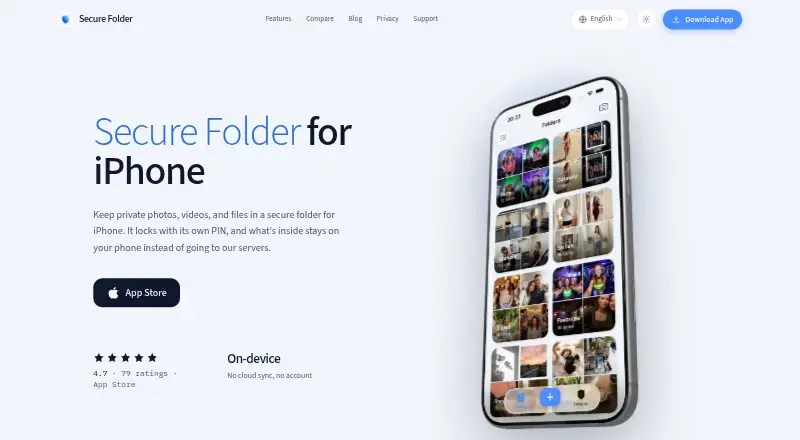
Secure Folder: Incogni Vault is an iPhone app for storing photos, videos, files, and notes behind a PIN or biometric lock. Its vault content stays in the app on the iPhone rather than being uploaded to a server. The app has no account system or cloud sync, and its vault works without a network connection. Face ID and Touch ID checks are handled by iOS; the app says it does not see biometric data. A second PIN opens a separate decoy vault with content chosen by the user. Stealth mode offers nine alternate icons, including calculator, calendar, weather, and sudoku designs. With Incogni Pro, a wrong PIN attempt can trigger a silent front-camera photo, logged on the device. The free plan includes limited imports, PIN and biometric lock, and stealth icons; Pro adds unlimited imports, intruder alerts, and widgets. Importing copies a photo into the vault, so the original remains in Photos until deleted. The homepage lists iOS 16.6 or later as a requirement. Indie developer Mehmet Ali Kısacık, based in Istanbul, Turkey, makes the app. The maker says the app is not affiliated with Surfshark's Incogni service or Samsung Secure Folder.
Who it suits
Incogni Vault suits iPhone users who want to keep selected media, files, or notes in a device-stored vault without an account or cloud sync. Its decoy vault and alternate icons may appeal to users who want additional privacy controls, while Pro adds intruder alerts and unlimited imports.
What it does well
- Vault content stays on the iPhone and is not uploaded to a server.
- Works offline without an account or cloud sync.
- A second PIN opens a user-populated decoy vault.
- Nine alternate icons are available for stealth mode.
- Face ID and Touch ID checks are handled by iOS.
What to know first
- Available only on iOS, requiring iOS 16.6 or later.
- Free-plan imports are limited.
- Forgotten PINs cannot be reset server-side.
Limits
The Free plan has limited imports. Vault data is stored only on the device, so the maker cannot reset a forgotten PIN server-side.
Plans
| Plan | Billed and limits | Price |
|---|---|---|
| Free | limited imports · PIN and biometric lock · stealth icons | Free |
| Incogni Pro | Available as a subscription or a one-time lifetime purchase; price not stated on the page · unlimited imports · intruder alerts · widgets | On request |
As getsecurefolder.com lists them, read 8 Oct 2026. The maker's own page has the final word.
Getting started
- Open the app website and check that the iPhone meets the iOS 16.6-or-later requirement.
- Install the app on an iPhone.
- Use the Free plan for limited imports, PIN and biometric lock, and stealth icons.
- Import selected content, remembering that photos are copied and originals stay in Photos until deleted.
- Consider Incogni Pro for unlimited imports, intruder alerts, and widgets; it is offered by subscription or lifetime purchase.
Verdict
Choose Incogni Vault if you want a device-only iPhone vault with PIN or biometric access, offline use, and a decoy option. Look elsewhere if you need cloud backup or recovery of a forgotten PIN; the app has no cloud sync and the maker cannot reset the PIN server-side.
Questions
What does the Free plan include?
It includes limited imports, PIN and biometric lock, and stealth icons. The listed price is free.
Does the vault use cloud backup or sync?
No. Vault content stays in the app on the iPhone, and there is no account system or cloud sync. The vault works without a network connection.
Which iPhone version is required?
The homepage lists iOS 16.6 or later as a requirement.
Can the maker recover a forgotten PIN?
No. The maker says a PIN cannot be reset server-side because vault data is stored only on the device.
Who makes Incogni Vault?
Indie developer Mehmet Ali Kısacık, based in Istanbul, Turkey, makes the app. The maker says it is not affiliated with Surfshark's Incogni service or Samsung Secure Folder.
Facts from Secure Folder: Incogni Vault's own pages
- Analytics
- The app sends anonymous usage events to Firebase Analytics and says those events do not include vault content or PINs. · getsecurefolder.com, 8 Oct 2026
- Biometrics
- Face ID and Touch ID checks are handled by iOS, and the app says it does not see biometric data. · getsecurefolder.com, 8 Oct 2026
- Decoy vault
- A second PIN opens a separate decoy vault containing content chosen by the user. · getsecurefolder.com, 8 Oct 2026
- Headquarters
- Istanbul, Turkey · getsecurefolder.com, 28 Sept 2026
- Import behavior
- Importing copies a photo into the vault, so the original remains in Photos until the user deletes it. · getsecurefolder.com, 8 Oct 2026
- Independence
- The maker says the app is not affiliated with Surfshark's Incogni service or Samsung Secure Folder. · getsecurefolder.com, 8 Oct 2026
- Intruder alerts
- With Incogni Pro, wrong PIN attempts can trigger a silent front-camera photo that is logged on the device. · getsecurefolder.com, 8 Oct 2026
- Maker
- The app is made by indie developer Mehmet Ali Kısacık, based in Istanbul, Turkey. · getsecurefolder.com, 8 Oct 2026
- No account or sync
- The app has no account system or cloud sync, and its vault works without a network connection. · getsecurefolder.com, 8 Oct 2026
- On-device storage
- Vault content is stored in the app on the iPhone and is not uploaded to a server. · getsecurefolder.com, 8 Oct 2026
- PIN recovery limit
- The developer says it cannot reset a forgotten PIN server-side because vault data is stored only on the device. · getsecurefolder.com, 8 Oct 2026
- Platform requirement
- The homepage lists iOS 16.6 or later as a requirement. · getsecurefolder.com, 8 Oct 2026
- Purpose
- Secure Folder: Incogni Vault is an iPhone app for hiding photos, videos, files, and notes in a PIN- or biometric-locked vault. · getsecurefolder.com, 8 Oct 2026
- Stealth mode
- The app can use one of nine alternate icons, including calculator, calendar, weather, and sudoku disguises. · getsecurefolder.com, 8 Oct 2026
- Support
- Support requests and feedback can be sent by email to [email protected]. · getsecurefolder.com, 8 Oct 2026
Where Secure Folder: Incogni Vault stands on Freedom251
- Photo Vault Apps#24 of 32