SecurePix
What SecurePix is
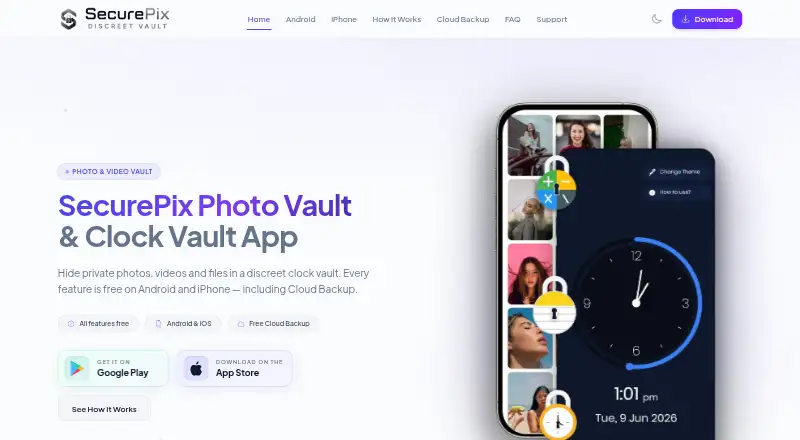
SecurePix is a mobile app for keeping photos, videos, and files in a password-protected vault made to look like a clock. It is available on Android and iOS, with private albums, a decoy vault, and clock-based unlocking. The maker says vault files use AES-256 encryption, and core vault functions do not require an account, email address, or personal data. Files remain on the device by default; optional Cloud Backup requires manually uploading selected files. Vault unlocking works offline, while recovery email verification requires connectivity. Android includes App Lock for selected apps. On iPhone and iPad, Face ID or Touch ID is supported when the device supports it, but App Lock is not included in the iOS app. The free plan costs nothing and includes all features with ads. A key limitation is that hidden files that are neither restored nor uploaded may be permanently lost after uninstalling, resetting a phone, or changing devices. SecurePix is developed by Ncap Solutions LLP in India.
Who it suits
SecurePix may suit Android and iOS users who want a device-based vault for private files. It is particularly relevant to users comfortable managing backups themselves and noting the stated data-loss risk.
What it does well
- Free plan includes all features.
- Vault unlocking works offline.
- Core vault features require no account or email.
- Maker says vault files are encrypted using AES-256.
- Optional backup lets users upload selected files.
What to know first
- Free plan is ad-supported.
- App Lock is Android-only.
- Unrestored, unuploaded files may be permanently lost after device changes.
Limits
The free plan is ad-supported, though it includes all features. App Lock is available only on Android. Hidden files that are neither restored nor uploaded may be permanently lost after uninstalling, resetting a phone, or changing devices.
Plans
| Plan | Billed and limits | Price |
|---|---|---|
| Free | All features included · ad-supported · Android and iOS | Free |
As securepixvault.com lists them, read 7 Oct 2026. The maker's own page has the final word.
Getting started
- Visit the SecurePix website.
- Choose the Android or iOS app for your device.
- Start with the free plan, which includes all features and is ad-supported.
- Use the core vault features without registering an account.
- If desired, manually upload selected files to Cloud Backup.
Verdict
SecurePix offers a private vault on Android and iOS, with optional cloud backup and device-based storage by default. Before relying on it, consider that some hidden files may be lost after uninstalling, resetting, or changing devices.
Questions
How much does SecurePix cost?
The Free plan costs nothing and includes all features. It is ad-supported.
Does SecurePix have a free trial?
No. The listed pricing information says there is no free trial.
Which platforms does SecurePix support?
SecurePix is available on Android and iOS. App Lock is Android-only; iOS supports Face ID or Touch ID when the device supports it.
Do I need an account to use SecurePix?
The maker says core vault features can be used without registering an account or providing an email or personal data.
Where are vault files stored?
Files stay on the device by default. Optional Cloud Backup requires manually uploading selected files.
Who develops SecurePix?
SecurePix is developed by Ncap Solutions LLP in India.
Facts from SecurePix's own pages
- Account requirement
- The maker says core vault features can be used without registering an account or providing an email or personal data. · securepixvault.com, 7 Oct 2026
- Android features
- The Android app includes App Lock for selected apps. · securepixvault.com, 7 Oct 2026
- Connectivity
- Vault unlocking works offline; optional recovery email verification requires connectivity. · securepixvault.com, 7 Oct 2026
- Data loss limit
- Hidden files that are neither restored nor uploaded may be permanently lost after uninstalling, resetting a phone, or changing devices. · securepixvault.com, 7 Oct 2026
- Developer
- SecurePix is developed by Ncap Solutions LLP in India. · securepixvault.com, 7 Oct 2026
- Encryption
- The maker says vault files are encrypted using AES-256. · securepixvault.com, 7 Oct 2026
- Headquarters
- Office No. 408, 4th Floor, Building No. A, Sumerru Business Corner, Adajan, Surat, Gujarat 395009, India · securepixvault.com, 28 Sept 2026
- iOS features
- The iPhone and iPad app supports Face ID or Touch ID when the device supports it. · securepixvault.com, 7 Oct 2026
- Platform limit
- App Lock is available on Android only and is not included in the iOS app. · securepixvault.com, 7 Oct 2026
- Pricing model
- SecurePix says all features are free and supported by ads. · securepixvault.com, 7 Oct 2026
- Purpose
- SecurePix hides private photos, videos, and files in a password-protected vault disguised as a clock. · securepixvault.com, 7 Oct 2026
- Storage
- Files stay on the device by default; Cloud Backup is optional and requires manually uploading selected files. · securepixvault.com, 7 Oct 2026
- Support
- The site says support typically responds within one to two business days. · securepixvault.com, 7 Oct 2026
- Vault features
- The app offers private albums, a decoy vault, and a clock-based password unlock. · securepixvault.com, 7 Oct 2026
Where SecurePix stands on Freedom251
- Photo Vault Apps#22 of 32