
Safety Photo+Video
What Safety Photo+Video is
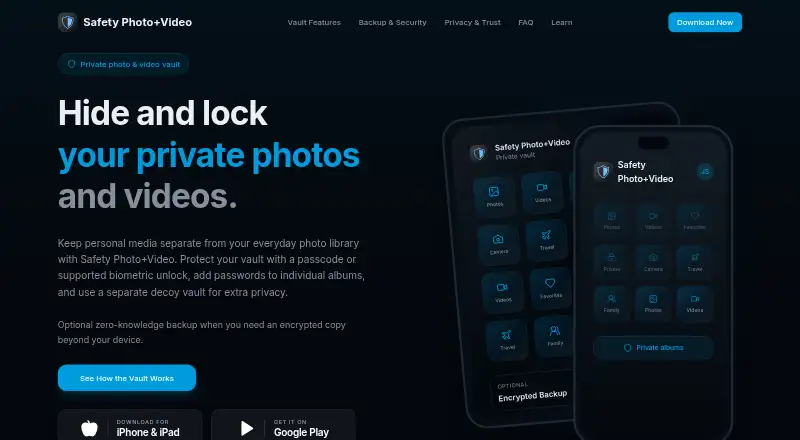
Safety Photo+Video is a mobile app for keeping selected personal photos and videos in a private library apart from the everyday photo gallery. Users can sort media into albums, mark favorites, and take photos or videos from inside the vault. Vault access supports a passcode or compatible biometric unlock, with options varying by device and app version. Separate album passwords and a second vault opened with a different password provide additional ways to control access. Files can be transferred through a browser over the local Wi-Fi network. The app is available for iPhone, iPad, and Android, and includes 10 GB of storage with a free plan. Paid choices include iCloud Sync, storage plans with monthly or yearly billing, and a one-time Pro upgrade. With zero-knowledge backup enabled, media is encrypted on the device before upload and access requires user-controlled credentials or recovery information. The maker says private media is not used for AI training and expired cloud backup is retained for 90 days. The app is positioned for personal and family photos, private videos, identity documents, sensitive work media, and media kept on shared devices. Support is by email, with replies typically taking 24–48 business hours, Monday through Friday, 9am–5pm EST. The maker cannot recover an Encryption Password.
Who it suits
Safety Photo+Video suits people who want to keep family or personal photos, private videos, identity documents, or sensitive work media apart from a regular gallery. Its separate album passwords and decoy vault may also suit people who use shared devices.
What it does well
- Organizes private media into albums and favorites.
- Supports passcode or compatible biometric vault access.
- Offers separate album passwords and a decoy vault.
- Can capture photos and videos inside the vault.
- Zero-knowledge backup encrypts media on the device before upload.
- Includes 10 GB of storage with a free plan.
What to know first
- Available only for Android, iPhone, and iPad.
- The maker cannot recover the Encryption Password.
- Biometric unlock options depend on device and app version.
Limits
The app includes 10 GB of storage. With zero-knowledge backup enabled, access requires user-controlled credentials or recovery information, and support cannot recover the Encryption Password. Expired cloud backup is retained for 90 days, according to the maker.
Plans
| Plan | Billed and limits | Price |
|---|---|---|
| iCloud Sync Yearly | Yearly · iCloud sync | $19.99 a year |
| iCloud Sync Monthly | Monthly · iCloud sync | $2.99 a month |
| 10 GB monthly | Monthly · 10 GB | $2.99 a month |
| 10 GB yearly | Yearly · 10 GB | $29.99 a year |
| Upgrade to Pro Version | Pro upgrade | $4.99, paid once |
| 100 GB monthly | Monthly · 100 GB | $5.99 a month |
| 100 GB yearly | Yearly · 100 GB | $59.99 a year |
| iCloud Sync Lifetime | Lifetime · iCloud sync | $59.99, paid once |
The first 8 of 9 plans, as safetyphoto.app lists them, read 7 Oct 2026. The maker's own page has the final word. Every plan
Getting started
- Download the app from Google Play or the App Store; the iPhone and iPad listing requires iOS 15.0 or later.
- Create a private vault and choose a passcode or supported biometric unlock.
- Organize media into albums, mark favorites, or capture media inside the vault.
- Use a browser on the local Wi-Fi network to transfer files if needed.
- Choose a free or paid option, including storage, iCloud Sync, or the one-time Pro upgrade.
Verdict
Choose Safety Photo+Video if you want a private mobile library with album controls, in-vault capture, and optional encrypted backup. Look elsewhere if you need a platform beyond Android, iPhone, or iPad, or if you need support to recover an Encryption Password.
Questions
Is Safety Photo+Video free?
It has a free plan and includes 10 GB of storage. Paid options include storage plans, iCloud Sync plans, and a one-time Pro upgrade.
What are the listed prices?
The listed plans include $2.99 a month for iCloud Sync Monthly or 10 GB monthly, and $4.99, paid once for the Pro upgrade. Other options include $5.99 a month for 100 GB monthly, $9.99 a month for 200 GB monthly, $19.99 a year for iCloud Sync Yearly, $29.99 a year for 10 GB yearly, $59.99 a year for 100 GB yearly, and $59.99, paid once for iCloud Sync Lifetime.
Which devices can use the app?
The app is available for Android, iPhone, and iPad. The App Store listing requires iOS 15.0 or later.
How does zero-knowledge backup work?
When enabled, media is encrypted on the device before upload. Access requires user-controlled credentials or recovery information, and support cannot recover the Encryption Password.
Does the maker use private media for AI training?
The maker says private media is not used for AI training.
How can I contact support?
Support is available by email. Replies typically take 24–48 business hours, Monday through Friday, 9am–5pm EST.
Facts from Safety Photo+Video's own pages
- AI training
- The maker says private media is not used for AI training. · safetyphoto.app, 7 Oct 2026
- Album passwords
- Users can set separate passwords for individual albums. · safetyphoto.app, 7 Oct 2026
- Backup retention
- The maker says expired cloud backup is retained for 90 days. · safetyphoto.app, 7 Oct 2026
- Backup security
- When zero-knowledge backup is enabled, protected media is encrypted on the device before upload and requires user-controlled credentials or recovery information to access. · safetyphoto.app, 7 Oct 2026
- Decoy vault
- A different password can open a separate decoy vault. · safetyphoto.app, 7 Oct 2026
- Headquarters
- Tanjung Bungah, Malaysia · safetyphoto.app, 28 Sept 2026
- Local transfer
- The app supports transferring files through a browser on the local Wi-Fi network. · apps.apple.com, 7 Oct 2026
- Organization
- Users can organize private photos and videos into albums and mark files as favorites. · apps.apple.com, 7 Oct 2026
- Platform availability
- The maker links to downloads for iPhone and iPad and Google Play; the App Store listing requires iOS 15.0 or later and the Google Play listing identifies the Android app. · safetyphoto.app, 7 Oct 2026
- Private capture
- The app can capture photos and videos directly inside the vault. · apps.apple.com, 7 Oct 2026
- Purpose
- The app keeps selected personal photos and videos in a private library separate from the everyday photo gallery. · safetyphoto.app, 7 Oct 2026
- Recovery limit
- Support cannot recover the user's Encryption Password. · safetyphoto.app, 7 Oct 2026
- Support
- The contact page lists support by email and says replies typically take 24–48 business hours, Monday through Friday, 9am–5pm EST. · safetyphoto.app, 7 Oct 2026
- Vault access
- The vault supports a passcode or supported biometric unlock, with available options depending on device and app version. · safetyphoto.app, 7 Oct 2026
- Who it is for
- The maker lists personal and family photos, private videos, identity documents, sensitive work media, and media on shared devices as use cases. · apps.apple.com, 7 Oct 2026
Where Safety Photo+Video stands on Freedom251
- Photo Vault Apps#20 of 32
- Photo Backup Software#17 of 25