Vaultly
What Vaultly is
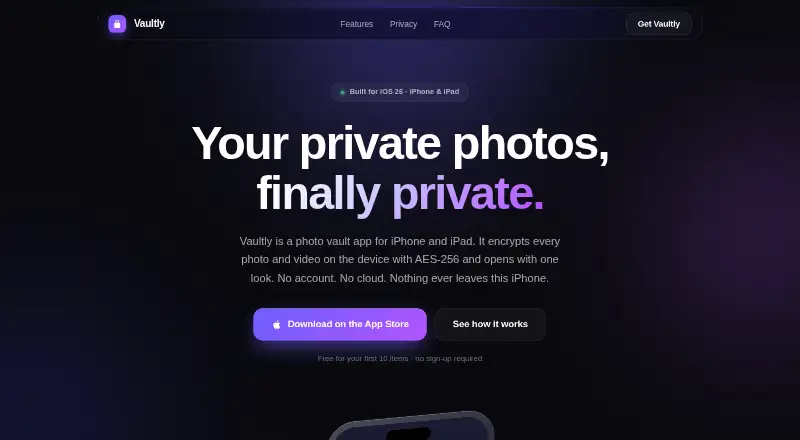
Vaultly is an iPhone and iPad photo vault for keeping photos and videos encrypted on the device. Its maker says each file is protected with AES-256-GCM, and that the app has no account, server, or networking code. Users can organize content into private albums, unlock with Face ID, and turn on alerts for incorrect passcodes. A second passcode opens a separate vault containing its own photos; the maker says this decoy vault does not expose the real one from inside. Vaultly also supports encrypted backups. A backup can be protected with a passphrase chosen by the user and saved to Files, iCloud Drive, a computer, or another device. The maker says forgotten passcodes cannot be reset and vault contents cannot be recovered, so it recommends keeping an encrypted backup. Vaultly requires iOS 26 or iPadOS 26 and provides a universal layout for both devices. Its site says vault content is excluded from screenshots, recordings, AirPlay, and mirroring, while noting Apple may change the system behavior behind those protections. Photo library, camera, and biometric permissions are optional. The Free plan costs nothing and requires no sign-up; plan details say it covers the first 10 items, and the stated free vault limit is 40 items.
Who it suits
Vaultly suits iPhone and iPad users who want to keep photos and videos in an on-device encrypted vault, with a separate decoy vault and optional Face ID access. It is also relevant to people who want to manage their own encrypted backups and can use iOS 26 or iPadOS 26.
What it does well
- Encrypts each file on device with AES-256-GCM.
- No account, server, or networking code, according to its maker.
- A second passcode opens a separate decoy vault.
- Encrypted backups can be saved to several destinations.
- Free plan requires no sign-up.
- Photo library, camera, and biometric permissions are optional.
What to know first
- Requires iOS 26 or iPadOS 26.
- Forgotten passcodes cannot be reset and vault contents cannot be recovered.
- The Free plan details specify the first 10 items.
- Cloud backup is not included.
Limits
The Free plan is listed as free and its details specify the first 10 items; the stated free vault limit is 40 items. Cloud backup is unavailable. A forgotten passcode cannot be reset, and vault content cannot be recovered.
Plans
| Plan | Billed and limits | Price |
|---|---|---|
| Free | first 10 items · no sign-up required | Free |
As photovaultly.com lists them, read 8 Oct 2026. The maker's own page has the final word.
Getting started
- Open the Vaultly website.
- Use an iPhone or iPad running iOS 26 or iPadOS 26.
- Start with the Free plan at no cost; no sign-up is required.
- Choose whether to grant photo library, camera, or biometric permissions; each is optional.
- Create an encrypted backup with a passphrase and save it to Files, iCloud Drive, a computer, or another device.
Verdict
Choose Vaultly if you want an on-device photo vault with encrypted files, a decoy vault, and encrypted backups you control. Look elsewhere if you need passcode recovery, cloud backup, or a device that does not run iOS 26 or iPadOS 26.
Questions
How much does Vaultly cost?
Its Free plan is listed as free and requires no sign-up.
How much can I keep in the free vault?
The plan details say the first 10 items, while the stated free vault limit is 40 items.
Which devices does Vaultly support?
Vaultly requires iOS 26 or iPadOS 26 and has a universal iPhone and iPad layout.
Does Vaultly store photos in the cloud?
The maker says photos stay on the device and that the app has no account, server, or networking code. Cloud backup is listed as unavailable; users can export an encrypted backup to destinations such as Files or iCloud Drive.
Can I recover a forgotten passcode?
No. The maker says a forgotten passcode cannot be reset and vault content cannot be recovered.
Are Vaultly's permissions required?
No. Photo library, camera, and biometric permissions are optional; declining them leaves the rest of the app functional.
Facts from Vaultly's own pages
- Backup
- Users can export an encrypted backup protected by a passphrase they choose and save it to Files, iCloud Drive, a computer, or another device. · photovaultly.com, 8 Oct 2026
- Decoy vault
- A second passcode opens a separate vault with its own photos, which the site says does not reveal the real vault from inside. · photovaultly.com, 8 Oct 2026
- Encryption
- The site says each file is encrypted on device with AES-256-GCM. · photovaultly.com, 8 Oct 2026
- Features
- Features include Face ID unlock, private albums, encrypted vault backups, and break-in alerts after a wrong passcode. · photovaultly.com, 8 Oct 2026
- Local storage
- The maker says Vaultly has no account, server, or networking code, and photos stay on the device. · photovaultly.com, 8 Oct 2026
- Passcode recovery
- The maker says a forgotten passcode cannot be reset and vault content cannot be recovered, so it recommends creating an encrypted backup. · photovaultly.com, 8 Oct 2026
- Permissions
- The privacy policy says photo library, camera, and biometric permissions are optional, and declining them leaves the rest of the app functional. · photovaultly.com, 8 Oct 2026
- Product
- Vaultly is a photo vault app for iPhone and iPad that encrypts photos and videos on the device. · photovaultly.com, 8 Oct 2026
- Screenshot protection
- The site says vault content is excluded from screenshots, screen recordings, AirPlay, and mirroring, but warns that Apple could change the underlying system behavior. · photovaultly.com, 8 Oct 2026
- Support
- The support page says replies usually arrive within one business day by email at [email protected]. · photovaultly.com, 8 Oct 2026
- System requirements
- Vaultly requires iOS 26 or iPadOS 26 and has a universal iPhone and iPad layout. · photovaultly.com, 8 Oct 2026
Where Vaultly stands on Freedom251
- Photo Vault Apps#26 of 32