Calculator Lock - Photo Vault
What Calculator Lock - Photo Vault is
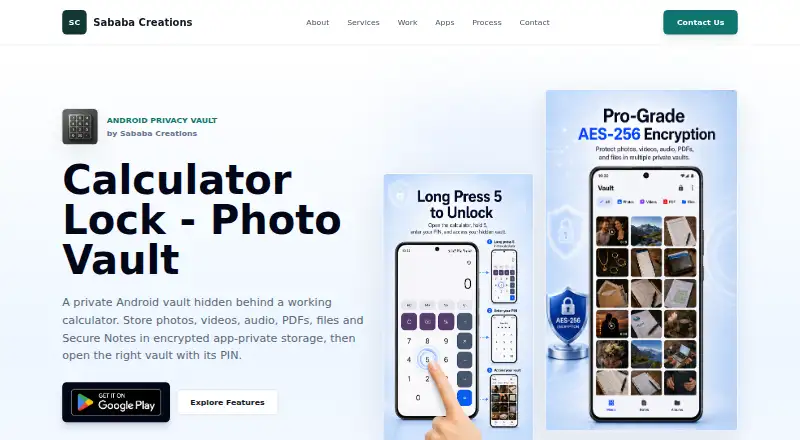
Calculator Lock - Photo Vault is an Android app that conceals a privacy vault behind a working calculator and opens it with a 4-digit PIN. It stores photos, videos, audio, PDFs, files, and Secure Notes in encrypted app-private storage on the device. Different PINs can open separate vaults without a visible session switcher. Users can search and pin notes, organize items with built-in folders, and restore deleted media or notes from Trash. Photos, videos, audio, and PDFs can be viewed in the app; other files can be unlocked, exported, or shared if previews are unsupported. The maker describes screenshot protection and clipboard cleanup for sensitive flows. The free plan allows up to two personal vaults, and ads may appear. There is no cloud backup or PIN recovery, so content may be lost if the PIN, app data, or device is lost. Optional Intruder Detection may take a front-camera photo after repeated failed PIN attempts and requires camera permission and applicable premium access.
Who it suits
It suits adults using Android who want local encrypted storage for media, files, and notes behind a PIN. It is less suitable for anyone who needs cloud backup or a PIN recovery option.
What it does well
- Stores several media and document types in encrypted storage.
- Separate PINs can open different vaults.
- Includes search, pinned notes, folders, and Trash.
- Free plan allows up to two personal vaults.
What to know first
- No cloud backup or PIN recovery.
- Forgotten PIN or lost device may mean lost content.
- Ads may appear on the free plan.
- Exports and shares can create copies outside the vault.
Limits
The free plan allows up to two personal vaults, and ads may appear.
Plans
| Plan | Billed and limits | Price |
|---|---|---|
| Free | Up to 2 vaults · ads may appear · core encrypted storage · media/file import · PDF preview · Secure Notes | Free |
| Pro | Removes ads · unlimited vaults · larger bulk imports · custom albums · custom auto-lock timing · optional Intruder Detection | On request |
As sababasystems.com lists them, read 15 Oct 2026. The maker's own page has the final word.
Getting started
- Find Calculator Lock - Photo Vault on Android.
- Open the working calculator interface and use a 4-digit PIN to access the vault.
- Choose the free plan for up to two personal vaults, or Pro for unlimited vaults and added features.
- Organize items with built-in folders and use Search for notes.
- Enable optional Intruder Detection only if you have applicable premium access and grant camera permission.
Verdict
Calculator Lock combines a concealed calculator entry point with local encrypted vaults and basic organization tools. Its lack of backup and PIN recovery makes safeguarding access especially important.
Questions
Is Calculator Lock - Photo Vault free?
Yes. The Free plan is listed as free and allows up to two personal vaults; ads may appear.
Which platform is supported?
The app is listed for Android.
Does it back up vault content to the cloud?
No. The app does not provide cloud backup.
What happens if I forget my PIN?
There is no PIN recovery, and vault content may be lost if the PIN is forgotten.
Does Intruder Detection take a photo?
It may capture a front-camera photo after repeated failed PIN attempts. It requires camera permission and applicable premium access.
Facts from Calculator Lock - Photo Vault's own pages
- Ads
- The free version may show ads; premium access is intended to remove in-app ads. · sababasystems.com, 15 Oct 2026
- Age positioning
- The privacy policy says the app is intended for adults and is not directed to children under 18. · sababasystems.com, 15 Oct 2026
- Albums and Trash
- Pro users can create custom albums, and deleted media or notes can be restored from Trash before permanent deletion. · play.google.com, 15 Oct 2026
- Android availability
- Google Play lists the product as an Android Tools app with 10K+ downloads, ads and in-app purchases. · play.google.com, 15 Oct 2026
- Audience
- The maker says the app is not directed to children or users under 18 and is intended for adults. · sababasystems.com, 8 Oct 2026
- Calculator disguise
- Users open the vault by entering the matching PIN through the calculator interface and pressing equals. · play.google.com, 15 Oct 2026
- Company founding
- No founded year, legal corporate name, employee count or funding information is stated on the opened maker or store pages. · sababasystems.com, 15 Oct 2026
- Data-loss risk
- Forgetting a PIN, uninstalling, clearing data, losing the device or corruption can make protected content permanently inaccessible. · sababasystems.com, 15 Oct 2026
- Data safety disclosure
- Google Play says the app may share location and app-activity data, may collect location and financial information, and encrypts data in transit. · play.google.com, 15 Oct 2026
- Encryption
- The product page identifies the vault as AES-256 encrypted and the policy describes encryption for vault files, thumbnails, notes and database records. · sababasystems.com, 15 Oct 2026
- Export limitation
- Export, share and unlock-to-device actions can create unencrypted copies outside the vault under the destination app's control. · sababasystems.com, 15 Oct 2026
- File viewing
- The app supports in-app viewing of photos, videos and audio, plus PDF previews; other files can be unlocked, exported or shared when preview is unsupported. · play.google.com, 8 Oct 2026
- Google Play update
- The Google Play listing records an update on 11 August 2026 with startup, import, memory, privacy and reliability improvements. · play.google.com, 15 Oct 2026
- Headquarters
- India · sababasystems.com, 28 Sept 2026
- Independent APK metadata
- APKPure identifies Sababa Creations as the developer and describes multiple encrypted calculator vaults for Android. · apkpure.net, 15 Oct 2026
- Independent download count
- Chrome-Stats reported 23,196 downloads for package com.sababa.calculator as of 14 September 2026. · chrome-stats.com, 15 Oct 2026
- Independent praise: multiple vaults
- Chrome-Stats comments specifically praise separate PINs and the multiple-vault concept as distinctive. · chrome-stats.com, 15 Oct 2026
- Independent praise: simplicity
- Chrome-Stats user comments dated 29 September 2026 praise the app as simple, clean and easy to use. · chrome-stats.com, 15 Oct 2026
- Independent store metadata
- AppAgg lists the app as free, released 30 June 2026, requiring Android 9, with no AppAgg comments and a Google Play rating shown as 0. · appagg.com, 15 Oct 2026
- Integrations
- The app uses Google Play Billing, Firebase, AdMob, Google UMP and possible Meta Audience Network mediation for billing, ads, consent, configuration and diagnostics. · sababasystems.com, 15 Oct 2026
- Integrations and services
- The privacy policy names Google Play, Firebase, AdMob, Google UMP and configured mediation partners, which may process billing, ads, consent, configuration, analytics or diagnostics data. · sababasystems.com, 8 Oct 2026
- Intruder Detection
- Optional premium Intruder Detection can capture a front-camera image after repeated failed PIN attempts when camera permission is granted. · sababasystems.com, 15 Oct 2026
- Limit: developer access
- The product and privacy pages expose no public API, SDK, open-source licence, self-hosting package or developer documentation. · sababasystems.com, 15 Oct 2026
- Limit: platform scope
- The maker's pages and store listing describe an Android app only; no web, desktop, iOS, Linux, extension or self-hosted deployment is stated. · sababasystems.com, 15 Oct 2026
Where Calculator Lock - Photo Vault stands on Freedom251
- Photo Vault Apps#5 of 32