Freedom251 › Video Editing Software

VN Video Editor
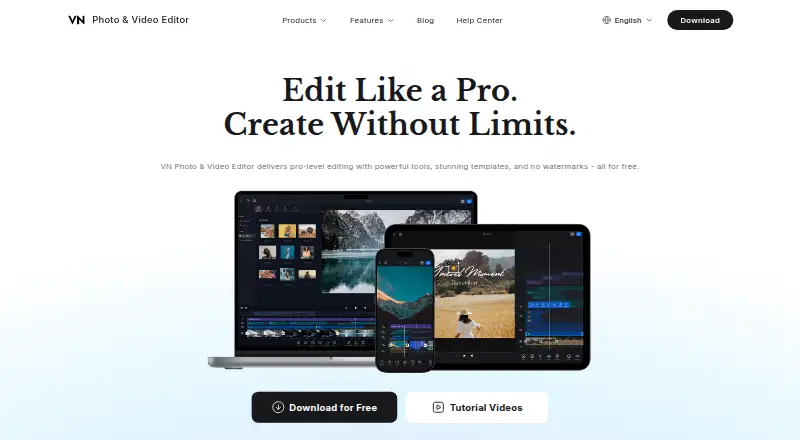
What VN Video Editor is
VN Video Editor is a photo and video editor for Android, iOS, macOS, and Windows, with mobile and desktop apps. Its multi-track timeline supports multiple video, audio, and overlay layers. The editor includes more than 1,000 music tracks and sound effects, along with AI tools for multilingual automatic captions, background removal, and image editing and generation. Videos can be exported at up to 4K resolution and 60 fps. Some tools work without an internet connection; users can prepare templates, music, and other elements before going offline. Project Sharing works across iOS, Android, macOS, and Windows, with read-only access and controls for passwords, expiration dates, and export limits. The free plan costs nothing and allows up to 100 projects, one project share per day, and free resources; AI credits can be purchased as needed. VN Pro (iOS) costs $7.99 a month and includes ad-free editing, unlimited projects and sharing, premium resources, and 100 AI credits per subscription month. Pro subscriptions cannot be shared across iOS, Android, and macOS.
Who it suits
VN suits beginners through advanced creators who want video and photo editing on mobile or desktop. Its free plan may fit users who can work within the project and sharing limits.
What it does well
- Multi-track timeline supports video, audio, and overlay layers.
- Includes more than 1,000 music tracks and sound effects.
- Exports videos at up to 4K and 60 fps.
- Project sharing includes password and expiration controls.
- Some tools work offline.
What to know first
- Free users are limited to 100 projects.
- Free users can share one project per day.
- VN Pro subscriptions are platform-specific.
- The listed VN Pro price is for iOS.
Limits
The free plan allows up to 100 projects and one project share per day, and includes free resources with no free AI credits. VN Pro for iOS includes 100 AI credits per subscription month; its subscription is platform-specific and cannot be shared across iOS, Android, and macOS.
Plans
| Plan | Billed and limits | Price |
|---|---|---|
| Free | 100 projects · One project share per day · Free resources · No free AI credits | Free |
| VN Pro (iOS) | Ad-free editing · Unlimited projects and project sharing · Premium resources · 100 AI credits per subscription month | $69.99 a year |
| VN Pro (iOS) | Ad-free editing · Unlimited projects and project sharing · Premium resources · 100 AI credits per subscription month | $7.99 a month |
As vlognow.me lists them, read 9 Oct 2026. The maker's own page has the final word.
Getting started
- Visit the VN Video Editor website.
- Install the app on Android, iOS, macOS, or Windows.
- Start with the free plan or choose VN Pro for iOS at $7.99 a month.
- Import media through AirDrop, Wi-Fi, WhatsApp, Telegram, or Zip.
- Prepare templates, music, and other elements before using offline tools.
VN Video Editor is a photo and video editor for phones and computers, suited to creators who want layered editing and high-resolution output. Its free tier offers substantial editing and sharing tools, but project limits and separate, platform-specific Pro subscriptions make the upgrade decision important.
Overview
VN brings a multi-track timeline, templates, built-in audio, AI features, and exports up to 4K at 60 fps into one editor. That range can serve both quick social clips and more involved projects, without requiring a paid plan to start. The trade-off is that free users face firm project and sharing caps, while Pro access does not travel freely between platforms.
Key features
Layered editing and sound
The timeline supports multiple video, audio, and overlay layers, giving creators room to assemble more than a simple sequence of clips. More than 1,000 music tracks and sound effects provide a sizable built-in source of audio. This combination suits creators who want a flexible editing workspace; people making only occasional basic trims may not need its breadth.
AI, export, and offline work
VN offers automatic multilingual captions, AI background removal, and AI image editing and generation. Free users get no AI credits, so trying these tools means buying credits separately. Export reaches 4K at 60 fps, useful for creators who need high-resolution output rather than a basic draft. Some tools work offline, and users can prepare templates, music, and other elements before disconnecting; that makes VN more practical for editing away from reliable internet, though not every tool is promised to work offline.
Project sharing and media transfer
Project Sharing works across iOS, Android, macOS, and Windows, with read-only access and controls for passwords, expiration dates, and export limits. Those safeguards are valuable when handing a project to someone else, but the free plan allows only one shared project per day. Media can be imported through AirDrop, Wi-Fi, WhatsApp, Telegram, or Zip, and projects can move through AirDrop or iCloud, giving users several ways to bring assets in or transfer work.
Pricing
Free
free includes up to 100 projects, one project share per day, and free resources. It is a credible starting plan for individual creators with modest project volume, but the cap can constrain an active workflow, and AI features require separately purchased credits.
VN Pro (iOS)
$7.99 a month adds ad-free editing, unlimited projects and project sharing, premium resources, and 100 AI credits per subscription month. This is the clearer fit for frequent iOS editors who need more room and use premium assets or AI. The subscription is platform-specific and cannot be shared across iOS, Android, and macOS, so users working across devices should factor in that restriction before paying.
Platforms
VN is available on Android, iOS, macOS, and Windows, with both mobile and desktop apps. Project sharing spans all four platforms, but Pro subscriptions do not transfer freely across platforms. The app listing says identifiers may be used to track users across other companies’ apps and websites; it also says identifiers, usage data, and diagnostics may be collected without being linked to identity. Users weighing privacy should consider those practices alongside the editing features.
Who it's for
VN is a good fit for creators who want multi-layer editing, built-in sound, 4K export, and project sharing without an upfront subscription. It also suits people who sometimes edit offline or move projects between phone and desktop. It is less compelling for someone who needs unlimited free project sharing, free AI credits, or one Pro subscription shared across platforms.
Pros and cons
- Pros: A multi-track timeline and more than 1,000 music tracks and sound effects support edits with layered visuals and audio.
- Pros: Export up to 4K at 60 fps serves creators who need high-resolution output.
- Pros: Cross-platform project sharing includes read-only access and password, expiration, and export-limit controls.
- Cons: Free users are limited to 100 projects and one project share per day, which may be restrictive for busy creators.
- Cons: The free plan has no AI credits, so AI use requires additional purchases.
- Cons: Pro is platform-specific, complicating paid use across iOS, Android, and macOS.
Alternatives
Choose CapCut if its free templates, mobile-focused editing, and cloud storage better fit your workflow; its Standard plan covers basic editing, while Pro includes 100 GB of cloud storage. Consider FlexClip if a browser-accessible editor is more useful: its free plan allows 12 online projects, videos up to 10 minutes, and one stock video and one stock audio item per project. Videoleap is another option if its free tools suit your needs, though free exports include a watermark. Animoto may suit creators who prefer a web-based option with unlimited free videos, but its free plan includes a watermark. InShot is worth considering for ad-supported video and photo editing on mobile and macOS. Kapwing may suit users who prefer a web editor, but its free plan limits exports to four minutes and 720p and includes 10 credits. Mojo offers free templates and royalty-free music, photos, and video for sharing across social platforms. Unfold is another freemium option for people seeking free tools to share their stories. For a broader shortlist, browse Social Media Video Makers, AI Video Editors, or Video Editing Software.
Verdict
VN is a strong choice for creators who want layered editing, 4K output, and flexible project sharing across phone and desktop without paying at the outset. Its free plan can go a long way, but the 100-project and daily-share caps matter, and AI tools are not free to use. Look elsewhere if you need unrestricted free sharing or a Pro subscription that follows you between platforms.
Verdict
VN Video Editor offers editing, AI tools, high-resolution export, and cross-platform project sharing. Review the free-plan limits and platform-specific Pro subscription terms before choosing a plan.
Questions
Is VN Video Editor free?
Yes. The free plan costs nothing and includes free resources, up to 100 projects, and one project share per day.
How much does VN Pro cost?
VN Pro for iOS costs $7.99 a month.
What does VN Pro include?
The listed iOS plan includes ad-free editing, unlimited projects and project sharing, premium resources, and 100 AI credits per subscription month.
Which platforms does VN Video Editor support?
It is available on Android, iOS, macOS, and Windows, with mobile and desktop apps.
Can VN Pro be shared across platforms?
No. A VN Pro subscription is platform-specific and cannot be shared across iOS, Android, and macOS.
Can projects be shared with controls?
Yes. Project Sharing supports read-only access and controls for passwords, expiration dates, and export limits.
Facts from VN Video Editor's own pages
- AI tools
- The maker lists automatic multilingual captions, AI background removal, and AI image editing and generation features. · vlognow.me, 9 Oct 2026
- Audience
- VN describes its editing tools as being for everyone, from beginners to advanced creators. · vlognow.me, 9 Oct 2026
- Desktop app
- Yes · vlognow.me, 20 Sept 2026
- Export
- The maker’s app listing says videos can be exported at up to 4K resolution and 60 fps. · apps.apple.com, 9 Oct 2026
- 4K export
- Yes · vlognow.me, 20 Sept 2026
- Free plan
- Yes · vlognow.me, 20 Sept 2026
- Free tier limits
- Free users can keep up to 100 projects, share one project per day, use free resources, and purchase AI credits as needed. · vlognow.me, 9 Oct 2026
- Headquarters
- 685 3rd Ave Fl 27, New York, NY 10017, United States · vlognow.me, 28 Sept 2026
- Integrations
- The app listing says media can be imported via AirDrop, Wi-Fi, WhatsApp, Telegram, or Zip and projects can be transferred via AirDrop or iCloud. · apps.apple.com, 9 Oct 2026
- Mobile app
- Yes · vlognow.me, 20 Sept 2026
- Music
- The editor includes more than 1,000 music tracks and sound effects. · vlognow.me, 9 Oct 2026
- Offline use
- VN’s Help Center says some tools work without an internet connection and discusses preparing templates, music, and elements before going offline. · vlognow.me, 9 Oct 2026
- Product
- VN is a photo and video editor that the maker describes as offering pro-level editing tools, templates, and exports without watermarks. · vlognow.me, 9 Oct 2026
- Project sharing
- VN Project Sharing supports iOS, Android, macOS, and Windows, with read-only and password, expiration-date, and export-limit controls. · vlognow.me, 9 Oct 2026
- Security and privacy
- The app listing reports that identifiers may be used to track users across other companies’ apps and websites, while identifiers, usage data, and diagnostics may be collected without being linked to identity. · apps.apple.com, 9 Oct 2026
- Subscription limits
- A VN Pro subscription is platform-specific and cannot be shared across iOS, Android, and macOS. · vlognow.me, 9 Oct 2026
- Support
- VN’s Help Center directs users to contact support at [email protected]. · vlognow.me, 9 Oct 2026
- Team collaboration
- Yes · vlognow.me, 20 Sept 2026
- Timeline
- Its multi-track timeline supports multiple video, audio, and overlay layers. · vlognow.me, 9 Oct 2026
Where VN Video Editor stands on Freedom251
- Video Editing Software#26 of 153
- Video editors#21 of 70
- AI Video Editors#41 of 80
- Video Creation And Editing Software#18 of 30
- Social Media Video Makers#18 of 29