Freedom251 › Image Upscaling Software
Upscal
by Upscal
What Upscal is
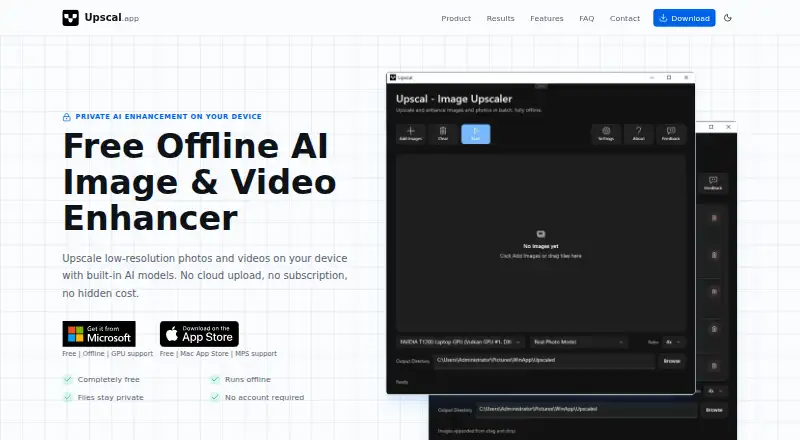
Upscal enhances low-resolution photos and videos on your device using built-in AI models. Its image tools are intended for blurry, compressed, or old photos, while video enhancement works frame by frame. Built-in super-resolution models enlarge images and videos up to 8×. Batch processing is supported, and output formats include JPG, PNG, WebP, MP4, MOV, and M4V. Upscal is available on iOS, macOS, and Windows. Once the app and required resources are installed, normal enhancement can run offline. The privacy policy says processed media stays local and is not sent to an external processing server, though anonymous technical diagnostics may be transmitted. The free plan costs nothing, has no subscription, and includes core image and video enhancement with offline processing; no account is required. The maker permits commercial use when users follow applicable laws and have the necessary rights to their input content. Results depend on the source and device, and the app cannot restore detail that was never captured.
Who it suits
Upscal may suit people enhancing old photos, creator or social videos, product and marketing images, anime, illustration, or digital art. It is also suited to users who want local processing and offline enhancement after installation.
What it does well
- Batch processing is supported.
- Normal enhancement can run offline after installation.
- Processed media is not sent to an external processing server.
- Free plan includes core image and video enhancement.
- Commercial use is permitted with required content rights.
What to know first
- Results depend on source quality and device capability.
- Enhancement cannot recover detail never captured.
- Anonymous technical diagnostics may be sent.
Limits
The free plan includes core image and video enhancement and offline processing. Upscaling is limited to a maximum of 8 x, and results depend on source resolution, blur, compression, noise, the selected model, and device capability.
Plans
| Plan | Billed and limits | Price |
|---|---|---|
| Free | Core image/video enhancement · offline processing · no account · mobile batch up to 5 images | Free |
| Monthly Plan | Unlimited usage | On request |
| Yearly Plan | Best value | On request |
| Lifetime Plan | Lifetime access | On request |
| Yearly Pro | Yearly · Removes mobile image-batch limit | $19.99 a year |
| Monthly Pro | Monthly · Removes mobile image-batch limit | $3.99 a month |
| Lifetime Pro | One-time purchase · Removes mobile image-batch limit | $39.99, paid once |
As upscal.app lists them, read 21 Oct 2026. The maker's own page has the final word.
Getting started
- Visit https://upscal.app/.
- Choose a supported platform: iOS, macOS, or Windows.
- Download and install the app and its required built-in resources.
- Use the free plan; no account or subscription is required.
- Select image or video media and an enhancement model, then export in a supported format.
Upscal is a local AI enlarger for photos and videos, aimed at creators, marketers, archivists, and anyone handling personal or client media. Its free core tier, batch tools, and offline workflow make it a practical choice when remote processing is undesirable; the trade-off is that hardware and source quality still set the ceiling.
Overview
Upscal runs built-in enhancement models on your device. For images, it targets blur, compression damage, and aging, attempting sharper edges, cleaner textures, and more natural detail. Video is improved frame by frame, and the same super-resolution approach can enlarge photos and videos by up to 8×.
Once the application and its required resources are installed, normal enhancement can work without an internet connection. The privacy policy says processed media is not uploaded, transmitted, or shared with an external processing server. That local design suits sensitive family archives, product imagery, and client projects. It is not equivalent to restoring information that was never recorded: results vary with resolution, blur, compression, noise, the chosen model, and device capability, and missing detail cannot be perfectly recreated.
Privacy is local for the media itself, but not completely data-free. Anonymous diagnostics may include app and operating-system versions, device category, crash traces, and error logs sent through Firebase or similar services. The maker also says its website may use Google Analytics and retain contact messages and email addresses to answer inquiries. Commercial use, including client work and content creation, is permitted when users obey applicable law and have the necessary rights to the input material.
Key features
- Photo enhancement: The models are designed for blurry, compressed, or old photos, so Upscal is relevant to restoration-oriented jobs as well as cleaner marketing and product assets. The outcome remains dependent on the original file and selected model rather than guaranteed recovery.
- Video enhancement: Local, frame-by-frame processing supports low-resolution clips for social and creator work. Video workloads can be demanding, making device capability an important practical constraint.
- Super-resolution: Enlargement reaches 8× for supported image and video work. Large scale increases are useful for reframing or display, but the stated source limitations still apply.
- Batch processing: Batch support favors repeated asset cleanup and production queues over one-off edits, although no batch-size quota is published.
- Offline operation: After setup, enhancement can run offline, a clear advantage for travel, restricted networks, or media that should stay on a workstation or phone.
- Formats: Output includes JPG, PNG, and WebP for images, plus MP4, MOV, and M4V for video.
- Support: Users can contact the maker by form or email and should describe their platform and what they are trying to enhance. There is no API access, so automated server-side integration is not part of the product.
Pricing
Upscal uses a freemium model. The Free plan costs free, is free to download and use with no subscription, and requires no account. It includes core image and video enhancement and offline processing. This is the sensible starting point for occasional users, privacy-conscious customers, and anyone evaluating whether their hardware produces acceptable results. There is no free trial because the core tier is already free.
The Monthly Plan has custom pricing and unlimited usage. It is aimed at people with sustained workloads who prefer a monthly commitment, but the price and any additional entitlements are not provided. The Yearly Plan also has custom pricing and is described as the best value, which may suit regular users willing to commit for a year; no renewal terms are given. The Lifetime Plan has custom pricing and lifetime access, potentially fitting long-term users who want to avoid recurring billing.
Platforms
Upscal offers apps for iOS, macOS, and Windows, with a desktop app alongside mobile availability. That coverage works for phone-originated media and desktop production, but there is no Linux version and no API for integrating enhancement into another service.
Who it's for
Choose Upscal for local cleanup of old photographs, creator and social videos, product and marketing imagery, anime, illustrations, or digital art. Its offline processing and no-account free tier are particularly useful when media should remain on the device or when connectivity is unreliable. Batch support helps users handling collections rather than isolated files.
Look elsewhere if you need predictable reconstruction of severely damaged footage, a published commercial price with clear quotas, cloud automation, or API access. Upscal's own qualification that results depend on the source and device matters most for demanding restoration and high-volume production.
Pros and cons
Pros
- Local processing: Normal enhancement does not send processed media to an external processing server, which reduces exposure for personal and client files.
- Free, no-account core tier: Users get image and video enhancement, offline processing, and no subscription at no cost.
- Broad media support: Photo and video enhancement, up to 8× enlargement, batch processing, and common output formats cover varied creator workflows.
- Commercial permission: Client work and content creation are allowed when users have the rights to their inputs and follow applicable laws.
Cons
- Results are source-limited: Blur, noise, compression, missing detail, and device capability can materially affect the output.
- Paid pricing is opaque: Monthly, yearly, and lifetime prices are custom, with no published seat, quota, or renewal terms.
- No API or Linux app: It is a poor fit for server automation or Linux-centered production environments.
- Diagnostics still leave the device: Anonymous technical data can include crash and device information even though processed media stays local.
Alternatives
Real-ESRGAN is the better choice for users who want a free, open-source option with Linux, Windows, macOS, web, and self-hosted availability.
Cutout.Pro suits readers who need a freemium service spanning web, mobile, desktop, and API access, with a listed 5.00 USD monthly plan for 80 credits.
Bigjpg is worth considering for a web-oriented freemium workflow whose free plan permits 20 pictures per month and up to 4× enlargement.
Imglarger offers a free trial, mobile and web apps, and a listed 9.99 USD-per-month Premium plan for users who prefer credit-based online processing.
Adima Image Upscaler Pro fits Windows and Android users seeking a free allowance of 20 4× upscales, batch support, and up to 16× enlargement.
NextGenUp is an alternative for readers wanting a completely free, open-source MIT-licensed tool with no subscription or watermark.
Ximilar Image Upscaler is aimed at API users, with a free allowance of 1,000 API credits per month and a 69.00 USD monthly Business 100K plan.
AI Upscale is another freemium web option.
Verdict
Upscal is a strong fit for individuals and small teams that want photo and video enlargement on iOS, macOS, or Windows without sending the media to a processing server. The free, no-account tier and offline operation are the main reasons to choose it. Look elsewhere if you need an API, Linux support, transparent paid pricing, or dependable recovery of detail that the original file never captured.
Verdict
Upscal combines local photo and video enhancement, batch processing, and offline use after setup. Its results depend on the input and device, and it cannot recreate missing detail.
Questions
Is Upscal free?
Yes. The Free plan costs nothing, has no subscription, and includes core image and video enhancement with offline processing.
Does Upscal require an account?
No account is required for the Free plan.
Which platforms does it support?
Upscal is available on iOS, macOS, and Windows.
Can it enhance videos and process batches?
Yes. It supports video upscaling and batch processing. Video enhancement improves clarity frame by frame.
Can Upscal work offline?
Normal image and video enhancement can run offline after the app and required built-in resources are installed.
What formats can it export?
Supported output formats are JPG, PNG, WebP, MP4, MOV, and M4V.
Facts from Upscal's own pages
- Account requirement
- The app can be downloaded and used without creating an account or signing in. · upscal.app, 21 Oct 2026
- API access
- No · upscal.app, 20 Sept 2026
- API and integrations
- Slashdot lists no integrations for Upscal, and the product pages expose no public API or SDK. · slashdot.org, 21 Oct 2026
- Batch processing
- Yes · upscal.app, 20 Sept 2026
- Commercial use
- The terms permit commercial processing of images and videos when users have the necessary rights and comply with law. · upscal.app, 21 Oct 2026
- Company funding disclosure
- Crunchbase lists Vertexshare Limited as an active private for-profit company and shows no funding amount or employee count. · crunchbase.com, 21 Oct 2026
- Company legal identity
- Independent software directories identify the vendor as Vertexshare Limited. · slashdot.org, 21 Oct 2026
- Company location and founding
- Slashdot lists Vertexshare Limited as founded in 2018 with headquarters in Hong Kong. · slashdot.org, 21 Oct 2026
- Company profile
- Vertexshare describes itself as a Hong Kong startup making Windows and Mac software, online tools and mobile apps. · vertexshare.com, 21 Oct 2026
- Company registration
- Hong Kong Companies Registry records Vertexshare Limited as company number 2730205 incorporated on 3 August 2018. · cr.gov.hk, 21 Oct 2026
- Desktop app
- Yes · upscal.app, 20 Sept 2026
- Diagnostics
- Anonymous diagnostics may include app and operating-system versions, device category, crash traces and error logs transmitted through Firebase or similar services. · upscal.app, 21 Oct 2026
- Free plan
- Yes · upscal.app, 20 Sept 2026
- Headquarters
- Hong Kong SAR, China · upscal.app, 28 Sept 2026
- Image enhancement
- The image workflow targets blurry, compressed, old and low-resolution photos to improve edges, textures and detail. · upscal.app, 21 Oct 2026
- Independent risk criticism
- ScamAdviser showed a trust score of 0 and cited low traffic, an IPQS phishing report and an IPQS suspicious classification, despite a valid SSL certificate. · scamadviser.com, 21 Oct 2026
- Independent security criticism
- Gridinsoft assigned upscal.app a 59/100 trust score, citing limited reputation data and a relatively new domain while noting no major malware or phishing detections. · gridinsoft.com, 21 Oct 2026
- Intended users
- The maker describes uses including old photos, creator and social video, product and marketing images, anime, illustration, and digital art. · upscal.app, 7 Oct 2026
- Licence
- Upscal grants a limited, non-exclusive, non-transferable and revocable use licence; the proprietary application is not open source. · upscal.app, 21 Oct 2026
- Limit: crashes and encoding
- Mac reviewers reported crashes during short-video processing and failures to encode video exports. · apps.apple.com, 21 Oct 2026
- Limit: device memory
- The App Store listing warns that outputs above 144 megapixels may exhaust device memory and advises keeping the app open while processing. · apps.apple.com, 21 Oct 2026
- Limit: mobile video quality
- An iOS reviewer reported that video upscaling produced little visible improvement and a much larger file; the developer attributed this to mobile hardware and traditional video algorithms. · apps.apple.com, 21 Oct 2026
- Limit: speed
- A Mac reviewer complained that rendering was slow, while another iOS reviewer said the app was slower than a website workflow. · apps.apple.com, 21 Oct 2026
- Media privacy
- The privacy policy says normal enhancement runs locally and does not upload, transmit, or share processed media with an external processing server. · upscal.app, 7 Oct 2026
Where Upscal stands on Freedom251
- Image Upscaling Software#8 of 99
- AI Image Upscalers#15 of 28