Freedom251 › Image Upscaling Software

Krea Enhancer
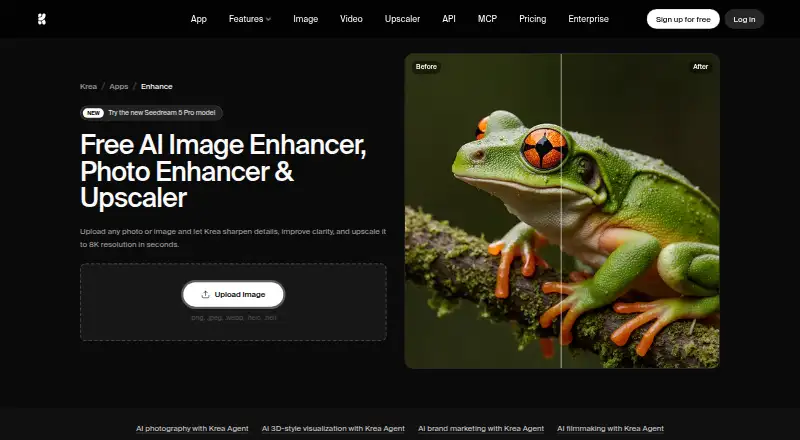
What Krea Enhancer is
Krea Enhancer uses AI to sharpen details, improve clarity, and upscale images, including blurry, pixelated, or low-resolution files. Its workflow is straightforward: upload an image, enhance it, and download the result. The Enhancer page says images can be upscaled to 8K in seconds, while paid upscaling plans list support up to 22K, including paid upscalers such as Topaz Standard. Supported inputs are PNG, JPEG, WebP, HEIC, and HEIF, and batch processing and API access are available. The page gives portraits, landscapes, product photos, old family photos, and screenshots as examples of suitable images. Users can try a limited number of free enhancements online without signing up or providing a credit card; the Free plan's basic upscaling is limited to 2K resolution. Krea lists plugins for Photoshop, After Effects, Premiere Pro, DaVinci Resolve, and Blender. The listed platforms are API, iOS, and web. Krea says it is SOC 2 compliant and offers its full report under NDA through its Trust Center. Plans range from a free daily allowance to paid monthly compute-unit packages, with business and enterprise controls for teams.
Who it suits
Krea Enhancer suits people who want to improve image clarity or enlarge images, including portraits, product photos, landscapes, old family photos, and screenshots. Teams may value its Business workspace controls and included seats, while developers can use the listed API access.
What it does well
- Accepts PNG, JPEG, WebP, HEIC, and HEIF.
- Supports batch processing and API access.
- Free online enhancements do not require sign-up or a card.
- Paid upscaling plans list support up to 22K.
- Enhanced images may be used commercially.
What to know first
- Free plan basic upscaling is limited to 2K resolution.
- Free use is limited to a number of enhancements.
- Business is limited to up to 50 included seats.
Limits
The Free plan costs nothing and includes 100 compute units per day; basic image upscaling is limited to 2K, and free enhancements are limited in number. Basic includes 5,000 compute units per month, while Pro includes 20,000, Max 60,000, and Business 80,000 with up to 50 seats.
Plans
| Plan | Billed and limits | Price |
|---|---|---|
| Free | 100 units/day · limited LoRA training up to 50 images · image upscaling up to 2K · image concurrency 1 | Free |
| Maker self-hosted model license | per model · self-hosting · fine-tuning and LoRA · up to 10,000 images/month · one domain · 10 licensed users · download weights and code | $1,000 a month |
| Business | annual price shown; regular $200/month · 80,000 units/month · 1,028 Nano Banana 2 generations · 333 Seedance 2.0 videos · up to 50 seats · SAML SSO · private Node Apps · unlimited image and video concurrency | $160 a month |
| Pro | annual price shown; regular $35/month · 20,000 units/month · 257 Nano Banana 2 generations · 83 Seedance 2.0 videos · upscaling up to 22K · image concurrency 8 · video concurrency 4 | $21 a month |
| Basic | Yearly plan; page also shows $9 · 5,000 units/month · image upscaling up to 22K | $5 a month |
| Max | annual price shown; regular $105/month · 60,000 units/month · 771 Nano Banana 2 generations · 250 Seedance 2.0 videos · upscaling up to 22K · unlimited image concurrency · video concurrency 8 · LoRA training up to 2,000 images | $63 a month |
| Enterprise | custom pricing · custom seat count · private Node Apps · custom terms · SAML SSO · priority support with SLA · per-member spend limits · IP indemnification | On request |
As krea.ai lists them, read 15 Oct 2026. The maker's own page has the final word.
Getting started
- Visit https://www.krea.ai/enhancer or open the web or iOS option.
- Upload a PNG, JPEG, WebP, HEIC, or HEIF image.
- Enhance the image, then download the result.
- Use the free online allowance without signing up or entering a credit card, or choose a monthly plan for its compute-unit allowance.
- For an API workflow, use the listed API access.
Overview
Krea Enhancer is an AI tool for sharpening, clarifying and upscaling images, including blurry, pixelated and low-resolution files. It suits creators and teams who want a straightforward upload-and-download workflow, batch processing or API access. The free tier is useful for trying it, but its 2K basic-upscaling cap and limited daily compute make sustained or high-resolution work a paid-plan proposition.
Key features
Enhancer’s workflow is simple: upload an image, enhance it, then download the result. It accepts PNG, JPEG, WebP, HEIC and HEIF, and supports batch processing, which is useful when improving several images rather than handling them one at a time. Krea says the Enhancer can reach 8K in seconds; paid plans separately list basic upscaling up to 22K, including paid upscalers such as Topaz Standard. These are different resolution claims, so buyers should match the stated capability to the workflow and plan they intend to use.
Examples include portraits, landscapes, product photos, old family photos and screenshots. Enhanced images may be used commercially, including in photography, marketing materials and professional projects. API access and plugins for Photoshop, After Effects, Premiere Pro, DaVinci Resolve and Blender give it routes into automated and creative workflows beyond the standalone web experience. Krea says it is SOC 2 compliant; its full report is available through its Trust Center under NDA.
Pricing
Krea uses a freemium model. The Free plan costs nothing, billed monthly, and includes 100 compute units per day. It allows a limited number of free enhancements without sign-up or a credit card, but basic upscaling is capped at 2K. That makes it a low-friction way to try the workflow, not a strong fit for regular high-resolution output.
- Basic: $9 a month, billed monthly, with 5,000 compute units per month. It raises listed basic-upscaling support to 22K, but provides less monthly compute than the higher tiers.
- Pro: $35 a month, billed monthly, with 20,000 compute units per month. It suits heavier individual use where Basic’s allowance is insufficient.
- Max: $105 a month, billed monthly, with 60,000 compute units per month. It is aimed at users whose volume justifies a much larger allowance.
- Business: $200 a month, billed monthly, with 80,000 compute units per month and up to 50 seats. Workspace roles and permissions and model access controls make it the clearest fit for teams that need administrative controls as well as shared capacity.
- Enterprise: custom pricing, with priority support with an SLA, Slack Connect, per-member spend limits and audit logs. These controls are more relevant to organizations managing access and spend than to individual creators.
All listed paid plans are monthly. The compute allowances rise with price; choose based on expected usage rather than assuming a higher tier is necessary for image quality alone.
Platforms
Krea Enhancer is available on web and iOS, with API access for integration. Its listed creative-software plugins include Photoshop, After Effects, Premiere Pro, DaVinci Resolve and Blender. This spread is useful for creators who want either a direct enhancement workflow or a way to connect image processing to existing tools.
Who it's for
It is a good match for photographers, designers and marketers who need to improve mixed image types, want commercial-use permission, or handle work in batches. The API, plugins and Business controls extend its appeal to teams and production pipelines. It is less compelling for occasional users who need output beyond 2K but do not want a recurring plan, or for anyone whose work requires a higher allowance than the chosen plan provides.
Pros and cons
- Pro: Broad input-format support, batch processing and API access make it adaptable to individual and automated workflows.
- Pro: Commercial use is permitted, and the examples span common creative and archival image tasks.
- Pro: Business and Enterprise add seat, access, spend and support controls for organizations.
- Con: Free basic upscaling stops at 2K, despite the higher resolution capabilities described for paid use.
- Con: Paid plans use monthly compute-unit quotas, so the stated resolution ceiling does not by itself tell users how much work their allowance will cover.
- Con: Business costs $200 a month, a substantial step up from individual plans for teams that need its controls and seats.
Alternatives
Real-ESRGAN is worth considering for users who prioritize a free, open-source option and want Linux, macOS, Windows, web or self-hosted availability. NextGenUp is another free, open-source choice, with a completely free plan and no trial limit or subscription; choose it if avoiding recurring payments is the priority.
Bigjpg may suit users who want mobile or desktop options as well as web and API access, but its free plan is capped at 20 pictures per month, 5MB uploads and 4x enlargement, with slow speed and a shared server. LetsEnhance offers 10 free credits without a credit card, but its free plan limits output to 8 megapixels and input to 24 megapixels and 50 MB.
SupaRes is an option for a web-and-API workflow with a one-time free quota of 10 processing credits, 64 megapixels and one user. PixelPanda Image Upscaler is worth a look if extension access or one-time credit purchases matter more than monthly subscriptions.
PicWish Image Upscaler may fit users seeking an API-based option with limited non-HD downloads each day on its free plan. Upscale.media offers an API-based free tier with three credits and three downloads every month. Browse more options in Image Upscaling Software.
Verdict
Krea Enhancer is a strong fit for creators and teams who need batch-capable AI enhancement, flexible integrations and paid upscaling beyond the free tier’s 2K limit. Its broad formats, commercial-use permission and API make it more versatile than a simple one-off upscaler. Look elsewhere if you need a fully free, open-source tool or want to avoid recurring compute quotas; for sustained high-resolution work, compare the plan allowance with your expected volume before committing.
Verdict
Choose Krea Enhancer if you need AI image sharpening and upscaling with batch processing, several supported formats, or API access. The free plan has limited enhancements and a 2K basic-upscaling ceiling; paid plans raise the listed resolution support and provide larger compute allowances.
Questions
Is Krea Enhancer free to use?
Yes. The Free plan includes 100 compute units per day, and the Enhancer page says a limited number of images can be enhanced online without signing up or providing a credit card.
How much do the paid plans cost?
Basic is $9 a month, Pro is $35 a month, Max is $105 a month, and Business is $200 a month. Enterprise has no listed price.
Which image formats can I upload?
Supported formats are PNG, JPEG, WebP, HEIC, and HEIF.
What resolution can it upscale to?
The Enhancer page says it can upscale images to 8K in seconds. The Free plan's basic upscaling is limited to 2K, while paid plans list upscaling up to 22K.
Can enhanced images be used commercially?
Yes. The Enhancer FAQ says they may be used for commercial purposes, including photography, marketing materials, and professional projects.
What platforms and integrations are listed?
The listed platforms are API, iOS, and web. Krea lists plugins for Photoshop, After Effects, Premiere Pro, DaVinci Resolve, and Blender.
Facts from Krea Enhancer's own pages
- 3D generation
- Krea describes text-to-3D and image-to-3D model creation for game and product workflows. · fobi.com, 15 Oct 2026
- API access
- Yes · krea.ai, 20 Sept 2026
- API billing
- API usage is billed separately from Pro, Max and team subscriptions. · krea.ai, 15 Oct 2026
- API documentation
- Krea says its API documentation guides a basic generation request in about five minutes and includes live endpoint schemas in a playground. · krea.ai, 15 Oct 2026
- App Builder
- The platform can turn Node workflows into reusable or shareable apps. · krea.ai, 15 Oct 2026
- Batch processing
- Krea advertises parallel processing of multiple image-upscaling jobs. · krea.ai, 15 Oct 2026
- Business controls
- The Business plan lists workspace roles and permissions, model access controls, and up to 50 included seats. · krea.ai, 10 Oct 2026
- Commercial API output
- Krea states that API outputs are licensed for commercial use, subject to partner-model terms where applicable. · krea.ai, 15 Oct 2026
- Commercial use
- The Enhancer FAQ says enhanced images may be used for commercial purposes, including photography, marketing materials, and professional projects. · krea.ai, 10 Oct 2026
- Company facts
- LinkedIn lists Krea as privately held, headquartered in San Francisco, with a stated company size of 11–50 employees. · linkedin.com, 15 Oct 2026
- Custom training
- Users can train custom LoRA styles, characters or objects from uploaded images. · krea.ai, 15 Oct 2026
- Documentation depth
- The Krea 2 repository includes prompting and safety guides plus ComfyUI, SGLang, Hugging Face Diffusers, Ostris and Kohya references. · github.com, 15 Oct 2026
- Enhancer
- The Enhancer reconstructs details in blurry or pixelated images and supports image upscaling to 4K, 8K and 16K. · krea.ai, 15 Oct 2026
- Enterprise support
- The Enterprise plan lists priority support with an SLA and Slack Connect. · krea.ai, 10 Oct 2026
- Founded and funding
- Fobi reports Krea was founded in 2022 in San Francisco and has raised $83M, most recently a $47M Series B in 2025 at a $500M valuation. · fobi.com, 15 Oct 2026
- Free plan
- Yes · krea.ai, 20 Sept 2026
- Free upscaling limit
- The pricing page says the Free plan's basic image upscaling is limited to 2K resolution. · krea.ai, 10 Oct 2026
- Free use
- The page says users can enhance images online for free without signing up or providing a credit card, with a limited number of free enhancements. · krea.ai, 10 Oct 2026
- Image editing
- Krea offers retouching, inpainting, compositing and region-specific prompting on an open canvas. · uk.trustpilot.com, 15 Oct 2026
- Image generation
- The iOS listing describes text and reference-image generation with models including Flux, Ideogram and Imagen 3. · apps.apple.com, 15 Oct 2026
- Input formats
- The upload page lists PNG, JPEG, WebP, HEIC, and HEIF formats. · krea.ai, 10 Oct 2026
- Integrations
- The API site provides an MCP endpoint and setup command for Claude Code, and lists integrations with Codex, OpenClaw, Cursor and Hermes. · krea.ai, 15 Oct 2026
- License
- Krea 2 weights use the Krea 2 Community License rather than a standard open-source license; the official inference repository itself is Apache-2.0. · github.com, 15 Oct 2026
- Limit: billing complaints
- BBB lists three complaints in the last three years, including disputed recurring charges and a subscription-refund access dispute. · bbb.org, 15 Oct 2026
Where Krea Enhancer stands on Freedom251
- Image Upscaling Software#4 of 99