Freedom251 › Image Upscaling Software
LetsEnhance
by LetsEnhance
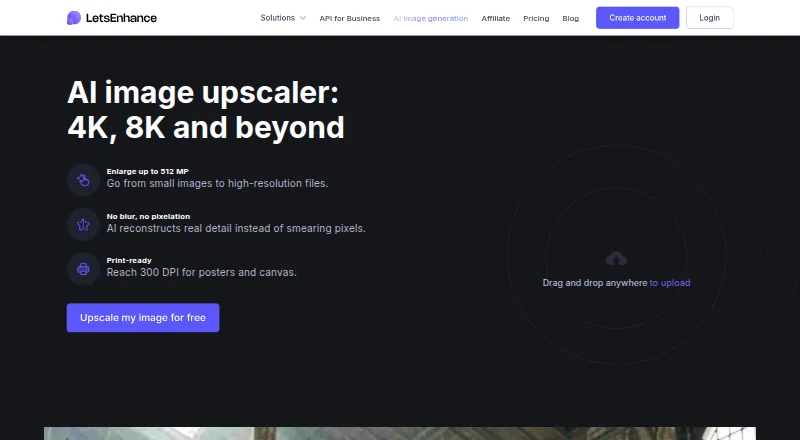
What LetsEnhance is
LetsEnhance is an AI image upscaler for JPG, PNG, and WebP files. Users can enlarge images by 2x, 4x, 8x, or 16x, or choose custom dimensions; the service lists output up to 512 megapixels and support for resolution suitable for 300 DPI printing. Prime, Gentle, and Old Photo modes address different enhancement needs, and the feature list includes face enhancement and old photo restoration. Batch processing and API access are available, but there is no desktop app. New users receive 10 free credits without a credit card, and each processed image uses one credit. Free inputs are limited to 24 megapixels or 50 MB, and outputs to 8 megapixels; free-plan images carry a watermark. Paid plans remove the watermark. Starter costs $9 a month, billed annually, and includes 100 monthly credits. Unused credits roll over while a subscription is active but expire when it ends; cancellation also ends unused credits and membership benefits at the billing period’s end. The company is based in San Francisco, California.
Who it suits
LetsEnhance suits people who want to upscale JPG, PNG, or WebP images individually or in batches, with API access available. Its free plan provides 10 credits; users needing more credits or watermark-free output can choose a paid plan.
What it does well
- Supports JPG, PNG, and WebP uploads.
- Offers 2x, 4x, 8x, 16x, and custom sizing.
- Batch processing and API access are available.
- Free signup provides 10 credits without a credit card.
- Paid users have the watermark removed.
What to know first
- Free output is limited to 8 megapixels.
- Free-plan images include a watermark.
- Starter costs $9 a month, billed annually.
- Credits expire when a subscription ends.
Limits
The Free plan includes 10 credits, accepts inputs up to 24 megapixels or 50 MB, and limits output to 8 megapixels. Free images include a watermark. Starter costs $9 a month billed annually and includes 100 monthly credits.
Plans
| Plan | Billed and limits | Price |
|---|---|---|
| Free | 24 megapixel input · 50 MB input · 8 megapixel output · 10 free credits | Free |
| Starter | Billed annually · 100 credits per month · 600 unused credits · 256 megapixel output · 64 megapixel or 50 MB input | $9 a month |
| Pro | Billed annually · 300 credits per month · 1800 unused credits · 350 megapixel output · 64 megapixel or 50 MB input | $24 a month |
| Max | Billed annually · 500 credits per month · 3000 unused credits · 512 megapixel output · 64 megapixel or 50 MB input | $34 a month |
As letsenhance.io lists them, read 28 Sept 2026. The maker's own page has the final word.
Getting started
- Open the LetsEnhance upscaler website.
- Create an account to receive 10 free credits; no credit card is needed for the free credits.
- Upload a JPG, PNG, or WebP image.
- Choose an enlargement factor or custom dimensions, then select an enhancement mode.
- Use one credit to process each image, or select a paid plan for monthly credits and watermark removal.
LetsEnhance is an AI service for enlarging and enhancing images, suited to people and teams with recurring jobs or large-output needs. Its batch processing, API access, and restoration modes give it range, but the free tier is watermarked and subscription credits expire when membership ends.
Overview
Upload JPG, PNG, or WebP images and enlarge them by 2x, 4x, 8x, 16x, or custom dimensions. The service supports output up to 512 megapixels and images suitable for 300 DPI printing, which can serve large-format projects. Its 8-megapixel free output cap is a much narrower test of that capability, and there is no desktop app.
Key features
- Enhancement modes: Prime, Gentle, and Old Photo modes, plus face enhancement and old-photo restoration, make the service useful beyond straightforward enlargement. Choose it when those processing options matter; it is not presented as a general-purpose photo editor.
- Flexible sizing: Fixed enlargement factors and custom dimensions suit varied output needs. The maximum scale is custom, but the plan output ceilings still matter: the free plan allows 8 megapixels, while paid plans range from 256 to 512 megapixels.
- Batch processing and API: Both support repeated or integrated workflows, a practical advantage for teams. For occasional single images, a recurring credit subscription may be more commitment than the job requires.
- Inputs and storage: JPG, PNG, and WebP are supported. Free users get unlimited storage for six months, but their outputs carry a watermark; paid plans remove it.
- Credits and support: Processing one image uses one credit, and unused credits roll over while the subscription stays active. Support is offered by email and chat, with priority chat on paid plans.
Pricing
The free plan costs nothing and gives new users 10 credits without a credit card. Free inputs can be up to 24 megapixels or 50 MB, and outputs up to 8 megapixels. The watermark and lower output ceiling make it suitable for trying the workflow, not for final unwatermarked work.
- Starter: $9 a month, billed annually, for 100 credits per month, up to 600 unused credits, 64-megapixel or 50 MB inputs, and 256-megapixel outputs. It is the entry paid option for modest recurring volume; it removes the watermark but commits users to annual billing.
- Pro: $24 a month, billed annually, for 300 monthly credits, up to 1,800 unused credits, the same input limit, and 350-megapixel outputs. It suits heavier workloads needing more monthly processing and output headroom.
- Max: $34 a month, billed annually, for 500 monthly credits, up to 3,000 unused credits, the same input limit, and 512-megapixel outputs. Choose it when the added quota and maximum output ceiling justify the higher price.
Rollover is conditional: remaining credits expire when the subscription ends. Cancellation ends unused credits and membership benefits at the billing period's end, so unused quota is not a lasting reserve. Payments are accepted by credit card and PayPal; LetsEnhance says it uses Stripe and does not store card data.
Platforms
The service is available through its website and API, with no desktop app. That favors browser use or integration over a locally installed workflow.
Who it's for
LetsEnhance is a strong fit for people or teams processing images repeatedly, especially when batch handling, API access, restoration modes, or high-resolution output are important. Occasional users who need only a few unwatermarked images, or who want a desktop app, should consider alternatives before taking on an annual plan.
Pros and cons
- Pros: Custom dimensions and factors through 16x; outputs up to 512 megapixels; batch processing and API access; restoration and face enhancement options.
- Cons: Free outputs are watermarked and capped at 8 megapixels; annual billing on paid plans; unused credits expire when membership ends; no desktop app.
Alternatives
For different platform, licensing, or quota priorities, compare Image Upscaling Software, AI Image Restoration Software, AI Photo Enhancer Software, and AI Image Upscalers.
- Real-ESRGAN is free and open source, with Linux, macOS, Windows, web, and self-hosted platforms; pick it if those attributes matter more than LetsEnhance's published paid plan structure.
- NextGenUp is free, open source under an MIT license, and has no subscription or watermark; choose it if avoiding subscriptions and watermarks is the priority.
- Bigjpg offers a free plan with 20 pictures per month, slow speed, shared server, 5 MB uploads, and up to 4x enlargement. It may suit modest jobs within those tighter limits.
- SupaRes has a free one-time quota of 10 processing credits, 64-megapixel limit, and one user; it is an option for a small, nonrecurring workload.
- PixelPanda Image Upscaler offers one-time purchases, including $1.99 a month for 10 credits and $10 a month for 50 credits; consider it if one-time credit purchases fit better than an annual subscription.
- PicWish Image Upscaler has limited non-HD downloads per day on its free plan and daily HD downloads for most online features on its Pro plan; it may suit readers who prefer daily download allowances.
- Krea Enhancer has a free tier of 100 compute units per day and a Basic plan at $9 a month for 5,000 units per month; compare it if compute-unit quotas suit your workflow.
- Upscale.media includes three free credits and three downloads each month; consider it for a small monthly allowance rather than LetsEnhance's 10-credit signup allotment.
Verdict
Choose LetsEnhance for repeat image work that benefits from batch processing, API access, restoration options, or outputs as large as 512 megapixels. Its main drawback is the annual subscription commitment and credits that expire at membership end; occasional users or those prioritizing watermark-free free use should look elsewhere.
Verdict
LetsEnhance offers multiple upscale factors, custom dimensions, and several enhancement modes, with batch processing and API access. Check the free input and output limits, watermark, and credit-expiry rules before choosing a plan.
Questions
How much does LetsEnhance cost?
The Free plan costs nothing. Paid plans start with Starter at $9 a month, billed annually.
What does the free plan include?
It gives new users 10 credits without a credit card. Inputs are limited to 24 megapixels or 50 MB, outputs to 8 megapixels, and free images have a watermark.
Which image formats does it accept?
It supports JPG, PNG, and WebP uploads.
Is there a desktop app?
No desktop app is listed; the listed platform is API.
What happens to unused credits?
Unused credits roll over while the subscription remains active and expire when it ends. Cancellation ends unused credits and membership benefits at the billing period's end.
Who makes LetsEnhance?
The page identifies the company as LetsEnhance, Inc., headquartered in San Francisco, California, United States.
Facts from LetsEnhance's own pages
- AI modes
- Prime, Gentle, and Old Photo modes target different enhancement needs. · letsenhance.io, 28 Sept 2026
- API access
- Yes · letsenhance.io, 20 Sept 2026
- Batch processing
- Yes · letsenhance.io, 20 Sept 2026
- Cancellation rule
- Cancellation ends unused credits and membership benefits at the billing period's end. · letsenhance.io, 28 Sept 2026
- Company identity
- The page identifies the company as LetsEnhance, Inc., with 2026 copyright. · letsenhance.io, 28 Sept 2026
- Credit expiry
- Remaining credits expire when the subscription ends. · letsenhance.io, 28 Sept 2026
- Credit rollover
- Unused credits roll over while the subscription remains active. · letsenhance.io, 28 Sept 2026
- Credit unit
- Processing one image uses one credit. · letsenhance.io, 28 Sept 2026
- Desktop app
- No · letsenhance.io, 20 Sept 2026
- Free credits
- New users receive 10 free credits without adding a credit card. · letsenhance.io, 28 Sept 2026
- Free input limit
- Free input images can be up to 24 megapixels or 50MB. · letsenhance.io, 28 Sept 2026
- Free output limit
- Free-plan images can be upscaled up to 8 megapixels. · letsenhance.io, 28 Sept 2026
- Free plan
- Yes · letsenhance.io, 20 Sept 2026
- Free storage
- The free plan includes unlimited storage for 6 months. · letsenhance.io, 28 Sept 2026
- Free watermark
- The free plan includes a watermark; paid users have it removed. · letsenhance.io, 28 Sept 2026
- Headquarters
- San Francisco, California, United States · letsenhance.io, 28 Sept 2026
- Input formats
- JPG, PNG, WebP · letsenhance.io, 20 Sept 2026
- Maximum resolution
- The upscaler can enlarge images up to 512 megapixels. · letsenhance.io, 28 Sept 2026
- Maximum scale
- custom · letsenhance.io, 20 Sept 2026
- Payment methods
- Payments are accepted by credit card and PayPal. · letsenhance.io, 28 Sept 2026
- Payment security
- LetsEnhance says it does not store credit-card data and uses Stripe. · letsenhance.io, 28 Sept 2026
- Print resolution
- The service supports output suitable for reaching 300 DPI. · letsenhance.io, 28 Sept 2026
- Paid from
- 9 · letsenhance.io, 20 Sept 2026
- Support channels
- Support is available by email, chat, and priority chat on paid plans. · letsenhance.io, 28 Sept 2026
Where LetsEnhance stands on Freedom251
- Image Upscaling Software#22 of 99
- AI Image Restoration Software#14 of 30
- AI Photo Enhancer Software#14 of 26
- AI Image Upscalers#16 of 28