Freedom251 › Image Upscaling Software
SuperImage
by SuperImage
What SuperImage is
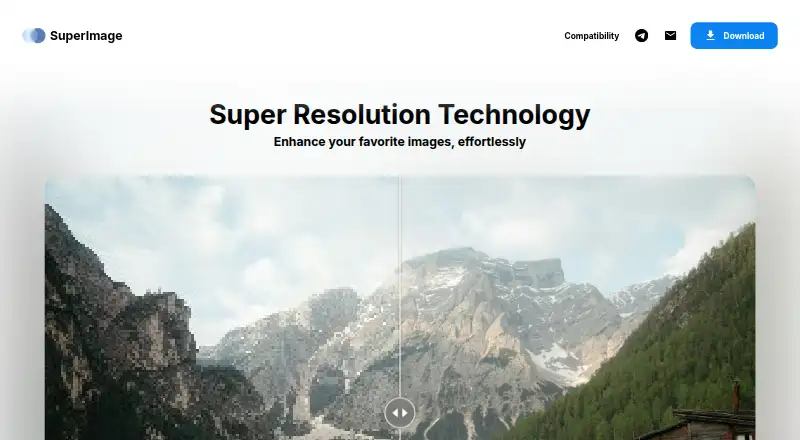
SuperImage is an AI app for enhancing and upscaling photos, anime wallpapers, and portraits. It runs image processing on the device rather than uploading photos to an online service, and it does not require an internet connection. Batch processing is supported, and the app is available for Android, macOS, and Windows. On supported devices, it can use an onboard NPU for image processing.
Users can import custom models in PyTorch, ONNX, and MNN formats. The free version can queue up to 25 images at once. SuperImage Pro is described as a lifetime license with no subscription and an unlimited image queue. Pro also includes ad-free use, the ability to save images anywhere, custom upscaling models, and early access to new features.
Android requires version 6.0 or later and Vulkan or OpenCL support. The Mac version supports Apple silicon Macs running macOS 13 or later. Windows requires 64-bit Windows 10 or later and a Vulkan or OpenCL-capable GPU; DirectX 12-capable GPUs are recommended. SuperImage is made by SuperImage and is headquartered in Brescia, Italy.
Who it suits
SuperImage suits people who want to upscale photos, anime wallpapers, or portraits while keeping image processing on their device. It may also suit batch-processing users who want to load custom models, provided their device meets the listed platform and hardware requirements.
What it does well
- Processes images locally without requiring internet access.
- Supports batch processing across Android, macOS, and Windows.
- Imports models in PyTorch, ONNX, and MNN formats.
- Pro provides an unlimited queue with no subscription.
- Can use an onboard NPU on supported devices.
What to know first
- The free version queues no more than 25 images at once.
- Android requires Vulkan or OpenCL support.
- Windows requires a capable GPU and 64-bit Windows 10 or later.
- The Pro license price is not provided in the plan details.
Limits
The free version can queue up to 25 images at once. Pro is described as a lifetime license with an unlimited queue, but its price is not provided.
Plans
| Plan | Billed and limits | Price |
|---|---|---|
| SuperImage Free | 25 images queued | Free |
| SuperImage | Free forever · queue up to 25 images at once | Free |
| SuperImage Pro | Lifetime license, no subscription required · Unlimited image queue · ad-free · save images anywhere · custom upscaling models · early access to new features | On request |
As superimage.io lists them, read 22 Sept 2026. The maker's own page has the final word.
Getting started
- Visit the SuperImage website.
- Choose Android, macOS, or Windows based on your device and its requirements.
- Install the app on a compatible device.
- Queue up to 25 images with the free version, or choose Pro for an unlimited queue.
- Import a custom model in PyTorch, ONNX, or MNN format if desired.
Verdict
Choose SuperImage if you want local AI upscaling and enhancement, especially for batches or custom models. The free version offers a queue of up to 25 images, while Pro removes that queue limit and adds several features under a lifetime license. Check device compatibility before choosing a platform, and consider that the listed Pro plan price is not provided.
Questions
Is SuperImage free?
Yes. Its free version is listed as free and can queue up to 25 images at once.
What does Pro include?
Pro is a lifetime license with no subscription. It includes an unlimited image queue, ad-free use, saving images anywhere, custom upscaling models, and early access to new features.
Which platforms does SuperImage support?
It is available for Android, macOS, and Windows.
Does SuperImage upload photos for processing?
Image processing runs on the device, without uploading photos to an online service. The site says no internet connection is required.
What are the device requirements?
Android requires version 6.0 or later and Vulkan or OpenCL support. The Mac version supports Apple silicon with macOS 13 or later; Windows requires 64-bit Windows 10 or later and a Vulkan or OpenCL-capable GPU.
Who makes SuperImage?
The maker is SuperImage, headquartered in Brescia, Italy.
Facts from SuperImage's own pages
- Android requirements
- Android requires version 6.0 or later and Vulkan or OpenCL support. · superimage.io, 12 Oct 2026
- Batch processing
- Yes · superimage.io, 22 Sept 2026
- Custom models
- Users can import custom models in PyTorch, ONNX, and MNN formats. · superimage.io, 12 Oct 2026
- Desktop app
- Yes · superimage.io, 22 Sept 2026
- Developer
- The site identifies Zhenxiang Chen in its copyright notice and lists a business inquiries email. · superimage.io, 12 Oct 2026
- Free plan
- Yes · superimage.io, 22 Sept 2026
- Free version limit
- The free version can queue up to 25 images at once. · superimage.io, 12 Oct 2026
- Hardware acceleration
- On supported devices, SuperImage can use an on-board NPU for image processing. · superimage.io, 12 Oct 2026
- Headquarters
- Brescia, Italy · superimage.io, 28 Sept 2026
- Image enhancement
- SuperImage enhances and upscales photos, anime wallpapers, and portraits using AI. · superimage.io, 12 Oct 2026
- Local processing
- Image processing runs on the device without uploading photos to an online service, and the site says no internet connection is required. · superimage.io, 12 Oct 2026
- Mac requirements
- The Mac version supports Apple silicon Macs running macOS 13 or later. · superimage.io, 12 Oct 2026
- Pro features
- Pro includes an ad-free experience, saving images anywhere, custom upscaling models, and early access to new features. · superimage.io, 12 Oct 2026
- Pro license
- Pro is described as a lifetime license with no subscription and an unlimited image queue. · superimage.io, 12 Oct 2026
- Support
- The developer lists [email protected] as the support email. · play.google.com, 12 Oct 2026
- Upscaling method
- ai · superimage.io, 22 Sept 2026
- Windows requirements
- Windows requires 64-bit Windows 10 or later and a Vulkan or OpenCL capable GPU; DirectX 12 capable GPUs are recommended. · superimage.io, 12 Oct 2026
Where SuperImage stands on Freedom251
- Image Upscaling Software#9 of 99