Freedom251 › PC benchmark tools

UNIGINE Valley Benchmark
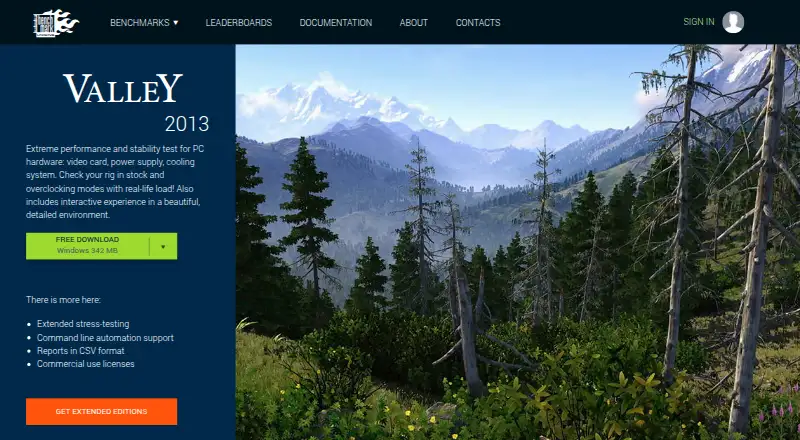
What UNIGINE Valley Benchmark is
UNIGINE Valley Benchmark is a PC hardware performance and stability test for evaluating video cards, power supplies, and cooling systems. It renders a detailed 3D landscape and monitors GPU temperature and clock speed. The terrain covers 64,000,000 square meters, and users can explore it in fly-by or hike-through modes. Display options include user-controlled dynamic weather, stereo 3D, and multi-monitor support. The product page lists extended stress testing, command-line automation, and CSV reports among extended-edition features. Results can be exported in HTML or CSV, and custom test profiles are available. Valley runs on Windows, Linux, and macOS. Its stated requirements include 512 MB of video memory and 1.5 GB of disk space; Linux use requires proprietary video drivers. Basic is free for one Gamer seat. Paid one-time plans start at 14.95 USD for Advanced; listed paid prices exclude tax. The standard EULA limits use to education and evaluation, while the Enterprise EULA allows commercial use and unlimited seats for a 20-year term. The listed version is 1.0 (2013).
Who it suits
Valley suits people evaluating graphics performance or the stability of PC components such as video cards, power supplies, and cooling systems. Its extended features and paid license options also address overclockers and commercial hardware businesses.
What it does well
- Monitors GPU temperature and clock speed.
- Offers fly-by and hike-through exploration modes.
- Supports Windows, Linux, and macOS.
- Exports results in HTML or CSV.
- Includes custom test profiles and automation.
What to know first
- Standard EULA limits use to education and evaluation.
- Linux requires proprietary video drivers.
- Listed version is 1.0 (2013).
- Paid prices exclude tax.
Limits
Basic is free for one Gamer seat, and the standard EULA limits use to educational and evaluation purposes. Enterprise permits commercial use and unlimited seats for a 20-year license term; its listed one-time price is 7500.00 USD, excluding tax.
Plans
| Plan | Billed and limits | Price |
|---|---|---|
| Basic | Gamer · 1 seat | Free |
| Advanced | Prices (tax not included) · Overclocker · 1 seat | $14.95, paid once |
| Professional | Prices (tax not included) · Commercial company, assembly/repair shop, hardware manufacturer · 1 seat | $495, paid once |
| Enterprise | Prices (tax not included) · Commercial company with multiple installations · unlimited seats | $7,500, paid once |
As benchmark.unigine.com lists them, read 7 Oct 2026. The maker's own page has the final word.
Getting started
- Visit the UNIGINE Valley Benchmark website.
- Choose the Basic free plan or a paid plan that fits your use.
- Use a listed platform: Windows, Linux, or macOS.
- Check that the system has 512 MB of video memory and 1.5 GB of disk space.
- For Linux, use proprietary video drivers.
UNIGINE Valley Benchmark is a graphics-performance and stability workload for PC hardware, pairing a large rendered environment with GPU telemetry. It is a strong fit for gamers, overclockers, and evaluators who want repeatable visual stress runs, while businesses must choose a commercial license. The dated 1.0 release and noncommercial standard EULA are its biggest cautions.
Overview
Valley renders 64,000,000 square meters of seamless, detailed terrain and lets you move through it in fly-by or hike-through modes. Dynamic weather controlled by the user, stereo 3D, and multi-monitor support provide ways to vary the display workload beyond a single fixed scene. That makes the software useful for checking how graphics hardware behaves under sustained, visually demanding output, including video cards, power supplies, and cooling systems.
GPU temperature and clock-speed monitoring add context to a score: a result can be considered alongside thermal and frequency behavior rather than as an isolated number. Custom test profiles help tailor runs, and command-line automation is valuable when the same procedure must be repeated across machines. HTML and CSV export support record-keeping, while the comparison database gives results a reference point. UNIGINE positions the benchmark as vendor-neutral and names AMD, Intel, and NVIDIA among its hardware-vendor partners.
Key features
Visual workload and monitoring
The expansive terrain and explorable modes suit demonstrations as well as stress testing. Weather, stereo output, and multiple displays can expose graphics and presentation setups that a basic single-screen run would not.
Repeatable results
Profiles, automation, and CSV or HTML reports make Valley more practical for comparative evaluations than a one-off visual demo. The comparison database is useful when you want a benchmark result placed alongside other submissions.
Age and licensing
The listed release is Valley Benchmark 1.0 from 2013. It remains relevant as a defined workload, but buyers seeking a current-generation benchmark should treat that age as a limitation. The standard EULA permits educational and evaluation use, not general commercial testing.
Pricing
| Plan | Price | Best fit and terms |
|---|---|---|
| Basic | free | Gamer; 1 seat |
| Advanced | $14.95, paid once | Overclocker; 1 seat |
| Professional | $495, paid once | Commercial company, assembly/repair shop, or hardware manufacturer; 1 seat |
| Enterprise | $7,500, paid once | Commercial company with multiple installations; unlimited seats |
Prices are tax exclusive. Basic is appropriate for personal gaming or evaluation within the standard educational/evaluation license, but it does not cover ordinary business use. Advanced adds a low-cost one-time route for an individual overclocker. Professional is the commercial option for a single licensed seat; Enterprise is aimed at multi-installation organizations and is the only listed plan with unlimited seats. The Enterprise EULA permits commercial use and grants a 20-year license term. There is no free trial.
Platforms
Valley is listed for Linux, macOS, and Windows. The stated operating-system requirements identify Windows and Linux, with proprietary video drivers required on Linux. Minimum requirements include 512 MB of video memory and 1.5 GB of disk space.
Who it's for
Choose Valley when you need a recognizable, graphics-heavy scene for GPU, cooling, or power-supply evaluation, plus telemetry and repeatable exports. Gamers can use Basic for personal assessment; overclockers who want custom runs and automation can use Advanced. Repair shops, hardware makers, and other commercial evaluators need Professional or Enterprise rather than relying on the standard license. It is a weaker choice for buyers who require a recently updated benchmark or broad commercial rights at the lowest price.
Pros and cons
- Pros: very large seamless terrain creates a demanding, varied rendering workload; temperature and clock monitoring connect scores to GPU behavior; custom profiles, command-line automation, and CSV/HTML exports support repeatable records; stereo 3D and multi-monitor modes broaden display testing; vendor-neutral positioning covers AMD, Intel, and NVIDIA hardware.
- Cons: version 1.0 dates to 2013; the standard EULA limits free use to educational and evaluation purposes; commercial licensing becomes expensive for organizations, especially Enterprise at $7,500, paid once; Linux requires proprietary video drivers.
Alternatives
For a wider catalog of options, see Game Benchmark Software and PC Benchmark Software.
- 3DMark is the better pick if you need Android or iOS support, web access, or a current Windows/macOS plan; its Windows and macOS plan is $34.99 per on.
- Basemark GPU suits home users wanting a free cross-platform option, but its free plan is private-use only, requires internet, submits data to Powerboard, and provides a single score without breakdown analysis.
- GameBench is preferable when mobile, API, web, or self-hosted coverage and a time-limited Pro trial matter.
- PerfDog is an alternative for non-profit organizations using its free version.
- Evolve Benchmark is a lower-cost alternative offering a free personal-use plan with GPU monitoring and score submission.
- NVIDIA ShadowPlay is a free Windows option tied to supported GeForce hardware.
- SPECapc for 3ds Max 2020 is a free Windows benchmark focused on 3ds Max.
- vkmark is a Linux Vulkan benchmarking suite distributed as source.
Verdict
UNIGINE Valley Benchmark is a sensible choice for gamers and hardware enthusiasts who want a broad, explorable GPU workload with monitoring, profiles, automation, and exportable results. Its main reasons to look elsewhere are the 2013-era release and the standard license's noncommercial boundary; commercial teams must budget for Professional or Enterprise licensing.
Verdict
Valley combines a rendered 3D scene with GPU monitoring and options for exploring and testing hardware. Check its license terms and system requirements before choosing a plan.
Questions
Is UNIGINE Valley Benchmark free?
Yes. Basic costs nothing for one Gamer seat. There is no free trial.
What do the paid plans cost?
Advanced costs 14.95 USD once, Professional costs 495.00 USD once, and Enterprise costs 7500.00 USD once. Listed paid prices exclude tax.
Which platforms does it support?
The listed platforms are Linux, macOS, and Windows. Linux requires proprietary video drivers.
Can it be used commercially?
The standard EULA limits use to educational and evaluation purposes. Enterprise licensing permits commercial use and unlimited seats for a 20-year term.
What are the system requirements?
The page specifies 512 MB of video memory and 1.5 GB of disk space. Linux requires proprietary video drivers.
What results and automation options are available?
Results can be exported in HTML or CSV. Custom test profiles and command-line automation are listed, with automation and CSV reports among extended-edition features.
Facts from UNIGINE Valley Benchmark's own pages
- Current version
- The product page lists Valley Benchmark version 1.0 (2013). · benchmark.unigine.com, 7 Oct 2026
- Enterprise license
- The Enterprise EULA permits commercial use and unlimited seats, with a 20-year license term. · benchmark.unigine.com, 7 Oct 2026
- Extended features
- The page lists extended stress testing, command-line automation, and CSV reports among the extended-edition features. · benchmark.unigine.com, 7 Oct 2026
- Founded
- 2005 · benchmark.unigine.com, 28 Sept 2026
- Free plan
- Yes · benchmark.unigine.com, 24 Sept 2026
- GPU monitoring
- The product monitors GPU temperature and clock speed. · benchmark.unigine.com, 7 Oct 2026
- Headquarters
- Abu Dhabi, UAE · benchmark.unigine.com, 28 Sept 2026
- Interactive modes
- Users can explore the valley in fly-by or hike-through modes. · benchmark.unigine.com, 7 Oct 2026
- License use
- The standard EULA limits use to educational and evaluation purposes. · benchmark.unigine.com, 7 Oct 2026
- Operating systems
- Windows; Linux · benchmark.unigine.com, 24 Sept 2026
- Purpose
- Valley is a performance and stability test for PC hardware, including video cards, power supplies, and cooling systems. · benchmark.unigine.com, 7 Oct 2026
- Support
- UNIGINE describes its team as including support engineers. · benchmark.unigine.com, 7 Oct 2026
- System requirements
- The page specifies 512 MB of video memory and 1.5 GB of disk space; Linux requires proprietary video drivers. · benchmark.unigine.com, 7 Oct 2026
- Terrain
- The benchmark features 64,000,000 square meters of detailed, seamless terrain. · benchmark.unigine.com, 7 Oct 2026
- Vendor neutrality
- UNIGINE says its benchmarks are vendor-neutral and names AMD, Intel, and NVIDIA among its hardware-vendor partners. · benchmark.unigine.com, 7 Oct 2026
- Weather and display
- Features include user-controlled dynamic weather, stereo 3D, and multi-monitor support. · benchmark.unigine.com, 7 Oct 2026
- Workload areas
- GPU graphics rendering; 3D scene performance · benchmark.unigine.com, 24 Sept 2026
Where UNIGINE Valley Benchmark stands on Freedom251
- PC benchmark tools#13 of 70
- Game Benchmark Software#12 of 22
- PC Benchmark Software#47 of 73