
Ueli
What Ueli is
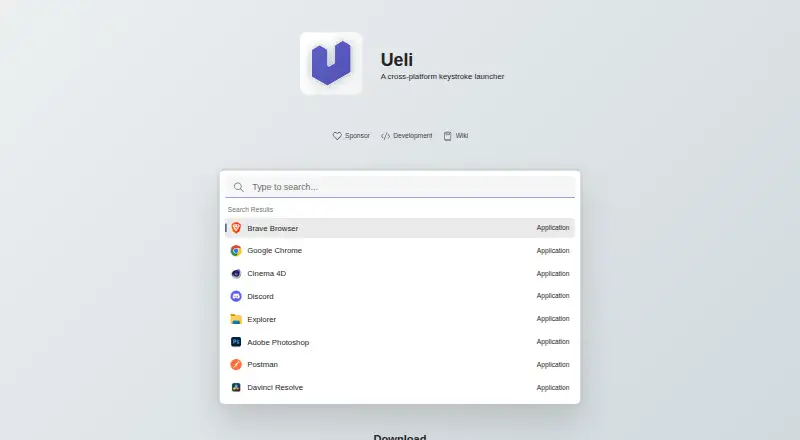
Ueli is a free keystroke launcher for Linux, macOS, and Windows. Users can show or hide it with a hotkey, type to find items, and press Enter to launch a result. Frequently used items can be saved to Favorites so they appear first in search. A selected result can also offer additional actions, opened with Cmd+K on macOS or Ctrl+K on Windows and Linux. Listed extensions include application search, browser bookmarks, calculator, currency conversion, DeepL Translator, file search, terminal launcher, Visual Studio Code, and web search. Each enabled extension has its own settings area, where users can configure or disable it. Windows users can install Ueli from the Microsoft Store or use winget with the Microsoft Store source; Linux and macOS downloads are also provided. The README notes that manually downloaded Windows binaries are unsigned, and macOS builds are unsigned and not notarized, so the systems may block them. Global hotkeys may not work in Linux Wayland sessions; a system shortcut is suggested as a workaround. The privacy statement says Ueli does not collect, store, or share personal, usage, device, or location data.
Who it suits
Ueli suits people who want keyboard-based access to search, launch items, and use extensions across Linux, macOS, or Windows. It may suit users who prefer to configure which extensions are enabled.
What it does well
- Available for Linux, macOS, and Windows.
- Favorites appear first in search results.
- Extensions include file search and a calculator.
- Enabled extensions have configurable settings.
- Privacy statement says it does not collect personal or usage data.
What to know first
- Manually downloaded Windows binaries are unsigned.
- macOS builds are unsigned and not notarized.
- Global hotkeys may fail in Wayland sessions.
Plans
| Plan | Billed and limits | Price |
|---|---|---|
| Free | No paid plans or usage limits stated | Free |
As ueli.app lists them, read 3 Oct 2026. The maker's own page has the final word.
Getting started
- Download Ueli for Linux or macOS, or get it from the Microsoft Store on Windows.
- On Windows, winget can also install it using the Microsoft Store source.
- Open or hide Ueli with Alt+Space.
- Type to search, then press Enter to launch a result.
- Use Cmd+K on macOS or Ctrl+K on Windows and Linux for additional result actions.
- Enable extensions and configure them in their settings sections.
Ueli is a free launcher for people who want to find and open items from the keyboard on Linux, macOS or Windows. It is best suited to users who value configurable extensions and a consistent search-led workflow; platform-specific setup hurdles make it less appealing if you expect a frictionless install.
Overview
Alt+Space shows or hides Ueli. Type to search, then press Enter to launch a result; for users who prefer keyboard navigation, that keeps the route from query to action short. Ueli also lets you open additional actions for a selected result, using Cmd+K on macOS or Ctrl+K on Windows and Linux.
Ueli’s privacy statement says it does not collect, store or share personal data, usage data, device information or location data, and does not share information with third-party services. That is a clear privacy position for a tool that searches across desktop items.
Key features
Its extensions span application search, browser bookmarks, file search, web search, a terminal launcher and Visual Studio Code, as well as a calculator, currency conversion and DeepL Translator. Users can enable or disable extensions and configure each enabled one in its own settings section. This breadth makes Ueli adaptable to different workflows, while the ability to turn extensions off helps keep the launcher focused.
Favorites put frequently used items first in search results. That is a useful shortcut for recurring targets, though its value depends on whether your routine includes items you want to prioritize.
For troubleshooting, Ueli directs users to Settings and Debug, where logs may help identify problems. This gives users a place to start diagnosing issues, but does not remove the setup caveats on some platforms.
Pricing
Ueli’s Free plan costs nothing. There are no paid plans or usage limits stated, so it is a straightforward choice for anyone who wants a keyboard launcher without a subscription or a stated quota. No free trial is offered, but there is no paid tier to trial.
Platforms
Ueli runs on Linux, macOS and Windows, with downloads provided for Linux and macOS. Windows users can install it from the Microsoft Store or through winget using the Microsoft Store source. That range makes it a plausible fit for users working across the three desktop systems, but the installation experience differs by platform.
Manually downloaded Windows binaries are unsigned, and Windows may prevent installation or opening. The macOS binaries are unsigned and not notarized; macOS may block them until the user allows the app in Privacy & Security settings. On Linux, global hotkeys may fail in Wayland sessions, for which Ueli suggests configuring a system shortcut as a workaround. These are meaningful caveats for anyone expecting the default hotkey and installer flow to work without intervention.
Who it's for
Ueli suits people who prefer keyboard-driven search, want to combine several kinds of desktop lookup in one launcher, or need a free option that spans Linux, macOS and Windows. It is a weaker fit for users who want signed or notarized downloads on macOS and Windows, or dependable global hotkeys in Wayland without a workaround.
Pros and cons
Pros
- Free across three desktop platforms: the plan has no stated usage limits or paid upgrade requirement.
- Broad extension mix: users can search files, bookmarks and applications, or reach tools such as a calculator and translator from the launcher.
- Configurable workflow: extensions can be enabled, disabled and configured individually, while Favorites prioritize recurring items.
- Clear privacy position: Ueli says it does not collect, store or share personal, usage, device or location data.
Cons
- Signing hurdles: manually downloaded Windows binaries are unsigned, and macOS builds are unsigned and not notarized, so either system may block opening.
- Wayland hotkey caveat: Linux users may need to create a system shortcut if global hotkeys do not work.
Alternatives
App Launcher Software is the broader category to browse if you want to compare more launchers.
Choose Launchy if its free, pay-what-you-want model and support for Android alongside Linux, macOS and Windows better match your needs. Its suggested value is $10 USD, with free download and a suggestion to consider paying $3; Ueli has no paid plans stated.
Raycast is worth considering if you want its free tier’s core features and thousands of extensions, with three months of Clipboard History and five Notes; it also offers a Teams Free plan. Its platform coverage includes iOS as well as macOS and Windows, unlike Ueli’s desktop focus.
Pick Alfred if you use macOS and want its free app launching and file searching, or prefer the option of a $34.00 USD once Single License for one user on two of their own Macs and the current version. Ueli instead covers Linux and Windows as well.
dmenu is a free Linux option built as an X11 dynamic menu under the MIT/X Consortium License.
foot is a free Wayland terminal emulator under the MIT license, rather than a cross-platform launcher.
Keypirinha is a Windows-only freeware choice with no nag screen, time limit or ads.
Rofi is a free option for Linux and macOS; its development version has no tarball release.
SyMenu is a free Windows option for Windows 10 and 11, in both 32-bit and 64-bit versions.
Verdict
Choose Ueli if you want a free, configurable keyboard launcher that brings a broad set of search extensions to Linux, macOS and Windows. Its extension controls, Favorites and stated privacy stance are compelling reasons to start there. Look elsewhere if unsigned downloads or Wayland hotkey workarounds are unacceptable; those platform caveats are the main cost of an otherwise unrestricted free plan.
Verdict
Ueli offers a keyboard-driven way to search and launch items, with Favorites and configurable extensions across three operating systems. Review the platform-specific signing and hotkey caveats before choosing an installation method.
Questions
How much does Ueli cost?
Ueli is free, with no paid plans or usage limits stated.
Which operating systems does Ueli support?
Ueli supports Linux, macOS, and Windows.
How do I open and use the launcher?
Use Alt+Space to show or hide Ueli, type to search, and press Enter to launch a result.
What extensions are available?
Listed extensions include application search, browser bookmarks, calculator, currency conversion, DeepL Translator, file search, terminal launcher, Visual Studio Code, and web search.
Is Ueli open source?
The listed facts do not state whether Ueli is open source.
How can I install Ueli on Windows or macOS?
Windows users can install it from the Microsoft Store or with winget using the Microsoft Store source. The maker provides macOS downloads, but those builds are unsigned and not notarized.
Facts from Ueli's own pages
- Actions
- Users can open additional actions for a selected search result with Cmd+K on macOS or Ctrl+K on Windows and Linux. · github.com, 3 Oct 2026
- Configurable extensions
- Users can enable or disable extensions and configure each enabled extension in its own settings section. · github.com, 3 Oct 2026
- Extensions
- Listed extensions include application search, browser bookmarks, calculator, currency conversion, DeepL Translator, file search, terminal launcher, Visual Studio Code, and web search. · github.com, 3 Oct 2026
- Extension settings
- The README says enabled extensions add a navigation item where users can configure that extension. · github.com, 3 Oct 2026
- Favorites
- Users can add frequently used items to Favorites, which places them first in the search results. · github.com, 3 Oct 2026
- How to use
- Users can open or hide Ueli with the Alt+Space hotkey, search, and launch a selected result with Enter. · github.com, 3 Oct 2026
- Linux availability
- The maker provides Linux downloads. · github.com, 3 Oct 2026
- Linux limitation
- Global hotkeys may not work in Wayland sessions; the README suggests configuring a system shortcut as a workaround. · github.com, 3 Oct 2026
- macOS availability
- The maker provides macOS downloads, which are unsigned and not notarized, so macOS may block them until the user allows opening the app in Privacy & Security settings. · github.com, 3 Oct 2026
- macOS signing
- The README says the macOS binaries are neither signed nor notarized and macOS may block them from opening. · github.com, 3 Oct 2026
- Platforms
- The installation instructions provide versions for Windows, macOS, and Linux. · github.com, 3 Oct 2026
- Privacy statement
- The privacy statement says Ueli does not collect, store, or share personal data, usage data, device information, or location data. · github.com, 3 Oct 2026
- Product
- Ueli describes itself as a cross-platform keystroke launcher. · github.com, 3 Oct 2026
- Search
- The launcher lets users type to find items and use a hotkey to show or hide the app. · github.com, 3 Oct 2026
- Support
- For troubleshooting, the README directs users to Settings and Debug, where logs may help identify problems. · github.com, 3 Oct 2026
- Third-party data sharing
- The privacy statement says Ueli does not share information with third-party services. · github.com, 3 Oct 2026
- Windows availability
- Ueli is available from the Microsoft Store and can also be installed with winget using the Microsoft Store source. · github.com, 3 Oct 2026
- Windows signing
- The README says manually downloaded Windows binaries are not signed and Windows may prevent installation or opening. · github.com, 3 Oct 2026
Where Ueli stands on Freedom251
- App Launchers#8 of 40
- App launchers#8 of 40
- App Launcher Software#18 of 40