Freedom251 › App Launcher Software
Appetizer
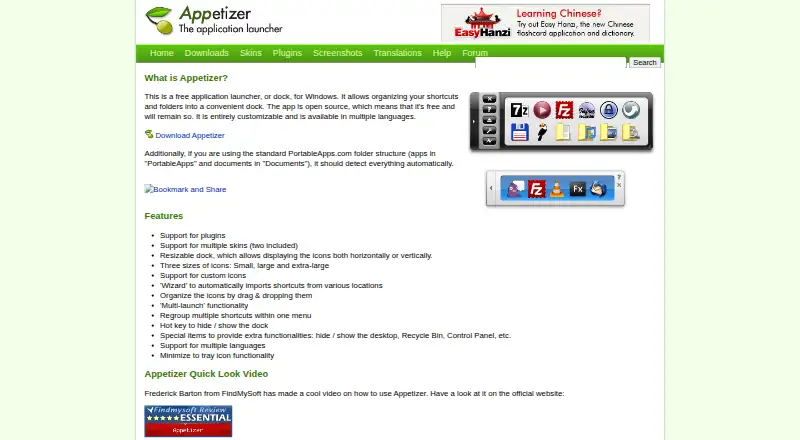
What Appetizer is
Appetizer is a free, open-source Windows launcher that keeps shortcuts and folders together in a dock. A setup wizard imports shortcuts from different locations; you can then arrange icons by dragging them or collect them in menus. Resize the dock and choose a horizontal or vertical layout, small, large, or extra-large icons, custom icons, and skins, including two supplied ones. With the standard PortableApps.com folder structure, Appetizer should find apps in PortableApps and documents in Documents. It can launch multiple items, hide or show through a hotkey, minimize to the tray, and provide controls for the desktop, Recycle Bin, and Control Panel. The maker offers version 1.4 as a Windows installer or ZIP package, which can be unpacked to a hard drive or USB stick; settings stay in the application directory. The download page lists Windows 2000, XP, and Vista. Plugins add optional functions such as USB document encryption, shortcut grouping, and closing the dock after launch; a restart is required to enable them.
Who it suits
Appetizer suits Windows users who want a customizable dock for organizing and launching shortcuts, including users of the standard PortableApps.com folder structure. Its portable ZIP package may suit those who want to keep the application and its settings on a USB stick.
What it does well
- Imports shortcuts with a wizard and supports drag-and-drop organization.
- Dock supports horizontal or vertical layouts and several icon sizes.
- Can launch multiple items and hide or show with a hotkey.
- Portable ZIP package can run from a hard drive or USB stick.
- Supports the standard PortableApps.com folder structure.
What to know first
- Download page lists Windows 2000, XP, and Vista.
- Plugins require a restart to enable.
- Forum registration is closed.
Limits
The download page says version 1.4 works on Windows 2000, XP, and Vista. Plugins need an Appetizer restart after installation to become enabled.
Plans
| Plan | Billed and limits | Price |
|---|---|---|
| Appetizer | Free open-source application launcher for Windows | Free |
As appetizer.cozic.net lists them, read 11 Oct 2026. The maker's own page has the final word.
Getting started
- Open the Appetizer website.
- Choose the Windows installer or download the ZIP package for portable use.
- If using the ZIP, unpack it to a hard drive or USB stick.
- Use the wizard to import shortcuts, then arrange icons or group them in a menu.
- To add a plugin, use the Configuration window's plugin tab with a .zpl file, then restart Appetizer.
Verdict
Appetizer combines shortcut organization, launch controls, and dock customization in a free Windows application. Check the listed Windows versions and plugin restart requirement before choosing it.
Questions
Is Appetizer free?
Yes. The Appetizer plan is free, and the maker describes the launcher as open source and says it will remain free.
Which platforms are listed?
The listed platforms are API, self-hosted, and Windows; the download page describes a Windows installer and ZIP package.
Which Windows versions does version 1.4 support?
The download page lists Windows 2000, XP, and Vista.
Can Appetizer run portably?
Yes. The ZIP package can be unpacked to a hard drive or USB stick, with settings saved in the application directory.
Does it support plugins?
Yes. Examples include document encryption and decryption for a USB key, shortcut grouping, and closing the dock after launching an app. Plugins are installed from the Configuration window's plugin tab using a .zpl file, and require a restart.
Who makes Appetizer?
The site's copyright identifies Laurent Cozic.
Facts from Appetizer's own pages
- Customization
- The dock supports plugins, multiple skins, custom icons, and horizontal or vertical layouts. · appetizer.cozic.net, 11 Oct 2026
- Dock layout
- The dock can be resized and display icons horizontally or vertically. · appetizer.cozic.net, 11 Oct 2026
- Download formats
- The maker offers version 1.4 as a Windows installer and a ZIP package for portable use, with settings saved in the application directory. · appetizer.cozic.net, 11 Oct 2026
- Help and API
- Help files are bundled with the executable and offered in several languages, and the site links to plugin creation guidance and an API reference. · appetizer.cozic.net, 11 Oct 2026
- Icons and skins
- It supports small, large, and extra-large icons, custom icons, and multiple skins, with two included. · appetizer.cozic.net, 11 Oct 2026
- Launch controls
- Features include multi-launch, a hotkey to hide or show the dock, and minimizing the dock to the tray. · appetizer.cozic.net, 11 Oct 2026
- Launch features
- Appetizer supports multi-launch and a hotkey to hide or show the dock. · appetizer.cozic.net, 11 Oct 2026
- Maker
- The site copyright identifies Laurent Cozic. · appetizer.cozic.net, 11 Oct 2026
- Open source
- The maker describes Appetizer as open source and says it will remain free. · appetizer.cozic.net, 11 Oct 2026
- Organization
- Users can drag and drop icons, group shortcuts in menus, and use a wizard to import shortcuts from various locations. · appetizer.cozic.net, 11 Oct 2026
- Plugin examples
- Available plugins include Securizer for encrypting and decrypting documents on a USB key, a shortcut grouping menu item, and a plugin to close Appetizer after launching an app. · appetizer.cozic.net, 11 Oct 2026
- Plugin installation
- Plugins are installed from the Configuration window's plugin tab using a .zpl file, and Appetizer must be restarted to enable them. · appetizer.cozic.net, 11 Oct 2026
- Plugins
- Available plugins include document encryption and decryption for a USB key, adding icons to groups, closing the dock after launching an app, revealing a shortcut target, and hiding the dock on startup. · appetizer.cozic.net, 11 Oct 2026
- PortableApps detection
- With the standard PortableApps.com folder structure, Appetizer should detect apps in “PortableApps” and documents in “Documents” automatically. · appetizer.cozic.net, 11 Oct 2026
- PortableApps support
- When using the standard PortableApps.com folder structure, Appetizer should detect its apps and documents automatically. · appetizer.cozic.net, 11 Oct 2026
- Portable package
- The ZIP package can be unzipped to a hard drive or USB stick, and settings are saved in the application directory. · appetizer.cozic.net, 11 Oct 2026
- Purpose
- Appetizer is a free application launcher, or dock, for Windows that organizes shortcuts and folders. · appetizer.cozic.net, 11 Oct 2026
- Shortcut organization
- A wizard imports shortcuts from various locations, and icons can be organized by drag and drop or regrouped in a menu. · appetizer.cozic.net, 11 Oct 2026
- Special items
- Special items can provide access to functions such as showing or hiding the desktop, Recycle Bin, and Control Panel. · appetizer.cozic.net, 11 Oct 2026
- Support
- Forum registration is closed because of spam, and the site says users may contact the maker if needed. · appetizer.cozic.net, 11 Oct 2026
- Supported Windows versions
- The download page says the latest version works on Windows 2000, XP, and Vista. · appetizer.cozic.net, 11 Oct 2026
- Windows compatibility
- The download page says version 1.4 works on Windows 2000, XP, and Vista. · appetizer.cozic.net, 11 Oct 2026
Where Appetizer stands on Freedom251
- App Launcher Software#6 of 40
- App Launchers#9 of 40
- App launchers#9 of 40