PortableApps.com Platform
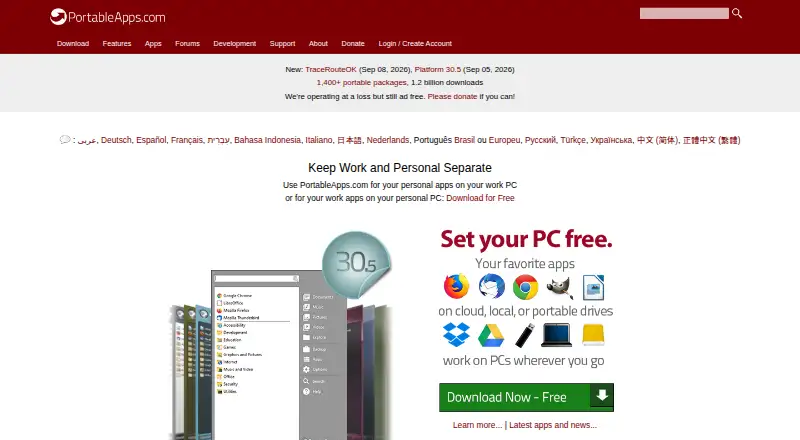
What PortableApps.com Platform is
PortableApps.com Platform helps users build a portable app suite for a synced cloud folder, local PC, or USB drive. Its built-in app store lets users browse and install available apps without a download limit. The menu can be customized with folders and favorites, and includes integrated search. The PortableApps.com Updater notifies users about app updates and can install them without changing settings or saved files. The download page also lists integrated backup and restore. The platform can be installed in synced folders such as Dropbox, Google Drive, and Box. The support page says apps obtained through its store are checked for malware and viruses and are not altered after checking. The platform is free and open source under GPL, with some MIT and CC components; its listed plan is free. The download is listed as 7MB and installed size as 19MB. Windows is listed, with Linux, Unix, and BSD use through Wine and Mac OS X through compatibility software. Apps outside PortableApps.com Format may not be included in app-data-only backups and can leave data on a local PC or lose functionality when moved.
Who it suits
It suits people who want to carry a software collection and its settings between PCs for work, home, school, or travel. It may also suit users who want to place their app suite in a synced folder or on a USB drive.
What it does well
- Built-in store has no download limit.
- Menu supports folders, favorites, and integrated search.
- Updater can preserve settings and saved files.
- Integrated backup and restore are listed.
What to know first
- Linux, Unix, and BSD use requires Wine.
- Mac OS X use requires compatibility software.
- Some apps may be excluded from app-data-only backups.
Limits
Apps outside PortableApps.com Format are excluded from app-data-only backups and may leave data on a local PC or lose functionality when moved between PCs. The platform is listed for Windows; use on Linux, Unix, and BSD is via Wine, and on Mac OS X via compatibility software.
Plans
| Plan | Billed and limits | Price |
|---|---|---|
| PortableApps.com Platform | Free / Open Source (GPL, some MIT, some CC images) · 7MB download / 19MB installed · Windows | Free |
| PortableApps.com Platform Free | Platform and portable app store · no paid tier published · donations accepted | Free |
As portableapps.com lists them, read 11 Oct 2026. The maker's own page has the final word.
Getting started
- Visit https://portableapps.com/.
- Download the platform; the listed download is 7MB.
- Choose a local PC, portable USB drive, or synced folder such as Dropbox, Google Drive, or Box.
- Browse and install available apps through the built-in app store.
- Organize apps with folders and favorites, then use integrated search to find them.
PortableApps.com Platform is a free, open-source suite for assembling portable applications and taking them, with their settings, between computers. It best fits people who work across home, school, office, or travel machines and want one managed collection on a USB drive or synced folder. The trade-off is important: portability is most dependable when apps use PortableApps.com Format.
Overview
Founded in 2004, the platform lets you build a personal app suite in a local folder, a portable USB drive, or a synced service such as Dropbox, Google Drive, or Box. Its built-in store handles browsing and installation, with no download limit, so it is more useful than a bare launcher for assembling a complete working toolkit. The project is free and open source under GPL, with some MIT and Creative Commons components.
Portability has a defined boundary. Apps in PortableApps.com Format are the safest choice for carrying settings and user data between PCs. When you back up only app data, software outside that format is excluded; such apps can leave data on the original computer or lose functionality after being moved. That makes the platform a strong fit for a curated portable library, not a guarantee that every desktop installer will behave like a portable app.
Key features
App discovery and organization
The integrated app store provides one place to find and install available software without a download quota. A customizable menu adds folders, favorites, and search, which becomes valuable as the suite grows beyond a few utilities. This is a practical way to keep a USB or cloud-based collection usable instead of turning it into a list of scattered executables.
Updates without resetting work
PortableApps.com Updater alerts you to available app updates and can install them while preserving settings and saved files. That reduces the maintenance burden of a portable collection and is particularly useful for people who regularly move between computers.
Backup, cloud use, and trust
The download page includes integrated backup and restore. Cloud-folder installation supports services including Dropbox, Google Drive, and Box, giving users a route to the same suite from multiple machines. The support documentation says apps obtained through the store are checked for malware and viruses and are not altered after checking. Support comes through online help pages, community forums, and live chat; support issues do not receive email or phone assistance.
Pricing
| Plan | Price | What it includes |
|---|---|---|
| PortableApps.com Platform | free | Free and open-source GPL software, with some MIT and Creative Commons components; 7MB download and 19MB installed |
There is no paid tier, usage charge, or free-trial period. The free plan is therefore the only choice and suits anyone who wants the full platform without a subscription. Its stated plan platform is Windows, while the project describes broader use through compatibility software rather than a separate native paid edition.
Platforms
The plan identifies Windows, and the platform is presented as cross-platform. The download information lists Windows operating systems and says Linux, Unix, and BSD can run it through Wine, while Mac OS X use depends on compatibility software. That makes it workable for mixed-device households, but users should not mistake compatibility layers for the same native experience on every system.
Who it's for
Choose it if you need favorite programs and settings available across work, home, school, or travel PCs, especially from a USB drive or synchronized cloud folder. It also suits open-source users who want an app catalog, updating, organization, and backup in one free package. Look elsewhere if your essential applications are outside PortableApps.com Format and must preserve data and functionality flawlessly across machines.
Pros and cons
Pros
- Unlimited app-store downloads: assembling a broad portable toolkit does not incur a download cap.
- Useful maintenance tools: the updater preserves settings and saved files, while integrated backup and restore support routine moves.
- Flexible storage: local folders, USB drives, and supported synced folders cover several working styles.
- Open and free: GPL-based open-source software has no paid plan or trial expiration.
- Store safety checks: apps are checked for malware and viruses and kept unchanged after checking.
Cons
- Format dependency: non-PortableApps.com apps are omitted from app-data-only backups and may retain data locally or break when moved.
- Compatibility caveat: Linux, Unix, BSD, and Mac OS X use Wine or other compatibility software rather than the stated Windows platform.
- Limited support channels: support issues have no email or phone option.
Alternatives
For a focused launcher rather than a portable suite, consider App Launcher Software. Launchy is a free, pay-what-you-want launcher across Android, Linux, macOS, and Windows. Raycast is a freemium option with core features, thousands of extensions, three months of Clipboard History, and five Notes on its free plan. Alfred suits Mac users wanting free launching and file search, with an optional $34.00 one-time single license for two of their Macs and the current version. bemenu is a GPLv3/LGPLv3 Linux and macOS menu with no stated usage limits. Cerebro is free, MIT-licensed, and available on Linux, macOS, and Windows. Ueli is a free launcher for those three desktop systems. Appetizer is a free, open-source launcher for Windows and self-hosted or API contexts. dmenu is a free Linux-only X11 dynamic menu under the MIT/X Consortium License.
Verdict
PortableApps.com Platform is the right choice for anyone who wants a free, organized app library that can travel on USB storage or a synced folder, with updating and backup built in. Choose it for dependable portability within its supported app format; choose another launcher if your priority is native, lightweight app search or unrestricted compatibility with ordinary desktop software.
Verdict
PortableApps.com Platform brings app selection, organization, updates, and backup tools into a portable suite. Users should check app-format limitations and platform requirements before relying on it across computers.
Questions
How much does PortableApps.com Platform cost?
It is free. The listed plan is free.
Is there a free plan or trial?
The platform has a free plan. No free trial is listed.
Which operating systems does it support?
Windows is listed. The download page also describes use on Linux, Unix, and BSD via Wine and on Mac OS X via compatibility software.
Is PortableApps.com Platform open source?
Yes. It is listed as open source under GPL, with some MIT and CC components.
How does it handle backups and app data?
The download page lists integrated backup and restore. Apps outside PortableApps.com Format are not included when backing up only app data and may leave data on a local PC or lose functionality when moved.
What support options are available?
Support is available through online support pages, community forums, and live chat. Email and phone support are not offered for support issues.
Facts from PortableApps.com Platform's own pages
- App data limit
- Apps outside PortableApps.com Format are not included when backing up only app data, and may leave data on the local PC or lose functionality when moved between PCs. · portableapps.com, 11 Oct 2026
- App organization
- Users can organize applications with folders, favorites, usage-based ordering and integrated search. · portableapps.com, 14 Oct 2026
- App store
- Its built-in app store lets users browse and install available apps, with no download limit. · portableapps.com, 11 Oct 2026
- Automatic updates
- The platform checks for and installs updates for supported portable applications. · portableapps.com, 14 Oct 2026
- Backup
- The platform download page lists integrated backup and restore as a feature. · portableapps.com, 11 Oct 2026
- Built-in app store
- Its integrated app directory lets users browse and install hundreds of free apps by category, title and release status. · portableapps.com, 14 Oct 2026
- Catalog scale
- The site reports more than 1,400 portable packages and 1.2 billion downloads. · portableapps.com, 14 Oct 2026
- Cloud integrations
- The platform can be installed in synced folders such as Dropbox, Google Drive, and Box. · portableapps.com, 11 Oct 2026
- Company founder
- Crunchbase names John Haller as founder, CEO and lead engineer. · crunchbase.com, 14 Oct 2026
- Company founding
- The maker says portable-software work began in March 2004; LinkedIn lists PortableApps.com as founded in 2005. · portableapps.com, 14 Oct 2026
- Company headquarters
- Crunchbase lists headquarters in New York, United States. · crunchbase.com, 14 Oct 2026
- Company legal name
- Crunchbase identifies the operating legal entity as Rare Ideas, LLC. · crunchbase.com, 14 Oct 2026
- Company size
- LinkedIn lists PortableApps.com as a 2–10 employee partnership. · linkedin.com, 14 Oct 2026
- Compatibility filtering
- The app store can hide packages incompatible with the detected Windows version and show legacy releases when available. · portableapps.com, 14 Oct 2026
- Compatibility limit
- The download page lists Windows operating systems and says the platform also works with Linux, Unix, and BSD via Wine and Mac OS X via compatibility software. · portableapps.com, 11 Oct 2026
- Developer documentation
- PortableApps.com publishes Launcher documentation covering launcher.ini, environment substitutions, packaging format, Java, Qt, registry handling, debugging and custom code. · portableapps.com, 14 Oct 2026
- Extensibility
- Developers can add non-PortableApps-format programs manually and supply command-line parameters through a .pap.ini file. · portableapps.com, 14 Oct 2026
- Founded
- 2004 · portableapps.com, 28 Sept 2026
- Funding model
- PortableApps.com says it operates at a loss and requests donations through cards, PayPal, cryptocurrency and other methods. · portableapps.com, 14 Oct 2026
- Intended users
- The site describes the platform as a way to carry favorite software and settings between PCs for work, home, school, and travel. · portableapps.com, 11 Oct 2026
- Latest documented release
- The changelog lists Platform 30.4.1 on May 30, 2026, including a 7-Zip update and logo-date update. · portableapps.com, 14 Oct 2026
- License filtering
- Version 29.0 added filters for personal, educational, business and open-source licensing choices. · portableapps.com, 14 Oct 2026
- Limit: configuration complexity
- A Snapfiles reviewer rated the product two stars and described it as clunky and difficult to configure. · snapfiles.com, 14 Oct 2026
- Limit: manual updates outside format
- Support documentation says applications outside PortableApps format are not included in app-data-only backups and may require manual update handling. · portableapps.com, 14 Oct 2026
Where PortableApps.com Platform stands on Freedom251
- App launchers#1 of 40
- App Launchers#2 of 40
- App Launcher Software#4 of 40