SyMenu
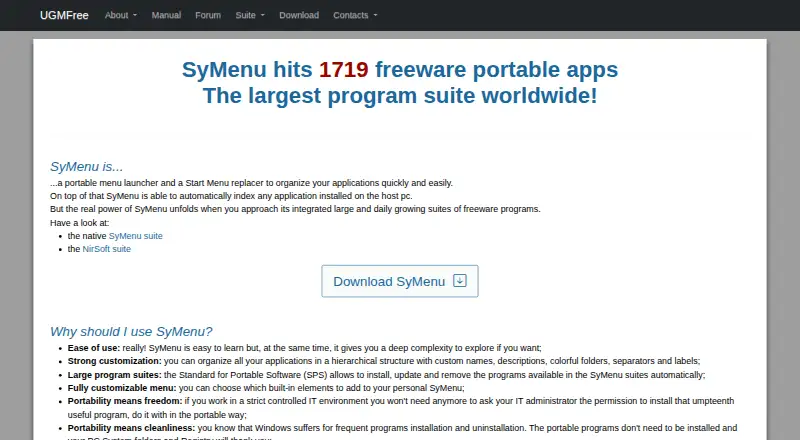
What SyMenu is
SyMenu is a free portable application launcher and Start Menu replacement for Windows 10 and Windows 11. It can index programs on the host PC and run from local or removable drives, including USB drives, memory cards, CDs, and DVDs. The maker describes two suites with more than 1,000 programs: a general-purpose SyMenu suite and a NirSoft suite focused on IT professionals and sysops.
Standard for Portable Software (SPS) lets users install, update, and remove documented programs. Applications can be organized in hierarchies with custom names, descriptions, folders, separators, and labels. Search can find configured items and, when enabled, files in indexed folders and programs on the host PC; it can also expose programs linked in the Windows Start menu. Autoexec can launch configured programs or scripts when SyMenu starts or closes. Third-party plugins are supported. The manual says SyMenu does not touch the registry, system folders, or Start menu unless users enable non-portable features. It does not automatically install program dependencies.
Who it suits
SyMenu suits Windows users who want a portable launcher, an organized application catalog, and search across configured items. Its removable-drive support may suit users who want to carry their launcher with them.
What it does well
- Runs from local or removable drives.
- Catalog suites contain more than 1,000 programs.
- SPS manages documented program installation and updates.
- Search can include indexed files and host programs.
- Freeware for Windows 10 and Windows 11.
What to know first
- Does not automatically install program dependencies.
- Supported operating systems are Windows 10 and Windows 11.
- Some features are not portable.
Limits
SyMenu does not automatically download and install dependencies required by a program, so users need a suitable runtime environment.
Plans
| Plan | Billed and limits | Price |
|---|---|---|
| SyMenu | Freeware · Windows 10 and Windows 11 · 32-bit and 64-bit | Free |
As ugmfree.it lists them, read 7 Oct 2026. The maker's own page has the final word.
Getting started
- Visit the SyMenu website.
- Use a Windows 10 or Windows 11 computer.
- Run SyMenu from a local or removable drive.
- Organize applications and configure search or Autoexec as needed.
- Use SPS to install, update or remove documented programs.
Verdict
SyMenu offers portable launching, catalog management, search, and automation without a listed price. Users should account for dependencies themselves and note that enabling some features makes them non-portable.
Questions
How much does SyMenu cost?
The listed SyMenu plan is free, and the pricing model is free.
Does SyMenu have a free plan or trial?
It has a free plan. There is no free trial.
Which platforms does SyMenu support?
It supports Windows 10 and Windows 11, in 32-bit and 64-bit editions.
Can SyMenu install or update programs?
Yes. Standard for Portable Software (SPS) lets users install, update and remove documented programs through SyMenu.
Does SyMenu support plugins?
Yes. Third-party plugins can be installed by copying a plugin folder into SyMenu’s Plugin folder.
Where can users get SyMenu support?
The maker’s forum is used for feature discussions, bug reports and community support.
Facts from SyMenu's own pages
- Application catalog
- The maker describes two suites with more than 1,000 programs, including a general purpose SyMenu suite and an IT professional and sysops focused NirSoft suite. · ugmfree.it, 7 Oct 2026
- Automation
- Autoexec can launch configured programs or scripts when SyMenu starts or closes. · ugmfree.it, 7 Oct 2026
- Customization
- Users can organize applications hierarchically with custom names, descriptions, folders, separators and labels. · ugmfree.it, 7 Oct 2026
- Founded
- 2008 · ugmfree.it, 28 Sept 2026
- Languages
- The maker lists translations including English, Spanish, Chinese, French, German, Italian, Korean and Portuguese. · ugmfree.it, 7 Oct 2026
- Limitations
- SyMenu does not automatically download and install dependencies required by a program, so users need a suitable runtime environment. · ugmfree.it, 7 Oct 2026
- Plugins
- SyMenu supports third party plugins, which can be installed by copying a plugin folder into the SyMenu Plugin folder. · ugmfree.it, 7 Oct 2026
- Portable use
- It can run from local or removable drives, including USB drives, memory cards, CDs and DVDs. · ugmfree.it, 7 Oct 2026
- Purpose
- SyMenu is a portable application launcher and Start Menu replacement that can index applications installed on the host PC. · ugmfree.it, 7 Oct 2026
- Requirements
- The manual lists no additional prerequisites and specifies Windows 10 and Windows 11 as supported operating systems. · ugmfree.it, 7 Oct 2026
- Search
- The search bar can find configured items and, when enabled, files in indexed folders and programs on the host PC. · ugmfree.it, 7 Oct 2026
- Security and system footprint
- The manual says SyMenu does not touch the Windows registry, system folders or Start menu unless users enable features that are not portable. · ugmfree.it, 7 Oct 2026
- SPS management
- Standard for Portable Software lets users install, update and remove documented programs through SyMenu. · ugmfree.it, 7 Oct 2026
- Support
- The maker's forum is used for feature discussions, bug reports and SyMenu community support. · ugmfree.it, 7 Oct 2026
- Windows integration
- SyMenu can expose programs linked in the host PC Windows Start menu through its search bar. · ugmfree.it, 7 Oct 2026
Where SyMenu stands on Freedom251
- App launchers#18 of 40
- App Launcher Software#26 of 40
- App Launchers#27 of 40