Freedom251 › Outliner Software

Tine
What Tine is
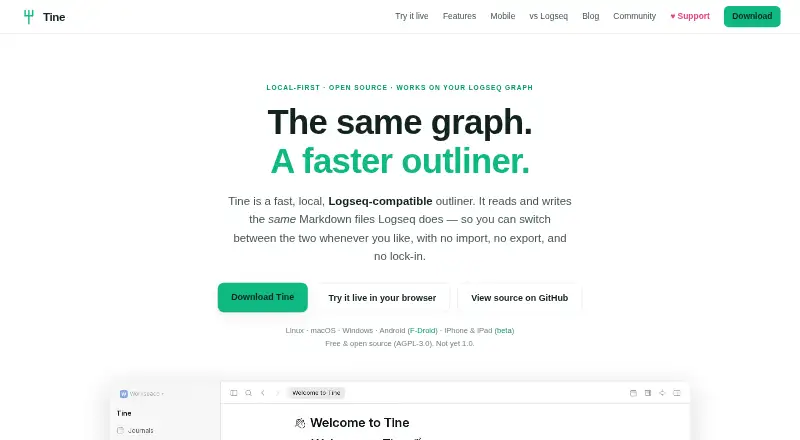
Tine is a free, local outliner for Markdown files, including the same on-disk format used by Logseq. A graph can be opened in either app without an import or export step. Tine supports split panes, separate tabs and histories, and layouts that persist after a restart. Search results can be filtered and displayed as lists, tables, or boards through a visual query editor synchronized with query text. Sheets can turn bullets and their children into grids, typed-field tables, or boards, with formulas, filters, aggregates, grouping, and CSV or TSV import. Tine can publish graph pages as a static site with search, tabs, split view, and navigation, without requiring a server. It has no built-in sync, so users need to bring a service such as Syncthing, Dropbox, or git. The app says it has no account, advertising, analytics, or tracking, and does not upload graph or note contents to Tine servers. Plugin support is experimental and does not work with Logseq or Obsidian plugin APIs. Android builds are available through F-Droid or GitHub; iPhone and iPad access is a public TestFlight beta, with no App Store listing yet.
Who it suits
Tine suits people who want a local Markdown outliner and need to work with a Logseq-format graph. It also fits users who want queries, sheets, or static-site publishing, provided they arrange their own sync service.
What it does well
- Reads and writes the same on-disk format as Logseq.
- Split panes, tabs, histories, and layouts are supported.
- Queries can display results as lists, tables, or boards.
- Can publish graph pages as a static site.
- Says it does not upload notes to Tine servers.
What to know first
- There is no built-in sync service.
- The plugin API is experimental and incompatible with Logseq and Obsidian plugins.
- iPhone and iPad access is a TestFlight beta, not an App Store listing.
Plans
| Plan | Billed and limits | Price |
|---|---|---|
| Free | Free and open source under AGPL-3.0 | Free |
As tine.page lists them, read 4 Oct 2026. The maker's own page has the final word.
Getting started
- Visit the Tine website to get started.
- Install Tine on Linux, macOS, Windows, or Android.
- Open a Markdown graph, including one in Logseq's on-disk format.
- Set up a separate sync service such as Syncthing, Dropbox, or git if you need sync.
- For iPhone or iPad, access the public TestFlight beta.
Tine is a local-first outliner for people who want their notes in Markdown files and their workspace organized around an outline. It is best suited to Logseq users and other people comfortable managing their own files and sync. The absence of built-in sync is a meaningful trade-off for anyone who expects their app to coordinate devices for them.
Overview
Tine reads and writes Logseq’s on-disk format, so the same graph can be opened in either app without an import or export step. That makes Tine a useful alternative workspace for an existing Logseq graph, while its local-file approach also suits people who want to keep notes outside a hosted account. It is less convenient for users who want a single service to manage both their notes and cross-device sync.
The app combines outlining with filtered search, structured Sheets, and static-site publishing. Its free, open-source plan removes a subscription decision, but users still need to choose how to synchronize files across devices.
Key features
Outlining and workspace
Tine supports Markdown, backlinks, folding, filtering, search, tabs, and focus mode. Split panes can keep separate tabs and histories, and the layout is retained after a restart. These controls are useful for research or planning that involves moving among several pages; someone who only needs a simple linear list may not need the additional workspace flexibility.
Search and Sheets
Search results can be narrowed with filters and presented as a list, table, or board. A visual query editor stays synchronized with the query text, which helps people who want to refine a search and inspect the resulting structure in more than one way.
Sheets turn bullets and their children into grids, typed-field tables, or boards, with formulas, filters, aggregates, grouping, and CSV or TSV import. This gives structured data a place within an outline, rather than limiting the app to nested notes. It is a stronger fit for users who want to organize and examine information in those formats than for those seeking only basic note capture.
Conflict handling and publishing
Tine has no built-in sync; its site points users to services such as Syncthing, Dropbox, or git. When page versions conflict, Concord compares them block by block and lets users keep either version, keep both, or merge them. That provides a way to resolve edits, but it does not remove the need to set up and maintain a separate sync service.
Graph pages can be exported as a static site with search, tabs, split view, and navigation, without requiring a server. This is useful for people who want to publish a browsable version of their graph without running a site backend.
Privacy and plugins
Tine says it has no account, advertising, analytics, or tracking, and does not upload graph or note contents to its servers. Plugins run in a capability-limited sandbox rather than receiving unrestricted access to the network, native platform, or filesystem. The plugin API is experimental, however, and Tine plugins are not compatible with Logseq’s or Obsidian’s plugin APIs; users relying on those ecosystems should not assume their extensions will carry over.
Pricing
Tine’s Free plan costs nothing and is open source under AGPL-3.0. It suits users who want the app without a paid tier or subscription. That price does not include built-in sync: users who need multiple devices to share a graph must bring a separate sync service.
Platforms
Tine supports Linux, macOS, Windows, and Android, with offline access. Android builds are available through F-Droid or GitHub. On iPhone and iPad, access is through a public TestFlight beta, with no App Store listing yet, so iOS users should be comfortable with that route. Questions and ideas go through GitHub Discussions; bugs and feature requests go through GitHub Issues.
Who it's for
Tine is a strong fit for Logseq users who want to work with the same local graph in another app, and for Markdown outliner users who value queries, data-oriented Sheets, or static publishing. Its privacy stance and open-source plan may also appeal to people who prefer local files and do not want to create an account.
Look elsewhere if built-in sync is essential, if you depend on plugins from Logseq or Obsidian, or if you need an iOS app from the App Store rather than a TestFlight beta.
Pros and cons
- Pros: Reads and writes Logseq’s file format, so existing graphs can be shared between the apps without conversion.
- Pros: Search views and Sheets offer filters, boards, tables, formulas, and data import within an outliner.
- Pros: Local files, offline access, and a capability-limited plugin sandbox suit users who prioritize control over their notes.
- Cons: No built-in sync means users must choose and maintain a separate service.
- Cons: The experimental plugin API is incompatible with Logseq’s and Obsidian’s plugin APIs.
- Cons: iPhone and iPad access is currently a public TestFlight beta, not an App Store release.
Alternatives
Logseq is the natural alternative for people who want to stay with the format Tine supports; its free plan is for personal use, and a Sync Backer plan offers beta sync access for $5 a month as a recurring monthly donation.
Dynalist is worth considering if a broader platform mix and a freemium service better fit your needs. Its free plan includes unlimited items and documents, with five bookmarks and community support.
Workflowy may suit readers who prefer its free Basic plan, which includes 100 nodes per month, 100mb file uploads, and all features.
Indenta is another free outliner available across Android, iOS, Linux, macOS, web, and Windows.
Legend offers a free plan with 10 panes, one plugin sync account, and unlimited documents and items; consider it if those limits and its freemium model match your workflow.
outl is a free alternative with no paid tier and an MIT license.
Checkvist is an alternative whose free plan includes unlimited hierarchical lists and sharing and collaboration.
CrossLine is another free outliner for Linux, macOS, and Windows.
Browse more options in Outliner Software.
Verdict
Choose Tine if you want a free, local Markdown outliner that can work directly with a Logseq graph and gives you tools for queries, structured Sheets, and static publishing. Its main reason to choose something else is practical: Tine leaves sync to you, and its iOS access remains a TestFlight beta.
Verdict
Tine offers local Markdown outlining, query tools, sheets, and static-site publishing without an account or built-in sync. Its strongest fit is someone prepared to supply their own sync service and, on iOS, use the TestFlight beta.
Questions
Is Tine free?
Yes. Tine is listed as free and open source under the AGPL-3.0 license.
Which platforms are available?
Tine is available for Linux, macOS, Windows, and Android. iPhone and iPad access is a public TestFlight beta, and there is no App Store listing yet.
Can Tine open Logseq graphs?
Yes. Tine reads and writes the same on-disk format as Logseq, so the same graph can be used in either app without importing or exporting.
Does Tine include sync?
No. Users can bring a sync service such as Syncthing, Dropbox, or git.
Is Tine open source?
Yes. It is free and open source under AGPL-3.0.
Who makes Tine?
The site credits Martin Koutecký and describes Tine as independently built.
Facts from Tine's own pages
- Conflict handling
- Concord compares conflicting page versions block by block and lets users keep either version, both, or a merge. · tine.page, 4 Oct 2026
- Logseq compatibility
- Tine targets Logseq’s on-disk format, allowing users to work with the same graph in either app without importing or exporting. · tine.page, 4 Oct 2026
- Maker
- The site credits Martin Koutecký and describes Tine as independently built; it does not state a headquarters or founding date. · tine.page, 4 Oct 2026
- Mobile availability
- Android builds are available through F-Droid or GitHub, while iPhone and iPad access is a public TestFlight beta with no App Store listing yet. · tine.page, 4 Oct 2026
- Plugin limits
- The plugin API is experimental and Tine plugins are not compatible with Logseq’s or Obsidian’s plugin APIs. · tine.page, 4 Oct 2026
- Plugin security
- Plugins run in a capability-limited sandbox and do not receive unrestricted access to the network, native platform, or filesystem. · tine.page, 4 Oct 2026
- Privacy
- Tine says it has no account, advertising, analytics, or tracking, and does not upload graph or note contents to Tine servers. · tine.page, 4 Oct 2026
- Product
- Tine is a fast, local outliner that reads and writes the same Markdown files as Logseq. · tine.page, 4 Oct 2026
- Publishing
- Tine can export graph pages as a static site with search, tabs, split view, and navigation, without requiring a server. · tine.page, 4 Oct 2026
- Search and queries
- Search results can be refined with filters and viewed as a list, table, or board using a visual query editor that stays in sync with query text. · tine.page, 4 Oct 2026
- Sheets
- Sheets turn bullets and their children into grids, typed field tables, or boards with formulas, filters, aggregates, grouping, and CSV/TSV import. · tine.page, 4 Oct 2026
- Split views and tabs
- Users can split the window into panes, keep separate tabs and histories, and retain the layout after a restart. · tine.page, 4 Oct 2026
- Support
- Questions and ideas go through GitHub Discussions, while bugs and feature requests go through GitHub Issues. · tine.page, 4 Oct 2026
- Sync compatibility
- Tine has no built-in sync; its site says to bring a sync service such as Syncthing, Dropbox, or git. · tine.page, 4 Oct 2026
Where Tine stands on Freedom251
- Outliner Software#17 of 31