Freedom251 › eBPF Observability Tools
Kindling
What Kindling is
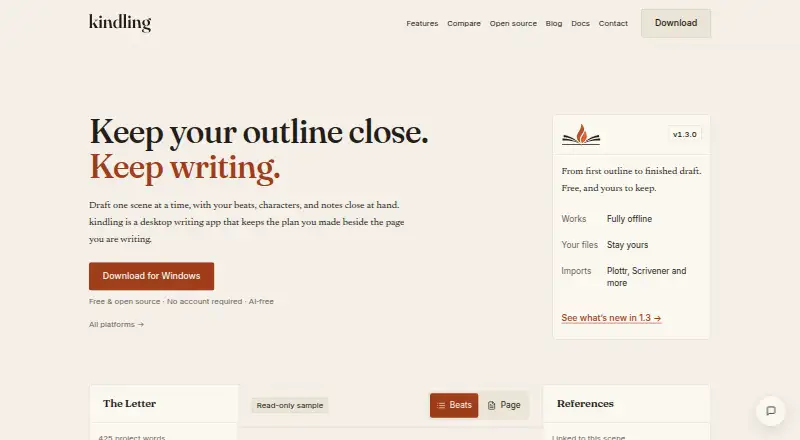
Kindling is a free desktop writing app for fiction writers who want planning material visible while drafting. Scene beats can expand into prompts in the drafting view, or writers can switch to full-page prose editing. Characters and locations tagged in a scene can appear in a side panel with descriptions, notes, and custom fields. The app imports projects from Plottr, Scrivener, yWriter, Obsidian Longform, novelWriter, and Markdown. Export options include DOCX, EPUB, HTML, plain text, Markdown, Scrivener, Longform, and novelWriter. For editorial review, writers can share a .kindling-review file for tracked suggestions and threaded comments, then import feedback and accept or reject changes. Screenplay projects include slugline input, page-count estimates, and one-page or five-page DOCX treatment exports. Projects are stored locally as SQLite files, and writing and review work offline. Kindling requires no account and does not use AI to analyze or interact with writing. It is open source under the MIT license. The listed platforms are Windows 10+, macOS 12+, and x86_64 Linux; the maker says there is no mobile version yet.
Who it suits
Kindling suits fiction writers who plan with outlines, whether they plot closely or work with less fixed plans. It also has tools for screenplay projects and offline editorial review.
What it does well
- Scene beats can appear as expandable drafting prompts.
- Imports and exports several writing project formats.
- Review files support tracked suggestions and threaded comments.
- Stores projects locally and supports offline writing.
- Free, open source, and available for Windows, macOS, and Linux.
What to know first
- There is no mobile version yet.
- Real-time collaboration is not available.
- Windows 10+, macOS 12+, or x86_64 Linux is required.
Limits
Kindling is free forever, with no premium tiers, subscriptions, or feature gates. There is no mobile version; the listed platforms are Windows 10+, macOS 12+, and x86_64 Linux.
Plans
| Plan | Billed and limits | Price |
|---|---|---|
| Kindling | Free forever · No premium tiers · no subscriptions · no feature gates | Free |
As kindlingwriter.com lists them, read 5 Oct 2026. The maker's own page has the final word.
Getting started
- Visit the Kindling website.
- Choose the download for Windows, macOS, or Linux.
- Import a project from a supported format, or start a project in the app.
- Use scene beats as drafting prompts or switch to full-page prose editing.
Kindling is a free desktop writing environment for fiction authors who want planning information beside the draft. It combines expandable scene beats, project references, import and export options, and an offline editorial-review workflow. Its strongest case is for writers who want an open-source, local-first tool rather than a cloud collaboration suite.
Overview
Kindling keeps an outline visible while you write, but it does not force a single planning method. Plotters can work from scene beats, pantsers can draft in the full-page prose editor, and writers who mix approaches can move between both views. Planning states marked as expandable beats or fixed, flexible, or undefined give structure without requiring every scene to be fully designed in advance.
The application is open source under the MIT license, with public source code. Project data stays in local SQLite files, and no account is required. The maker says there are no analytics, telemetry, or usage tracking. Writing and editorial review work offline; automatic updates and optional feedback submissions need an internet connection.
Key features
Outline-aware drafting
Scene beats appear as expandable prompts inside the drafting view, so a writer can keep the next piece of structure in sight without leaving the manuscript. A full-page prose editor is available when the outline becomes a distraction. This makes Kindling a better fit for outline-led fiction than a general notes app, while still accommodating less rigid workflows.
References and formats
Characters and locations tagged in a scene can appear in a side panel with descriptions, notes, and custom fields. That keeps reference material close to the relevant passage, although the supplied workflow is built around tagging rather than a separate live collaboration space. Kindling imports projects from Plottr, Scrivener, yWriter, Obsidian Longform, novelWriter, and Markdown. It exports to DOCX, EPUB, HTML, plain text, Markdown, Scrivener, Longform, and novelWriter, giving authors practical routes into and out of the app.
Editorial review
A .kindling-review file carries tracked suggestions and threaded comments. You can import that feedback and accept or reject changes, which suits an author exchanging a manuscript with an editor while keeping the project local. There is no real-time collaboration, so simultaneous cloud editing is not its purpose.
Screenwriting
Screenplay projects add slugline input, page-count estimates, and one-page or five-page DOCX treatment exports. Those tools make Kindling relevant to writers who move between prose and screenplay projects, though the published feature set is more extensive for planning and drafting than for production collaboration.
Pricing
Kindling — $0.00 USD, free forever. The free plan has no premium tiers, subscriptions, or feature gates. It includes the complete published feature set, so there is no cheaper tier that trades away export formats, review tools, or offline access. There is no free trial because the product itself is permanently free. This is the straightforward choice for individual writers who want the full desktop app without recurring costs or seat calculations.
Platforms
Kindling runs on macOS 12+, Windows 10+, and x86_64 Linux. There is no mobile version yet, so writers who need phone or tablet drafting must look elsewhere. Support and contribution channels are GitHub Issues and Discord.
Who it's for
Choose Kindling if you write fiction and want beats, references, and prose in one desktop workspace; if you are moving a project from Scrivener, Plottr, yWriter, Obsidian Longform, novelWriter, or Markdown; or if local files, offline work, and an open-source license matter more than hosted collaboration. Screenwriters may also value the screenplay-specific fields and treatment exports.
It is a poor fit for teams requiring real-time collaboration, a mobile app, or cloud-managed projects. Its non-AI design also suits writers who prefer pattern matching for reference detection and do not want AI analysis or interaction with their writing.
Pros and cons
- Pro: The full feature set is free forever, with no subscriptions or feature gates, so cost will not limit a long project.
- Pro: Local SQLite storage, no account, and no telemetry support privacy-conscious, offline writing.
- Pro: Broad import and export coverage reduces lock-in when switching from established writing tools.
- Pro: Review files with threaded comments and tracked suggestions provide a structured handoff to editors.
- Con: No real-time collaboration limits it to asynchronous review and individual work.
- Con: No mobile version rules out writers who need the same project on phones or tablets.
- Con: Internet is still needed for automatic updates and optional feedback submissions.
Alternatives
For a broader comparison of planning tools, see Outliner Software; choose that list when you want alternatives beyond a fiction-focused desktop app. The eBPF Observability Tools list is for Linux and infrastructure observability rather than writing.
Kubeshark, DeepFlow, Qpoint, Coroot, groundcover, Inspektor Gadget, Odigos, and Parca are observability products; pick one of them when monitoring software systems, not drafting or reviewing fiction, is your goal.
Verdict
Kindling is an excellent match for solo fiction writers who want visible planning, nearby story references, offline operation, and a genuinely free open-source desktop app. Choose it for local control and format flexibility; look elsewhere if mobile access, real-time teamwork, or a cloud-first workflow is essential.
Verdict
Kindling keeps outlining, drafting, reference notes, and review tools in a free desktop app. Its local storage and offline workflow may suit writers who prefer project data on their device.
Questions
How much does Kindling cost?
The Kindling plan costs 0.00 USD, billed free forever.
Is Kindling open source?
Yes. Kindling is open source under the MIT license, and its source code is public.
Which platforms does Kindling support?
It is available for Windows 10+, macOS 12+, and x86_64 Linux. There is no mobile version.
Does Kindling work offline?
Writing and editorial review work offline. Automatic updates and optional feedback submissions use the internet.
Can writers collaborate in real time?
No. Kindling does not include real-time collaboration, but writers can exchange review files with tracked suggestions and threaded comments.
Does Kindling use AI on writing?
No. It does not use AI to analyze or interact with writing; reference auto-detection uses pattern matching.
Facts from Kindling's own pages
- AI
- Kindling does not use AI to analyze or interact with writing, and its reference auto-detection is described as a non-AI pattern-matching engine. · kindlingwriter.com, 5 Oct 2026
- Editorial review
- Writers can share a .kindling-review file for tracked suggestions and threaded comments, then import feedback and accept or reject changes. · kindlingwriter.com, 5 Oct 2026
- Export formats
- Kindling exports to DOCX, EPUB, HTML, plain text, Markdown, Scrivener, Longform, and novelWriter. · kindlingwriter.com, 5 Oct 2026
- For whom
- The maker describes it as built for fiction writers who plan, including plotters, pantsers, and writers between those approaches. · kindlingwriter.com, 5 Oct 2026
- Import formats
- Kindling imports projects from Plottr, Scrivener, yWriter, Obsidian Longform, novelWriter, and Markdown. · kindlingwriter.com, 5 Oct 2026
- License
- Kindling is open source under the MIT license, and its source code is public. · kindlingwriter.com, 5 Oct 2026
- Offline use
- The maker says writing and editorial review work offline, while automatic updates and optional feedback submissions use the internet. · kindlingwriter.com, 5 Oct 2026
- Outline-aware drafting
- Scene beats appear as expandable prompts in the drafting view, and writers can also switch to a full-page prose editor. · kindlingwriter.com, 5 Oct 2026
- Platform limits
- The maker lists Windows 10+, macOS 12+, and x86_64 Linux, and says there is no mobile version yet. · kindlingwriter.com, 5 Oct 2026
- Privacy and storage
- The desktop app stores project data locally as SQLite files and does not require an account or include analytics, telemetry, or usage tracking. · kindlingwriter.com, 5 Oct 2026
- Screenwriting
- Screenplay projects include slugline input, page-count estimates, and one-page or five-page DOCX treatment exports. · kindlingwriter.com, 5 Oct 2026
- Story references
- Characters and locations tagged in a scene can surface in a side panel with descriptions, notes, and custom fields. · kindlingwriter.com, 5 Oct 2026
- Support
- The maker links to GitHub Issues and Discord for questions and contributions. · kindlingwriter.com, 5 Oct 2026
- What it does
- Kindling is a desktop writing app that keeps an outline visible while fiction writers draft. · kindlingwriter.com, 5 Oct 2026
Where Kindling stands on Freedom251
- eBPF Observability Tools#12 of 29
- Outliner Software#13 of 31