Freedom251 › Coding Playgrounds
Theia IDE
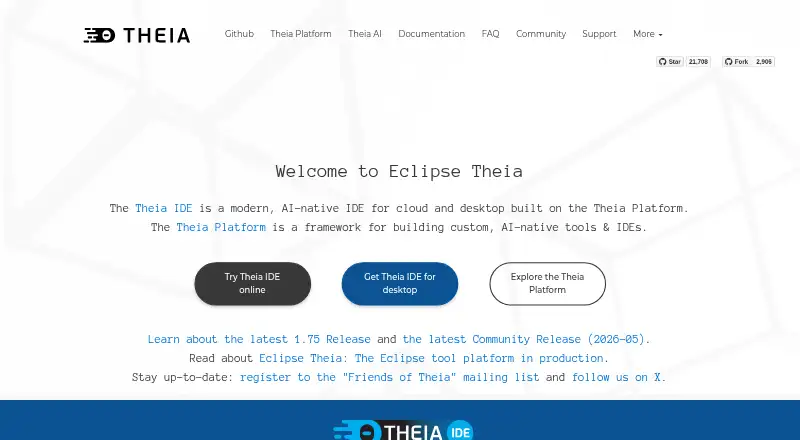
What Theia IDE is
Theia IDE is a free, open-source development environment for cloud and desktop, built on the Theia Platform. Users can choose cloud, self-hosted, or local AI models and create custom agents. It connects through official SDKs for providers including OpenAI, Anthropic, and Google, and sends AI data to the provider selected by the user. The IDE supports VS Code extensions through Open VSX, although some Microsoft-proprietary extensions are unavailable and some extension API features may not work as expected. Language support uses the Language Server Protocol, including for Python, Java, JavaScript, and C++. Workspace Trust puts untrusted folders in Restricted Mode and disables features that could run code or access sensitive workspace content; the project notes that this protection is still maturing. Theia IDE does not collect or transmit user activity, project details, or code, though it can check for IDE and extension updates. The ready-to-use IDE is free, and its online test version is limited to 30 minutes per session. The underlying platform can be adapted into customized or white-labeled IDEs and tools.
Who it suits
Theia IDE suits developers seeking a free, open-source environment for cloud or desktop work, with a choice of AI model hosting. Theia Platform is aimed at adopters building customized or domain-specific IDEs and tools.
What it does well
- Choose cloud, self-hosted, or local AI models
- Create custom AI agents
- Uses Language Server Protocol for multiple languages
- Workspace Trust restricts untrusted folders
What to know first
- Online test version lasts 30 minutes per session
- Some Microsoft-proprietary extensions are unavailable
- Some extension API features may not work as expected
- Workspace Trust is still maturing
Limits
The free online demo is limited to 30 minutes per session. The free Theia IDE plan is open-source; no other plan limits are listed.
Plans
| Plan | Billed and limits | Price |
|---|---|---|
| Theia IDE | Open-source IDE · online demo limited to 30 minutes per session | Free |
As theia-ide.org lists them, read 30 Sept 2026. The maker's own page has the final word.
Getting started
- Open the Theia IDE website.
- Choose a web, Linux, macOS, or Windows setup.
- Select cloud, self-hosted, or local AI models if you want AI assistance.
- Add supported extensions through Open VSX.
- Use the online demo for a session of up to 30 minutes.
Theia IDE is an open-source environment for building software in a browser or on the desktop, with AI deployment choices that range from local to cloud. It fits developers who want control over models and data, and organizations that may eventually shape a customized IDE. The trade-off is a less complete extension ecosystem and workspace-security features that are still developing.
Overview
Theia combines a ready-to-use general-purpose IDE with the Theia Platform, its modular foundation for creating customized or white-labeled cloud and desktop tools. That makes it two products in practical terms: an editor for everyday development and a toolkit for teams building domain-specific coding environments. The platform is a strong reason to consider Theia when your workflow needs tailoring; it matters less if you only want the broadest out-of-the-box compatibility.
Remote development is supported, and the IDE runs on the web as well as on desktop systems. The online test session ends after 30 minutes, so the browser demo is useful for a short appraisal, not for sustained project work.
Key features
Flexible AI deployment
Theia accepts cloud, self-hosted, and local AI models and lets you create custom agents. Official SDK integrations include OpenAI, Anthropic, and Google, while AI data is sent to the provider you select. This suits teams with data-routing or deployment requirements and developers who want to avoid dependence on one model vendor. It also puts responsibility for provider choice and resulting data handling with the user.
Privacy and workspace controls
The IDE does not collect or transmit user activity, project details, or code. It may check for IDE and extension updates, but that is materially narrower than telemetry that records development work. Workspace Trust opens untrusted folders in Restricted Mode and disables features that could execute code or read sensitive workspace content. The protection is valuable when opening unfamiliar projects, although the system is still maturing: some extensions are treated as supported despite limited untrusted-workspace behavior, and some subsystems still need deeper integration. Security-conscious teams should account for that unevenness.
Languages, extensions, and customization
Language Server Protocol support covers languages including Python, Java, JavaScript, and C++. VS Code extensions are available through Open VSX, giving the IDE a substantial starting point for tooling. Compatibility is not complete: Microsoft-proprietary extensions are unavailable, and some extension API features may behave differently than expected. If your workflow depends on a particular Microsoft extension, this is a decisive constraint rather than a minor inconvenience.
The modular Theia Platform allows adopters to build and brand their own cloud or desktop IDEs and tools. That extensibility is more significant for product teams than for an individual looking for a conventional editor.
Pricing
Theia IDE is free and open source. The sole plan, Theia IDE, costs free and includes the open-source IDE; the online demo remains limited to 30 minutes per session. There are no paid seats, usage quotas, renewal terms, or trial conversion to weigh. Professional support, training, and development services are offered by contributing companies, which is relevant for organizations that need assistance beyond community help.
Platforms
Theia is available as an extension and runs on Linux, macOS, Windows, the web, and self-hosted deployments. This combination supports local desktop work, browser-based access, and teams that want to operate their own environment. Remote development and AI assistance are supported, and an extensions marketplace is available through Open VSX.
Who it's for
Choose Theia if you are a developer who wants local or self-hosted AI options, a team with requirements about where AI data goes, or an organization building a specialized or white-labeled IDE. It is also a sensible free option for common languages when your required extensions are available through Open VSX. Look elsewhere if Microsoft-proprietary extensions are central to your work, if you need fully mature untrusted-workspace coverage today, or if a 30-minute online session cannot accommodate your evaluation.
Pros and cons
Pros
- Model freedom: cloud, self-hosted, and local AI choices, plus custom agents, reduce vendor lock-in.
- Narrow telemetry scope: activity, project details, and code are not collected or transmitted.
- Broad deployment: web, desktop, self-hosted, and remote-development options fit varied setups.
- Platform extensibility: teams can create customized and white-labeled IDE products.
- Free access: the open-source IDE costs nothing and has no paid-seat structure.
Cons
- Extension gaps: Microsoft-proprietary extensions are unavailable and some APIs may not work as expected.
- Workspace Trust is unfinished: support classifications and subsystem integration are still evolving.
- Short online sessions: the test version stops after 30 minutes, limiting browser-based evaluation.
- Support is split: community help is through GitHub Discussions, while professional assistance comes from contributing companies.
Alternatives
GitHub Codespaces is the better fit when you want a freemium, browser-centered environment with paid compute options, including 2-core compute at $0.18 a month and 4-core at 0.36 USD.
Mendix suits teams seeking a low-code platform with a free deployment environment or a paid single-app plan at $1,090 a month, rather than a general-purpose IDE.
Pick Replit for a freemium coding workspace whose Starter plan provides free daily usage, one live project, and one background task at a time.
Alpha Anywhere is an alternative for web and mobile development with a free Community Edition that supports unlimited apps and connections to any data source.
Consider Google Antigravity IDE if individual users prefer a free plan with multiple agent models, unlimited Tab completions and Command requests, and basic weekly rate limits.
Visual Studio Code is the straightforward free choice for Linux, macOS, web, and Windows users who want Microsoft's established editor ecosystem.
Apache NetBeans is a free Apache-licensed IDE and platform for commercial or non-commercial use on Linux, macOS, and Windows.
Eclipse IDE is another free, open-source option with packages for Java, Enterprise Java and Web, C/C++, DSL, and RCP/RAP development.
Verdict
Theia IDE is a strong recommendation for developers and tool builders who value open-source control, selectable AI deployment, and a modular foundation for customized environments. Choose it when those freedoms outweigh extension compatibility concerns. Look elsewhere when your workflow depends on Microsoft-proprietary extensions or demands fully mature workspace-trust behavior and unrestricted online sessions.
Verdict
Theia IDE offers a free development environment with flexible AI model choices and a modular platform behind it. Consider the stated extension and Workspace Trust limitations, and note the online test session time limit.
Questions
Is Theia IDE free?
Yes. The listed Theia IDE plan costs nothing and is an open-source IDE.
Which platforms does it support?
Theia IDE is listed for extension, Linux, macOS, self-hosted, web, and Windows.
Can I choose which AI models to use?
Yes. Users can choose cloud, self-hosted, or local models and create custom agents. AI data is sent to the provider the user chooses.
Which AI providers does it integrate with?
It integrates with official SDKs for providers including OpenAI, Anthropic, and Google.
Does it support VS Code extensions?
It supports VS Code extensions through Open VSX. Some Microsoft-proprietary extensions are unavailable, and some extension API features may not work as expected.
Where can I get help?
Community help is available through GitHub Discussions. Contributing companies offer professional support, training, and development services.
Facts from Theia IDE's own pages
- AI models
- Theia IDE lets users choose cloud, self-hosted, or local AI models and create custom agents. · theia-ide.org, 30 Sept 2026
- AI providers
- Theia integrates with official SDKs for providers including OpenAI, Anthropic, and Google, and sends AI data to the provider the user chooses. · theia-ide.org, 30 Sept 2026
- Customization
- The Theia Platform is modular and allows adopters to build customized or white-labeled cloud and desktop IDEs and tools. · theia-ide.org, 30 Sept 2026
- Extensions
- Theia supports VS Code extensions through Open VSX, but some Microsoft-proprietary extensions are unavailable and some extension API features may not work as expected. · theia-ide.org, 30 Sept 2026
- Free plan
- Yes · theia-ide.org, 20 Sept 2026
- Intended users
- Theia IDE is a ready-to-use general-purpose IDE, while the Theia Platform is aimed at building customized or domain-specific IDEs and tools. · theia-ide.org, 30 Sept 2026
- Languages
- The IDE uses the Language Server Protocol for support of languages including Python, Java, JavaScript, and C++. · theia-ide.org, 30 Sept 2026
- Online demo limit
- The online test version is limited to 30 minutes per session. · theia-ide.org, 30 Sept 2026
- Platforms
- Theia IDE offers desktop downloads for Windows, Linux, and macOS, plus an online demo and an experimental Docker image for online hosting. · theia-ide.org, 30 Sept 2026
- Support
- Community help is available through GitHub Discussions, and professional support, training, and development services are offered by contributing companies. · theia-ide.org, 30 Sept 2026
- Telemetry
- Theia IDE does not collect or transmit user activity, project details, or code, though it can check for IDE and extension updates. · theia-ide.org, 30 Sept 2026
- Trust limitations
- Workspace Trust is still maturing; some extensions with limited untrusted-workspace support are treated as supported, and some subsystems may need more integration. · theia-ide.org, 30 Sept 2026
- What it is
- Theia IDE is an open-source, AI-native IDE for cloud and desktop, built on the Theia Platform. · theia-ide.org, 30 Sept 2026
- Workspace security
- Workspace Trust uses Restricted Mode for untrusted folders and disables features that could execute code or read sensitive workspace content. · theia-ide.org, 30 Sept 2026
Where Theia IDE stands on Freedom251
- Coding Playgrounds#19 of 138
- Web Development IDEs#22 of 44
- IDE Software#29 of 53
- Go IDEs#15 of 24