Freedom251 › Coding Playgrounds
SageMath
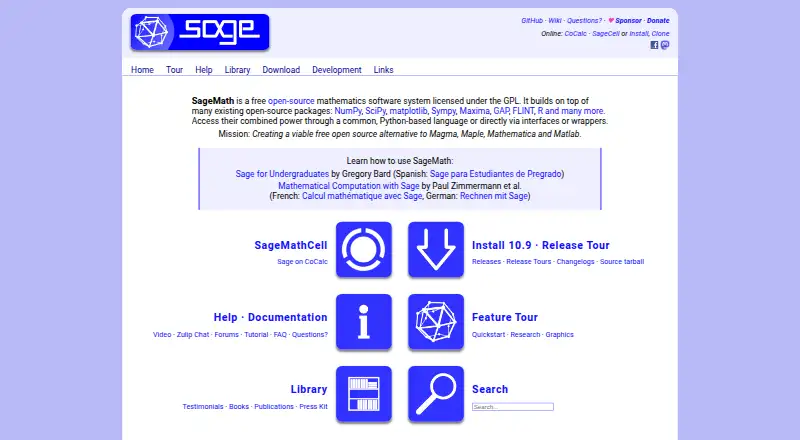
What SageMath is
SageMath is free, open-source mathematics software for calculations across algebra, calculus, number theory, cryptography, numerical computation, commutative algebra, group theory, combinatorics, and graph theory. The project describes it as suited to education and research for mathematicians, researchers, and students. Work through a browser notebook, command line, or Python library, and embed SageMath in LaTeX documents. It connects packages including NumPy, SciPy, matplotlib, SymPy, Maxima, GAP, FLINT, and R using a common Python-based language or interfaces and wrappers. The project lists Linux, macOS, Windows, web, and self-hosted use. Its license is GPLv2+, with worldwide use permitted for private, commercial, and governmental purposes. Windows users are directed to Windows Subsystem for Linux; Linux binaries have been discontinued, with installation alternatives in the guide. The download page points macOS users to recommended binaries on GitHub releases and lists Docker images. Support resources include documentation, discussion groups, ask.sagemath.org, and Zulip chat. Octave, MAGMA, Maple, and Mathematica are not included and must be installed separately where applicable.
Who it suits
SageMath suits mathematicians, researchers, and students needing tools across a broad range of mathematical subjects. Its browser notebook, command-line, and Python library interfaces support different working preferences.
What it does well
- Covers a broad range of mathematics
- Browser notebook, command line, and Python library
- Can be embedded in LaTeX documents
- GPLv2+ permits private, commercial, and governmental use
- Docker images are listed
What to know first
- Linux binaries have been discontinued
- Windows users are directed to Windows Subsystem for Linux
- Octave, MAGMA, Maple, and Mathematica are not included
Limits
The free plan permits installation on unlimited computers and downloading and redistributing copies. Octave, MAGMA, Maple, and Mathematica are not included and must be installed separately where applicable.
Plans
| Plan | Billed and limits | Price |
|---|---|---|
| SageMath | Free open-source software · Install on unlimited computers · Download and redistribute copies | Free |
As sagemath.org lists them, read 8 Oct 2026. The maker's own page has the final word.
Getting started
- Visit the SageMath website.
- Choose a way to use SageMath: browser notebook, command line, or Python library.
- For Windows, use Windows Subsystem for Linux as directed by the download page.
- For Linux, follow the installation guide for alternatives to discontinued binaries.
- For macOS, use the recommended binaries linked from GitHub releases.
- Alternatively, use a listed SageMath Docker image.
SageMath is a free, open-source mathematics system for calculations across a notably broad range of disciplines. It suits students, educators, mathematicians and researchers who are comfortable with Python-based tools and may need several mathematical engines in one environment. Its strongest case is breadth and flexibility; its main trade-off is that getting the right installation and external packages can require technical work.
Overview
SageMath brings algebra, calculus, number theory, cryptography, numerical computation, commutative algebra, group theory, combinatorics and graph theory into one system. That scope makes it more than a single-purpose calculator: it is a general mathematical workbench for coursework, exploratory research and reproducible computational projects.
The project is released under GPLv2+, with permission for private, commercial and governmental use worldwide. You can install it on unlimited computers and redistribute copies, which is particularly useful for teaching labs, research groups and organisations that need to avoid per-seat licensing.
Key features
Multiple ways to work
A browser notebook provides an interactive, document-oriented workspace, while the command-line interface suits scripted or fast, keyboard-driven work. The Python library lets developers incorporate SageMath into Python programs, and LaTeX embedding supports mathematical documents that include Sage computations. This range fits users moving between classroom demonstrations, experiments and automated workflows.
One Python-based ecosystem
SageMath unifies open-source projects including NumPy, SciPy, matplotlib, SymPy, Maxima, GAP, FLINT and R through a common Python-based language, interfaces and wrappers. The practical advantage is access to specialised capabilities without changing applications for every subject. The cost is that users may need to understand which underlying package supplies a result when behaviour or compatibility differs between domains.
Education and research focus
Its broad subject coverage and open licence make SageMath a strong fit for teaching concepts alongside executable examples, and for research that benefits from inspectable, redistributable software. Documentation, support and discussion groups, ask.sagemath.org and Zulip chat provide routes to help when setup or mathematical implementation questions arise.
Pricing
| Plan | Price | What you get |
|---|---|---|
| SageMath | free | Free open-source software; install on unlimited computers; download and redistribute copies. |
There are no seats, usage quotas or renewal charges attached to the free plan. It is the natural choice for individuals, classrooms and organisations that can manage installation themselves. SageCell offers one computation at a time as a one-off online service, while CoCalc is an independent commercial service for trying Sage without downloading it; those options are better suited to a quick experiment than to assuming a hosted SageMath subscription.
Platforms
SageMath supports Linux, macOS, Windows, self-hosted deployments and web use. Windows users are directed to Windows Subsystem for Linux rather than a native Windows download. Linux binaries have been discontinued, so Linux installation follows the project’s installation guidance; macOS users are directed to recommended binaries on SageMath’s GitHub releases page. Docker images are also provided, giving administrators a practical route to containerised or repeatable deployments.
BitTorrent downloads automatically verify checksums, helping guard against corrupt or malicious data. Compatibility is not universal: SageMath includes GAP, PARI, Singular and Maxima, but Octave, MAGMA, Maple and Mathematica are not included and must be installed separately where needed.
Who it's for
Choose SageMath for mathematics students and teachers who need many subjects in one free environment, researchers who value open and redistributable tooling, and Python users building calculation workflows. It is less suitable if you want a polished, native Windows installer, a fully managed hosted notebook, or guaranteed inclusion of proprietary systems such as Maple or Mathematica.
Pros and cons
- Pro: Broad coverage spanning pure and applied mathematics avoids assembling separate specialist applications.
- Pro: Browser, command-line, Python-library and LaTeX workflows accommodate both interactive learning and automation.
- Pro: GPLv2+ licensing, unlimited installations and redistribution support make classroom and organisational rollout straightforward.
- Con: Windows requires WSL, and Linux users must follow alternative installation routes because binaries are discontinued.
- Con: Several well-known systems are excluded and require separate installation, complicating mixed-tool environments.
- Con: The breadth of wrapped packages can demand technical judgement about dependencies and interfaces.
Alternatives
For a notebook-focused experience, compare marimo, a free, permissively licensed open-source notebook available across web, desktop and API-oriented platforms. Apache Zeppelin is another free, Apache-licensed open-source notebook for Linux, macOS, web and self-hosted use.
Deepnote suits teams wanting a hosted freemium notebook with a free tier, three editors and five projects. Paperspace Notebooks is the better direction when free CPU and GPU notebook machines and included storage matter. Pluto.jl offers a free, MIT-licensed notebook built around Julia and supports Android as well as desktop and web platforms.
Datalore targets hosted collaborative work with a free tier including 120 CPU S-machine hours, 10 GB cloud storage and two parallel notebooks. Dnote is a free open-source option with an optional self-hosted server. JupyterHub is appropriate when you need an open-source, self-hosted multi-user notebook service on your own hardware or cloud.
For broader discovery, see the Notebook Software, Math Solver Apps and Coding Playgrounds directories.
Verdict
SageMath is a compelling choice for mathematically serious users who want extensive subject coverage, Python integration and software they can install and share without licensing costs. Choose it when openness and breadth outweigh setup effort; look elsewhere when you need a native Windows experience, turnkey hosting or bundled access to proprietary mathematics packages.
Verdict
SageMath brings many mathematical areas and interfaces together in free, open-source software. Check the installation guidance for your platform and whether separately installed packages are needed.
Questions
How much does SageMath cost?
The SageMath plan is free.
Is there a free plan?
Yes. SageMath is free, open-source software; its plan allows installation on unlimited computers and downloading and redistributing copies.
Which platforms does SageMath support?
The listed platforms are Linux, macOS, self-hosted, web, and Windows. Windows users are directed to Windows Subsystem for Linux.
Is SageMath open source?
Yes. Its license is GPLv2+.
Can SageMath be used for commercial work?
The license information says it can be used worldwide for private, commercial, and governmental purposes.
Can I use Octave, MAGMA, Maple, or Mathematica with SageMath?
They are not included and must be installed separately where applicable.
Facts from SageMath's own pages
- Compatibility limit
- Sage includes GAP, PARI, Singular, and Maxima, but its documentation says Octave, MAGMA, Maple, and Mathematica are not included and must be installed separately where applicable. · doc.sagemath.org, 8 Oct 2026
- Containers
- The download page lists SageMath Docker images as an available download. · sagemath.org, 8 Oct 2026
- Education and research
- The project says SageMath is well-suited for education and research. · sagemath.org, 8 Oct 2026
- Free plan
- Yes · sagemath.org, 19 Sept 2026
- Integrations
- SageMath combines open-source packages including NumPy, SciPy, matplotlib, SymPy, Maxima, GAP, FLINT, and R through a common Python-based language or interfaces and wrappers. · sagemath.org, 8 Oct 2026
- Interfaces
- Users can work through a browser notebook, a command-line interface, or a Python library, and can embed SageMath in LaTeX documents. · sagemath.org, 8 Oct 2026
- License
- The press kit lists SageMath's license as GPLv2+ and says it can be used worldwide for private, commercial, and governmental purposes. · sagemath.org, 8 Oct 2026
- Linux downloads
- The download page says Linux binaries have been discontinued and points users to the installation guide for alternatives. · sagemath.org, 8 Oct 2026
- macOS downloads
- The download page points users to the recommended macOS binaries on the SageMath GitHub releases page. · sagemath.org, 8 Oct 2026
- Mathematics
- It supports areas including algebra, calculus, number theory, cryptography, numerical computation, commutative algebra, group theory, combinatorics, and graph theory. · sagemath.org, 8 Oct 2026
- Online use
- The FAQ describes SageCell as a one-off service for doing one computation at a time and identifies CoCalc as an independent commercial service where users can try Sage without downloading it. · doc.sagemath.org, 8 Oct 2026
- Purpose
- SageMath is a free, open-source mathematics software system that aims to provide mathematicians, researchers, and students with tools for mathematical calculations. · sagemath.org, 8 Oct 2026
- Security
- The download page says BitTorrent downloads automatically verify the checksum to help protect against corrupt or malicious data. · sagemath.org, 8 Oct 2026
- Support
- The project lists documentation, support and discussion groups, ask.sagemath.org, and Zulip chat as support resources. · sagemath.org, 8 Oct 2026
- Windows support
- The download page directs Windows users to use Windows Subsystem for Linux. · sagemath.org, 8 Oct 2026
Where SageMath stands on Freedom251
- Coding Playgrounds#16 of 138
- Math Solver Apps#33 of 68
- Notebook Software#18 of 25