Freedom251 › Coding Playgrounds
Deepnote
by Deepnote
What Deepnote is
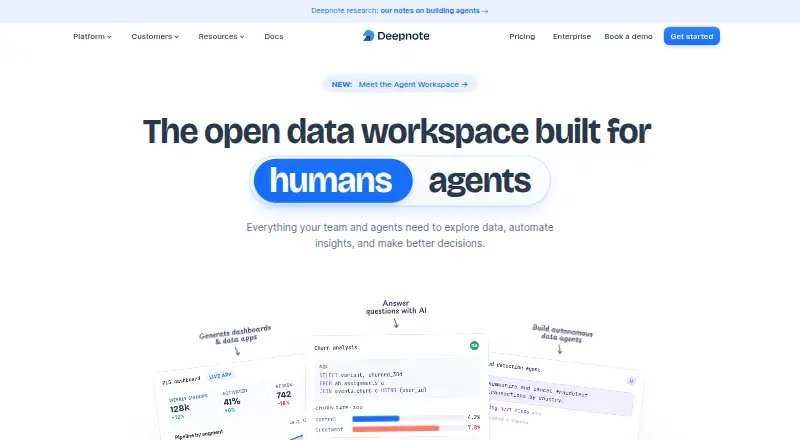
Deepnote is an AI workspace for data analysis, exploration and machine learning. Its AI copilot can chat with data, create charts and write code, while notebooks can become dashboards or apps. Teams can collaborate in notebooks, comment on blocks and share work by link or email invitation. Users can host interactive apps with live data, schedule notebooks hourly, daily, weekly or monthly, and deploy notebooks as APIs. Listed integrations include PostgreSQL, BigQuery, Amazon S3, MySQL, Snowflake, GitHub and dbt. An editor extension supports VS Code, Cursor, Windsurf and Antigravity for notebook editing, execution and deployment. Deepnote supports Python, SQL, R and Stata. The free plan allows up to three editors and five projects, with basic machines and seven-day revision history. The listed Team plan costs $3,920 a month per editor when billed yearly. Deepnote says it has SOC 2 Type II certification, encrypts data at rest and in transit, and does not use customer data to improve AI or ML models.
Who it suits
Deepnote suits data professionals and teams working on analysis, exploration or machine learning. Its notebooks, shared workspaces, dashboards and hosted apps support both collaborative work and scheduled or API-based use.
What it does well
- AI copilot chats with data, creates charts and writes code
- Notebooks can become dashboards, apps or APIs
- Collaborative notebooks support comments and sharing
- Integrations include PostgreSQL, BigQuery and Snowflake
- Free plan supports up to three editors
What to know first
- Free plan is limited to five projects
- Free plan has seven-day revision history
- Team plan is listed at $3,920 a month per editor, billed yearly
Limits
The free plan allows up to three editors and five projects, with Basic machines capped at 5 GB RAM and 2 vCPU and revision history of seven days. The Team plan includes 30-day revision history, scheduled notebooks, and background execution.
Plans
| Plan | Billed and limits | Price |
|---|---|---|
| Free | forever · Up to 3 editors · Up to 5 projects · Unlimited Basic machines with 5 GB RAM, 2 vCPU · 7 day revision history | Free |
| Team | per editor/month billed yearly · Unlimited viewers and notebooks · Premium integrations · Background execution · Scheduled notebooks · 30 day revision history · $39 worth of AI credits every month · $280 worth of CPU every month · $50 worth of GPU every month | $3,920 a month |
| Enterprise | Custom · Custom contract and invoice · Priority support · Dedicated success manager · Unlimited AI · SSO and directory sync · Audit logs · Single-tenancy | On request |
As deepnote.com lists them, read 28 Sept 2026. The maker's own page has the final word.
Getting started
- Open deepnote.com.
- Start with the Free plan, or use the 14-day trial.
- Create a project and work in notebooks with the supported languages.
- Connect a listed integration such as PostgreSQL, BigQuery, or GitHub as needed.
- Invite collaborators by email or share work through a link.
Overview
Deepnote is a notebook workspace for data analysis, exploration and machine learning, with AI assistance and ways to share work beyond code. It suits data teams that want to collaborate on analyses and turn them into dashboards, live-data apps or scheduled work. Its strongest case is the combination of notebooks and team-facing outputs; the free plan’s small project cap and the Team plan’s per-editor pricing are important constraints.
Key features
Notebooks, AI and collaboration
The AI copilot can chat with data, create charts and write code, which can help move from a question to an analysis without leaving the notebook workflow. Real-time collaboration, block-level comments and sharing by link or email invitations make notebooks usable as team workspaces, not just individual scripts. AI is an assistance layer rather than a substitute for checking generated code or charts.
Deepnote supports Python, SQL, R and Stata, and its hybrid execution model pairs with formats including .deepnote, .ipynb, .qmd, .py (Percent/Marimo) and PDF. The editor extension brings notebook editing, block execution, local execution and deployment to Deepnote.com into VS Code, Cursor, Windsurf and Antigravity, a useful bridge for people who prefer those editors.
Sharing and automation
Notebooks can become dashboards or interactive apps hosted with live data, giving teams a way to present analyses as working tools. Scheduled runs can recur hourly, daily, weekly or monthly, and notebooks can also be deployed as APIs. Those options broaden the product beyond exploratory work, although scheduled notebooks and background execution are Team-plan features.
Built-in integrations include PostgreSQL, BigQuery, Amazon S3, MySQL, Snowflake, GitHub and dbt. GPU compute is supported, but the Team plan’s GPU allowance is finite, so sustained or heavier workloads may call for a higher tier.
Security and support
Deepnote says it holds SOC 2 Type II certification, conducts regular third-party penetration testing and runs a private bug bounty program. It encrypts data at rest with AES 256-bit encryption and data in transit with TLS 1.2 or higher, and says customer data is not used to train, fine-tune or otherwise improve AI or ML models. All customers receive technical support through Intercom and email on weekdays from 9 am to 5 pm Pacific Time at minimum.
Pricing
Deepnote is freemium, with a 14-day trial. The free tier is a real starting point for small projects, while Team adds automation and larger collaboration allowances at a substantial per-editor cost.
| Plan | Price and terms | What it includes |
|---|---|---|
| Free | free, billed forever | Up to 3 editors, up to 5 projects, unlimited Basic machines with 5 GB RAM and 2 vCPU, and 7 day revision history. |
| Team | $3,920 a month, billed per editor/month billed yearly | Unlimited viewers and notebooks, premium integrations, background execution, scheduled notebooks, 30 day revision history, $39 worth of AI credits every month, $280 worth of CPU every month and $50 worth of GPU every month. |
| Enterprise | Custom pricing | Priority support, a dedicated success manager, SSO and directory sync, audit logs, single-tenancy and private Docker images. |
Free is best for an individual or small group testing the workflow: its three-editor and five-project ceilings and one-week history limit make it less suitable for an expanding team or long-lived work. Team fits teams that need scheduled or background runs, premium integrations and unlimited viewers, but its yearly-billed per-editor price and monthly compute and AI credits deserve close attention. Enterprise is aimed at organizations that need identity controls, audit logs or single-tenancy. The listed Team amount is $3,920 a month per editor when billed yearly.
Platforms
Deepnote supports web, Linux, macOS, Windows, self-hosted deployments, an API and an editor extension. The breadth gives teams several ways to access or integrate the workspace; local execution through the extension also suits developers who want to work in a supported editor.
Who it's for
Deepnote is a strong fit for data professionals and teams that want collaborative notebooks connected to databases and cloud storage, plus a route from analysis to dashboards, live-data apps, scheduled jobs or APIs. It is less compelling for a solo user who only needs a free notebook, or for teams whose compute needs would exceed the Team plan’s monthly CPU and GPU allowances.
Pros and cons
- Pro: Notebooks can be shared as dashboards, live-data apps and APIs, so analysis can serve audiences beyond notebook authors.
- Pro: Real-time collaboration, block comments and link or email sharing support review and joint work in context.
- Pro: The Free plan includes up to three editors and unlimited Basic machines, giving small groups room to try the core workflow.
- Con: Free is capped at five projects and seven days of revision history, limiting its usefulness for larger or longer-running work.
- Con: Team is billed per editor yearly and its AI, CPU and GPU credits have monthly dollar allowances, which may constrain cost-sensitive or compute-heavy teams.
- Con: Enterprise is custom pricing, so organizations needing its controls must seek a tailored quote.
Alternatives
Datalore is worth comparing if its free cloud allowance of 120 CPU S machine hours, 10 GB storage, two parallel notebooks and one workspace better matches a small cloud-based start. JupyterLab is the straightforward choice for free, open-source notebook software installed locally with pip. Polynote suits readers specifically seeking free, open-source notebook software distributed as a self-hosted server.
BinderHub is an option when the priority is open-source deployment software and the operator can supply the cloud or hardware infrastructure. Google Colab may suit a reader who accepts limited GPU access and no guaranteed compute units on its Colab plan. Hex is another freemium alternative, with a Community plan that includes data-source connections, all cell types, small compute and an agent trial.
Kaggle Notebooks is a fit for free notebook work where limited P100 GPU or TPU availability, possible queues and session time limits are acceptable. Nextjournal offers a free plan with unlimited private notebooks and data and secrets management, alongside limited concurrent compute resources.
Verdict
Choose Deepnote if your data team wants a shared notebook workflow that can turn analysis into scheduled work, dashboards, live-data apps or APIs, with AI assistance close at hand. Its combination of collaboration and practical publishing options is the main reason to choose it. Look elsewhere if a free, locally installed notebook is enough, or if the Team plan’s per-editor yearly billing and monthly compute allowances do not suit your workload.
Verdict
Deepnote combines collaborative notebooks with AI assistance, scheduled runs and hosted data apps. The free plan has editor, project and history limits; the listed Team price is $3,920 a month per editor when billed yearly.
Questions
Does Deepnote have a free plan?
Yes. The Free plan is billed forever and includes up to three editors and five projects.
What does Deepnote cost?
The Team plan is listed at $3,920 a month, billed per editor monthly with yearly billing. The pricing note lists paid plans from $39/user/mo (annual).
Is there a free trial?
Yes. Deepnote lists a 14-day trial.
Which languages does Deepnote support?
The listed languages are Python, SQL, R, and Stata.
What integrations are available?
Deepnote lists PostgreSQL, BigQuery, Amazon S3, MySQL, Snowflake, GitHub, and dbt as built-in integrations.
Who makes Deepnote?
Deepnote is made by Deepnote, whose headquarters are in Prague. The company was founded in 2019.
Facts from Deepnote's own pages
- AI and notebooks
- Its AI data copilot can chat with data, create charts, and write code, and notebooks can be turned into dashboards or apps. · deepnote.com, 28 Sept 2026
- AI data use
- Deepnote says it does not use customer data to train, fine-tune, or otherwise improve AI or ML models. · deepnote.com, 28 Sept 2026
- Collaboration
- Deepnote supports collaborative notebooks, commenting on blocks, and sharing work through links or email invitations. · deepnote.com, 28 Sept 2026
- Company history and HQ
- A Deepnote job listing describes the company as a remote-friendly US tech company with its headquarters in Prague and says it has been building its product since 2019. · deepnote.com, 28 Sept 2026
- Data apps
- Users can create and host interactive apps with live data and turn analyses into dashboards for their team. · deepnote.com, 28 Sept 2026
- Editor extension
- The official extension supports VS Code, Cursor, Windsurf, and Antigravity, with notebook editing, block execution, local execution, and deployment to Deepnote.com. · deepnote.com, 28 Sept 2026
- Encryption
- The security overview says data at rest is encrypted with AES 256-bit encryption and data in transit with TLS 1.2 or higher. · deepnote.com, 28 Sept 2026
- Founded
- 2019 · deepnote.com, 28 Sept 2026
- Free plan
- Yes · deepnote.com, 20 Sept 2026
- Integrations
- The maker lists built-in integrations including PostgreSQL, BigQuery, Amazon S3, MySQL, Snowflake, GitHub, and dbt. · deepnote.com, 28 Sept 2026
- Product
- Deepnote describes itself as an AI workspace for data professionals for data analysis, exploration, and machine learning. · deepnote.com, 28 Sept 2026
- Scheduling and APIs
- Notebooks can be scheduled hourly, daily, weekly, or monthly, and notebooks can be deployed as APIs. · deepnote.com, 28 Sept 2026
- Security certification
- Deepnote says it has SOC 2 Type II certification and that it conducts regular third-party penetration testing and operates a private bug bounty program. · deepnote.com, 28 Sept 2026
- Support
- Deepnote provides all customers technical support through Intercom and email on weekdays from 9 am to 5 pm Pacific Time as a minimum. · deepnote.com, 28 Sept 2026
Where Deepnote stands on Freedom251
- Coding Playgrounds#10 of 138
- Data Science and Machine Learning Platforms#3 of 26
- Data Science Platforms#4 of 32
- Notebook Software#5 of 25
- Data Science Analytics#7 of 30