Freedom251 › Code Playground Software

JDoodle
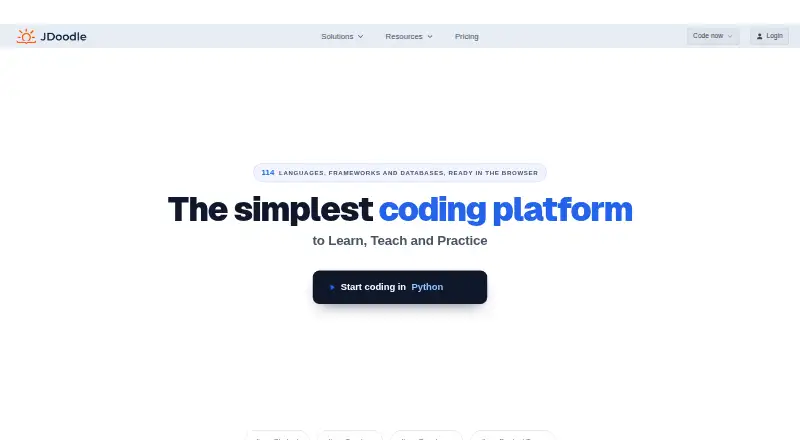
What JDoodle is
JDoodle is an online programming platform for learning, teaching, and practicing code. Its browser IDE runs programs on JDoodle machines and requires no installation. JDoodle supports 114 languages, frameworks, and databases, with full-stack runtime scope, real-time collaboration, and public sharing. Its Compiler API offers REST results and WebSocket streaming for interactive programs; API and embedded submissions run with bounded time and memory. Runnable IDEs can be embedded in websites, course materials, and learning systems. Education tools support assignments, automated grading, varied question types, roles, and result disclosures. Mobile apps are available for iOS and Android, and a free Chrome extension is offered. The Free plan costs nothing and includes 1,000 executions per day and 100 saved projects; the maker says it does not expire or require a card. Pro costs $15 a month. Student costs $4 a month, billed yearly at US$48 a year. Free API access includes 20 credits per day and no internet access; paid API plans start at $10 a month.
Who it suits
JDoodle suits students, teachers, and developers who want to learn, teach, or practice programming in a browser. Its education features also suit instructors managing assignments and grading.
What it does well
- Browser IDE requires no installation.
- Supports 114 languages, frameworks, and databases.
- Education tools include automated correction and grading.
- Mobile apps support iOS and Android.
- Free plan does not expire or require a card.
What to know first
- Free platform plan limits projects to 100 saved projects.
- Chrome extension has no Firefox or Safari version.
- API Free has no internet access.
- Pro costs $15 a month.
Limits
The Free platform plan provides 1,000 code executions per day, 100 saved projects, and one collaborator per project. API Free provides 20 credits per day and no internet access.
Plans
| Plan | Billed and limits | Price |
|---|---|---|
| Enterprise | SSO · Payment by invoice · Advanced user management · Priority support | On request |
| API Free | $0/month · 20 credits/day · no internet access · REST and WebSocket · all languages | Free |
| Free | US$0; no expiry · 1,000 executions/day · latest language versions · 100 saved projects · 15 AI credits/day (30/month) · 3 collaborators · unlimited embeds, students, assessments and questions | Free |
| API Starter | $10/month · 1,000 credits/day · internet access · REST and WebSocket · all languages | $10 a month |
| API Business | $100/month · 10,000 credits/day · internet access · REST and WebSocket · all languages | $100 a month |
| Pro | US$12/month billed yearly (US$144/year) · Unlimited executions and projects · every language version · internet access · 10 collaborators · 150 AI credits/month · 4× workspace · advanced settings | $12 a month |
| API Growth | $20/month · 2,000 credits/day · internet access · REST and WebSocket · all languages | $20 a month |
| Teacher | US$20/month billed yearly (US$240/year) · Unlimited executions and projects · every language version · internet access · unlimited collaborators, students, assessments and questions · 150 AI credits/month | $20 a month |
The first 8 of 11 plans, as jdoodle.com lists them, read 20 Sept 2026. The maker's own page has the final word. Every plan
Getting started
- Open https://www.jdoodle.com/.
- Choose the Free platform plan or another listed plan.
- Use the browser IDE without installing an IDE.
- For mobile coding, use the app on iOS or Android.
- For browser-extension use, install the free Chrome extension.
Overview
JDoodle is an online coding workspace with tools for teaching, embedded editors and programmatic code execution. It is a strong fit for students and teachers who need more than a code runner, and for developers who want to run code in a browser or integrate execution into another product. Its free options make it easy to start, but the platform and API have separate quotas and paid plans.
Key features
The browser IDE runs programs on JDoodle’s machines, so there is no software to install locally. Its support for 114 languages, frameworks and databases gives learners and developers a broad place to experiment. Full-stack runtime scope, real-time collaboration and public sharing make it useful beyond one-off snippets, though hosted execution is subject to time and memory limits.
For coursework, JDoodle offers assignments, automated correction and grading, different question types, roles and result disclosures. That combination suits teachers managing structured practice and assessment better than a standalone code runner. Developers can also embed a runnable IDE in a website, course material or learning management system with three lines of HTML.
The Compiler API provides REST responses for final results and WebSocket streaming for interactive programs. API and embed submissions run on JDoodle machines with bounded time and memory, so it offers a way to add hosted execution without running submissions on a user’s own machine. The free Chrome extension is useful for browser-based access, but there is no Firefox or Safari version. Mobile apps let users write and run code on iOS and Android phones and tablets.
Pricing
JDoodle has several plans for distinct uses. The Free platform plan costs nothing, is free forever and requires no credit card. It includes 1,000 code executions per day, 100 saved projects and one collaborator per project. That is a workable starting point for individual learning and small projects, but the project cap and daily quota may constrain heavier use.
Pro costs $15 a month, billed monthly, and includes 150 AI credits a month, 10 collaborators per project and five Premium Embed IDEs. It suits users who need more collaboration or premium embeds; the listed inclusions do not specify a higher execution quota. Student costs $4 a month, billed yearly at US$48 a year, and adds unlimited executions and saved projects, 50 AI credits a month, twice the standard workspace and 10 collaborators per project. Its annual billing is a meaningful commitment, though the unlimited executions and projects make it a better fit for sustained student use.
Teacher has custom pricing and unlimited collaborators per project, assessments and students, fitting educators running courses at scale. Enterprise also has custom pricing, with SSO, invoice payment, advanced user management and priority support for organizations that need those administrative options.
The API has its own plans. API Free costs nothing and provides 20 credits per day, no internet access, REST and WebSocket APIs, and all languages. API Starter costs $10 a month for 1,000 credits per day and internet access; API Growth costs $20 a month for 2,000 credits per day and internet access; API Scale costs $50 a month for 5,000 credits per day and internet access. The free API tier is useful for limited experiments, while the paid tiers suit integrations that need internet access or greater daily volume.
Platforms
JDoodle is available on the web, Android and iOS, with an API and a browser extension. The extension is limited to Google Chrome. The company says it primarily stores personal information in Australia and the United States and uses security measures against unauthorized access. Stripe processes credit card payments; JDoodle says it does not store or handle card details in its systems. Its support team answers customer questions directly and provides documentation.
Who it's for
JDoodle is most compelling for students, teachers and developers who benefit from combining browser-based coding with education tools, embeddable IDEs or an execution API. Teachers can use its assessment features, and developers can choose an API plan by daily credit needs. It is less suitable for someone who needs a locally installed environment, or for users who require a Firefox or Safari extension.
Pros and cons
- Pros: The free platform plan does not expire or require a card, and allows 1,000 executions per day.
- Pros: Support for 114 languages, frameworks and databases serves varied learning and development needs in one browser IDE.
- Pros: Assignments, automated grading, embeds and REST or WebSocket API access cover classroom and integration use cases.
- Cons: The free platform plan caps saved projects at 100 and collaborators at one per project.
- Cons: API Free is limited to 20 credits per day and has no internet access.
- Cons: The browser extension works only with Chrome.
- Cons: Student pricing is billed yearly, while Teacher and Enterprise require custom pricing.
Alternatives
Choose CodeHS if a free teacher plan with 100+ courses and automatic code submission and section management is a closer match for your classroom. OneCompiler is worth considering if unlimited code executions on its free plan matter more than JDoodle’s education and collaboration features; its free tier also includes 20 AI credits per day. Playcode offers a free plan with three projects or published sites and one collaborator, plus a free trial, for users comparing browser-based coding options.
Replit has a free Starter plan with daily usage and one live project and background task at a time. CodePen is an alternative for public web projects, with unlimited public Pens and three files per Pen on its free plan. Scratch is a free platform for creating and sharing projects. CodePad is another free option. Google Colab is an alternative if notebook-based work is the priority; its free plan has no guaranteed access to compute units and limited GPU access.
Browse more options in Code Playground Software and Coding Playgrounds.
Verdict
Choose JDoodle if you want a lasting free browser coding environment, especially when coursework, collaboration, embeds or API execution are part of the job. Its breadth is a practical advantage, but the split plan structure, daily limits and Chrome-only extension give users with heavier or more specialized needs good reason to compare alternatives.
Verdict
JDoodle combines a browser-based coding environment with education tools, mobile apps, embeds, and API access. Its no-expiration free plan provides a way to start, while some options have usage or platform limits.
Questions
Is JDoodle free?
Yes. The Free platform plan costs nothing, lasts indefinitely, and does not require a credit card. A separate API Free plan is also free.
What does the Free platform plan include?
It includes 1,000 code executions per day, 100 saved projects, and one collaborator per project.
Which platforms does JDoodle support?
The listed platforms are Android, API, browser extension, iOS, and web. The free extension is for Google Chrome.
What does JDoodle Pro cost?
Pro costs $15 a month, billed monthly. It includes 150 AI credits a month, 10 collaborators per project, and five Premium Embed IDEs.
Does JDoodle have a free trial?
No. The Free platform plan is described as a non-expiring plan rather than a trial.
What is included in API Free?
API Free costs nothing and includes 20 credits per day, with no internet access. REST API, WebSocket API, and all languages are included.
Facts from JDoodle's own pages
- API credit rules
- A normal run costs one credit; WebSocket startup, multi-file upload and internet access add credits. · jdoodle.com, 15 Oct 2026
- API exhaustion
- Calls made after the daily allowance is exhausted return HTTP 429 and are not queued or charged. · jdoodle.com, 15 Oct 2026
- API extensibility
- The documented backend integration uses POST /v1/execute with client credentials, script, language and version index. · jdoodle.com, 15 Oct 2026
- API protocols
- The Compiler API offers REST for final results and WebSocket connections for streaming and interactive input. · jdoodle.com, 15 Oct 2026
- API response
- Execution responses include output, status code, memory use and CPU time. · jdoodle.com, 15 Oct 2026
- API sandbox
- Each API execution runs in an isolated filesystem and process environment without a route to the network. · jdoodle.com, 15 Oct 2026
- Browser extension
- The free browser extension works with Google Chrome and has no Firefox or Safari version. · jdoodle.com, 1 Oct 2026
- Browser extension limits
- The Chrome extension runs one selected snippet at a time and does not provide projects, multiple files or library management. · jdoodle.com, 15 Oct 2026
- Browser IDE
- The IDE runs in a web browser, executes programs on JDoodle machines, and requires nothing to be installed. · jdoodle.com, 1 Oct 2026
- Code isolation
- API and embed submissions run on JDoodle machines, with bounded execution time and memory limits. · jdoodle.com, 1 Oct 2026
- Collaboration
- Projects can be shared by link and edited collaboratively in real time. · jdoodle.com, 15 Oct 2026
- Company profile
- LinkedIn lists JDoodle as privately held, headquartered in Canberra, founded in 2013, with 11–50 employees. · au.linkedin.com, 15 Oct 2026
- Debugger and GUI
- The IDE supports step debugging for 23 language/version combinations and live GUI windows for supported programs. · jdoodle.com, 15 Oct 2026
- Documentation depth
- Documentation is organized into teacher, student, coder, writer and builder guides plus references for IDE, API, embeds, assessments, AI, extension, mobile and teams. · jdoodle.com, 15 Oct 2026
- Education
- The education platform supports assignments, automated correction and grading, varied question types, roles and result disclosures. · jdoodle.com, 1 Oct 2026
- Embed integration
- An embedded IDE renders JDoodle's editor inside another page, while the API lets a product keep its own interface. · jdoodle.com, 15 Oct 2026
- Embeds
- JDoodle embeds can place a runnable IDE in websites, course materials and learning management systems with three lines of HTML. · jdoodle.com, 1 Oct 2026
- Free plan
- Yes · jdoodle.com, 20 Sept 2026
- Free plan status
- JDoodle says the Free platform plan is not a trial, does not expire and does not require a card. · jdoodle.com, 1 Oct 2026
- Funding news
- TechCrunch reported on June 14, 2023 that JDoodle raised about A$3.2 million from Main Sequence after bootstrapping to 800,000 users. · techcrunch.com, 15 Oct 2026
- Hosted execution
- Submitted code executes on JDoodle machines, so the documentation describes no self-hosted runtime package. · jdoodle.com, 15 Oct 2026
- IDE frameworks and databases
- The IDE documentation lists React, Vue, Express, Flask, Spring Boot, Laravel, PostgreSQL, MySQL and MongoDB. · jdoodle.com, 15 Oct 2026
- Language coverage
- The platform lists 114 supported languages, frameworks and databases. · jdoodle.com, 15 Oct 2026
- Language support
- JDoodle supports 114 languages, frameworks and databases. · jdoodle.com, 1 Oct 2026
Where JDoodle stands on Freedom251
- Code Playground Software#5 of 58
- Coding Playgrounds#17 of 138