Freedom251 › Coding Playgrounds
Scratch
by Scratch
What Scratch is
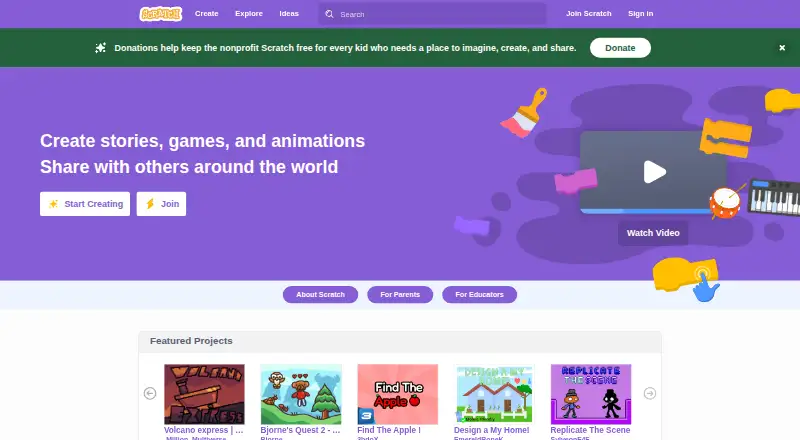
Scratch is a free programming platform for creating interactive stories, games, and animations, then sharing them in an online community. It is designed especially for ages 8 to 16, though people of all ages use it. Its learning aims include creative thinking, systematic reasoning, and collaboration through project-based work. The Scratch app can also be used offline, and projects created in the app are not accessible by Scratch. Download information lists Windows 10+, macOS 10.13+, ChromeOS, and Android tablets running Android 6.0+; the platform is also available on the web and on Android, macOS, and Windows. Extensions add blocks that connect projects to hardware devices or web services. Scratch says it is used in more than 150 countries and offered in more than 40 languages. Optional memberships provide early or exclusive content, members-only tutorials, merchandise, and store discounts. Annual Membership costs $35 a year, and Lifetime Membership costs $150, paid once; both are membership donations. Scratch is a project of the Lifelong Kindergarten Group at the MIT Media Lab.
Who it suits
Scratch suits young people, especially ages 8 to 16, who want to make interactive projects while learning programming concepts. It is also used by people of all ages.
What it does well
- Free platform for creating and sharing projects.
- Supports project-based learning.
- App can be used offline.
- Extensions connect projects to hardware or web services.
- Available in more than 40 languages.
What to know first
- Offline projects are not accessible by Scratch.
- App download information specifies supported operating systems and versions.
- Scratch says no security system is impenetrable.
Limits
The Scratch platform is free. Offline projects are not accessible by Scratch; the optional Annual Membership is $35 a year and the Lifetime Membership is $150, paid once, with both listed as donations.
Plans
| Plan | Billed and limits | Price |
|---|---|---|
| Scratch platform | Free digital platform for creating and sharing projects | Free |
| Lifetime Membership | $150 one-time membership donation · Early and exclusive content · members-only tutorials · merchandise and discounts | $150, paid once |
| Annual Membership | $35 membership donation per year · Early and exclusive content · members-only tutorials · merchandise and discounts | $35 a year |
As scratch.mit.edu lists them, read 30 Sept 2026. The maker's own page has the final word.
Getting started
- Visit the Scratch website to create and share projects online.
- Or download the Scratch app for Windows 10+, macOS 10.13+, ChromeOS, or Android tablets running Android 6.0+.
- Use the free Scratch platform to make stories, games, or animations.
- Add extensions when you want blocks for hardware devices or web services.
- Consider Annual Membership for $35 a year or Lifetime Membership for $150, paid once if you want membership benefits.
Scratch is a project-based programming environment for making interactive stories, games, and animations. It suits young learners especially well, while remaining usable by people of all ages. Its core platform is free; the main trade-off is that work made offline cannot be accessed through Scratch.
Overview
Scratch combines a programming language with a community for sharing projects. That makes it a good fit for learning through creation: users can turn programming ideas into something interactive and share the result. Its goals of creative thinking, systematic reasoning, and collaboration support introductory computer science learning, though Scratch is better suited to creative projects than to general-purpose software development.
A project of the Lifelong Kindergarten Group at the MIT Media Lab, Scratch is designed especially for ages 8 to 16 and is also used by people of all ages. Its use across more than 150 countries and availability in more than 40 languages make it a broadly accessible option for learners in different settings.
Key features
Creative projects and sharing
Users can build interactive stories, games, and animations with Scratch, then share them in the online community. The project-based format gives learners a concrete reason to practice programming concepts. It is a stronger choice for creative exploration than for readers seeking a conventional coding environment.
Extensions and offline work
Extensions add blocks that connect projects to hardware devices or web services, expanding what learners can build. The Scratch app also works offline, which is useful when a connection is unavailable. The important limitation is that projects created in the app are not accessible by Scratch, so offline work does not carry the same access as online projects.
Privacy and support
Scratch says it limits information collected during signup and made public on its website, does not sell or rent account information, and uses administrative, physical, and technical safeguards, including SSL/TLS for data transfers and restricted server access. It also acknowledges that no security system is impenetrable and cannot completely guarantee database security or prevent interception during internet transmission. Community members are asked to protect personal information and report guideline violations. Parents can contact staff through Contact Us or ask questions in discussion forums.
Pricing
The Scratch platform costs free and includes the digital platform for creating and sharing projects. That is the right starting point for learners, families, and educators who want the core experience without a subscription.
The optional memberships are donations with extra content and merchandise benefits, not prerequisites for using the platform:
- Annual Membership: $35 a year, billed as a $35 membership donation per year. It includes early or exclusive content, members-only tutorials, merchandise, and store discounts. Choose it if those extras are worth an annual contribution.
- Lifetime Membership: $150, paid once, billed as a $150 one-time membership donation, with the same early or exclusive content, tutorials, merchandise, and discounts. It suits supporters who prefer a one-time contribution over annual billing.
Neither membership is needed to create and share projects, so the free platform remains the practical choice when the goal is simply to learn and make.
Platforms
Scratch is available on the web and on Android, macOS, and Windows. Download information specifies Windows 10+, macOS 10.13+, ChromeOS, and Android tablets running Android 6.0+. The downloadable app supports offline use, with the caveat that its projects are not accessible by Scratch.
Who it's for
Scratch is best for young people, particularly ages 8 to 16, who learn by making interactive projects, as well as educators and families introducing programming through creative work. People of all ages can use it, but those seeking a general-purpose development environment should look elsewhere.
Pros and cons
- Free core platform: Creation and sharing are available without paying for a membership.
- Project-based learning: Interactive stories, games, and animations give learners a practical focus for programming.
- Extensions: Hardware and web-service connections can extend projects beyond the basic environment.
- Offline option with a catch: The app works without a connection, but its projects are not accessible by Scratch.
- Membership extras are optional: Tutorials, exclusive content, merchandise, and discounts require a paid donation, while core platform access does not.
Alternatives
Code Playground Software, Coding Learning Software, and Coding Playgrounds are broader directories for comparing options by category.
Choose Playcode instead if you want a free web-oriented coding option with a free trial; its free plan limits users to 3 projects or published sites, one collaborator, and required Playcode branding.
Replit is an alternative with free daily usage, one live project, and one background task at a time.
CodeHS may suit teachers looking for a permanent free teacher plan with 100+ courses, a browser-based editor, and automatic code submission and section management.
JDoodle is another free option, with 1,000 code executions per day, 100 saved projects, and one collaborator per project.
Choose JupyterLite instead for open-source browser-based computing without a dedicated application server; kernel and package compatibility depends on the environment.
OneCompiler offers unlimited code executions and 20 AI credits per day on its free plan.
CodePad is a free alternative for readers comparing other coding tools.
CodePen is worth considering for public web projects: its free plan includes unlimited public Pens and three files per Pen.
Verdict
Choose Scratch for a free, project-based introduction to programming, especially for learners aged 8 to 16 who want to make and share interactive work. Its extensions add room to explore hardware and web services, while the memberships remain optional. Look elsewhere if you need a general-purpose development environment or expect offline projects to be accessible through Scratch.
Verdict
Scratch offers a free way to create and share interactive projects, with offline app use and extensions for hardware or web services. Optional memberships add content and merchandise benefits for a listed donation.
Questions
Is Scratch free?
Yes. The Scratch platform is free for creating and sharing projects.
What do Scratch memberships cost?
Annual Membership is $35 a year. Lifetime Membership is $150, paid once; both are membership donations.
What do the memberships include?
Both offer early or exclusive content, members-only tutorials, merchandise, and store discounts.
Which platforms can I use for Scratch?
Scratch is available on the web and on Android, macOS, and Windows. App download information lists Windows 10+, macOS 10.13+, ChromeOS, and Android tablets running Android 6.0+.
Can I use Scratch offline?
Yes. The Scratch app can be used offline, but projects made offline are not accessible by Scratch.
Who makes Scratch?
Scratch is a project of the Lifelong Kindergarten Group at the MIT Media Lab.
Facts from Scratch's own pages
- Audience
- Scratch is designed especially for ages 8 to 16, and is also used by people of all ages. · scratch.mit.edu, 30 Sept 2026
- Community safety
- Scratch asks community members to keep personal information private and report content that violates its community guidelines. · scratch.mit.edu, 30 Sept 2026
- Download platforms
- The Scratch app download information lists Windows 10+, macOS 10.13+, ChromeOS, and Android tablets running Android 6.0+. · scratch.mit.edu, 30 Sept 2026
- Extensions
- Scratch extensions add blocks that connect projects to hardware devices or web services. · scratch.mit.edu, 30 Sept 2026
- Founded
- 2007 · scratch.mit.edu, 28 Sept 2026
- Free plan
- Yes · scratch.mit.edu, 23 Sept 2026
- Global reach
- Scratch says it is used in more than 150 countries and is available in more than 40 languages. · scratch.mit.edu, 30 Sept 2026
- Learning goals
- Scratch aims to help young people think creatively, reason systematically, and work collaboratively. · scratch.mit.edu, 30 Sept 2026
- Membership benefits
- Scratch Membership offers early or exclusive content, including new sprites, members-only tutorials, merchandise, and store discounts. · scratchfoundation.org, 30 Sept 2026
- Offline use
- The Scratch app can be used offline, and projects made in it are not accessible by Scratch. · mitscratch.freshdesk.com, 30 Sept 2026
- Organization
- Scratch is a project of the Lifelong Kindergarten Group at the MIT Media Lab. · scratch.mit.edu, 30 Sept 2026
- Privacy
- Scratch says it does not sell or rent account information, and limits information collected during signup and made public on the website. · scratch.mit.edu, 30 Sept 2026
- Privacy limitation
- Scratch states that no security system is impenetrable and it cannot completely guarantee database security or prevent interception during internet transmission. · mitscratch.freshdesk.com, 30 Sept 2026
- Purpose
- Scratch lets users program interactive stories, games, and animations and share creations in its online community. · scratch.mit.edu, 30 Sept 2026
- Security
- Scratch says it uses administrative, physical, and technical safeguards, including SSL/TLS for data transfers and restricted access to its servers. · mitscratch.freshdesk.com, 30 Sept 2026
- Support
- Parents can contact Scratch staff through the Contact Us link and ask questions in the discussion forums. · scratch.mit.edu, 30 Sept 2026
Where Scratch stands on Freedom251
- Coding Playgrounds#20 of 138
- Coding Education Platforms#8 of 49
- Code Playground Software#20 of 58
- Coding Learning Software#18 of 42