Freedom251 › Code Playground Software

JupyterLite
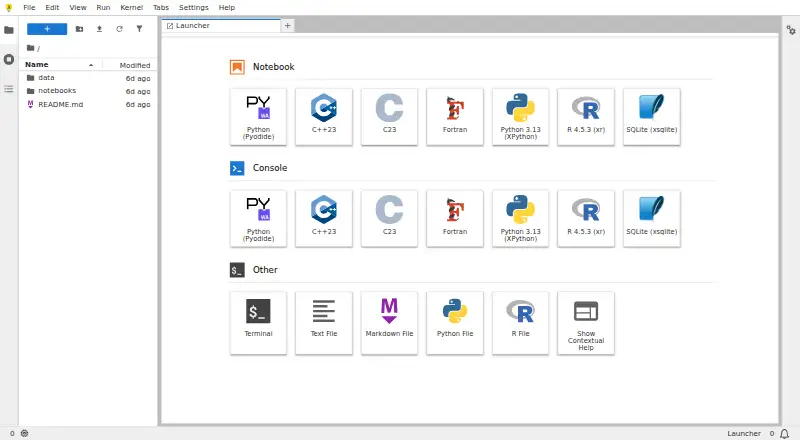
What JupyterLite is
JupyterLite is a free, open-source JupyterLab distribution that runs entirely in a browser. It supports JupyterLab and Jupyter Notebook interfaces, as well as a minimal browser REPL. Its documented Python kernels are based on Pyodide and Xeus Python, and contributors maintain an R kernel based on Xeus R. The documentation lists interactive visualization support for Altair, bqplot, ipywidgets, matplotlib, and Plotly. Users can edit, save, upload, and download files through the browser; files are stored in browser storage, usually IndexedDB. Data remains in the browser unless an enabled extension sends it to an external service or notebook code uses the browser’s fetch mechanism. JupyterLite can be served as static HTTP(S) assets, embedded in an application, or deployed through hosts such as GitHub Pages, ReadTheDocs, Vercel, Netlify, GitLab Pages, and Binder. It does not require a dedicated application server. Browser storage is limited, and the documentation says smaller uploads up to about 50 MB should be suitable. Some Python packages may not work because WebAssembly kernels cannot use certain native extensions, system libraries, threading, or filesystem access patterns.
Who it suits
JupyterLite suits people who want browser-based Jupyter interfaces and can work within browser storage and WebAssembly package constraints. It also fits deployments that can be served as static assets without a dedicated application server.
What it does well
- Runs in a browser without a dedicated application server.
- Offers JupyterLab, Notebook, and a browser REPL.
- Supports documented Python and R kernels.
- Files can be edited, saved, uploaded, and downloaded.
- Can be deployed as static HTTP(S) assets.
What to know first
- Browser storage has limited capacity.
- Some Python packages may not work in its WebAssembly environment.
- Data may leave the browser through extensions or notebook fetch calls.
Limits
The free plan has limited browser storage; the documentation says smaller uploads up to about 50 MB should be fine. Some Python packages are incompatible with WebAssembly kernel constraints, including limitations around native extensions, system libraries, threading, and filesystem access patterns.
Plans
| Plan | Billed and limits | Price |
|---|---|---|
| JupyterLite | Open-source browser-based computing · no dedicated application server required · kernel and package compatibility depends on the browser environment | Free |
As jupyter.org lists them, read 9 Oct 2026. The maker's own page has the final word.
Getting started
- Open the JupyterLite website in a supported browser.
- Choose the JupyterLab, Jupyter Notebook, or minimal REPL interface.
- Create or upload files, then save them in browser storage or download them.
- For a deployment, serve the site as static HTTP(S) assets or embed it in a larger application.
- Configure deployment extensions, kernels, and content as needed.
JupyterLite is a browser-delivered JupyterLab distribution for running notebooks and kernels without a dedicated application server. It is best for educators, publishers, and developers distributing lightweight computational content as a static site. Choose it when browser-local execution and deploy-anywhere simplicity matter more than full desktop Python compatibility or shared live sessions.
Overview
JupyterLite brings familiar JupyterLab and Jupyter Notebook workspaces into a web page, with a smaller REPL option for quick experiments. Kernels execute in the browser, so a site can provide interactive computing without provisioning a backend service. That architecture is a strong fit for tutorials, demonstrations, documentation, and self-contained analyses that can be packaged for the browser. It is less suitable for notebooks that depend on native system libraries, large datasets, or server-side workflows.
Key features
Python users can choose kernels based on Pyodide or Xeus Python, while an Xeus R kernel extends the environment to R work. Support for Altair, bqplot, ipywidgets, matplotlib, and Plotly covers a useful range of interactive charts, controls, and scientific visualizations. These choices make JupyterLite more capable than a basic code editor, particularly for teaching and explanatory notebooks.
Files can be edited, saved, uploaded, and downloaded directly in the browser. Storage defaults to IndexedDB, keeping work on the device and avoiding server administration. Browser capacity is finite, however; uploads of roughly 50 MB or less should be comfortable, while larger projects need another storage strategy. Data remains in the browser unless an extension sends it to an outside service or notebook code uses the browser's fetch mechanism, so the privacy benefit depends on the deployment's extensions and code.
Deployment is one of JupyterLite's clearest advantages. Sites can be published as static HTTP(S) assets locally, on static hosting, or inside a larger application, and they do not need a dedicated application server. JupyterLab's extension system lets maintainers configure extensions, kernels, and bundled content. Guides cover GitHub Pages, ReadTheDocs, Vercel, Netlify, GitLab Pages, and Binder, giving teams several established publishing routes.
Where the browser and operating system support it, a JupyterLite site can be installed as an application; the project documents Linux and Android examples. This can make a published notebook collection feel more like a local tool, but execution still follows browser and WebAssembly constraints.
Pricing
JupyterLite — free. The open-source plan provides browser-based computing with no dedicated application server required. It is the right choice for anyone able to host or embed a JupyterLite site and willing to work within browser kernel and package compatibility limits. There is no paid tier or trial period to weigh against it; the practical costs are deployment work and any limits imposed by the browser environment.
Platforms
JupyterLite runs on the web and can be deployed in self-hosted environments. The project identifies Linux and Android support, including installable-app examples where the browser and operating system permit it. Since kernels run through WebAssembly in the browser, platform behavior and package support can vary with that environment.
Who it's for
Choose JupyterLite for course materials, documentation, public demos, and embedded computational explanations that should open from a URL and remain mostly static to operate. It also suits teams that want to distribute a customized Jupyter front end through static hosting. Look elsewhere for multi-user real-time collaboration, large file collections, or Python stacks built around native extensions, system libraries, threading, or filesystem access patterns that WebAssembly kernels cannot provide.
Pros and cons
Pros
- Serverless delivery: Static assets can provide an interactive notebook without maintaining an application server.
- Multiple notebook experiences: JupyterLab, Jupyter Notebook, and a minimal REPL cover full workspaces and quick examples.
- Python and R kernels: Pyodide, Xeus Python, and Xeus R broaden language coverage.
- Useful visualization stack: Support for Altair, bqplot, ipywidgets, matplotlib, and Plotly enables interactive teaching and analysis.
- Browser-local privacy: Files normally stay in browser storage unless code or extensions transmit them.
Cons
- Finite browser storage: IndexedDB is not a substitute for a large data workspace; uploads around 50 MB are the practical guidepost.
- WebAssembly compatibility gaps: Packages requiring native extensions, system libraries, threading, or particular filesystem access may fail.
- No real-time collaboration: Shared live editing is not part of the runtime scope.
- Browser-dependent behavior: Kernel and installable-app support depend on the browser and operating system.
Alternatives
For a broader directory of browser coding environments, see Code Playground Software; for notebook-focused products, browse Notebook Software.
- Playcode is a freemium, multi-platform coding workspace with a free tier limited to three projects or published sites, one collaborator, trial AI credits, and required branding.
- Replit is a freemium, multi-platform environment whose Starter plan provides free daily usage but limits you to one live project and one background task at a time.
- CodeHS offers a free teacher plan with more than 100 courses and browser-based code editing, making it a stronger education-oriented alternative.
- JDoodle provides free forever access with 1,000 code executions per day, 100 saved projects, and one collaborator per project.
- Scratch is a free platform for creating and sharing projects, aimed at a different, block-based learning experience.
- OneCompiler has unlimited free code executions and 20 AI credits per day, with a paid Plus plan for additional AI access.
- CodePad is a free iOS and web option.
- CodePen focuses on web experiments; its free plan allows unlimited public Pens with three files per Pen.
Verdict
JupyterLite is an excellent choice for publishing self-contained, interactive notebooks as browser pages or embedded components, especially when static hosting and local data handling simplify delivery. Its decisive weakness is the browser boundary: limited storage, no real-time collaboration, and incomplete compatibility with native Python packages. Choose it for lightweight, shareable computation; choose a server-backed or broader coding platform when your notebooks need large datasets, unrestricted packages, or simultaneous collaboration.
Verdict
JupyterLite provides browser-based notebook interfaces and kernels without requiring a dedicated application server. Its fit depends on whether browser storage and WebAssembly package limitations work for the intended notebooks.
Questions
Is JupyterLite free?
Yes. Its listed plan is JupyterLite at no cost, and it is open source.
Does JupyterLite have a free trial?
No. The listed pricing model is free, with a free plan and no free trial.
Which interfaces and kernels does it support?
It provides JupyterLab, Jupyter Notebook, and a minimal browser REPL. Documented kernels include Python based on Pyodide or Xeus Python, and R based on Xeus R.
Which platforms are listed?
The listed platforms are Android, Linux, self-hosted, and web.
Where can a JupyterLite site be deployed?
It can be served as static HTTP(S) assets or embedded in a larger application. Deployment guides cover GitHub Pages, ReadTheDocs, Vercel, Netlify, GitLab Pages, and Binder.
Does JupyterLite support real-time collaboration?
No. Real-time collaboration is listed as unsupported.
Facts from JupyterLite's own pages
- Deployment
- A JupyterLite site can be served as static HTTP(S) assets locally or on static hosts, embedded in larger applications, and does not require a dedicated application server. · jupyterlite.readthedocs.io, 9 Oct 2026
- Files and storage
- Files created in JupyterLite are stored in browser storage, by default IndexedDB, and users can edit, save, upload, and download files through the browser. · jupyterlite.readthedocs.io, 9 Oct 2026
- Hosting options
- The documentation includes deployment guides for GitHub Pages, ReadTheDocs, Vercel, Netlify, GitLab Pages, and Binder. · jupyterlite.readthedocs.io, 9 Oct 2026
- Installable app
- Where supported by the browser and operating system, a JupyterLite website can be installed as an application; the documentation shows Linux and Android examples. · jupyterlite.readthedocs.io, 9 Oct 2026
- Integrations
- JupyterLite uses the JupyterLab extension system and supports configuring deployments with extensions, kernels, and content. · jupyterlite.readthedocs.io, 9 Oct 2026
- Interfaces
- JupyterLite supports the JupyterLab and Jupyter Notebook interfaces, as well as a minimal browser REPL application. · jupyterlite.readthedocs.io, 9 Oct 2026
- Notable limit
- Browser storage has limited capacity; the documentation says smaller uploads up to about 50 MB should be fine. · jupyterlite.readthedocs.io, 9 Oct 2026
- Package compatibility
- Some Python packages may not work because WebAssembly kernels cannot use certain native extensions, system libraries, threading, or filesystem access patterns. · jupyterlite.readthedocs.io, 9 Oct 2026
- Privacy
- The documentation says data stays in the browser unless an enabled extension sends it to an external service or notebook code uses the browser’s fetch mechanism. · jupyterlite.readthedocs.io, 9 Oct 2026
- Project status
- JupyterLite is part of the Project Jupyter Frontends subproject, and the project says only its last two releases are actively supported. · jupyterlite.readthedocs.io, 9 Oct 2026
- Python kernels
- The project documents Python kernels based on Pyodide and Xeus Python, which run in the browser. · jupyterlite.readthedocs.io, 9 Oct 2026
- R kernel
- JupyterLite contributors also maintain an R kernel based on Xeus R. · jupyterlite.readthedocs.io, 9 Oct 2026
- Visualization
- The documentation lists support for interactive visualization libraries including Altair, bqplot, ipywidgets, matplotlib, and Plotly. · jupyterlite.readthedocs.io, 9 Oct 2026
- What it is
- JupyterLite is a JupyterLab distribution that runs entirely in the browser. · jupyterlite.readthedocs.io, 9 Oct 2026
Where JupyterLite stands on Freedom251
- Code Playground Software#6 of 58
- Notebook Software#10 of 25