Tesseract OCR
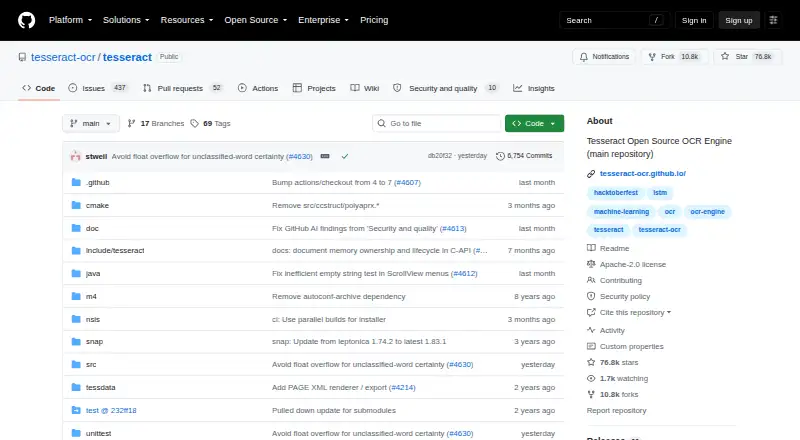
What Tesseract OCR is
Tesseract OCR is a free, open-source engine for recognizing text in images. It accepts image inputs, including PNG, JPEG, and TIFF, and can create searchable PDFs. It runs on Linux, Windows, macOS, and Android. Tesseract 4 introduced an LSTM-based neural OCR engine focused on line recognition, while Legacy OCR Engine mode provides compatibility with Tesseract 3. The repository code is licensed under Apache License 2.0. Developers can build applications with the libtesseract C or C++ API, and wrapper documentation describes bindings for other programming languages. The project identifies major version 5 as its current stable version. Tesseract uses Leptonica to open input images, and improving image quality may help produce better recognition results. It does not support handwriting OCR. HP open sourced the project in 2005, and Google developed it from 2006 to August 2017. Stefan Weil is identified as its current lead developer.
Who it suits
Tesseract suits developers building image text recognition into applications, and users who need searchable PDFs from image files. It does not support handwriting OCR.
What it does well
- Free and licensed under Apache License 2.0.
- Accepts PNG, JPEG, and TIFF images.
- Can produce searchable PDFs.
- Provides C and C++ APIs and language bindings.
- Runs on Linux, Windows, macOS, and Android.
What to know first
- Handwriting OCR is not supported.
- Recognition results may depend on input image quality.
- Leptonica is used to open input images.
Plans
| Plan | Billed and limits | Price |
|---|---|---|
| Tesseract OCR | Open-source OCR engine · Apache 2.0 license | Free |
As github.com lists them, read 7 Oct 2026. The maker's own page has the final word.
Getting started
- Visit the Tesseract OCR repository.
- Install through a Linux distribution, macOS package manager, Windows installer, or source build.
- Install the engine and the language traineddata you need.
- Use the command-line program or build an application with the C or C++ libtesseract API.
- Improve input image quality when needed for better recognition results.
Tesseract OCR is a free, open-source engine and command-line tool for extracting printed text from images. It suits developers and technically minded users who want to build or shape an OCR workflow; it is a poor fit for handwriting or for image files that cannot be brought into good condition.
Overview
Tesseract’s main advantage is that it is an engine rather than a ready-made desktop app: you can run it from the command line or integrate it into software. The code is licensed under Apache License 2.0, and the C and C++ API offers a direct route for developers. That control comes with setup work, including a dependency on Leptonica for opening images and separate installation of language data.
Major version 5 is the current stable release. Tesseract 4 introduced an LSTM-based neural engine focused on line recognition, while Legacy OCR Engine mode retains compatibility with Tesseract 3. The two paths give projects a choice between newer recognition and legacy compatibility, but neither changes the engine’s lack of handwriting recognition.
Key features
Image recognition and output
Tesseract accepts image inputs such as PNG, JPEG, and TIFF. It can return plain text and several structured formats, including hOCR, TSV, ALTO, and PAGE, as well as searchable PDFs and invisible-text-only PDFs. This range is useful when OCR results need to feed another process or make scanned material searchable. Recognition is limited to printed text, and better results may require improving image quality first.
Languages and integration
The project says the engine supports UTF-8 and recognizes more than 100 languages out of the box; its documentation lists trained-data packages for over 130 languages and over 35 scripts. Language data is installed separately from the engine, so users should account for that extra setup when preparing a deployment. Developers can use libtesseract through its C or C++ API, with third-party wrappers documented for other programming languages.
There is no built-in graphical interface. Installation is documented through Linux distributions, macOS package managers, Windows installers, or source builds, and third-party interfaces are an option for users who prefer a GUI. The project directs users to documentation, FAQs, forums, past issues, and mailing lists; bug reports belong in issues rather than questions.
Pricing
Tesseract OCR: free. The plan is the open-source OCR engine under Apache 2.0, making it suitable for individuals and developers who can manage installation and integration themselves. There is no paid tier or trial to weigh against it; the trade-off for the zero-cost engine is that users must supply their own interface and workflow.
Platforms
Tesseract is available for Linux, macOS, and Windows, as well as through its API and self-hosted deployments. Android is also listed as a platform. The project’s installation guidance spans package managers, installers, and source builds, so it can fit local or embedded software workflows rather than requiring a hosted service.
Who it's for
Tesseract is best for developers building printed-text recognition into applications, or technical users who want a free engine for image-to-text and searchable-PDF work. Its multiple output formats and language data make it adaptable, while its lack of a GUI and separate language-data installation ask for more setup than a finished app. Readers handling handwriting or unable to improve poor-quality images should look elsewhere.
Pros and cons
- Pro: Apache 2.0 licensing and a free engine make it practical to reuse in custom OCR software without a software-plan charge.
- Pro: Searchable PDF output and structured formats such as hOCR, TSV, ALTO, and PAGE support more than plain text extraction.
- Pro: The C and C++ API, plus documented third-party wrappers, gives developers several integration routes.
- Con: No built-in GUI means users wanting a ready-to-use desktop application need a third-party interface.
- Con: Handwriting is not supported, and source-image quality may need improvement for better results.
- Con: Leptonica and separately installed language data add dependencies and setup steps.
Alternatives
Compare OCR software if you want to weigh other tools against an engine-first option.
- PaddleOCR is another free OCR option, with Android and iOS platforms and an Official API Free Tier that allows up to 20,000 document pages per day; consider it if mobile platforms or that API quota suit your needs better.
- docTR is a free open-source Python library for Python 3.11 or higher, installable with pip, Git, or Docker; choose it if a Python-library workflow is the priority.
- OCRmyPDF is free self-hosted software that depends on external OCR and PDF tools; consider it for a self-hosted workflow built around those tools.
- EasyOCR is a free option for Linux, macOS, and self-hosted use; consider it as another engine to evaluate.
- FreeOCR.AI offers a free plan and paid options including Monthly Pro at $10 a month and Yearly Pro at $80 a year; consider it if a freemium service fits better than a free engine requiring your own interface.
- i2OCR is a freemium web option whose free OCR processes one image or PDF page at a time; consider it for occasional browser-based work.
- Scribe OCR is a free, open-source web application for self-hosted or web use; consider it if that form better fits your workflow.
- Prizmo is a freemium option for iOS and macOS with a Premium Pack and a Cloud Plan that includes handwriting recognition; consider it if handwriting support is important.
Verdict
Choose Tesseract if you need a free, adaptable engine for printed text in images and can handle installation, image preparation, and integration. Its range of output formats and developer interfaces are the strongest reasons to use it. Look elsewhere if you need handwriting recognition or a finished graphical app rather than an OCR foundation.
Verdict
Tesseract OCR is a free image-based text recognition engine with developer APIs and searchable PDF output. Image quality can affect results, and handwriting recognition is not supported.
Questions
Is Tesseract OCR free and open source?
Yes. It is listed as free, and its repository code is licensed under Apache License 2.0.
Does Tesseract include a graphical interface?
No. The project does not include a GUI application and points users to third-party interfaces.
Which image formats can it read?
Supported image formats include PNG, JPEG, and TIFF. Tesseract uses Leptonica to open input images.
Can Tesseract create searchable PDFs?
Yes. Searchable PDF and invisible-text-only PDF are among its supported output formats.
Does it recognize handwriting?
No. Handwriting OCR is listed as unsupported.
How can developers use Tesseract?
Developers can use the C or C++ libtesseract API, and wrapper documentation lists bindings for other programming languages.
Facts from Tesseract OCR's own pages
- Lead developer
- Stefan Weil is identified as the current lead developer. · github.com, 27 Sept 2026
- Stable version
- Major version 5 is described as the current stable version. · github.com, 27 Sept 2026
- Image library dependency
- Tesseract uses Leptonica to open input images. · github.com, 27 Sept 2026
- Developer API
- Developers can use the libtesseract C or C++ API to build applications. · github.com, 27 Sept 2026
- Developer interfaces
- Developers can use the C or C++ libtesseract API, and the documentation lists third-party wrappers for other languages. · github.com, 7 Oct 2026
- Founded
- 1985 · github.com, 28 Sept 2026
- Free plan
- Yes · github.com, 23 Sept 2026
- Handwriting OCR
- No · github.com, 23 Sept 2026
- Image inputs
- Supported image formats include PNG, JPEG, and TIFF. · github.com, 27 Sept 2026
- Image quality
- The project notes that improving the input image quality may be needed to get better OCR results. · github.com, 7 Oct 2026
- Image quality limit
- Better OCR results may require improving the quality of the input image. · github.com, 27 Sept 2026
- Input formats
- The project lists PNG, JPEG, and TIFF among its supported image formats. · github.com, 7 Oct 2026
- Supported inputs
- image · github.com, 23 Sept 2026
- Installation
- The documentation describes installation through Linux distributions, macOS package managers, Windows installers, and source builds. · tesseract-ocr.github.io, 7 Oct 2026
- Language bindings
- Bindings for other programming languages are available through the wrapper documentation. · github.com, 27 Sept 2026
- Language data
- The engine and language traineddata are separate installation components, and the documentation lists packages for over 130 languages and over 35 scripts. · tesseract-ocr.github.io, 7 Oct 2026
- Languages
- The project says Tesseract supports UTF-8 and recognizes more than 100 languages out of the box. · github.com, 7 Oct 2026
- Legacy engine
- Tesseract 3 compatibility is available through Legacy OCR Engine mode. · github.com, 27 Sept 2026
- License
- The code is licensed under Apache License 2.0 and is provided without warranties under the license terms. · github.com, 7 Oct 2026
- Neural OCR engine
- Tesseract 4 added an LSTM-based neural network OCR engine focused on line recognition. · github.com, 27 Sept 2026
- No built-in GUI
- The project does not include a GUI application and points users to third-party interfaces. · github.com, 7 Oct 2026
- Open-source license
- The repository code is licensed under Apache License 2.0. · github.com, 27 Sept 2026
- Output formats
- Supported output formats include plain text, hOCR, PDF, invisible-text-only PDF, TSV, ALTO, and PAGE. · github.com, 7 Oct 2026
- Primary platform
- desktop · github.com, 23 Sept 2026
Where Tesseract OCR stands on Freedom251
- OCR software#3 of 40