
docTR
by docTR
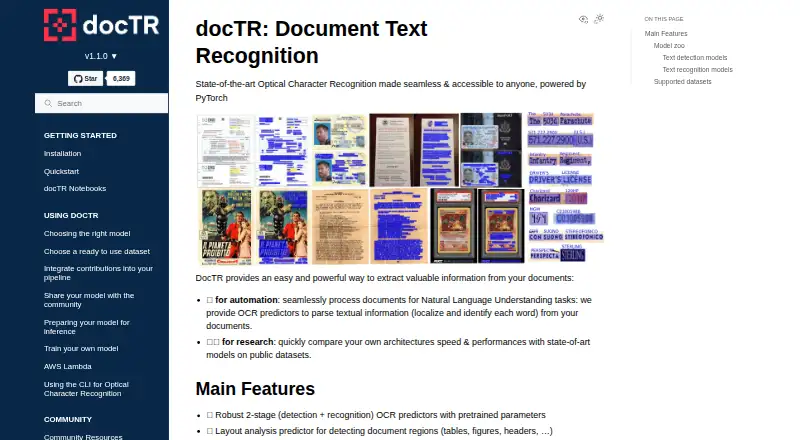
What docTR is
docTR is a free deep learning OCR library for locating and recognizing text in documents, aimed at document automation and research. Its pretrained OCR predictors use two stages: text detection followed by recognition. A separate layout predictor can identify regions such as tables, figures, and headers. The quickstart covers loading PDFs, images, and web pages, then exporting results as plain text or a JSON-serializable dictionary. The project describes its predictors as optimized for inference on both CPU and GPU. If pretrained models are not suitable, users can train custom detection, recognition, layout, and table-structure models. The documentation describes loading and sharing models through the Hugging Face Hub, and provides a minimal REST API deployment template and browser demo. Installation is available through pip or Git, with official Docker images published through GitHub Container Registry. The installation guide requires Python 3.11 or higher. For AWS Lambda, the guide advises disabling multiprocessing and placing the model cache under /tmp to meet the environment's write restrictions. The project uses the Apache License 2.0.
Who it suits
docTR suits developers and researchers building document automation or OCR workflows who want a free library they can customize. Its REST API template and browser demo may also help teams explore deployment options.
What it does well
- Pretrained two-stage text detection and recognition
- Layout prediction identifies tables, figures, and headers
- Supports CPU and GPU inference
- Custom training for detection, recognition, layout, and tables
- Apache License 2.0
What to know first
- Installation requires Python 3.11 or higher
- AWS Lambda requires multiprocessing to be disabled
- Lambda model cache must be placed in /tmp
Limits
The free plan is the docTR open-source Python library, which requires Python 3.11 or higher. Reading web pages requires the optional HTML extra.
Plans
| Plan | Billed and limits | Price |
|---|---|---|
| docTR open-source Python library | Python 3.11 or higher · install with pip, Git, or Docker | Free |
As mindee.github.io lists them, read 5 Oct 2026. The maker's own page has the final word.
Getting started
- Visit the docTR website.
- Use Python 3.11 or higher.
- Install the library with pip, from Git, or with an official Docker image.
- Load PDFs or images; install the optional HTML extra to use web pages.
- Run a pretrained predictor; its weights download on first use and are cached locally.
docTR is a free Python library for detecting and recognizing text in documents, with layout analysis and tools for custom model training. It suits developers and researchers building document-automation workflows who can work in Python; its main trade-off is a Python 3.11-or-higher requirement.
Overview
Rather than a ready-made desktop OCR app, docTR is a library for adding OCR to software and research pipelines. Its pretrained predictors locate text and recognize it in a two-stage process, while a separate layout predictor identifies regions such as tables, figures, and headers. That combination makes it useful when a workflow needs more than extracted text, though integrating a library is a different fit from using a standalone OCR service.
Key features
- Document OCR: Pretrained detection and recognition predictors process PDFs and images. Results can be rendered as plain text or exported as a nested, JSON-serializable dictionary, giving developers a practical route from source documents to application data.
- Layout analysis: A predictor identifies document regions including tables, figures, and headers. This is valuable when downstream processing needs to distinguish page structure, not just read words.
- Flexible inputs: The quickstart covers PDFs, images, and web pages; HTML input requires the optional html extra. That breadth helps with mixed-source workflows, but HTML users must account for the extra dependency.
- Model customization: Users can train detection, recognition, layout, and table-structure models when pretrained ones fall short. This provides room to adapt the library to specialized documents, at the cost of taking on model-training work.
- Deployment and integration: Models can be loaded and shared through the Hugging Face Hub. A minimal REST API template and browser demo offer starting points for serving or demonstrating OCR, rather than a turnkey hosted service.
- Additional tools: The contrib module includes an artefact detector for logos, QR codes, and barcodes, but it requires onnxruntime. Pretrained weights download on first use and are cached locally for subsequent calls.
The project describes its predictors as optimized for CPU and GPU inference. Installation is through pip, Git, or official Docker images; the Python 3.11-or-higher requirement may rule it out for environments that cannot meet that baseline. For AWS Lambda, the guide calls for disabling multiprocessing and placing the model cache in /tmp to meet the platform's write restrictions.
Pricing
docTR is free, with no free trial because there is no paid plan to trial. The open-source Python library costs nothing and includes the library for Python 3.11 or higher, installable with pip, Git, or Docker. Its Apache License 2.0 makes it a clear option for teams seeking a free library they can deploy themselves; the offer is a library, not a priced hosted OCR service.
Platforms
docTR is available for Linux, macOS, and Windows, as well as API and self-hosted use. Docker images support deployment in containerized environments. Its primary platform is desktop, but its library and API template are aimed at development and deployment workflows rather than an end-user desktop interface.
Who it's for
Choose docTR if you are a developer or researcher who wants a free, customizable OCR library, needs layout detection alongside text recognition, or intends to train models for a particular document type. Look elsewhere if you need a hosted service, a conventional ready-to-use OCR app, or must run on an older Python version. Community questions can go to GitHub Discussions or the #doctr Slack channel; the project also welcomes issues, pull requests, and community models.
Pros and cons
- Pro: Text recognition, layout prediction, and custom training sit in one library, which suits workflows that need structured document understanding.
- Pro: Free access, multiple installation routes, and CPU/GPU inference options leave deployment choices to the user.
- Pro: Text and JSON-serializable outputs make it practical to feed extracted content into other software.
- Con: Python 3.11 or higher is mandatory, limiting use in older Python environments.
- Con: Training custom models and deploying the REST template require development and operational effort; docTR is not presented as a hosted OCR service.
- Con: HTML input needs an optional extra, and the additional artefact detector depends on onnxruntime.
Alternatives
Pick PaddleOCR if mobile platforms matter: it lists Android and iOS support and an Official API Free Tier with a daily parsing limit of 20,000 pages. Choose OCRmyPDF for free self-hosted software that depends on external OCR and PDF tools. EasyOCR is another free option for Linux, macOS, and self-hosted use.
Consider FreeOCR.AI if you want a freemium option with web support: its Monthly Pro plan is $10 a month, billed monthly, for 10,000 credits per month, and its Yearly Pro plan is $80 a year, billed annually, for 120,000 credits per year. i2OCR is a web alternative whose free plan processes one image or PDF page at a time. Tesseract OCR is a free alternative supporting Linux, Windows, macOS, and Android. Scribe OCR offers a free, open-source web application alongside self-hosted use. Prizmo is a freemium option for iOS and macOS, with on-device OCR and cloud OCR plans.
For broader comparisons, browse OCR software or OCR API Software.
Verdict
docTR is a strong fit for developers and researchers who want free OCR they can embed, extend, and deploy themselves.
Verdict
docTR offers OCR, layout analysis, and custom model training in a free library, with installation and deployment options including Docker and a REST API template. Check the Python requirement and AWS Lambda guidance against your environment.
Questions
How much does docTR cost?
The free plan costs nothing.
Is docTR open source?
The project identifies its license as Apache License 2.0.
Which platforms does docTR support?
Listed platforms are API, Linux, macOS, self-hosted, and Windows.
What inputs can docTR process?
It can read PDFs and images. Web-page input requires the optional HTML extra.
How can I install docTR?
Installation is available through pip, Git, or official Docker images. Python 3.11 or higher is required.
Can docTR connect to Hugging Face Hub?
Its documentation describes loading and sharing models through the Hugging Face Hub.
Facts from docTR's own pages
- Customization
- Users can train custom detection, recognition, layout, and table structure models when pretrained models do not meet their needs. · mindee.github.io, 5 Oct 2026
- Deployment
- The documentation offers templates for a browser demo and API deployment, and documents running docTR on AWS Lambda. · mindee.github.io, 5 Oct 2026
- Extra modules
- The contrib module includes an artefact detector for items such as logos, QR codes, and barcodes, and requires onnxruntime. · mindee.github.io, 5 Oct 2026
- Founded
- 2021 · mindee.github.io, 23 Sept 2026
- Free plan
- Yes · mindee.github.io, 23 Sept 2026
- Inference
- The project describes its predictors as optimized for inference on both CPU and GPU. · mindee.github.io, 5 Oct 2026
- Input formats
- docTR can read PDFs, images, and web pages, with HTML input requiring the optional html extra. · mindee.github.io, 5 Oct 2026
- Inputs and outputs
- The quickstart shows loading PDFs, images, and web pages and exporting results as plain text or a JSON-serializable dictionary. · mindee.github.io, 5 Oct 2026
- Supported inputs
- both · mindee.github.io, 23 Sept 2026
- Installation
- The library can be installed with pip or from Git, and official Docker images are available from GitHub Container Registry. · mindee.github.io, 5 Oct 2026
- Installation requirement
- The library requires Python 3.11 or higher and can be installed from pip, Git, or an official Docker image. · mindee.github.io, 5 Oct 2026
- Integrations
- The documentation describes loading and sharing models through the Hugging Face Hub. · mindee.github.io, 5 Oct 2026
- Layout analysis
- A layout predictor detects document regions such as tables, figures, and headers. · mindee.github.io, 5 Oct 2026
- License
- The documentation's source code identifies the program as licensed under Apache License 2.0. · mindee.github.io, 5 Oct 2026
- Maker
- The project documentation says docTR is actively maintained by Mindee. · mindee.github.io, 5 Oct 2026
- OCR features
- It provides pretrained two-stage text detection and recognition predictors and a layout analysis predictor for regions such as tables, figures, and headers. · mindee.github.io, 5 Oct 2026
- OCR pipeline
- Its pretrained OCR predictors use a two-stage text detection and recognition pipeline. · mindee.github.io, 5 Oct 2026
- Output
- OCR results can be rendered as plain text or exported as a JSON-serialisable nested dictionary. · mindee.github.io, 5 Oct 2026
- Primary platform
- desktop · mindee.github.io, 23 Sept 2026
- Pretrained weights
- Pretrained weights are downloaded on first use and cached locally for later calls. · mindee.github.io, 5 Oct 2026
- Purpose
- docTR is a deep learning OCR library for locating and recognizing text in documents, intended for document automation and research. · mindee.github.io, 5 Oct 2026
- Requirements
- The installation guide requires Python 3.11 or higher. · mindee.github.io, 5 Oct 2026
- Security considerations
- For AWS Lambda, the guide says to disable multiprocessing and set the model cache directory within /tmp to comply with Lambda's write restrictions. · mindee.github.io, 5 Oct 2026
- Support
- The contribution guide directs users with questions to GitHub Discussions and also mentions a #doctr channel on Slack. · mindee.github.io, 5 Oct 2026
Where docTR stands on Freedom251
- OCR API Software#2 of 29
- OCR software#4 of 40