Calamari OCR
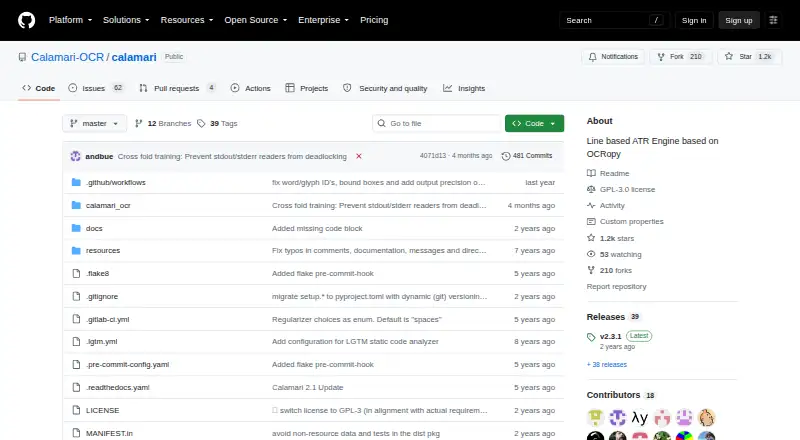
What Calamari OCR is
Calamari OCR is a Python 3 engine for recognizing text in lines. Based on OCRopy and Kraken, it is designed to run from the command line, and its modular design can also be integrated and customized in Python scripts. The project documentation provides commands for training models, resuming training, and cross fold training, and links to pretrained and experimental models. It lists plain files, PageXML, Abbyy, and HDF5 as dataset formats. For PageXML training, the documented workflow uses page images with their corresponding XML files. Installation options include pip and source installation, with Conda available as an alternative environment setup. Calamari is listed for Linux, API, and self-hosted use; PyPI classifies it for developers, education, and science or research, and labels it OS independent. The project also lists structure extraction and handwriting OCR, with Python as its SDK language. Its command line documentation currently supports OCR on lines. The repository is published under the GNU General Public License version 3, and the project points users to its documentation for installation and usage guidance.
Who it suits
Calamari suits developers, educators, and science or research users who need a line-based OCR engine they can run from the command line or integrate through Python. Its training commands, model repositories, and documented dataset formats may suit people working with their own OCR datasets.
What it does well
- Python scripts can integrate and customize its modular engine.
- Training, resumed training, and cross fold training are documented.
- Pretrained and experimental model repositories are linked.
- Supports plain files, PageXML, Abbyy, and HDF5 datasets.
- Published under the GNU General Public License version 3.
What to know first
- Command line OCR currently supports lines only.
- Requires installation through pip, source, or a Conda environment.
Limits
The command line documentation currently supports OCR on lines. The software is free and open source under the GNU General Public License version 3.
Getting started
- Open the Calamari project website on GitHub.
- Install with pip, use the source installation path, or set up an environment with Conda.
- Follow the project documentation for installation and usage.
- For PageXML training, provide page images with corresponding XML files.
Verdict
Choose Calamari if you need a free, open source Python OCR engine with line recognition, model training commands, and customization through scripts. Its documented command line workflow is limited to OCR on lines, so consider that scope when choosing it for a recognition project.
Questions
How much does Calamari OCR cost?
It is free and open source.
Is there a free plan or trial?
The project is free; no free trial is listed.
Which platforms does it support?
It is listed for API, Linux, and self-hosted use. PyPI labels it OS independent.
What dataset formats are documented?
The documentation lists plain files, PageXML, Abbyy, and HDF5.
What license does Calamari use?
The repository is published under the GNU General Public License version 3.
What programming language does it use?
Calamari is a Python 3 engine, and Python is its listed SDK language.
Facts from Calamari OCR's own pages
- Audience
- PyPI classifies the package for developers, education, and science or research, and labels it OS independent. · pypi.org, 4 Oct 2026
- Command line
- Calamari is designed to be used from the command line. · github.com, 4 Oct 2026
- Customization
- The engine can be integrated and customized from Python scripts, and the documentation includes a Python API. · github.com, 9 Oct 2026
- Data formats
- The documentation lists plain files, PageXML, Abbyy, and HDF5 dataset formats. · calamari-ocr.readthedocs.io, 4 Oct 2026
- Input formats
- The documentation lists Plain files, PageXML, Abbyy, and HDF5 dataset formats. · calamari-ocr.readthedocs.io, 9 Oct 2026
- Installation
- The README says Calamari is available on PyPI and gives `pip install calamari-ocr` as the installation command. · github.com, 9 Oct 2026
- Intended users
- The README describes command-line use and modular integration into Python scripts, and asks research-project users to cite its 2020 paper. · github.com, 9 Oct 2026
- License
- The GitHub repository identifies its license as GPL-3.0. · github.com, 9 Oct 2026
- Line-level limit
- Calamari currently supports OCR on lines; page segmentation and preceding preprocessing require other software. · calamari-ocr.readthedocs.io, 9 Oct 2026
- Line recognition
- The project describes Calamari as a line based text recognition engine. · github.com, 4 Oct 2026
- Model training
- The `calamari-train` command trains new models and supports data augmentation and early stopping. · calamari-ocr.readthedocs.io, 9 Oct 2026
- Model voting
- Calamari supports confidence voting across predictions from multiple models. · calamari-ocr.readthedocs.io, 9 Oct 2026
- Notable limitation
- The command line documentation states that currently only OCR on lines is supported. · github.com, 4 Oct 2026
- PageXML workflow
- For PageXML training, the documentation instructs users to provide page images with corresponding XML files. · calamari-ocr.readthedocs.io, 4 Oct 2026
- Prediction
- The `calamari-predict` command transcribes images of text lines into text. · calamari-ocr.readthedocs.io, 9 Oct 2026
- Pretrained models
- The README links to standard and experimental repositories of pretrained models. · github.com, 9 Oct 2026
- Purpose
- Calamari is a line-based OCR engine based on OCRopy and Kraken, written in Python 3. · github.com, 9 Oct 2026
- Support
- The project links users to its documentation for further installation and usage instructions. · github.com, 4 Oct 2026
- Training
- Its documentation includes commands for training, resuming training, and cross fold training models. · calamari-ocr.readthedocs.io, 4 Oct 2026
Where Calamari OCR stands on Freedom251
- OCR API Software#7 of 29