EasyOCR
What EasyOCR is
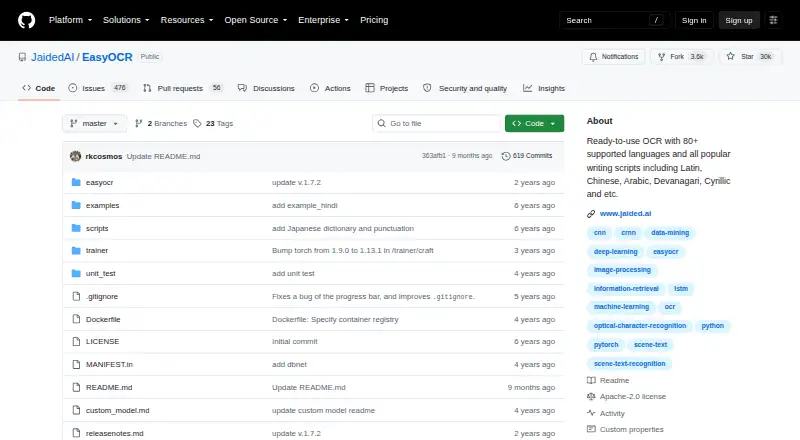
EasyOCR is a free, open-source Python module for extracting text from images, including natural-scene text and dense documents. It supports more than 80 languages, and compatible languages can be recognized together. Its readtext method can provide detected text with bounding-box coordinates and confidence values, or text alone. Images can be supplied as a file path, NumPy array, bytes, or URL. The Reader can run on a GPU when available or in CPU-only mode. Pretrained models download automatically when EasyOCR is used, and can also be downloaded manually for offline environments. The API allows custom recognition networks and settings for detection, recognition, decoding, and text-box merging. Installation options include pip, source, and Docker; Windows users may need to install PyTorch manually first. The project also offers a web demo and is integrated into Hugging Face Spaces through Gradio. Handwriting recognition is not supported; the README lists it as planned work. No paid plans are listed.
Who it suits
EasyOCR suits developers who need image-based text extraction and want to configure recognition or run it on a GPU or CPU. It may also suit offline workflows, with manual model downloads.
What it does well
- Supports more than 80 languages.
- Accepts file paths, arrays, bytes, and URLs.
- Can use a GPU or run CPU-only.
- Apache-2.0 licensed with no paid plans listed.
What to know first
- Handwriting recognition is not supported.
- Windows users may need to install PyTorch manually first.
- No searchable PDF or Word export.
Limits
Handwriting recognition is not supported; it is listed as planned work. Pretrained models download automatically when EasyOCR is used, though they can be downloaded manually for offline environments.
Plans
| Plan | Billed and limits | Price |
|---|---|---|
| EasyOCR | Open-source OCR library · no paid plans listed | Free |
As github.com lists them, read 4 Oct 2026. The maker's own page has the final word.
Getting started
- Open the project at https://github.com/JaidedAI/EasyOCR
- Install EasyOCR using pip, from source, or with Docker
- On Windows, install PyTorch manually first if needed
- Create a Reader and provide an image as a file path, NumPy array, bytes, or URL
- Use `readtext` to retrieve text, bounding boxes, and confidence values, or request text alone
EasyOCR is a Python library that extracts text from natural-scene images and dense documents. It best suits developers building their own image-processing workflows rather than readers seeking a ready-made desktop editor. Its broad language coverage and configurable processing are compelling; the absence of handwriting recognition is a firm boundary.
Overview
EasyOCR’s readtext method can return recognized text alongside bounding boxes and confidence values, or provide text alone. Coordinates and confidence can help an application decide where text appears and how reliable a reading may be. Inputs can come from a file path, NumPy array, bytes, or URL, which makes it adaptable to varied Python pipelines.
This is an open-source library, not a finished document-editing app. The public repository identifies it as Apache-2.0 licensed. EasyOCR does not provide searchable PDF or Word export, so readers who need those outputs should look elsewhere or build additional processing around it.
Key features
Multilingual recognition
EasyOCR supports more than 80 languages, and compatible languages can be read together. That breadth is useful for mixed-language image collections. Handwriting recognition remains planned work, however, so it is not a fit for workflows centered on handwritten notes or forms.
Configurable processing and compute
Developers can adjust detection, recognition, decoding, and text-box merging, or use custom recognition networks. This flexibility can help tailor OCR to an application, but it assumes the user is comfortable integrating and tuning a library rather than relying on a fixed interface.
The Reader can use a GPU when available or run on CPU alone. Pretrained models download automatically on use, with a manual download option for offline environments. These choices support different deployment conditions, although Windows users may need to install PyTorch separately before installation.
Installation and project support
Installation routes include pip, source, and Docker. The repository also provides a web demo and says EasyOCR is integrated into Hugging Face Spaces using Gradio. For enterprise work, Jaided AI directs inquiries to custom OCR and AI implementation, training or fine-tuning, and deployment services. Issues older than six months are automatically closed, though critical issues can be reopened.
Pricing
EasyOCR is free: its EasyOCR plan costs nothing and provides an open-source OCR library. There are no paid plans listed, and the free plan has no stated request quota or seat cap. That makes it suitable for developers who can host and integrate the library themselves; it is not a packaged paid service with searchable PDF or Word export.
Platforms
EasyOCR supports Linux, macOS, Windows, and self-hosted use, with desktop as its primary platform. Its Python-module format means platform support is most relevant to developers setting up an environment, rather than people expecting a conventional desktop app.
Who it's for
Choose EasyOCR if you need multilingual image text recognition inside a Python application, want access to bounding boxes and confidence values, or need to tune processing and compute choices. It is less suitable for nontechnical users seeking an out-of-the-box document editor, anyone who needs handwriting OCR today, or workflows that require built-in searchable PDF or Word export.
Pros and cons
- Pros: More than 80 supported languages, including compatible combinations, serve multilingual image workflows.
- Pros: Multiple input types, optional GPU use, CPU-only operation, and offline model downloads give developers deployment flexibility.
- Pros: Configurable processing and custom recognition networks allow application-specific adaptation.
- Cons: Handwriting recognition is planned rather than supported, ruling it out for handwritten material.
- Cons: As a Python library, it requires integration work and is not a ready-made desktop document editor.
- Cons: Searchable PDF and Word export are absent.
Alternatives
OCR.space is worth considering when a hosted API and broader platform availability matter; its free plan allows 25,000 requests per month, with a 1 MB file-size cap, three PDF pages, and 500 requests per day per IP, and includes searchable PDF with a watermark.
Tesseract OCR is another free, Apache-2.0 open-source OCR engine if you want an alternative engine and broader listed platform support. docTR may suit Python developers who prefer a library installable with pip, Git, or Docker and require Python 3.11 or higher. OCRmyPDF is a better direction for self-hosted PDF workflows, though it depends on external OCR and PDF tools.
PaddleOCR is an option to compare if its official API’s daily parsing allowance of 20,000 pages fits the workload. Veryfi Invoices OCR API is aimed at invoice processing, with a Starter plan at $500 a month and a $500/mo minimum commitment. Amazon Textract AnalyzeExpense is a paid API alternative with a new-customer free tier of up to 100 pages per month for three months, followed by a listed Analyze Expense API price of $0.01 per mon. API4AI OCR offers pay-as-you-go and a free RapidAPI plan, and may suit readers looking for an API-oriented option.
Browse more options in OCR API Software or OCR software.
Verdict
EasyOCR is a strong choice for developers who want a free, multilingual OCR component with configurable processing and flexible image inputs. Choose it for an integrated Python workflow; look elsewhere if handwriting recognition, built-in document exports, or a finished desktop experience is essential.
Verdict
EasyOCR offers configurable image text recognition across many languages, with multiple input and compute options. Its key limitation is that handwritten text support remains planned rather than available.
Questions
Is EasyOCR free?
Yes. EasyOCR is free, and no paid plans are listed.
Is EasyOCR open source?
Yes. Its public GitHub repository identifies the license as Apache-2.0.
Which languages does EasyOCR support?
The project states that it supports more than 80 languages. Compatible languages can be read together.
What image inputs can it read?
Images can be supplied as a file path, NumPy array, bytes, or URL.
Does EasyOCR recognize handwriting?
No. Handwriting recognition is listed as planned work.
How can I install EasyOCR?
The documented options are pip, installation from source, and Docker. Windows users may need to install PyTorch manually first.
Facts from EasyOCR's own pages
- Compute options
- The Reader can use a GPU when available or run in CPU-only mode. · jaided.ai, 4 Oct 2026
- Customization
- The API supports custom recognition networks and configurable detection, recognition, decoding, and text-box merging options. · jaided.ai, 4 Oct 2026
- Free plan
- Yes · github.com, 23 Sept 2026
- Handwriting OCR
- No · github.com, 23 Sept 2026
- Input formats
- Images can be supplied as a file path, NumPy array, bytes, or URL. · jaided.ai, 4 Oct 2026
- Supported inputs
- image · github.com, 23 Sept 2026
- Installation
- The maker documents installation through pip, from source, or with Docker; Windows users may need to install PyTorch manually first. · jaided.ai, 4 Oct 2026
- Integrations
- The repository says EasyOCR is integrated into Hugging Face Spaces using Gradio and provides a web demo. · github.com, 4 Oct 2026
- Issue handling
- The repository says that issues older than six months are automatically closed and can be reopened if critical. · github.com, 4 Oct 2026
- Supported languages
- 80 · github.com, 23 Sept 2026
- Languages
- The project states that it supports more than 80 languages, and compatible languages can be read together. · jaided.ai, 4 Oct 2026
- License
- The public GitHub repository identifies EasyOCR as licensed under Apache-2.0. · github.com, 4 Oct 2026
- Maker
- jDai Lab says it was founded in 2020 and describes itself as a small, independent AI research lab; the about page does not state its headquarters. · jaided.ai, 4 Oct 2026
- Model downloads
- Pretrained models download automatically when EasyOCR is used, and can also be downloaded manually for offline environments. · jaided.ai, 4 Oct 2026
- Notable limitation
- The README lists handwritten text support as planned work. · github.com, 4 Oct 2026
- Primary platform
- desktop · github.com, 23 Sept 2026
- Purpose
- EasyOCR is a Python module for extracting text from images, including natural scene text and dense document text. · jaided.ai, 4 Oct 2026
- Recognition output
- The readtext method returns detected text with bounding box coordinates and confidence values, with an option for text-only output. · jaided.ai, 4 Oct 2026
- Security
- The maker pages reviewed do not state a security certification or compliance claim for EasyOCR. · jaided.ai, 4 Oct 2026
- Support
- The repository directs enterprise inquiries to Jaided AI for custom OCR/AI implementation, training or fine-tuning, and deployment services. · github.com, 4 Oct 2026
Where EasyOCR stands on Freedom251
- OCR API Software#3 of 29
- OCR software#8 of 40