Freedom251 › Terminal Emulators
Termalin
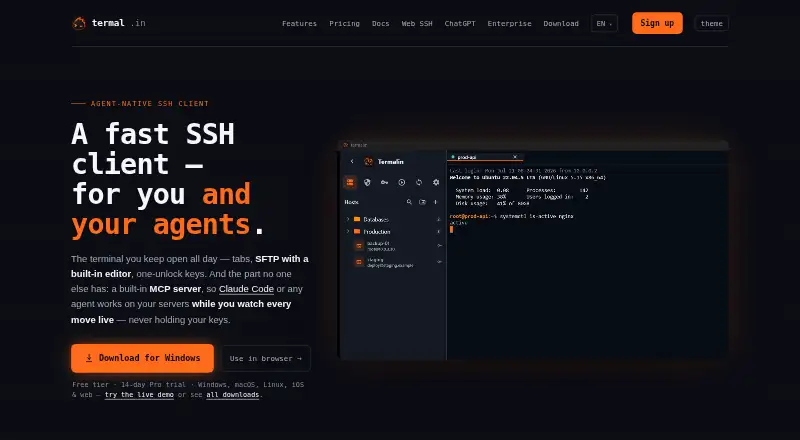
What Termalin is
Termalin is an SSH client for people and AI agents, bringing terminal sessions together with file transfer, database access, and agent connections. The terminal includes tabs, a hosts sidebar, snippets, and session restoration with scrollback. File tools cover SFTP, FTP, and S3 browsers, alongside an editor and dual-pane file manager. Its database client supports 13 engines, including PostgreSQL, SQLite, MongoDB, Redis, and SQL Server. A built-in MCP server lets connected agents open sessions, run commands, use SFTP to read or write files, and join live sessions while the user watches. The web cabinet provides terminal, file-browsing, and recording-replay access from a laptop, phone, or tablet without installing the app. Termalin supports Windows, macOS, Linux, and web access. The free plan includes SSH and SFTP, a local encrypted vault, recording and replay, and the database client. Pro costs $8.00 per month billed yearly and adds encrypted cloud vault and device sync. The Windows .exe is not code-signed; the Microsoft Store build is signed.
Who it suits
Termalin suits users who need SSH, file-transfer, and database tools alongside agent access. Its web cabinet can serve people who want terminal and file-browser access without installing the app.
What it does well
- Database client supports 13 engines.
- MCP server lets agents run commands and use SFTP.
- Web cabinet works without installing the app.
- Free plan includes SSH, SFTP, and session replay.
What to know first
- Windows .exe is not code-signed.
- Pro's $8.00 monthly price is billed yearly.
- Independent penetration testing is planned, not completed.
Limits
The free plan includes SSH and SFTP with a local encrypted vault. Encrypted cloud vault, device sync, snippet sync, command automation, cloud recordings, and agent live-session access are included with Pro, listed at $8/user/mo billed annually.
Plans
| Plan | Billed and limits | Price |
|---|---|---|
| Free | Free forever · SSH & SFTP · local encrypted vault · session recording & replay · watch grid · 13-engine database client · MCP agent | Free |
| Pro | billed yearly · Everything in Free · encrypted cloud vault · device sync · snippet sync · command automation · cloud recordings · agent live-session access | $8 a month |
| Team | billed yearly · Everything in Pro · shared team vault · session sharing · collaboration · roles & permissions · consolidated billing | $15 a month |
| Beta founders — Pro, for life | single payment · Lifetime Pro · all future Pro features included · limited to beta | $149, paid once |
| Enterprise | Talk to us · Multiple vaults · granular access · SAML SSO coming soon · org audit review coming soon · agent governance beta · SCIM coming soon · SLA & priority support · dedicated manager · migration & onboarding | On request |
As termal.in lists them, read 28 Sept 2026. The maker's own page has the final word.
Getting started
- Open https://termal.in to access Termalin.
- Choose the free plan or review the paid plans; Pro has a 14-day trial.
- Use the web cabinet from a laptop, phone, or tablet without installing the app.
- For a desktop install, choose a supported Windows, macOS, or Linux route.
- Set up an account using a passkey or TOTP with backup codes.
Termalin is an SSH workspace that brings terminal sessions together with file management, database access and tools for AI agents. It suits people who regularly move between those jobs; if you only need a terminal, a narrower alternative may be a better fit.
Its breadth is the appeal, but the paid tiers matter for cloud sync, collaboration and agent access to live sessions. Windows users should also account for the unsigned .exe, or use the signed Microsoft Store build.
Overview
Termalin pairs a tabbed terminal with SFTP, FTP and S3 browsing, a built-in editor, a dual-pane file manager and a database client covering 13 engines. That combination can keep routine remote administration in one workspace instead of requiring separate tools. Session restore with scrollback and saved snippets support recurring work, while the database coverage is useful for teams dealing with mixed systems.
Its MCP server lets compatible agents open sessions, run commands, read and write files over SFTP, and join live sessions while the user watches. Integrations are documented for Claude, ChatGPT, Cursor, Codex and other MCP-capable agents. This is a distinctive strength for agent-assisted workflows, but unnecessary complexity if you do not want an agent working alongside your terminal.
The web cabinet provides terminal, file browsers and recording replay from a laptop, phone or tablet without installing the app. For private servers, the Connector dials out without requiring an inbound port, uses short-lived certificates and keeps the agent blind to SSH bytes. Vault data is encrypted on-device before synchronization with a master-password-derived PBKDF2-HMAC-SHA256 key and AES-256-GCM. Accounts support TOTP with backup codes and passkeys; SSH host keys are pinned on first use.
Recordings capture terminal output and event markers, not raw keystrokes, and hidden-prompt passwords are not echoed into them. Termalin says data minimisation and account and data deletion on request are shipped; an independent penetration test is planned, and SOC 2 is on the roadmap. That is a more measured security posture than a completed independent assessment would provide.
Key features
Terminal, files and databases
The terminal uses xterm-256color sessions with browser-style tabs, a hosts sidebar, snippets and session restore with scrollback. File access spans SFTP, FTP and S3, with an editor and dual-pane transfers. The 13-engine database client includes PostgreSQL, MySQL/MariaDB, SQLite, MongoDB, Redis, ClickHouse, Elasticsearch, Cassandra/ScyllaDB, Neo4j, InfluxDB, RabbitMQ, SQL Server and Cloudflare D1. This breadth makes Termalin more compelling as a multi-purpose operations workspace than as a lightweight terminal alone.
Agent and remote access
Agents can use local or hosted MCP connections. The live-session access included in Pro lets an agent join while the user watches, an important distinction for users who want oversight rather than unattended access. The browser cabinet extends access to devices without the app, though the available platform details do not establish feature parity with the installed client.
Pricing
The Free plan costs nothing, billed Free forever. It includes SSH and SFTP, a local encrypted vault, session recording and replay, watch grid, the 13-engine database client and MCP agent access. It is a substantial starting point for individual use, but it does not include encrypted cloud vault, device and snippet sync, command automation, cloud recordings or agent live-session access.
Pro costs $8 a month, billed billed yearly, and adds those cloud and automation features to everything in Free. It suits an individual who needs synced devices or cloud recordings. Team costs $15 a month, billed billed yearly, and adds a shared team vault, session sharing, collaboration, roles and permissions, and consolidated billing; it is the relevant upgrade for coordinated work rather than simply more personal convenience.
Enterprise has custom pricing and includes multiple vaults, granular access, agent governance, SLA and priority support, plus a dedicated manager, migration and onboarding. The Beta founders — Pro, for life plan costs $149 a month, billed Limited to the beta, and promises lifetime Pro access with all future Pro features included; the stated billing term makes this a beta-limited offer, not a straightforward alternative to annual Pro. A 14-day trial is available.
Platforms
Termalin supports Windows, macOS and Linux, and lists API, iOS and web among its platforms. The Windows .exe is not code-signed yet, so SmartScreen may show an unknown-publisher warning; the Microsoft Store build is signed. Vulnerability reports are acknowledged within 3 working days.
Who it's for
Termalin is best suited to administrators and developers who need SSH, file transfers and varied database connections in the same workspace, especially if they also want MCP-capable agents to work with supervision. Free is a credible way to use its core tools; Pro is for individuals who need sync and automation, while Team and Enterprise address collaboration and governance. It is less suited to someone seeking only a terminal or to Windows users unwilling to install a build that may prompt an unsigned-publisher warning.
Pros and cons
- Pro: Terminal, SFTP/FTP/S3 tools and a 13-engine database client sit together, reducing tool switching for mixed remote-work tasks.
- Pro: MCP access covers commands, files and watched live sessions, giving agent users a way to combine assistance with oversight.
- Pro: The free tier includes the database client, recordings and MCP agent access, not just basic SSH.
- Con: Cloud vault, device sync, command automation and live-session agent access require the annually billed Pro tier.
- Con: Windows installation outside the Microsoft Store can trigger SmartScreen because the .exe is unsigned.
- Con: Independent penetration testing remains planned and SOC 2 is on the roadmap, so those milestones are not completed credentials.
Alternatives
Browse Terminal Emulators for a broader set of options. Choose Contour if you want a free terminal for Linux, macOS or Windows without Termalin’s paid tiers. Warp is another freemium option for Linux, macOS, self-hosted environments and Windows, with a free plan for developers that includes core terminal features and Warp Agent CLI access.
gitsome is a free option for Linux, macOS, self-hosted environments and Windows. Hyper is a free option for Linux, macOS and Windows. Tabby offers a forever-FOSS option for Linux, macOS and Windows. WezTerm is MIT-licensed software for Linux, macOS and Windows, with no paid plans advertised. Alacritty is a free option for Linux, macOS and Windows. Ghostty is free and open source for Linux and macOS, with no commercial backing or dedicated support team.
Verdict
Choose Termalin if you want SSH, file management, broad database support and supervised agent access in one workspace, with a useful free plan to start. Look elsewhere if you only need a terminal, or if you need independent security testing already completed or an unsigned Windows installer is a deal-breaker.
Verdict
Termalin combines terminal, file, database, and agent tools, with a free plan and a web cabinet. Windows users should note that the .exe is unsigned, though the Microsoft Store build is signed.
Questions
Is Termalin free?
Yes. Its Free plan costs nothing and includes SSH and SFTP, a local encrypted vault, session recording and replay, a watch grid, the database client, and MCP agent access.
How much does Pro cost?
Pro is $8/user/mo billed annually. The plan adds encrypted cloud vault, device and snippet sync, command automation, cloud recordings, and agent live-session access.
Is there a free trial?
Yes. Termalin lists a 14-day trial.
Which platforms does it support?
Listed platforms include Windows, macOS, Linux, web, iOS, and API. Supported desktop platforms are Windows, macOS, and Linux.
Which databases does Termalin support?
Its database client supports 13 engines, including PostgreSQL, MySQL/MariaDB, SQLite, MongoDB, Redis, SQL Server, and Cloudflare D1.
What does the Team plan cost?
Team is $15 per month billed yearly. It includes shared team vault, session sharing, collaboration, roles and permissions, and consolidated billing.
Facts from Termalin's own pages
- Agent access
- The MCP server lets agents open sessions, run commands, read or write files over SFTP, and step into live sessions while the user watches. · termal.in, 28 Sept 2026
- Agent integrations
- Termalin documents connections for Claude, ChatGPT, Cursor, Codex and other MCP-capable agents through local or hosted MCP. · termal.in, 28 Sept 2026
- Authentication
- Accounts support TOTP with backup codes and passkeys, while SSH host keys are pinned on first use. · termal.in, 28 Sept 2026
- Browser cabinet
- The web cabinet provides terminal, SFTP/FTP/S3 browsers and recording replay from a laptop, phone or tablet without installing the app. · termal.in, 28 Sept 2026
- Compliance status
- Termalin says data minimisation and account/data deletion on request are shipped, an independent penetration test is planned, and SOC 2 is on the roadmap. · termal.in, 28 Sept 2026
- Connector
- A private-server Connector dials out to Termalin, requires no inbound port, uses short-lived certificates and keeps the agent blind to SSH bytes. · termal.in, 28 Sept 2026
- Database support
- Its database client supports 13 engines, including PostgreSQL, MySQL/MariaDB, SQLite, MongoDB, Redis, ClickHouse, Elasticsearch, Cassandra/ScyllaDB, Neo4j, InfluxDB, RabbitMQ, SQL Server and Cloudflare D1. · termal.in, 28 Sept 2026
- Encryption
- Vault data is encrypted on the device with a master-password-derived PBKDF2-HMAC-SHA256 key and AES-256-GCM before synchronization. · termal.in, 28 Sept 2026
- File tools
- Termalin includes SFTP, FTP and S3 file browsers, a built-in editor and a dual-pane file manager for transfers. · termal.in, 28 Sept 2026
- Free plan
- Yes · termal.in, 24 Sept 2026
- Notable limit
- The Windows .exe is not code-signed yet, so SmartScreen may show an unknown-publisher warning; the Microsoft Store build is signed. · termal.in, 28 Sept 2026
- Platforms
- Downloads are provided for Windows 10 or later, macOS 11 or later and Linux x86_64 AppImage; the site also lists iOS apps and a browser cabinet. · termal.in, 28 Sept 2026
- Product
- Termalin is a fast SSH client for users and AI agents, with tabs, SFTP, one-unlock keys and a built-in MCP server. · termal.in, 28 Sept 2026
- Recordings
- Session recordings contain terminal output and event markers, not raw keystrokes; hidden-prompt passwords are not echoed into recordings. · termal.in, 28 Sept 2026
- Scripting API
- Yes · termal.in, 24 Sept 2026
- Session sync
- Yes · termal.in, 24 Sept 2026
- SSH support
- Yes · termal.in, 24 Sept 2026
- Support
- Enterprise includes SLA and priority support plus a dedicated manager, migration and onboarding; vulnerability reports are acknowledged within 3 working days. · termal.in, 28 Sept 2026
- Supported platforms
- Windows,macOS,Linux · termal.in, 24 Sept 2026
- Terminal
- The terminal provides xterm-256color sessions, browser-style tabs, a hosts sidebar, snippets and session restore with scrollback. · termal.in, 28 Sept 2026
Where Termalin stands on Freedom251
- Terminal Emulators#14 of 40
- Terminal apps#26 of 41