Freedom251 › AI Sales Call Analysis Software

TalkPilot
What TalkPilot is
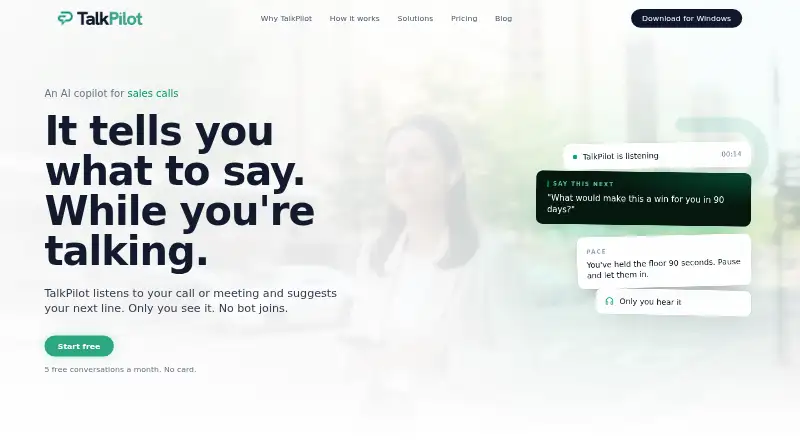
TalkPilot listens to calls and meetings and displays private suggestions for what to say while the conversation is underway. It runs on the user's Android, iOS, macOS, or Windows device rather than joining as a meeting participant. Afterward, it can produce structured notes, summaries, and action items. The maker presents it for sales, customer care, contact centers, real estate, interviews, and everyday conversations. Users can connect Google Calendar to see upcoming events while preparing. Listed compatible services and tools include Zoom, Microsoft Teams, Google Meet, RingCentral, Five9, Genesys, Aircall, Talkdesk, Zendesk, Intercom, Freshdesk, Salesforce Service Cloud, HubSpot, and ServiceNow. TalkPilot says it does not record or store audio, and users start and can stop each session. It says it does not use audio, transcripts, or client information to train AI models. Processing takes place in the United States, with no EU data residency option; transcript bodies are retained for 365 days by default, configurable per organization. The Free plan costs nothing and includes five monthly conversations up to 30 minutes each, five practice runs, and three scenarios. Pro is $20 a month; Teams is $32 a year billed annually, or $40 billed monthly, with a two-seat minimum.
Who it suits
TalkPilot suits people who want private, in-conversation prompts and post-call notes for sales, customer care, interviews, or everyday conversations. Its Free plan may fit occasional use; Teams adds shared playbooks, scorecards, and team roles.
What it does well
- Runs on Android, iOS, macOS, and Windows.
- Does not join meetings as a participant.
- Produces notes, summaries, and action items.
- Free plan includes five monthly conversations.
- Does not use conversation data to train AI models.
What to know first
- Free conversations are limited to 30 minutes each.
- Pro costs $20 a month.
- Processing is in the United States; no EU data residency.
- Transcript bodies default to 365-day retention.
Limits
The Free plan allows five conversations per month, each up to 30 minutes, five practice runs, and three scenarios. Pro costs $20 a month and allows unlimited conversations up to two hours each; it also includes earbud coaching, a teleprompter, document context, and full Deep Dive and practice.
Plans
| Plan | Billed and limits | Price |
|---|---|---|
| Free | 5 conversations/month, up to 30 minutes each · 5 practice runs/month · 3 scenarios | Free |
| Pro | monthly · Unlimited conversations, up to 2 hours each · Earbud coaching · Teleprompter · Document context · Full Deep Dive and practice | $20 a month |
| Teams | annually; or $40 billed monthly · Minimum 2 seats · Shared playbook and knowledge base · Scorecards and team dashboard · Admin, manager, and member roles | $32 |
| Enterprise | More than 20 users · Custom pricing | On request |
As talkpilot.co lists them, read 2 Oct 2026. The maker's own page has the final word.
Getting started
- Visit https://www.talkpilot.co/
- Choose Android, iOS, macOS, or Windows
- Start with the Free plan or select a paid plan
- Start a session on your device when ready for a conversation
- Connect Google Calendar to view upcoming events for preparation
Overview
TalkPilot is a conversation assistant for people who want private prompts while speaking and organized follow-up afterward. It is best suited to professionals who need live guidance without adding a bot to a meeting. The free tier makes occasional use accessible, but its monthly caps quickly rule it out for regular coaching.
Key features
Live coaching and follow-up
TalkPilot listens on the user’s device and suggests what to say during calls or meetings, then can turn conversations into notes, summaries and action items. Its listed capabilities also include transcription, objection detection, next-step extraction, coaching scorecards and CRM synchronization. This combination is useful when a conversation needs both in-the-moment support and a clear handoff afterward; teams should confirm that the functions they need work with their particular tools.
Preparation and compatibility
Google Calendar connectivity can surface upcoming events to help users prepare. For customer-care workflows, compatible platforms or tools include Zoom, Microsoft Teams, Google Meet, RingCentral, Five9, Genesys, Aircall, Talkdesk, Zendesk, Intercom, Freshdesk, Salesforce Service Cloud, HubSpot and ServiceNow. The breadth is promising for customer-care teams, though compatibility alone does not establish which features are available for each integration. Because TalkPilot does not join as a meeting participant, it suits users who want to avoid a bot attendee, not teams seeking a meeting-bot workflow.
Privacy and security
TalkPilot says it does not record or store audio; users start each session and can stop it at any time. It encrypts data in transit with TLS 1.2 or higher and at rest with AES-256, and says it does not use audio, transcripts or client information to train AI models. These are meaningful safeguards, but transcripts are retained for 365 days by default, although organizations can configure retention. All processing takes place in the United States, with no EU data-residency option, which may disqualify it for organizations with location requirements. Privacy and security questions can be sent by email; the company aims to respond to general inquiries within five business days.
Pricing
TalkPilot has a free plan, two paid individual or team tiers, and a custom-priced enterprise option. The main trade-off is between low-cost, capped individual use and broader coaching or team administration features.
- Free — free: Includes five conversations per month, up to 30 minutes each, five practice runs per month and three scenarios. It is a reasonable way to try occasional coaching, but the conversation and practice caps make it a poor fit for frequent work calls.
- Pro — $20 a month, billed monthly: Offers unlimited conversations up to two hours each, plus earbud coaching, a teleprompter, document context, and full Deep Dive and practice. It fits individuals who have outgrown the free quotas and want those added coaching tools.
- Teams — $32 a year, billed annually; or $40 billed monthly: Requires at least two seats and adds a shared playbook and knowledge base, scorecards, a team dashboard, and admin, manager and member roles. These collaboration and oversight features make it the relevant tier for teams, but the minimum seats mean it is not a one-person upgrade.
- Enterprise — custom pricing: Intended for more than 20 users. Organizations at that scale can consider it, but should request a quote to assess the cost.
Platforms
TalkPilot supports Android, iOS, macOS and Windows, giving individuals a choice across mobile and desktop. A web platform is not among its supported platforms.
Who it's for
The product is presented for sales, customer care, contact centers, real estate, job interviews and everyday conversations. It is particularly relevant to people who want discreet prompts and structured follow-up without a meeting participant bot. Organizations should weigh its team features against the two-seat minimum and check whether US-only processing and default transcript retention suit their policies.
Pros and cons
- Pro: Live prompts and post-call notes, summaries and action items support both the conversation and follow-through.
- Pro: Users start and can stop sessions, and TalkPilot says it neither stores audio nor trains AI models on audio, transcripts or client information.
- Pro: The free tier offers five monthly conversations and five practice runs, enough for limited, occasional use.
- Con: Free conversations are capped at 30 minutes each, so longer or regular calls require a paid plan.
- Con: The Teams plan starts at two seats, a constraint for solo users who want team administration features.
- Con: Processing is US-only, and transcript bodies are retained for 365 days by default; those conditions may conflict with organizational requirements.
Alternatives
Choose Amotions AI if a free option with live coaching, roleplay, scorecards and transcripts—and two playbook documents or links—is the better fit; its free tier has limited usage.
Colibri.ai is worth considering for a free transcription-focused option with five hours per month, a 40-minute recording limit and one user.
Pick ConversationPilot if you want a free tier with three calls per month or a paid Solo plan with full live coaching for individual use.
Avoma may suit teams looking for a Startup plan with up to 25 paid seats and unlimited free view-only seats.
Consider Jiminny if its Insights Seat and minimum 12-month contract suit your purchasing needs.
Gong Forecast is a paid alternative with per-user licenses and a platform fee based on the number of users supported.
Allego is another paid option, priced per user per month and billed annually upfront.
Closr AI is a paid, web-based alternative.
For a broader comparison, browse AI Sales Call Analysis Software.
Verdict
TalkPilot is a strong fit for individuals and customer-facing teams who want private live coaching paired with structured follow-up, without a meeting bot. Its free plan is best for occasional use, while Pro removes the conversation quota and Teams adds shared tools and roles. Look elsewhere if US-only processing or year-long default transcript retention is incompatible with your requirements, or if a solo buyer needs team features without a seat minimum.
Verdict
TalkPilot combines live conversation suggestions with follow-up notes and action items, without joining the meeting as a participant. Check its US-only processing and default transcript retention against your organization's requirements before choosing a plan.
Questions
Is TalkPilot free?
Yes. Its Free plan costs nothing and includes five conversations per month, up to 30 minutes each, five practice runs, and three scenarios.
What does Pro cost?
Pro is $20 a month, billed monthly.
Which devices support TalkPilot?
TalkPilot is available on Android, iOS, macOS, and Windows.
Does it join meetings or record audio?
TalkPilot runs on the user’s device rather than joining a meeting as a participant. The maker says it does not record or store audio; users start each session and can stop it at any time.
What tools can it work with?
TalkPilot can connect to Google Calendar. Its customer care page lists Zoom, Microsoft Teams, Google Meet, RingCentral, Five9, Genesys, Aircall, Talkdesk, Zendesk, Intercom, Freshdesk, Salesforce Service Cloud, HubSpot, and ServiceNow as compatible platforms or tools.
What does the Teams plan cost?
Teams is $32 a year when billed annually, or $40 billed monthly. It requires at least two seats.
Facts from TalkPilot's own pages
- AI training
- The privacy policy says TalkPilot does not use audio, transcripts, or client information to train AI models. · talkpilot.co, 2 Oct 2026
- Audio handling
- The security page says TalkPilot does not record or store audio, and each session must be started by the user and can be stopped at any time. · talkpilot.co, 2 Oct 2026
- Calendar
- TalkPilot can connect to Google Calendar to show upcoming events for preparation. · talkpilot.co, 2 Oct 2026
- Data location
- The security page says all processing takes place in the United States and there is no EU data residency option. · talkpilot.co, 2 Oct 2026
- Encryption
- The security page states that data is encrypted in transit using TLS 1.2 or higher and at rest using AES-256. · talkpilot.co, 2 Oct 2026
- Headquarters
- Newark, Delaware, USA · talkpilot.co, 28 Sept 2026
- Integrations
- The customer care page lists Zoom, Microsoft Teams, Google Meet, RingCentral, Five9, Genesys, Aircall, Talkdesk, Zendesk, Intercom, Freshdesk, Salesforce Service Cloud, HubSpot, and ServiceNow as compatible platforms or tools. · talkpilot.co, 2 Oct 2026
- No meeting bot
- TalkPilot runs on the user's device and does not join meetings as a participant. · talkpilot.co, 2 Oct 2026
- Notes and coaching
- The product offers live suggestions and produces structured notes, summaries, and action items after conversations. · talkpilot.co, 2 Oct 2026
- Product
- TalkPilot listens to calls or meetings and privately suggests what to say during the conversation. · talkpilot.co, 2 Oct 2026
- Retention
- Transcript bodies are retained for 365 days by default, with retention configurable per organization. · talkpilot.co, 2 Oct 2026
- Support
- TalkPilot provides security and privacy contact by email at [email protected]; its privacy policy says it aims to respond to general inquiries within five business days. · talkpilot.co, 2 Oct 2026
- Use cases
- The maker presents TalkPilot for sales, customer care, contact centers, real estate, job interviews, and everyday conversations. · talkpilot.co, 2 Oct 2026
Where TalkPilot stands on Freedom251
- AI Sales Call Analysis Software#5 of 23