Freedom251 › Event Diagramming Software
Table-Plan.com
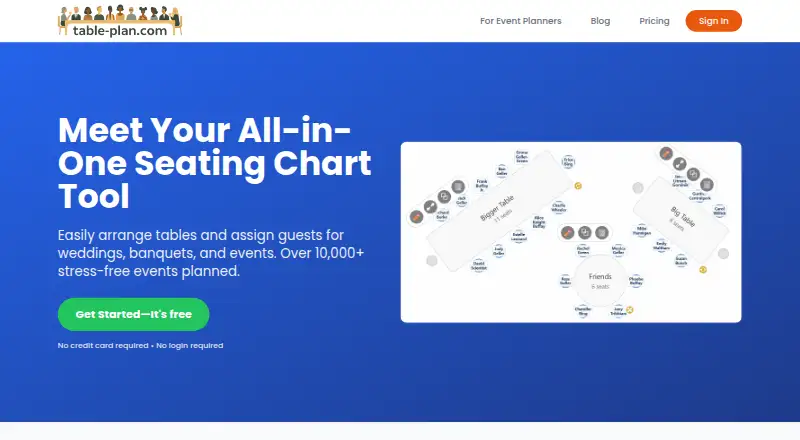
What Table-Plan.com is
Table-Plan.com is a browser-based tool for building and managing event seating charts. Paste guest names from a spreadsheet, RSVP list, or notes into its editor, then arrange them at round or long tables and chair rows. Add room elements such as a dance floor, stage, bar, or DJ booth; drag guests to seats, swap places, color-code groups, and track who remains unseated. Premium and Pro let guests use a shared link or QR code to look up their table and seat. Charts can be exported as images or PDFs, guest data as CSV, and Print Studio can prepare place cards, posters, table lists, and QR signs. Pro adds a password-protected project link for client editing without an account. The editor runs in a modern browser on Mac, Windows, or Chromebook and is designed for laptop or desktop screens; guests can view shared plans on phones. The free plan covers up to 30 guests and one project. Premium is $29 as a one-time payment, valid for three months; Pro is $49 a month.
Who it suits
It suits event planners, venues, and people arranging weddings, corporate events, galas, or parties. Its guest lookup and client editing options may help organizers who need to share plans with attendees or clients.
What it does well
- Import names by pasting one per line.
- Arrange tables and room features in the editor.
- Track guests who still need seats.
- Export charts as images or PDFs.
- Pro supports client editing without an account.
What to know first
- Free plan is limited to 30 guests and one project.
- Premium is valid for three months.
- Pro costs $49 a month.
- The editor is designed for laptop or desktop screens.
Limits
The Free plan allows up to 30 guests, one project, and unlimited tables. Premium allows up to 250 guests and three projects and is valid for three months; Pro supports unlimited guests and projects at $49 a month.
Plans
| Plan | Billed and limits | Price |
|---|---|---|
| Free | Up to 30 guests · 1 Project · Unlimited tables | Free |
| Premium | One-time payment. Plan is valid for 3 months. · Up to 250 guests · Up to 3 Projects · Unlimited Tables · QR code sharing · CSV Export · Print Studio PDFs | $29, paid once |
| Pro | Billed monthly. Cancel anytime. · Unlimited guests · Unlimited projects · Unlimited tables · Client Collaboration · QR code sharing · CSV Export · Print Studio PDFs · Priority support | $49 a month |
As table-plan.com lists them, read 7 Oct 2026. The maker's own page has the final word.
Getting started
- Visit https://table-plan.com/.
- Open the editor in a modern browser on Mac, Windows, or Chromebook.
- Paste guest names, one per line, into the editor.
- Choose a plan based on guest count and project needs.
- Arrange tables and seats, then export or print the chart as needed.
Table-Plan.com is a browser-based seating planner for turning a guest list into a room arrangement and event print materials. It is best suited to hosts and planners working at a laptop or desktop who need more than a basic diagram. Its strongest fit is a single event workflow that combines seating, guest lookup, and printable outputs; the right plan depends on guest count and how long the project needs to remain active.
Overview
Names can be pasted from a spreadsheet, RSVP list, or notes, then assigned to round or long tables and chair rows. Room elements such as a stage, bar, dance floor, and DJ booth help put those placements in context. Dragging and swapping guests, color-coding groups, and seeing who remains unseated are practical aids when a list or arrangement is still changing.
Charts can be exported as images or PDFs, while CSV export and Print Studio add table lists, place cards, posters, and QR signs. Premium and Pro also let guests use a shared link or QR code to find their table and seat. Pro adds a password-protected project link for client editing without an account, a useful handoff for planners who need client input without giving out account access.
Key features
From guest list to room plan
The editor supports common table shapes, chair rows, and room landmarks, rather than limiting the work to a bare seating grid. That makes it a sensible choice when the seating plan also needs to communicate the room setup. The editor is designed for laptop or desktop screens, so it is not the best choice for someone who expects to build or revise a plan primarily on a phone; guests can still open shared plans on phones.
Guest access and client editing
Guest lookup is included with Premium and Pro, helping attendees find their assigned seat without requiring a printed chart to be their only reference. Client editing is reserved for Pro. That distinction matters: a host who only needs attendees to look up seats can pay less, while an event planner collaborating with a client needs the higher-tier plan.
Pricing
The Free plan costs nothing and allows up to 30 guests, one project, and unlimited tables. It is a useful starting point for a small event, but the guest cap and single project make it a poor fit for a larger guest list or several events in progress.
Premium costs $29, paid once, with a one-time payment and validity of three months. It raises the limit to 250 guests and three projects, with unlimited tables, QR code sharing, CSV export, and Print Studio PDFs. This is the clearest fit for a larger event or a short planning cycle that needs guest lookup and print documents. The three-month duration is an important constraint for projects that need to stay active longer.
Pro costs $49 a month, billed monthly, and can be cancelled anytime. It includes unlimited guests, projects, and tables, plus client collaboration, QR code sharing, CSV export, Print Studio PDFs, and priority support. Choose it when guest capacity or concurrent projects exceed Premium's limits, or when a client needs to edit the plan. For a single event within Premium's limits, the monthly plan is harder to justify unless client editing or priority support is needed.
Platforms
The editor runs in a modern browser on Mac, Windows, and Chromebook, with the workspace designed for laptop and desktop screens. Guests can view shared plans on phones. The platform information also identifies macOS, web, and Windows.
Who it's for
Table-Plan.com suits wedding hosts, corporate event and gala planners, parties, and venues that need a guest seating chart plus materials for printing or guest lookup. It is less suited to phone-first editing, a large event that needs the free plan, or a planner who needs client collaboration without paying for Pro. Its privacy policy says it may collect account name and email, event project data including guest lists and seating arrangements, and browser usage data such as IP address and browser type. The maker says it uses administrative, technical, and physical security measures while cautioning that no measures are perfect or impenetrable, so users should weigh that when storing guest details.
Pros and cons
- Pros: Guest importing, seating, room elements, and unseated tracking keep planning tasks together rather than splitting the chart from the guest list.
- Pros: Image and PDF charts, CSV export, and Print Studio documents support both sharing and event-day materials.
- Pros: Premium adds attendee lookup and more capacity at a one-time price, while Pro adds client editing and removes guest and project caps.
- Cons: Free is capped at 30 guests and one project, so it will not cover a larger event or several active plans.
- Cons: Premium lasts three months, which may not suit long planning timelines.
- Cons: Editing is designed for larger screens, not phones.
Alternatives
Event Diagramming Software is a broader category to explore when comparing diagramming tools. Pick Event Floor Planner instead if a free online tool with no signup and PDF export is enough. EventDiagram is another freemium web option. Choose Eventscript if its free allowance of one upcoming event at a time suits your needs, or if you need its yearly plan with unlimited users, teams, and contacts. OnePlan offers a free plan for one event with 25 objects and a low-resolution watermarked PNG export, making it a possible alternative when that limited diagramming scope is enough. SeatChart.io is worth comparing if its free plan's full editor, templates, guest import, exports, sharing, QR, and three AI floor-plan imports match your needs. SeatPlan.io has a free design option with guest-list import and one AI floor-plan import, but no saved work or PDF export; pick it if those limits are acceptable. SeatPlanning offers a free project with caps on seats, tables, and elements plus a watermarked PDF export, so it suits a smaller plan where those restrictions work. TablePlan.io offers a free browser demo for one event with work saved in the browser; consider it if that arrangement fits better.
Verdict
Choose Table-Plan.com if you need a desktop-oriented seating workflow that also produces event print materials, and Premium's three-month window and 250-guest ceiling fit your event. Its main reason to choose is the combination of guest placement, guest lookup, and print outputs; look elsewhere if you need phone-first editing, a longer-lived Premium plan, or client editing without Pro's monthly charge.
Verdict
Table-Plan.com combines guest seating, chart exports, and print materials in one browser editor. Check the guest limits and plan duration against the size and timing of your event.
Questions
Is there a free plan?
Yes. Free costs nothing and includes up to 30 guests, one project, and unlimited tables.
How much do the paid plans cost?
Premium is 29.00 USD once and is valid for three months. Pro costs $49 a month and is billed monthly, with cancellation allowed anytime.
Which devices can run the editor?
The editor runs in a modern browser on Mac, Windows, and Chromebook and is designed for laptop or desktop screens. Guests can open shared plans on phones.
Can guests find their seats themselves?
Premium and Pro provide a shared link or QR code for guests to search their name and view their table and seat.
Can I export charts and guest lists?
The service offers image or PDF chart output, and guest data can be exported as CSV. Print Studio PDFs include place cards, posters, table lists, and QR signs on the listed paid plans.
Does Pro let clients edit a chart?
Yes. Pro provides a unique password-protected project link through which clients can edit without an account.
Facts from Table-Plan.com's own pages
- Client collaboration
- Pro users can share a unique password protected project link that lets clients edit a seating chart without an account. · table-plan.com, 7 Oct 2026
- Data collected
- The privacy policy says the service may collect account name and email, event project data including guest lists and seating arrangements, and browser usage data such as IP address and browser type. · table-plan.com, 7 Oct 2026
- Designed for
- The maker describes use for weddings, corporate events and galas, parties, event planners, and venues. · table-plan.com, 7 Oct 2026
- Desktop use
- The editor runs in a modern browser on Mac, Windows, and Chromebook and is designed for laptop or desktop screens; guests can open shared plans on phones. · table-plan.com, 7 Oct 2026
- Exports and print
- The service offers image or PDF chart output, CSV export, and Print Studio documents including place cards, posters, table lists, and QR signs. · table-plan.com, 7 Oct 2026
- Guest access
- With Premium or Pro, guests can use a shared link or QR code to search their name and view their table and seat. · table-plan.com, 7 Oct 2026
- Guest lists
- Users can paste guest names from a spreadsheet, RSVP list, or notes, one name per line, and import them into the editor. · table-plan.com, 7 Oct 2026
- Guest seating
- Users can drag guests to seats, swap guests, color code groups, and track how many guests remain unseated. · table-plan.com, 7 Oct 2026
- Layout tools
- The editor supports round and long tables, chair rows, and room elements such as a dance floor, stage, bar, and DJ booth. · table-plan.com, 7 Oct 2026
- Purpose
- Table-Plan.com is a browser based tool for creating and managing event seating charts. · table-plan.com, 7 Oct 2026
- Security
- The privacy policy says the maker uses administrative, technical, and physical security measures and cautions that no security measures are perfect or impenetrable. · table-plan.com, 7 Oct 2026
- Support
- The Pro plan includes priority support. · table-plan.com, 7 Oct 2026
Where Table-Plan.com stands on Freedom251
- Event Diagramming Software#8 of 24