Freedom251 › Event Diagramming Software
SeatChart.io
What SeatChart.io is
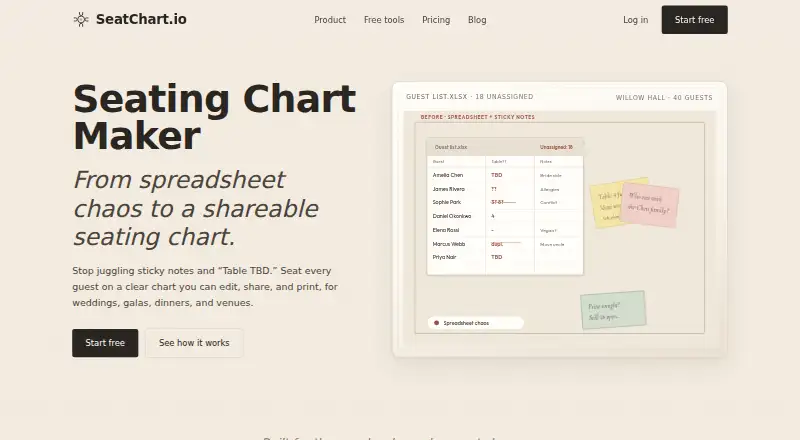
SeatChart.io is a web app for arranging tables, assigning guests, and sharing seating plans for events. Its canvas editor places tables and chairs alongside venue areas such as stages, dance floors, bars, buffets, entrances, and restrooms. Templates cover weddings, galas, birthdays, corporate dinners, restaurants, and conferences; the service also describes classroom seating charts. Guest management supports CSV imports, grouping families and parties, noting dietary requirements and comments, and assigning seats. Users can upload a venue screenshot or PDF for an AI floor-plan import that detects tables and key elements for review on the canvas. View-only links let clients or staff see a chart, while edit links allow collaborators to change the same project. A QR seat finder lets guests look up their own assignment without showing the full guest list. The free plan includes one event, three AI floor-plan imports, the full editor, templates, guest import, exports, sharing, QR access, and priority support. Starter costs 8.00 USD once, Professional costs 14.00 USD once, and Event Manager costs $25 a month. Paid exports include chart files, guest lists, place card name tags, and QR seat finder posters.
Who it suits
It suits event planners, venues, and hosts arranging seating for weddings, galas, corporate dinners, or other listed event types. The free plan is limited to one event; larger event allowances are on paid plans.
What it does well
- Free plan includes the full editor and sharing.
- Imports guests from CSV.
- AI floor-plan import accepts screenshots or PDFs.
- QR finder displays assignments, not the full guest list.
What to know first
- Free plan is limited to one event.
- Free plan includes three AI floor-plan imports.
- Terms advise storing guest personal information only with a lawful basis.
Limits
The free plan is limited to one event and three AI floor plan imports. Listed exports are available on paid plans.
Plans
| Plan | Billed and limits | Price |
|---|---|---|
| Free | 1 event · 3 AI floor plan imports · full editor · templates and guest import · export · sharing · QR · priority support | Free |
| Professional | Pay once · 50 events · 50 AI floor plan imports · 3 collaborators · full editor · export · version history · share links · QR · priority support | $14, paid once |
| Event Manager | Billed monthly · Unlimited events · unlimited AI floor plan imports · unlimited collaborators · full editor · export · version history · share links · QR · priority support | $25 a month |
| Starter | Pay once · 20 events · 10 AI floor plan imports · full editor · templates and guest import · export · version history · share links · QR · priority support | $8, paid once |
As seatchart.io lists them, read 7 Oct 2026. The maker's own page has the final word.
Getting started
- Open https://www.seatchart.io/ in a web browser.
- Choose the Free plan for one event and up to three AI floor plan imports, or select a listed paid plan.
- Create a layout with the canvas editor, use a template, or upload a venue screenshot or PDF for AI detection.
- Import a guest list from CSV, group guests, record requirements or comments, and assign seats.
- Share a view-only or edit link, or provide guests with the QR seat finder.
SeatChart.io is a web-based workspace for drawing event rooms, assigning guests, and distributing the finished plan. It fits planners, venues, and hosts whose seating decisions depend on both the guest list and the physical room. The strongest case is its unusually broad free tier; the main trade-off is that serious multi-event work quickly requires a paid tier.
Overview
The editor combines a visual canvas with guest administration. You can place tables and chairs alongside stages, dance floors, bars, buffets, entrances, and restrooms, so the chart can reflect how an actual venue operates. CSV import, family and party grouping, dietary requirements, comments, and seat assignments keep operational guest information with the drawing.
Templates are provided for weddings, galas, birthdays, corporate dinners, restaurants, and conferences. SeatChart.io is also presented for classroom seating charts, although its named templates emphasize events and hospitality.
Key features
Layout and guest management
The room canvas is more capable than a table-only planner. Representing surrounding zones is useful when circulation, catering, or a stage affects where people can sit. CSV import saves retyping an existing list, while grouping and notes help preserve household relationships and dietary information during assignment.
AI floor-plan import
Upload a venue screenshot or PDF and the service detects tables and key elements for review on the canvas. This can shorten the transition from an existing drawing to an editable plan, though the detected layout still needs checking before it becomes the working chart.
Sharing, collaboration, and guest lookup
View-only links suit clients or staff who should see progress without editing it; edit links let collaborators change the same project. The collaboration model is real-time, and Professional and Event Manager include specified collaborator allowances or unlimited collaborators. A QR seat-finder poster lets guests scan and see their own assignment rather than exposing the complete guest list, a sensible distinction for privacy-conscious events.
Exports
Paid plans can export charts as A3 or A4 PDF and PNG, guest lists as PDF, Excel, or CSV, plus place-card name tags and QR seat-finder posters. Those outputs matter when a plan must move from the browser to printing, check-in, or on-site signage.
Pricing
The freemium structure is unusually usable for a one-off event. Free costs nothing and includes one event, three AI floor-plan imports, the full editor, templates, guest import, export, sharing, QR lookup, and priority support. It is a credible option for a single wedding, dinner, or classroom chart, but the one-event cap and three-import allowance rule out maintaining a larger portfolio.
Starter costs $8, paid once, billed “Pay once.” It raises capacity to 20 events and 10 AI imports, adding version history while retaining the editor, imports, exports, share links, QR, and priority support. This is the sensible low-cost step for an occasional planner who needs several projects; it gives up the 50-event and three-collaborator capacity of Professional.
Professional costs $14, paid once, also billed “Pay once.” It supports 50 events, 50 AI imports, and three collaborators, with version history, sharing, QR, exports, and priority support. Choose it when a small team needs concurrent editing and a substantial event library without a subscription.
Event Manager costs $25 a month, billed monthly. It removes event and AI-import limits and allows unlimited collaborators, while including the full editor, exports, version history, share links, QR, and priority support. The recurring charge is justified for venues or planners running ongoing programs; occasional users should prefer the one-time tiers.
Billing runs through Paddle. Users handling guest data should follow the service terms and store personal information only with a lawful basis.
Platforms
SeatChart.io runs on the web, making it accessible from a browser rather than tied to a desktop or mobile operating system.
Who it's for
It is well suited to wedding and gala planners, corporate-dinner organizers, venues, restaurants, and event teams that need room diagrams linked to named guests. The combination also serves classroom seating work. Solo hosts with one event can stay on Free; recurring professionals and collaborative teams gain the most from Professional or Event Manager.
Pros and cons
Pros
- Generous free scope: one event still includes guest import, sharing, exports, QR lookup, and the full editor.
- Venue-aware canvas: stages, bars, entrances, restrooms, and other zones keep the plan grounded in the real room.
- Useful handoff tools: paid export formats, place cards, and QR posters support printing and guest arrival.
- Flexible collaboration: separate view and edit links, with real-time work on shared projects.
Cons
- Free is limited to one event and three AI imports: multi-event planners must upgrade.
- Advanced output is paid: the broad A3/A4, spreadsheet, place-card, and poster export set requires a paid plan.
- Collaboration is tiered: only Professional specifies three collaborators, while unlimited collaborators are reserved for the monthly plan.
Alternatives
For a broader shortlist, see Event Diagramming Software.
Choose Event Floor Planner if you want a free Android, iOS, or web tool with no signup and PDF export. Table-Plan.com suits users needing macOS, Windows, or web access, with a free 30-guest project and a 29.00 USD one-time premium plan valid for three months. EventDiagram is an alternative web/API option with a free plan and no trial clock. Eventscript fits teams wanting one upcoming event free or an annual paid arrangement. OnePlan is worth considering for team plans and a free tier limited to one event, 25 objects, and watermarked PNG export. SeatPlan.io offers a free web tier with one AI import but no saved work or PDF export, while its Pro option costs 8.00 GBP once. SeatPlanning targets smaller projects with limits on seats, tables, and elements. TablePlan.io provides a browser-based free demo for one event at a time.
Verdict
Choose SeatChart.io if you need one connected workspace for venue layout, named assignments, collaboration, and guest-facing QR lookup. Its free plan is enough for a single event, while low-cost one-time upgrades cover many occasional planners. Look elsewhere if you need a native mobile app, substantially different guest or project limits, or a pricing model better matched to your workflow than one-time tiers and a 25.00 USD monthly unlimited plan.
Verdict
SeatChart.io combines layout editing, guest assignments, collaboration, and a guest-facing QR lookup. Its free plan covers one event, while paid options add higher event and import allowances.
Questions
How much do SeatChart.io plans cost?
The Free plan costs nothing. Starter is $8, paid once, Professional is $14, paid once, and Event Manager is $25 a month.
What does the free plan include?
It includes one event, three AI floor plan imports, the full editor, templates, guest import, export, sharing, QR, and priority support.
Which platforms does SeatChart.io support?
SeatChart.io is available on the web.
Can I import a venue floor plan or guest list?
You can upload a venue layout screenshot or PDF for AI detection and import guest lists from CSV.
What can paid plans export?
Paid plans can export charts as PDF or PNG in A3 or A4, guest lists as PDF, Excel, or CSV, place card name tags, and QR seat finder posters.
How does the QR seat finder work?
Guests can scan a QR code to look up their seat assignment. It displays seat assignments rather than the full guest list.
Facts from SeatChart.io's own pages
- AI floor plan import
- Users can upload a venue layout screenshot or PDF; the tool detects tables and key elements for review on the canvas. · seatchart.io, 7 Oct 2026
- Billing processor
- The FAQ states that billing runs through Paddle. · seatchart.io, 7 Oct 2026
- Collaboration
- View-only links can be shared with clients or staff, while edit links let collaborators change the same project. · seatchart.io, 7 Oct 2026
- Exports
- Paid plans can export charts as PDF or PNG in A3 or A4, guest lists as PDF, Excel, or CSV, place card name tags, and QR seat finder posters. · seatchart.io, 7 Oct 2026
- Guest management
- Users can import guest lists by CSV, group families and parties, record dietary requirements and comments, and assign seats. · seatchart.io, 7 Oct 2026
- Purpose
- SeatChart.io lets users arrange tables, assign guests, and share seating charts for events. · seatchart.io, 7 Oct 2026
- QR seat finder
- Guests can scan a QR code and look up their assignment; the finder displays seat assignments rather than the full guest list. · seatchart.io, 7 Oct 2026
- Room layouts
- The editor places tables, chairs, and venue zones on a canvas, including stages, dance floors, bars, buffets, entrances, and restrooms. · seatchart.io, 7 Oct 2026
- Support
- Each listed plan includes priority support. · seatchart.io, 7 Oct 2026
- Templates
- The site lists templates for weddings, galas, birthdays, corporate dinners, restaurants, and conferences. · seatchart.io, 7 Oct 2026
- Terms and privacy
- The terms say use of the service is governed by the Privacy Policy and advise users to store guest personal information only with a lawful basis. · seatchart.io, 7 Oct 2026
- Who it serves
- The product is presented for weddings, galas, corporate dinners, venues, and event planners; the site also describes classroom seating charts. · seatchart.io, 7 Oct 2026
Where SeatChart.io stands on Freedom251
- Event Diagramming Software#9 of 24