Freedom251 › Computer-Assisted Translation Software
Supervertaler Workbench
What Supervertaler Workbench is
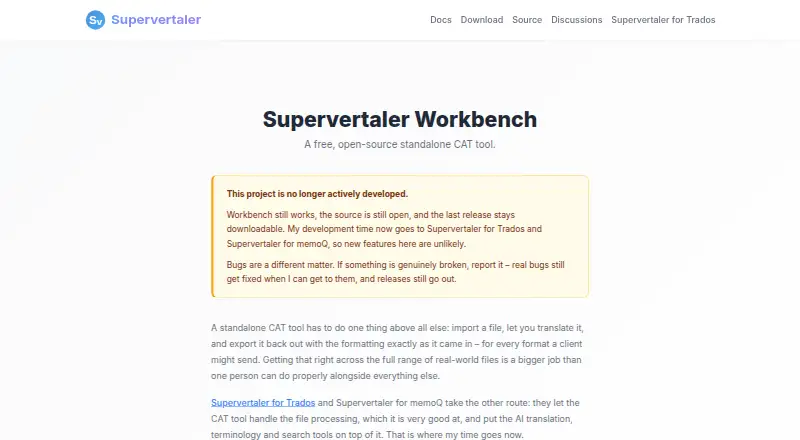
Supervertaler Workbench is a desktop CAT tool that combines AI translation with traditional translation workflows. It supports AI translation, batch translation, chat, prompts, image context, proofreading, and local models through Ollama. Listed providers include OpenAI, Anthropic Claude, Google Gemini, Mistral AI, DeepSeek, OpenRouter, and custom OpenAI-compatible endpoints. Translation tools include fuzzy matching, TMX import, and concordance search; terminology features include termbases, automatic term highlighting, and TermLens. Workbench supports DOCX and TXT, with further formats through Okapi, including IDML, HTML, XLIFF, PO, XLSX, and PPTX. Its documentation describes exchange workflows for memoQ, Trados Studio, Phrase, and CafeTran. Documents, termbases, and translation memories stay on the user's machine. When an AI action is triggered, requests go to the selected provider; Ollama processes them locally. Workbench runs on Linux, macOS, and Windows and supports offline use. It is free and open source under the MIT license. Its maker says development is no longer active, though genuine bugs may still be fixed and releases continue.
Who it suits
Workbench may suit translators seeking a free desktop CAT tool with both AI and traditional translation features. It is available for Linux, macOS, and Windows, with offline use and an Ollama local-AI option.
What it does well
- Free and open source under the MIT license
- Works offline on Linux, macOS, and Windows
- Includes fuzzy matching, TMX import, and concordance search
- Supports termbases and automatic term highlighting
What to know first
- No longer actively developed
- No alignment tool
Plans
| Plan | Billed and limits | Price |
|---|---|---|
| Free | Free and open source (MIT) · Standalone CAT tool | Free |
As supervertaler.com lists them, read 30 Sept 2026. The maker's own page has the final word.
Getting started
- Visit https://supervertaler.com/workbench/.
- Choose the Linux, macOS, or Windows desktop platform.
- Use the free, open source MIT plan.
- For AI features, select a listed provider; Ollama is the local processing option.
Supervertaler Workbench is a free desktop CAT tool that pairs AI translation with translation-memory and terminology workflows. It suits translators who want those capabilities across Linux, macOS or Windows, especially users comfortable choosing an AI provider or running local models. Its no-cost, open-source offering is compelling, but its paused development makes it a weaker choice for work that depends on ongoing product development.
Overview
Workbench brings machine-assisted translation into a standalone CAT environment rather than replacing established translation workflows. It supports fuzzy matches, TMX imports and concordance search, alongside termbases and automatic term highlighting. That combination makes it useful for translators who want AI alongside reusable language assets, not just a prompt-and-response interface.
Its development status is the central caveat: the maker says active development has stopped, though genuine bugs may still be fixed and releases continue. That leaves a capable free tool with less assurance of continued feature development than a translator may want for a long-term workflow.
Key features
AI and translation memory
AI translation, batch translation, chat, prompts, image context and AI proofreading cover several points in a translation workflow. Providers include OpenAI, Anthropic Claude, Google Gemini, Mistral AI, DeepSeek, OpenRouter, Ollama and custom OpenAI-compatible endpoints. The breadth gives users choice, while the need to select a provider makes the tool a better fit for translators prepared to manage that part of their setup.
For privacy-conscious users, the policy says documents, termbases and translation memories stay on the user's machine, and AI requests go directly to the selected provider when an AI action is triggered. Ollama offers a local alternative: its processing stays on the computer, so data does not leave it through that provider.
Terminology and file workflows
Termbases, automatic term highlighting and TermLens support consistent terminology; QA checks add a review step, though there is no alignment tool. DOCX and TXT are supported directly, with Okapi adding formats such as IDML, HTML, XLIFF, PO, XLSX and PPTX. Exchange workflows are documented for memoQ, Trados Studio, Phrase and CafeTran, which can help translators connect Workbench to existing CAT-tool processes.
Pricing
Workbench's Free plan costs nothing. It is free and open source under the MIT license, and includes the standalone CAT tool. There is no paid tier or free-trial period to weigh against it; the trade-off is not a feature cap but the product's no-longer-active development.
Platforms
Workbench is a desktop application for Linux, macOS and Windows. It supports offline desktop use, which suits translators who want to work locally; AI requests still go to the chosen provider unless using Ollama, which processes them locally.
Who it's for
Choose Workbench if you want a free CAT tool with AI options, translation memory, terminology support and broad document-format coverage, and you are comfortable with a product that is no longer actively developed. Its local Ollama option is particularly relevant if keeping AI processing on the computer is a priority. If continued active development is essential to your daily workflow, look elsewhere.
Pros and cons
- Pros: Free and MIT-licensed, with no trial or paid-plan decision to make.
- Pros: Combines AI features with fuzzy matching, TMX import, concordance search, termbases and QA checks.
- Pros: Works on Linux, macOS and Windows, with offline desktop use and local AI through Ollama.
- Cons: Active development has stopped, limiting its appeal for users who prioritize ongoing product development.
- Cons: No alignment tool is included, so it is not the fit for translators whose workflow requires one.
Alternatives
Compare computer-assisted translation software if you want to assess Workbench alongside more CAT tools.
- BasicCAT is another free, open-source CAT tool for Linux, macOS and Windows; consider it if you want a straightforward free CAT alternative rather than Workbench's documented AI feature set.
- CafeTran Espresso has a free plan capped at 1,000 translation units and 500 glossary terms, plus an €80 a year annual subscription. Choose it if you want a free entry point with stated usage caps and a paid subscription option.
- locAGI offers a free platform plan across API, Linux, macOS and web, with unlimited seats and AI billed separately. Consider it if those deployment options and seat terms better match your needs.
- Lokalize is a free option for Linux, macOS and Windows from KDE. Choose it if that alternative better suits your CAT-tool needs.
- Déjà Vu X3 has a free edition for standalone and satellite projects prepared with Déjà Vu X3 Workgroup, as well as a Professional plan. Consider it if you work with those prepared projects.
- OpenTM2 is a free, open-source Windows translation-memory tool; pick it if a Windows-focused TM tool is a closer fit.
- Segmova is a web option with plans described as free during Beta. Consider it if you prefer a browser-based tool.
- TextUnited offers a web and API free plan capped at 15,000 words per month, 15 PDF pages per month and one user. Choose it if those monthly limits suit a single-user workflow.
Verdict
Supervertaler Workbench is a strong choice for translators who want a free, cross-platform desktop CAT tool with AI, translation memory and terminology features, particularly if local processing through Ollama matters. Its main reason to look elsewhere is equally clear: with active development stopped, it is harder to recommend for workflows that depend on continued product development.
Verdict
Workbench brings AI features and established CAT workflows together in a free desktop app. Its development status is an important consideration for anyone choosing a tool for ongoing work.
Questions
How much does Workbench cost?
Its Free plan costs nothing and is open source under MIT.
Which platforms does it support?
It runs on Linux, macOS, and Windows as a desktop application.
Can Workbench be used offline?
Yes. Offline desktop use is supported.
Which AI providers does it support?
The listed providers are OpenAI, Anthropic Claude, Google Gemini, Mistral AI, DeepSeek, OpenRouter, Ollama, and custom OpenAI-compatible endpoints.
Where is user data processed?
Documents, termbases, and translation memories stay on the user's machine. AI requests go directly to the selected provider when triggered; Ollama processes data locally.
Is Workbench still being developed?
The maker says it is no longer actively developed, though genuine bugs may still be fixed and releases still go out.
Facts from Supervertaler Workbench's own pages
- AI features
- It supports AI translation, batch translation, chat, prompts, image context, AI proofreading, and local models through Ollama. · docs.supervertaler.com, 30 Sept 2026
- AI providers
- The provider documentation lists OpenAI, Anthropic Claude, Google Gemini, Mistral AI, DeepSeek, OpenRouter, Ollama, and custom OpenAI-compatible endpoints. · docs.supervertaler.com, 30 Sept 2026
- CAT tool workflows
- The documentation describes exchange workflows for memoQ, Trados Studio, Phrase, and CafeTran. · docs.supervertaler.com, 30 Sept 2026
- Development status
- The product page says Workbench is no longer actively developed, although the maker says genuine bugs may still be fixed and releases still go out. · supervertaler.com, 30 Sept 2026
- File formats
- Document support includes DOCX and TXT, with additional formats via Okapi including IDML, HTML, XLIFF, PO, XLSX, and PPTX. · docs.supervertaler.com, 30 Sept 2026
- Local AI option
- The policy says Ollama processes data locally on the user's machine, so no data leaves the computer when using that provider. · supervertaler.com, 30 Sept 2026
- Local data and AI privacy
- The privacy policy says documents, termbases, and translation memories stay on the user's machine; AI requests go directly to the selected provider when the user triggers an AI action. · supervertaler.com, 30 Sept 2026
- Maker
- The maker is Michael Beijer, a Dutch patent translator and translation technology developer based in Hastings, UK. · beijer.uk, 30 Sept 2026
- Purpose
- Workbench is a standalone CAT tool that combines AI translation with traditional computer-assisted translation workflows. · docs.supervertaler.com, 30 Sept 2026
- Support
- The documentation directs users to report issues on GitHub or ask questions in GitHub Discussions. · docs.supervertaler.com, 30 Sept 2026
- Terminology
- Workbench supports termbases, automatic term highlighting, and TermLens. · docs.supervertaler.com, 30 Sept 2026
- Translation memory
- Workbench includes fuzzy matching, TMX import, and concordance search. · docs.supervertaler.com, 30 Sept 2026