Freedom251 › Computer-Assisted Translation Software
BasicCAT
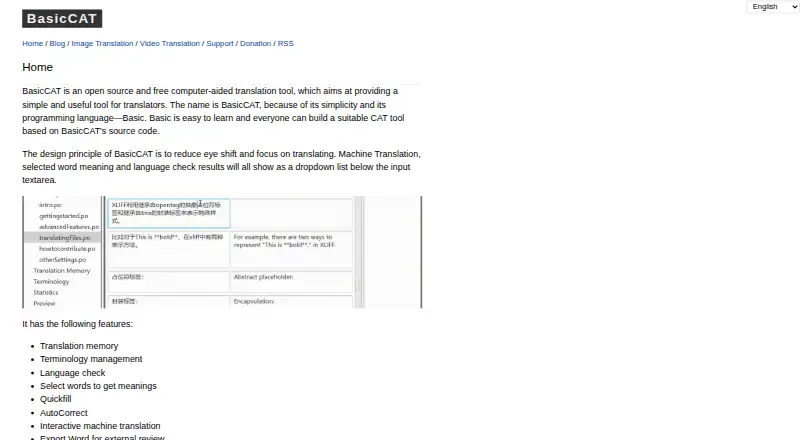
What BasicCAT is
BasicCAT is a free, open-source computer-aided translation tool for translators working on Linux, macOS, or Windows. It includes translation memory, terminology management, language checking, Quickfill, AutoCorrect, interactive machine translation, and tools to merge or split segments. Supported formats include TXT, IDML, XLIFF, and Gettext PO, along with the TMX, TBX, and SRX standards. Translators can export Word files for external review and bilingual paragraph files. The documentation lists built-in connections to 12 machine translation services, including Baidu, Google, Microsoft Bing, MyMemory, Tencent Cloud, IBM Watson, and Amazon. Most services require API keys; MyMemory instead uses an email address. Language checks use LanguageTool through its API or locally. Teams can share translation memory and terms through a server program, and use Git collaboration for work files, though Git does not sync translation memory or terms. The sharing server requires Java 8 or later. The download page also lists plugins for services such as ChatGPT, Gemini, DeepL, Google, and Amazon.
Who it suits
It suits translators looking for a free desktop tool with translation memory, terminology management, and machine-translation options. Teams that need shared translation resources can use its server program, while Git collaboration is available for work files.
What it does well
- Free and open source across Linux, macOS, and Windows.
- Includes translation memory and terminology management.
- Exports Word files for external review.
- Offers LanguageTool checks through API or local use.
What to know first
- Most machine translation services require API keys.
- The sharing server requires Java 8 or later.
- Git does not sync translation memory or terms.
Plans
| Plan | Billed and limits | Price |
|---|---|---|
| BasicCAT | Open source · free CAT tool | Free |
As basiccat.org lists them, read 3 Oct 2026. The maker's own page has the final word.
Getting started
- Open the BasicCAT website.
- Choose the download for Windows, macOS, or Linux and other platforms.
- Install any plugins you want to use, such as a listed machine-translation plugin.
- For machine translation, provide an API key for the service, or an email address for MyMemory.
- For language checks, use the LanguageTool API or run LanguageTool locally.
Overview
BasicCAT is a free, open-source desktop computer-assisted translation tool for translators who want a configurable workspace without a subscription. Its combination of translation memory, terminology tools, and broad file support is useful for individual projects, though collaboration is split between separate mechanisms.
It handles TXT, IDML, XLIFF, and Gettext PO files, as well as TMX, TBX, and SRX standards. Word export supports external review, while bilingual paragraph export offers another way to share translated text.
Explore our Computer-Assisted Translation Software directory for more options.
Key features
Translation and quality tools
Translation memory and terminology management provide the core working resources, with QA checks and an alignment tool alongside them. Quickfill and AutoCorrect support text entry; segment merging and splitting let translators adjust how content is divided. Language checking runs through LanguageTool, either via its API or locally, so users can choose between an online connection and a local setup.
Interactive machine translation connects to 12 services, including Baidu, Google, Microsoft Bing, MyMemory, Tencent Cloud, IBM Watson, and Amazon. Most require service API keys; MyMemory instead requires an email address. Quotas can shape how useful these connections are for sustained work: Baidu and Bing have a 2 million monthly limit, MyMemory allows 10,000 words daily, and Yandex allows 1 million words daily and 10 million monthly. Plugins add connections including ChatGPT, Gemini, DeepL, Google, and Amazon, as well as a Gettext PO filter.
Collaboration
A server program can share translation memory and terms, while Git collaboration covers work files. Git does not synchronize the memory or terminology, so teams relying on those shared resources need the separate server. That server requires Java 8 or later and can be protected with an access key in key.txt. This arrangement offers options for shared work, but teams should account for the extra setup and the division between file and resource synchronization.
Pricing
The BasicCAT plan costs nothing and is open-source desktop CAT software. It includes translation memory, terminology management, QA checks, and alignment. There are no paid tiers or subscription terms to weigh; machine-translation services may still require credentials and impose their own usage limits.
Platforms
BasicCAT is a desktop application for Linux, macOS, and Windows. Downloads include Windows 32-bit and 64-bit builds, macOS builds for Intel and Apple CPUs, and an archive for Linux and other platforms.
Who it's for
BasicCAT suits translators seeking a free tool with translation memory, terminology management, file-format support, and configurable language checks. It is also a sensible fit for users comfortable managing service credentials or setting up local tools. Teams needing a single integrated collaboration path should consider whether separate Git and server-based sharing meet their workflow.
Pros and cons
- Pros: Free, open-source use includes translation memory, terminology management, QA checks, and alignment, without a subscription commitment.
- Pros: TXT, IDML, XLIFF, and Gettext PO support, plus TMX, TBX, and SRX standards, cover a range of project and exchange formats.
- Pros: LanguageTool can run locally, and Word export supports review outside the application.
- Cons: Machine-translation connections generally require API keys, and documented service quotas may constrain high-volume use.
- Cons: Git collaboration does not sync translation memory or terms; sharing those requires a separate Java 8-or-later server.
Alternatives
locAGI is worth considering for teams that want a web and API option with unlimited seats on its free platform plan; its free offer includes 1 GB of storage, with AI billed separately.
Supervertaler Workbench is another free desktop option for Linux, macOS, and Windows.
CafeTran Espresso may fit translators who can work within a capped free tier of 1,000 translation units and 500 glossary terms, or prefer its €80 a year annual subscription.
Déjà Vu X3 offers a free Windows plan limited to one target language per project and one translation memory and termbase per target language; its Professional plan is an option for those willing to consider custom pricing.
TextUnited is a web and API alternative with a free self-service tier capped at 15,000 words and 15 PDF pages per month for one user, or a €150 a month team plan.
XTM Cloud suits readers seeking a paid option with a free trial; its Team plan is $16,500 a year and includes 2 million processed words yearly and unlimited users.
Lokalize is another free option for Windows, macOS, and Linux.
Smartcat is a freemium alternative with annual Adapt and Accelerate plans at 1200.00 USD and 24000.00 USD, respectively.
Verdict
Choose BasicCAT if you want a no-cost desktop translation workspace with memory, terminology, alignment, and several ways to work with common translation formats. Its strongest case is the depth of useful translation tools available without a license fee; look elsewhere if your team needs file, memory, and terminology collaboration synchronized through one mechanism, or if you want machine translation without managing service access and quotas.
Verdict
BasicCAT brings translation memory, terminology, file-format support, and machine-translation connections into a free desktop tool. Note that machine-translation services may require credentials, and its Git collaboration does not include translation memory or terms.
Questions
Is BasicCAT free?
Yes. BasicCAT is listed as a free, open-source CAT tool, with a plan price of $0.
Which operating systems does it support?
BasicCAT supports Linux, macOS, and Windows. Downloads include Windows 32-bit and 64-bit, macOS Intel and Apple CPU builds, and a Linux and other platforms archive.
What machine translation services can it use?
The documentation lists built-in support for 12 services, including Baidu, Google, Microsoft Bing, MyMemory, Tencent Cloud, IBM Watson, and Amazon. Most require API keys; MyMemory requires an email address instead.
Does it support translation memory and terminology management?
Yes. It includes both, and they can be shared through a server program. Git collaboration for work files does not sync these resources.
What file formats does it support?
The homepage lists TXT, IDML, XLIFF, and Gettext PO files, as well as the TMX, TBX, and SRX standards. It can also export Word files for review and bilingual paragraph files.
How can users get support?
The support page recommends posting issues on BasicCAT’s GitHub issue tracker rather than emailing the maker.
Facts from BasicCAT's own pages
- Collaboration
- BasicCAT supports sharing translation memory and terms through a server program, and Git collaboration for work files; Git collaboration does not sync translation memory or terms. · docs.basiccat.org, 3 Oct 2026
- Export and review
- BasicCAT can export Word files for external review and bilingual paragraph files. · basiccat.org, 3 Oct 2026
- File formats
- The homepage lists support for TXT, IDML, XLIFF, and Gettext PO files, and for the TMX, TBX, and SRX standards. · basiccat.org, 3 Oct 2026
- Integration requirements
- The documentation says users need API keys for the listed machine translation services, while MyMemory requires an email address instead of an API key. · docs.basiccat.org, 3 Oct 2026
- Language checking
- BasicCAT uses LanguageTool for language checks, and the documentation says users can use its API or run LanguageTool locally. · docs.basiccat.org, 3 Oct 2026
- Machine translation integrations
- The documentation lists built-in support for 12 machine translation services, including Baidu, Google, Microsoft Bing, MyMemory, Tencent Cloud, IBM Watson, and Amazon. · docs.basiccat.org, 3 Oct 2026
- Plugins
- The download page lists machine-translation plugins including ChatGPT, Gemini, DeepL, Google, and Amazon, plus a Gettext PO filter plugin. · basiccat.org, 3 Oct 2026
- Purpose
- BasicCAT is an open-source, free computer-aided translation tool aimed at providing a simple tool for translators. · basiccat.org, 3 Oct 2026
- Service limits
- The documentation states that Baidu and Bing have a 2 million limit per month, MyMemory a 10,000-word limit per day, and Yandex a 1 million-word daily and 10 million-word monthly limit. · docs.basiccat.org, 3 Oct 2026
- Sharing server requirement
- The translation-memory and term-sharing server requires Java 8 or later, and the documentation says an access key can be set in key.txt. · docs.basiccat.org, 3 Oct 2026
- Support
- The support page recommends posting BasicCAT issues on its GitHub issue tracker rather than emailing the maker. · basiccat.org, 3 Oct 2026
- Supported desktop platforms
- The download page offers Windows 32-bit and 64-bit, macOS Intel and Apple CPU builds, and a Linux and other platforms archive. · basiccat.org, 3 Oct 2026
- Translation tools
- Features include translation memory, terminology management, language checking, Quickfill, AutoCorrect, interactive machine translation, and segment merging and splitting. · basiccat.org, 3 Oct 2026