Freedom251 › Computer-Assisted Translation Software
Lokalize
What Lokalize is
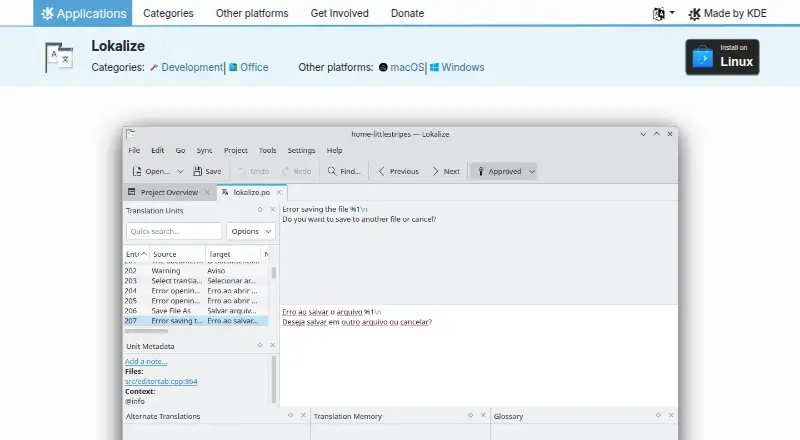
Lokalize is a desktop localization tool for KDE and other free and open-source software. It also supports computer-aided translation of OpenDocument files. For that workflow, Translate-Toolkit extracts text from .odt documents into .xliff files, then merges translated text back into the .odt files. Lokalize includes translation memory, terminology management, and quality assurance checks. It is available for Linux, macOS, and Windows. On Linux, users can install it through Discover, other AppStream application stores, or their distribution’s package manager. KDE links to macOS and Windows platform pages and lists nightly installers for Windows and for Intel and ARM Macs; those nightly builds are intended for testing. The listed release is version 26.08.2, dated 2026-10-08. Lokalize is free and open-source software under the GPL-2.0+ license, with a listed price of $0. KDE provides a Lokalize Handbook and forum, and links to bug reporting, source code, and localization project pages for people who want to participate. KDE describes itself as an international community building and distributing free, open-source software since 1996, represented legally by the German nonprofit KDE e.V.
Who it suits
Lokalize suits people working on KDE or other free and open-source software translations, as well as translators handling OpenDocument files. Its translation memory, terminology management, and QA checks support desktop translation work across Linux, macOS, and Windows.
What it does well
- Free and open-source under the GPL-2.0+ license.
- Supports Linux, macOS, and Windows.
- Includes translation memory and terminology management.
- Provides quality assurance checks.
- OpenDocument workflow converts .odt text through .xliff files.
What to know first
- Nightly installers are intended for testing.
- The listed deployment model is desktop.
Plans
| Plan | Billed and limits | Price |
|---|---|---|
| Lokalize | Free and open-source software | Free |
As apps.kde.org lists them, read 8 Oct 2026. The maker's own page has the final word.
Getting started
- Visit the KDE Lokalize page.
- On Linux, install through Discover, another AppStream store, or your distribution’s package manager.
- For macOS or Windows, follow the platform links on the product page.
- For OpenDocument translation, use Translate-Toolkit to extract .odt text into .xliff files and merge translated text back.
- Consult the Lokalize Handbook or KDE forum for help.
Lokalize is a desktop localization tool for KDE and other free and open-source software, with support for computer-aided translation of OpenDocument files. It suits translators working on open-source projects or .odt documents; its strongest case is a free, GPL-licensed workflow with translation memory, terminology management, and QA checks.
Overview
Lokalize is built for software localization rather than general-purpose document editing. Its OpenDocument workflow uses Translate-Toolkit to extract text from .odt files into .xliff files, then merge translated text back into the original document. That gives translators a defined route between document formats and translation work, but it also means the workflow depends on Translate-Toolkit.
The core feature set covers translation memory, terminology management, and quality-assurance checks. Together, these address reuse, consistency, and review in localization work. The desktop deployment is a fit for individual translators and project contributors who want a local tool; it is not a web-based collaboration service.
Key features
- Translation memory: Reuses prior translation work, useful when localizing related software or repeated content.
- Terminology management: Helps keep project vocabulary consistent across translations.
- QA checks: Provides a way to catch issues during translation review.
- OpenDocument support: Translate-Toolkit extracts .odt text into .xliff and merges the translated text back, supporting a document-to-translation workflow.
Pricing
Lokalize is free: its plan is free, for free and open-source software. There is no paid tier to trade against a lower-cost edition, and no free-trial clock or subscription term to manage. That makes it a straightforward option for translators who need the listed desktop localization features without a software fee.
Platforms
Lokalize supports Linux, macOS, and Windows. On Linux, users can install it through Discover and other AppStream stores or use their distribution’s package manager. KDE links to macOS and Windows platform pages and provides nightly installers for macOS Intel and ARM and Windows. Those nightly builds are intended for testing, so users seeking a testing build should distinguish them from the regular platform installation route.
The latest listed release is version 26.08.2, dated 2026-10-08. Lokalize is licensed under GPL-2.0+. KDE links to the Lokalize Handbook and a forum for help, as well as pages for bug reporting, source code, and participation in KDE localization.
Who it's for
Lokalize is best suited to translators contributing to KDE or other free and open-source software, and to people translating OpenDocument files through the .odt-to-.xliff workflow. Its memory, terminology, and QA features make it more relevant to recurring or structured translation work than to someone who only needs occasional text conversion. Choose another kind of service if browser-based collaboration is central to the job: Lokalize is a desktop application.
Pros and cons
- Pro: Free and open-source under GPL-2.0+, so there is no software charge for the desktop localization workflow.
- Pro: Translation memory, terminology management, and QA checks cover three practical needs in software localization.
- Pro: Linux, macOS, and Windows support gives contributors on all three desktop platforms a route to use the same tool.
- Con: OpenDocument translation uses Translate-Toolkit to move between .odt and .xliff, adding a separate tool to that workflow.
- Con: Desktop deployment makes Lokalize a poor fit when browser access or web-based collaboration is required.
- Con: Nightly installers are meant for testing, not a substitute for the regular installation path when stability is the priority.
Alternatives
For a broader comparison, see Computer-Assisted Translation Software.
- BasicCAT is another free, open-source CAT tool for Linux, macOS, and Windows; consider it if you want a comparable free desktop option.
- CafeTran Espresso has a free plan capped at 1,000 translation units and 500 glossary terms, plus a trial and an annual subscription; it may suit someone who wants a freemium option with a defined free allowance.
- locAGI offers a freemium platform across API, Linux, macOS, and web; consider it if web or API access matters alongside desktop use.
- Supervertaler Workbench is a free option for Linux, macOS, and Windows; it is another desktop alternative to compare.
- ApSIC Xbench includes a free, frozen non-Unicode version 2.9 and a paid version 3.0 at €99 a year; it may suit Windows users focused on terminology and QA checks.
- Déjà Vu X3 offers a free edition for standalone and satellite projects prepared with Déjà Vu X3 Workgroup; consider it if that project setup matches your work.
- Matecat is free, with unlimited features, users, and projects, and supports web, API, Linux, and self-hosted use; choose it if browser access or self-hosting is important.
- OpenTM2 is a free, Windows-only translation memory tool under the Eclipse Public License; it may fit a Windows user seeking that narrower focus.
Verdict
Choose Lokalize if you translate KDE or other open-source software, or need to translate OpenDocument files with translation memory, terminology management, and QA checks at no software cost. Its cross-platform desktop availability and GPL license make it a practical fit for that work. Look elsewhere if you need a browser-based collaboration workflow or want to avoid the separate Translate-Toolkit step for .odt translation.
Verdict
Choose Lokalize for free desktop localization work, especially for KDE or other free and open-source software and OpenDocument translation. It offers translation memory, terminology management, and QA checks across three desktop platforms. Its listed deployment model is desktop, and nightly installers are intended for testing.
Questions
Is Lokalize free?
Yes. Lokalize has a free plan and is listed as free.
Which platforms does it support?
Linux, macOS, and Windows.
What license does Lokalize use?
The product page lists it under the GPL-2.0+ license.
Can it translate OpenDocument files?
Yes. Translate-Toolkit extracts text from .odt files into .xliff files and merges translated text back into .odt files.
Who makes Lokalize?
It is a KDE product. KDE describes itself as an international community building and distributing free, open-source software since 1996.
Facts from Lokalize's own pages
- Document workflow
- For OpenDocument translation, Translate-Toolkit extracts text from .odt files to .xliff files and merges translated text back into .odt files. · apps.kde.org, 8 Oct 2026
- Help
- The product page links to the Lokalize Handbook and a KDE forum for help. · apps.kde.org, 8 Oct 2026
- Latest listed release
- The page lists version 26.08.2, dated 2026-10-08. · apps.kde.org, 8 Oct 2026
- License
- The product page lists Lokalize under the GPL-2.0+ license. · apps.kde.org, 8 Oct 2026
- Linux installation
- The KDE page offers Linux installation through Discover and other AppStream application stores, and says users can also use their distribution’s package manager. · apps.kde.org, 8 Oct 2026
- Maker
- KDE describes itself as an international community building and distributing free, open-source software since 1996. · kde.org, 8 Oct 2026
- Nightly builds
- KDE says nightly installers are available from its CDN and are intended for testing. · apps.kde.org, 8 Oct 2026
- Organization
- KDE says it is a voluntary community rather than a for-profit company, and identifies KDE e.V. as the German nonprofit organization that legally represents KDE. · kde.org, 8 Oct 2026
- Other platforms
- The product page links to macOS and Windows platform pages and lists nightly installers for Windows and macOS Intel and ARM. · apps.kde.org, 8 Oct 2026
- Project participation
- The page links to bug reporting, source code, and KDE localization project pages for getting involved. · apps.kde.org, 8 Oct 2026
- Purpose
- Lokalize is a localization tool for KDE and other free and open-source software, and a computer-aided translation system for translating OpenDocument files. · apps.kde.org, 8 Oct 2026
- Security and privacy claims
- KDE says its software contains no ads, spyware, subscription services, forced updates, secret crypto-mining, or AI training. · kde.org, 8 Oct 2026