Freedom251 › Computer-Assisted Translation Software
locAGI
What locAGI is
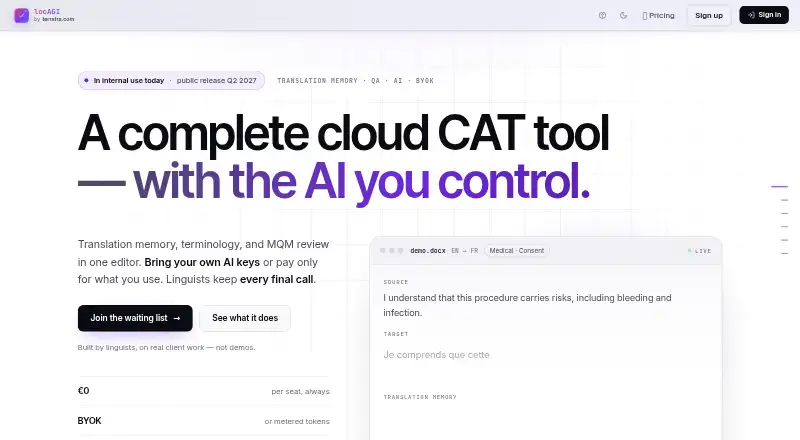
locAGI is a managed cloud platform for computer-assisted translation, bringing translation memory, terminology management, quality checks, alignment, and AI-assisted translation into a web workflow. It is designed for enterprise localisation and linguistic teams, including in-house staff and contracted freelancers. For review, teams can use MQM Core, LISA QA Model 3.1, or custom free-text categories, then export findings to Excel. The maker lists models from OpenAI, Anthropic, Google, Mistral, DeepSeek, xAI, and DeepL, as well as private models through Ollama or OpenAI-compatible endpoints. It supports memoQ, Trados, Phrase, and XLIFF workflows, plus more than 40 source formats such as DOCX, HTML, JSON, and SRT. A REST API, tokens, webhooks, and an OpenAPI specification support project, segment, QA, and export automation. The platform plan is free, with AI billed separately or used through BYOK. locAGI is in private beta, with public release scheduled for Q2 2027.
Who it suits
It suits enterprise localisation teams and linguists who need translation, terminology, and QA tools in a managed cloud workflow. Teams handling very large XLIFF files should note the maker’s stated desktop-tool limitation.
What it does well
- Free platform plan with unlimited seats.
- Supports more than 40 source formats.
- Exports MQM findings to Excel.
- Offers REST API, tokens, and webhooks.
What to know first
- Currently in private beta.
- Managed cloud service cannot be self-hosted.
- AI usage is billed separately or via BYOK.
- Desktop CAT tools are more battle-tested for XLIFF files with 50,000 or more segments.
Limits
The free platform plan includes 1 GB of storage. AI usage is billed separately, with token rates not stated, or can use BYOK.
Plans
| Plan | Billed and limits | Price |
|---|---|---|
| Free forever — platform | $0 for platform, seats, and setup; no annual commitment · Unlimited seats · included storage (1 GB on homepage) · AI billed separately or BYOK | Free |
| Pay-as-you-go AI | Tokens consumed; no monthly minimum; exact token rates not stated · AI tokens provisioned by locAGI · same integrated editor · can switch to BYOK | On request |
As locagi.com lists them, read 2 Oct 2026. The maker's own page has the final word.
Getting started
- Visit https://locagi.com/.
- Use the web-based platform; Linux and macOS are also listed as platforms.
- Start with the free platform plan, which includes unlimited seats and 1 GB of storage.
- Choose separately billed AI tokens or switch to BYOK for AI use.
Overview
locAGI is a cloud CAT platform for localisation teams that want translation, review, and automation in one workflow. It best suits teams prepared to work in a managed service and accept beta-stage constraints; its broad toolset is offset by no self-hosting and a private beta through its planned Q2 2027 public release.
Translation memory, terminology management, QA checks, and alignment cover recurring translation work, while MQM review and integrations with other CAT formats support review and handoffs. The service is operated by Terratra OÜ in Tallinn, Estonia. For a wider comparison, see Computer-Assisted Translation Software.
Key features
Translation and file workflows
Support for more than 40 source formats, including DOCX, XLSX, PPTX, IDML, HTML, XML, DITA, JSON, PO, RESX, and SRT, gives teams room to handle varied content without narrowing work to one file type. memoQ MQXLIFF, Trados SDLXLIFF, Phrase MXLIFF, and XLIFF 1.2 and 2.0 workflows provide routes between locAGI and established CAT environments. The maker cautions that desktop CAT tools are more battle-tested for XLIFF files with 50,000 or more segments, so very large projects are a weaker fit.
AI and quality review
AI model options include OpenAI, Anthropic, Google, Mistral, DeepSeek, xAI, and DeepL, as well as private models through Ollama or OpenAI-compatible endpoints. Teams can use tokens provisioned by locAGI or bring their own key; that flexibility matters for teams choosing their model route, but AI usage is separate from the free platform plan.
MQM review supports MQM Core, LISA QA Model 3.1, or custom free-text categories, and findings can be exported to Excel. That gives linguistic teams a structured way to review issues against their preferred framework rather than relying on a single fixed category scheme.
Automation and controls
A REST API covers projects, segments, QA runs, and exports. API tokens, webhooks, and an OpenAPI specification support integration and automation work. Security controls include project audit logs, per-user rate limiting on AI surfaces, BYOK, and private-model routing. SSO, SCIM provisioning, SOC 2 Type II readiness, and data-residency controls are roadmap work, with SOC 2 readiness underway; organisations that require those controls now should look elsewhere.
Pricing
Free forever — platform: free. Platform, seats, and setup are billed at $0, with no annual commitment and unlimited seats. Included storage is 1 GB on the homepage. AI is billed separately or used through BYOK, so the free platform price does not mean unlimited free AI translation. This is the clearest fit for teams wanting to try the platform without a seat charge.
Pay-as-you-go AI: custom pricing. Tokens are provisioned by locAGI, with the same integrated editor and an option to switch to BYOK. Teams that need predictable per-month AI costs should weigh the variable usage model carefully.
Platforms
locAGI is available as a managed cloud service through the web, with API access and Linux and macOS platform listings. It cannot be self-hosted and has no offline desktop use, which rules it out for teams that need local deployment or work without connectivity.
Who it's for
Enterprise localisation teams and linguistic teams with internal staff and contracted freelancers are the intended audience. Unlimited seats on the free platform plan may suit teams evaluating shared workflows, while format compatibility, QA export, and API automation are more compelling for teams coordinating ongoing translation operations. The private beta makes it a less suitable choice for organisations that need a mature production platform today.
Pros and cons
Pros
- Translation memory, terminology, QA, alignment, and MQM review combine core recurring workflows in one platform.
- Broad source-format and CAT exchange support helps teams work across varied content and existing CAT environments.
- Unlimited platform seats and no annual commitment make the free plan accessible for team evaluation.
- Multiple AI providers, private-model routing, and BYOK give teams a choice of AI setup.
Cons
- Private beta status and a planned Q2 2027 public release are significant caveats for production-critical use.
- Managed-cloud-only deployment means no self-hosting or offline desktop workflow.
- Desktop CAT tools are more battle-tested on XLIFF files with 50,000 or more segments.
- SSO, SCIM, SOC 2 Type II readiness, and data-residency controls remain roadmap work.
Alternatives
For a free, open-source CAT tool with Linux, macOS, and Windows support, consider BasicCAT. Supervertaler Workbench is another free option for Linux, macOS, and Windows users. Choose CafeTran Espresso if its free plan of 1,000 translation units and 500 glossary terms fits the work, or its €80 a year plan suits a higher-volume need.
Déjà Vu X3 offers a Windows free plan limited to one target language per project and one translation memory and termbase per target language. TextUnited may suit a web-and-API workflow with a free allowance of 15,000 words per month, 15 PDF pages per month, and one user. Lokalize is a free option for Windows, macOS, and Linux.
Smartcat has annual plans at $1,200 a year for one workspace and 100K Smartwords, or $24,000 a year for one workspace and 1M Smartwords. Matecat is another free option with API support.
Verdict
locAGI is worth considering for localisation and linguistic teams that want translation, structured QA, flexible AI routing, and automation under a shared cloud platform without per-seat platform charges. Its main draw is the breadth of workflows and model choices; its main reasons to look elsewhere are private beta status, cloud-only deployment, separate AI costs, and unfinished enterprise compliance controls.
Verdict
locAGI combines translation workflows, configurable QA, and automation in a free platform plan, with AI charges separate. Its beta status and cloud-only deployment are important constraints to consider.
Questions
Is locAGI free?
Its platform plan is free, with no annual commitment, unlimited seats, and 1 GB of storage. AI usage is billed separately or can use BYOK.
Which platforms does locAGI support?
The listed platforms are API, Linux, macOS, and web. It is a managed cloud service and does not support offline desktop use.
Which AI models can be used?
The maker lists OpenAI, Anthropic, Google, Mistral, DeepSeek, xAI, and DeepL, as well as private models through Ollama or OpenAI-compatible endpoints.
What translation and review workflows does it support?
It supports memoQ MQXLIFF, Trados SDLXLIFF, Phrase MXLIFF, and XLIFF 1.2 and 2.0 workflows. Review can use MQM Core, LISA QA Model 3.1, or custom free-text categories.
Who makes locAGI?
Terratra OÜ builds and operates the platform in Tallinn, Estonia.
When will locAGI be publicly available?
It is currently in private beta, with public release scheduled for Q2 2027.
Facts from locAGI's own pages
- AI models
- The maker lists OpenAI, Anthropic, Google, Mistral, DeepSeek, xAI, and DeepL, plus private models through Ollama or OpenAI-compatible endpoints. · locagi.com, 2 Oct 2026
- Automation
- A REST API is available for projects, segments, QA runs, and exports; the maker also lists API tokens, webhooks, and an OpenAPI spec. · locagi.com, 2 Oct 2026
- Availability
- The product is currently in private beta, with public release scheduled for Q2 2027. · locagi.com, 2 Oct 2026
- Company
- The platform is built and operated by Terratra OÜ in Tallinn, Estonia. · locagi.com, 2 Oct 2026
- Compliance status
- SSO, SCIM provisioning, SOC 2 Type II readiness, and data-residency controls are listed as roadmap work; SOC 2 readiness is underway. · locagi.com, 2 Oct 2026
- File support
- The maker says it supports more than 40 source formats, including DOCX, XLSX, PPTX, IDML, HTML, XML, DITA, JSON, PO, RESX, and SRT. · locagi.com, 2 Oct 2026
- Headquarters
- Tallinn, Estonia · locagi.com, 28 Sept 2026
- Integrations
- The platform supports memoQ MQXLIFF, Trados SDLXLIFF, Phrase MXLIFF, and XLIFF 1.2 and 2.0 workflows. · locagi.com, 2 Oct 2026
- Intended users
- The maker describes locAGI as built for enterprise localisation teams and linguistic teams, including internal staff and contracted freelancers. · locagi.com, 2 Oct 2026
- Notable limits
- The maker says it is a managed cloud service and cannot be self-hosted; desktop CAT tools are more battle-tested for XLIFF files with 50,000 or more segments. · locagi.com, 2 Oct 2026
- Platforms
- locAGI is browser-native, Linux and macOS friendly, and requires no desktop installation. · locagi.com, 2 Oct 2026
- Product
- locAGI is a managed cloud CAT platform combining translation memory, terminology, MQM review, and AI-assisted translation. · locagi.com, 2 Oct 2026
- Quality review
- MQM review supports MQM Core, LISA QA Model 3.1, or custom free-text categories, with findings exportable to Excel. · locagi.com, 2 Oct 2026
- Security controls
- The maker describes project audit logs, per-user rate limiting on AI surfaces, BYOK, and private-model routing as available controls. · locagi.com, 2 Oct 2026
- Support and customization
- The maker says customer suggestions benefiting the platform are implemented free of charge, typically within a week. · locagi.com, 2 Oct 2026