Freedom251 › Client Portal Software

SuperOkay
What SuperOkay is
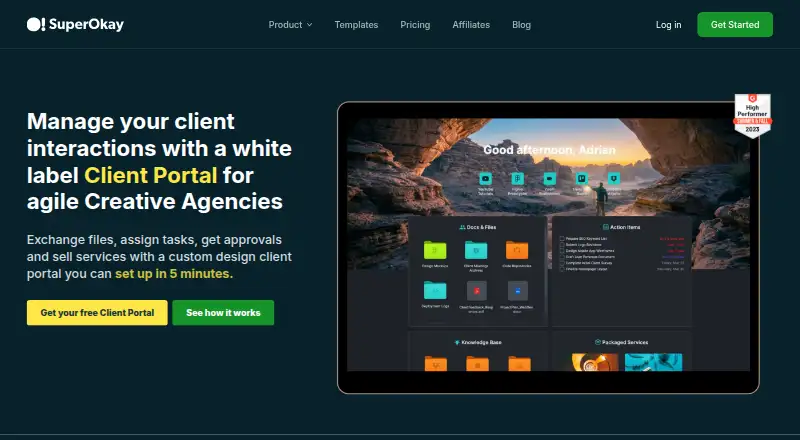
SuperOkay is a web-based white-label client portal for agencies and freelancers. Project portals can use a client’s logo, colors, images, and fonts, while teams use them to exchange files, assign tasks, collect approvals, and present services. Interactive documents support long text, multiple-choice and image-choice inputs, file uploads, ratings, and sliders, including a two-dimensional slider. Tasks can be assigned to a team or clients, shown in Kanban or List view, and kept private or shared. An Approval button in a document can collect client sign-off. Embedded apps use iframes and can feature tools such as Airtable, Figma, Miro, Google Data Studio, and Google Drive folders. Embedded pages generally need to be public and not require login; Google Docs cannot be embedded directly. SuperOkay has no full native chat, though chat widgets can be added through integrations. The free plan covers one client, one contact, one project, 0.5GB storage, and 10 items each for documents, tasks, quick links, and embedded apps. Paid plans are available from $12 a month for Solo.
Who it suits
It suits digital agencies, software studios, and freelancers who want branded client portals for project work, files, tasks, and approvals. It may be a fit for teams that can work around the lack of full native chat and direct Google Docs embedding.
What it does well
- Portal branding supports client logos, colors, images, and fonts.
- Tasks can be private or shared with clients.
- Documents can collect client sign-off.
- All plans list 12 hours of daily live support.
What to know first
- Free plan covers one client and one project.
- Full native chat is not included.
- Google Docs cannot be embedded directly.
- Custom domain is not available.
Limits
The Free plan includes one client, one contact, one project, 0.5GB storage, and 10 documents, tasks, quick links, and embedded apps. Solo includes three clients and five contacts; Solo+ includes five clients, ten contacts, three team members, and 10GB storage; Business includes 1TB storage.
Plans
| Plan | Billed and limits | Price |
|---|---|---|
| Free | Monthly · 1 client · 1 contact · 1 project · 0.5GB storage · 10 documents, tasks, quick links, and embedded apps | Free |
| Solo | Monthly · 3 clients · 5 contacts · 2GB storage · unlimited projects, documents, tasks, quick links, and embedded apps | $12 a month |
| Business | Monthly · Unlimited clients, contacts, team members, pages, projects, documents, tasks, quick links, and embedded apps · 1TB storage | $146 a month |
| Solo+ | Monthly · 5 clients · 10 contacts · 3 team members · 10GB storage · unlimited projects, documents, tasks, quick links, and embedded apps | $38 a month |
As superokay.com lists them, read 8 Oct 2026. The maker's own page has the final word.
Getting started
- Visit https://superokay.com/.
- Use SuperOkay on the web.
- Start with the Free plan, billed monthly.
- Upgrade to Solo for $12.00 per month, Solo+ for $38.00 per month, or Business for $146.00 per month.
SuperOkay is a web portal for agencies, software studios, and freelancers coordinating client work. It is best for service businesses that need polished project handoffs, structured feedback, and approvals rather than a conversation-first workspace. The product’s breadth is useful, but its small free-plan allowances and embed restrictions make plan selection important.
Overview
SuperOkay combines branded project portals with document forms, task tracking, file sharing, request intake, and service sales. Portals can use a client’s logo, colors, images, and fonts, giving an agency more control over the client-facing experience than a generic shared folder. There is no custom-domain option, however, so the SuperOkay address remains part of the presentation.
It runs on the web. The privacy policy describes SuperOkay, operated by Specstimate Ltd., as a data processor and customers as data controllers, with reasonable administrative, technical, and physical safeguards. Live customer support is offered for 12 hours daily on every plan.
Key features
Interactive documents
Documents handle long text, multiple-choice and image-choice questions, file uploads, ratings, sliders, and two-dimensional sliders. That combination works well for briefs, discovery questionnaires, creative feedback, and structured scope discussions where a plain message thread would be ambiguous. An Approval button can collect client sign-off inside the relevant document, keeping acceptance tied to the work rather than scattered across email.
Tasks and client visibility
Tasks may be assigned to team members or clients, displayed in Kanban or List view, and kept private or shared. Agencies can therefore expose milestones without revealing internal work, while clients can receive concrete assignments instead of passive status updates.
Embeds, files, and chat
Iframe embeds support tools such as Airtable, Figma, Miro, Google Data Studio, and Google Drive folders. The limitation is practical: an embedded app generally needs a public page that does not require login, and Google Docs cannot be embedded directly. Cloud-storage integrations are described as forthcoming, so linking to cloud files such as Google Docs is the current workaround. SuperOkay has no full native chat; teams wanting chat must add Intercom or another widget through integrations.
Pricing
The free plan costs nothing, billed monthly. It allows one client, one contact, one project, 0.5GB of storage, and 10 documents, tasks, quick links, and embedded apps. That is enough to assess the workflow or run a very small engagement, but the single-client cap makes it unsuitable as an ongoing agency system.
Solo costs $12 a month, billed monthly, and supports three clients, five contacts, 2GB of storage, and unlimited projects, documents, tasks, quick links, and embedded apps. It suits an independent operator with a few active accounts, though it has no stated team-member allowance. The pricing note also advertises paid plans from $9/mo on annual billing, so the lower starting figure requires an annual term rather than the monthly Solo rate.
Solo+ costs $38 a month, billed monthly. It raises capacity to five clients and 10 contacts, adds three team members, and provides 3GB of storage with the same unlimited project and work-item allowances. This is the sensible tier for a small collaborative studio that has outgrown Solo.
Business costs $146 a month, billed monthly. It removes caps on clients, contacts, team members, pages, projects, documents, tasks, quick links, and embedded apps, and includes 1TB of storage. Dedicated support and an onboarding call make this the plan for larger operations that need predictable capacity and assisted setup, but its price is difficult to justify for a solo practice. All plans include live support for 12 hours per day.
Platforms
SuperOkay is available through the web, making it accessible across desktop operating systems and browsers without a separate native app.
Who it's for
Choose SuperOkay if you run a digital agency, software studio, or freelance service and want each engagement presented as a branded portal with forms, tasks, files, and formal approvals. It is particularly suitable when client input must be structured and auditable. Look elsewhere if your process depends on private, login-protected embeds, direct Google Docs embedding, a custom domain, or built-in chat.
Pros and cons
- Pro: Deep portal branding with client logos, colors, images, and fonts supports a tailored agency experience.
- Pro: Rich document inputs and in-document approvals cover briefs, feedback, and sign-off in one workflow.
- Pro: Private or client-shared tasks provide a clear boundary between internal delivery and visible progress.
- Con: The free plan’s one-client, one-project, and 0.5GB limits are too restrictive for most working agencies.
- Con: Public-page embed requirements and the lack of direct Google Docs embedding complicate authenticated workflows.
- Con: No native chat or custom domain means extra integrations and less control over the portal address.
Alternatives
For a broader cross-platform client-portal option, consider FuseBase, which has a free portal plan and apps spanning mobile, desktop, web, API, and browser extension. Assembly is worth considering when its free tier’s five active contacts, one internal user, three apps, and 50 monthly build credits fit a smaller operation. Choose Kitchen.co if unlimited clients and projects on its free plan matter more than SuperOkay’s richer form controls; its free tier allows two internal users and 2GB of storage.
Dock is an alternative for teams whose portal work centers on deal desks, playbooks, courses, and order forms. OnBrio offers another web and API-based freemium option. ProjectSend suits organizations willing to self-host an open-source file portal with no stated caps on users, clients, files, or storage. Tarkle Portal is a web-based alternative with a free 5GB tier and brand-page features. Xpand Portal is an option for buyers seeking a paid, self-hosted-capable portal with a 30-day free period.
For a wider directory of comparable tools, see Customer Portal Software.
Verdict
SuperOkay is a strong fit for small agencies and studios that want branded client portals, structured forms, task visibility, and approval capture in one web workspace. Its main reason to choose it is the combination of presentation control and practical client-work mechanics. Its main reason to look elsewhere is the absence of native chat and the constraints around authenticated embeds, especially when Google Docs is central to delivery.
Verdict
SuperOkay focuses on branded project portals with document, task, approval, and embed tools. Its free plan is limited, and teams needing native chat or direct Google Docs embedding should account for those constraints.
Questions
Is there a free plan?
Yes. Free is billed monthly and includes one client, one contact, one project, 0.5GB storage, and 10 documents, tasks, quick links, and embedded apps.
How much do the paid plans cost?
Solo costs $12.00 per month, Solo+ costs $38.00 per month, and Business costs $146.00 per month. Each is billed monthly.
Which platforms does SuperOkay support?
SuperOkay is available on the web.
Can clients approve documents?
Yes. Users can add an Approval button to a document to collect client sign-off.
Can SuperOkay embed other apps?
Yes. Its embedded apps use iframes and can feature Airtable, Figma, Miro, Google Data Studio, and Google Drive folders. Embedded pages generally need to be public and cannot require a login; Google Docs cannot be embedded directly.
Who makes SuperOkay?
Its privacy policy identifies Specstimate Ltd. as the legal entity. It describes customers as data controllers and SuperOkay as their data processor.
Facts from SuperOkay's own pages
- Approvals
- Users can add an Approval button to a document to collect client sign-off. · superokay.com, 8 Oct 2026
- Chat
- SuperOkay does not have a full native chat feature; its help center describes adding Intercom or other chat widgets through integrations. · help.superokay.com, 8 Oct 2026
- Documents
- Its interactive documents support long text, multiple choice, image choice, file upload, rating, slider, and 2D slider inputs. · superokay.com, 8 Oct 2026
- Embed limit
- An embedded app generally must be on a public page that does not require login, and Google Docs cannot be embedded directly. · superokay.com, 8 Oct 2026
- File links
- The help center says cloud storage integrations are coming soon and users can link to cloud files such as Google Docs. · help.superokay.com, 8 Oct 2026
- Integrations
- The embedded apps feature uses iframe embeds and highlights tools including Airtable, Figma, Miro, Google Data Studio, and Google Drive folders. · superokay.com, 8 Oct 2026
- Intended users
- The founders describe SuperOkay as an app for digital agencies, software studios, and freelancers to manage sales, workflow, and scope changes with clients. · superokay.com, 8 Oct 2026
- Maker
- The privacy policy identifies the legal entity as Specstimate Ltd. · superokay.com, 8 Oct 2026
- Portal branding
- Project portals can be customized with a client's logo, colors, images, and fonts. · superokay.com, 8 Oct 2026
- Product
- SuperOkay is a white-label client portal for agencies and freelancers to exchange files, assign tasks, get approvals, and sell services. · superokay.com, 8 Oct 2026
- Security and privacy
- The privacy policy says SuperOkay uses reasonable administrative, technical, and physical safeguards and identifies customers as data controllers and SuperOkay as their data processor. · superokay.com, 8 Oct 2026
- Support
- The pricing page lists live customer support for 12 hours per day on all plans, with dedicated support and an onboarding call on Business. · superokay.com, 8 Oct 2026
- Tasks
- Tasks can be assigned to a team or clients, shown in Kanban or List view, and kept private or shared with clients. · superokay.com, 8 Oct 2026
Where SuperOkay stands on Freedom251
- Client Portal Software#3 of 17
- Client Management software#5 of 27
- Customer Portal Software#9 of 31