Freedom251 › Customer Portal Software
OnBrio
What OnBrio is
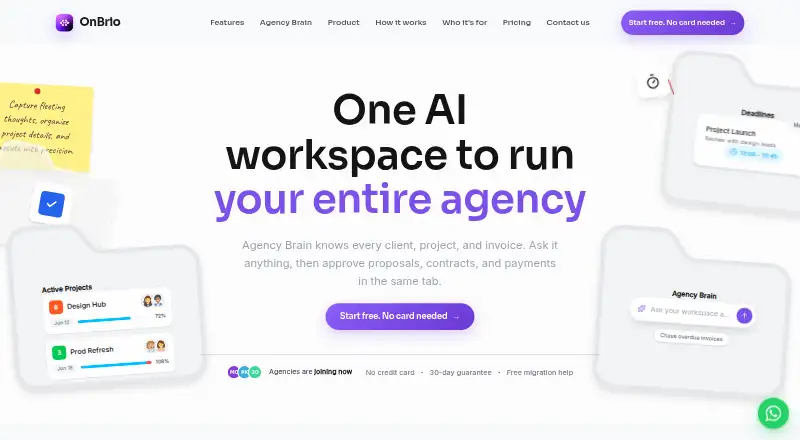
OnBrio is an agency workspace for managing client and project work, from proposals and contracts to invoicing and client communication. It combines CRM, e-signatures, time tracking, project management, and a client portal. Projects can be viewed as Kanban boards, lists, or Gantt charts, with progress visible to clients in the portal. Invoices can be generated from time logs, and the service supports Stripe payments and recurring retainers.
Agency Brain uses workspace data to answer questions and surface risks, and can draft work for a user to approve before acting. The web and API product has a free Starter plan during early access, with no trial clock or credit-card requirement. Paid plans start at $29/mo, billed annually. Higher plans add automation, portal branding, team seats, accounting sync, analytics, and API access, depending on the plan. OnBrio says it encrypts data in transit and at rest, separates workspace data by account, and uses role-based permissions. Customers can export clients, projects, invoices, and contracts at any time.
Who it suits
OnBrio is aimed at freelancers and growing agencies, with plans also described for larger studios and enterprise groups. It may suit teams that want client work, project progress, and billing managed in one workspace.
What it does well
- Kanban, list, and Gantt project views
- Client portal can show project progress
- Invoices can come from time logs
- Free Starter plan during early access
- Clients, projects, invoices, and contracts are exportable
What to know first
- No free trial
- Paid plans start at $29/mo, billed annually
- Starter is branded with OnBrio's portal
- SOC 2 Type II is on the post-launch roadmap
Limits
Starter is free during early access and includes clients and projects, proposals with e-signatures, invoicing with Stripe payments, an OnBrio-branded portal, and time tracking. Solo is the lowest listed paid plan at $29/mo billed annually; it does not list the Agency plan’s five team seats or QuickBooks and Xero sync.
Plans
| Plan | Billed and limits | Price |
|---|---|---|
| Starter | billed annually; free during early access · Clients & projects · Proposals + e-signatures · Invoicing + Stripe payments · OnBrio-branded client portal · Time tracking | Free |
| Studio | billed annually; $1788/yr · saves $480/yr vs monthly · Everything in Agency · Unlimited team seats · Sub-workspaces (multi-brand) · White-label portal · Advanced analytics + CSV export · API access | $149 a month |
| Solo | billed annually; $348/yr · saves $120/yr vs monthly · Unlimited clients & projects · Automation builder · Custom portal branding & your domain · Proposals + e-signatures · Priority support | $29 a month |
| Agency | billed annually; $828/yr · saves $240/yr vs monthly · Everything in Solo · 5 team seats + role permissions · White-label client portal · QuickBooks + Xero sync · Portfolio analytics dashboard · Dedicated onboarding call | $69 a month |
| Enterprise | Custom pricing for multi-brand groups · Unlimited seats · SSO · Custom DPA · Dedicated account manager · SLA-backed support | On request |
As onbrio.com lists them, read 8 Oct 2026. The maker's own page has the final word.
Getting started
- Visit https://www.onbrio.com/ and use the web workspace.
- Choose Starter for free access during early access, or select a paid plan.
- Sign up for Starter without a credit card or trial clock.
- Connect Stripe for payment processing.
- Use the API if your workflow calls for API access.
OnBrio is an agency workspace that brings client management, project work, proposals, contracts, and billing together. It suits freelancers and agencies that want clients to see project progress as well as receive and pay for work in one portal. The early-access free plan makes it approachable, but teams should weigh its annual paid-plan commitments and its still-future SOC 2 Type II certification.
Overview
OnBrio combines CRM, proposals with e-signatures, contracts, invoicing, project management, a client portal, and AI. That breadth can reduce the need to stitch together separate tools for client work, particularly for service businesses handling proposals through recurring billing. Its value depends on wanting this combined workflow; it is not just a project tracker or a standalone portal.
Agency Brain can answer questions using workspace data, surface risks, and draft work for user approval before taking action. Keeping drafts subject to approval is a sensible boundary for AI in client operations, though the described role is an assistant to the workspace rather than an autonomous operator.
Key features
Projects and client visibility
Kanban, list, and Gantt views let teams choose among board, task-list, and timeline-style project tracking. Clients can see progress in the portal, which may reduce the gap between internal tracking and client communication. OnBrio also includes time tracking and can generate invoices from time logs, a useful link for teams billing by hours.
Proposals, portals, and payments
Proposals with e-signatures, contracts, and invoicing put several steps of client work in one workspace. Stripe handles payments, including recurring retainers. The Starter plan uses an OnBrio-branded portal; custom branding and a domain begin with Solo, while Agency adds a white-label portal. That progression matters if a client-facing workspace needs to look like the agency’s own service rather than a third-party product.
Security and portability
OnBrio says it encrypts traffic in transit with TLS and data at rest, and isolates workspace data by account with role-based permissions. It supports GDPR export and deletion requests, offers DPAs during early access, and lets customers export clients, projects, invoices, and contracts at any time. It also says it does not sell customer data. These are useful safeguards and exit options, but organizations that require current SOC 2 Type II certification should look elsewhere: certification is on OnBrio’s post-launch roadmap.
Pricing
OnBrio is freemium, with Starter free during early access and no trial clock or credit-card requirement. There is no free trial. Paid prices below are billed annually, so they are commitments to consider against a monthly workflow.
| Plan | Price | What it includes and who it suits |
|---|---|---|
| Starter | free | Clients and projects, proposals with e-signatures, invoicing with Stripe payments, an OnBrio-branded client portal, and time tracking. A practical way for a freelancer to start, but it does not include the unlimited clients and projects or custom portal branding offered by Solo. |
| Solo | $29 a month, billed annually ($348/yr; saves $120/yr vs monthly) | Unlimited clients and projects, automation builder, custom portal branding and domain, proposals with e-signatures, and priority support. A fit for an individual freelancer who has outgrown Starter; team seats and accounting sync are not included. |
| Agency | $69 a month, billed annually ($828/yr; saves $240/yr vs monthly) | Everything in Solo, five team seats with role permissions, white-label portal, QuickBooks and Xero sync, portfolio analytics dashboard, and a dedicated onboarding call. The natural step for a small team needing shared access and accounting integrations; the five-seat limit may constrain a larger agency. |
| Studio | $149 a month, billed annually ($1788/yr; saves $480/yr vs monthly) | Everything in Agency, unlimited seats, sub-workspaces for multiple brands, advanced analytics with CSV export, and API access. It is aimed at larger studios that need multi-brand organization or broader access, but costs substantially more than Agency. |
| Enterprise | Custom pricing | Unlimited seats, SSO, custom DPA, dedicated account manager, and SLA-backed support for multi-brand groups. Consider it when those enterprise requirements matter; the price is custom. |
Platforms
OnBrio is available on the web and through an API. That covers browser-based work and API access for integrations or custom workflows; the listed platforms do not include dedicated mobile or desktop apps.
Who it's for
OnBrio is best suited to freelancers and growing agencies that want proposals, delivery tracking, client communication, and payments connected in one system. Solo is aimed at an independent operator, Agency at a team of up to five seats, and Studio at teams needing unlimited seats and multiple brand workspaces. Enterprise is positioned for multi-brand groups with requirements such as SSO and SLA-backed support.
It is a weaker fit for buyers who need SOC 2 Type II certification now, or who want a paid plan without annual billing. Smaller teams that only need a client portal may also find OnBrio broader than necessary.
Pros and cons
- Pros: Client work spans proposals, e-signatures, contracts, project tracking, time-based invoicing, and Stripe payments, reducing handoffs between these tasks.
- Pros: Client-visible project progress and white-label portal options make the workspace useful beyond internal task management.
- Pros: Starter is free during early access without a trial deadline or credit-card requirement, giving freelancers a low-risk starting point.
- Pros: Exportable core records and stated GDPR export and deletion support give customers meaningful data-portability options.
- Cons: Paid tiers are quoted with annual billing, which is less flexible for teams that want to pay month to month.
- Cons: Agency is capped at five seats; unlimited seats require Studio at $149 a month, billed annually.
- Cons: SOC 2 Type II certification is a post-launch roadmap item, ruling it out for buyers that require that certification today.
Alternatives
If a client portal is the priority, compare Customer Portal Software options. FuseBase is another freemium portal option, with a free plan for one client portal and one workspace and apps across mobile, desktop, web, and browser extension. Assembly may suit buyers seeking a free starting tier with five active contacts, one internal user, three apps, and community support.
Kitchen.co is worth considering for a small team that wants a free plan with two internal users, unlimited clients and projects, and 2 GB storage. Dock offers a free tier with capped workspaces and sales-content assets, while ProjectSend is the alternative to consider for self-hosted, open-source file sharing with no caps on users, clients, files, or storage.
SuperOkay is another web-based freemium option. Tarkle Portal offers a free plan with 5 GB cloud storage and one team member. Xpand Portal has no free plan, but offers a 30-day free trial and a Starter plan priced at €399 a month with a one-year minimum commitment.
Verdict
Choose OnBrio if you are a freelancer or agency that wants client management, project visibility, proposals, and billing to work together, and the early-access free plan or annual paid tiers fit your needs. Its strongest case is the connected client-service workflow, from signed proposal through tracked work to payment. Look elsewhere if current SOC 2 Type II certification, monthly paid billing, or more than five seats at the Agency tier is essential.
Verdict
OnBrio brings client management, project tracking, proposals, and billing into one workspace, with an early-access free plan and paid tiers for larger teams. Buyers should note that its SOC 2 Type II certification is only on the post-launch roadmap.
Questions
How much does OnBrio cost?
Starter is free during early access. Solo costs $29 a month, billed annually ($348/yr); Agency is $69 a month and Studio is $149 a month, both billed annually. Enterprise has custom pricing.
Does OnBrio have a free plan or trial?
Starter is free during early access, with no trial clock or credit-card requirement. There is no free trial.
Which platforms does OnBrio support?
The listed platforms are web and API.
What integrations are listed?
Stripe is used for payment processing. The Agency plan lists QuickBooks and Xero sync.
Who makes OnBrio?
OnBrio is made by Youth Geekers SUARL, which the company says is registered in Tunisia and operates internationally.
What does the Enterprise plan cost?
Enterprise pricing is custom for multi-brand groups.
Facts from OnBrio's own pages
- AI
- Agency Brain answers questions from workspace data, surfaces risks, and drafts work for user approval before it acts. · onbrio.com, 8 Oct 2026
- Audience
- OnBrio says it is built for freelancers and growing agencies, with plans also described for larger studios and enterprise groups. · onbrio.com, 8 Oct 2026
- Compliance
- OnBrio says it supports GDPR data export and deletion requests, offers DPAs during early access, and has SOC 2 Type II certification on its post-launch roadmap. · onbrio.com, 8 Oct 2026
- Data portability
- Customers can export clients, projects, invoices, and contracts at any time, and OnBrio says it does not sell customer data. · onbrio.com, 8 Oct 2026
- Free access
- Starter is free during early access and has no trial clock or credit-card requirement. · onbrio.com, 8 Oct 2026
- Integrations
- The Agency plan lists QuickBooks and Xero sync; Stripe is used for payment processing. · onbrio.com, 8 Oct 2026
- Maker
- OnBrio is made by Youth Geekers SUARL, which the company says is registered in Tunisia and operates internationally. · onbrio.com, 8 Oct 2026
- Payments
- OnBrio supports Stripe payments, recurring retainers, and invoices generated from time logs. · onbrio.com, 8 Oct 2026
- Product
- OnBrio describes itself as an agency workspace combining CRM, proposals with e-signatures, contracts, invoicing, a client portal, project management, and AI. · onbrio.com, 8 Oct 2026
- Project management
- Project management includes Kanban, list, and Gantt views, with client-visible progress in the portal. · onbrio.com, 8 Oct 2026
- Security
- OnBrio says traffic is encrypted in transit via TLS, data at rest is encrypted, and workspace data is isolated per account with role-based permissions. · onbrio.com, 8 Oct 2026
- Support
- The About page says the company replies to general, press, and legal inquiries within one business day. · onbrio.com, 8 Oct 2026
Where OnBrio stands on Freedom251
- Customer Portal Software#7 of 31